Get ideas that fit your brand
Ask your Director for video ideas any time, in plain words. Each idea comes back as a card with a real video behind it — real view counts, the creator who posted it, and one line on why it fits your brand. Asking for ideas doesn’t spend credits unless your Director runs a live search for fresh reference videos, which costs half a credit.
Ask for ideas
- Open your dashboard and start a conversation (click New thread if you’re mid-project).
- Type what you want — "Find new ideas about …" is a good opener — and press Send.
Three example prompts that work well:
- "Find me 5 ideas for next week."
- "Find new ideas about quick lunches for busy parents."
- "What could I post that’s like my best video from last month?"
An Inspiration card appears in the chat with your ideas, usually within a minute.
How to read an idea card
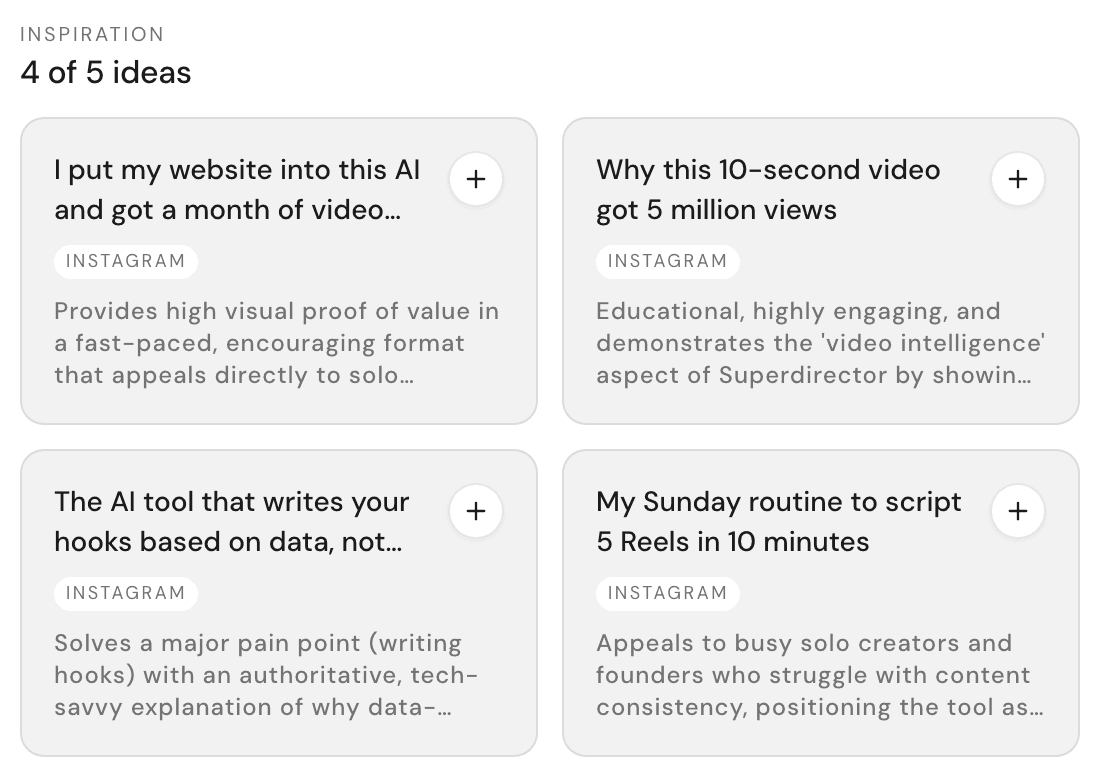
Every part of the card tells you something:
- Thumbnail — the real video this idea comes from. Ideas without a source video show a lightbulb instead.
- Tag — some ideas carry a small Hook, Topic, or Style tag, telling you which part to borrow.
- Title — the idea in one line.
- Numbers line — views (how many times people watched it), how recently it was posted, and who made it.
- Gray line — why this fits your brand, based on what your Director knows from your Brand DNA.
Click a card to open Idea detail: the full view with Views, Likes, and Comments, a Why it fits section, and Adaptation tips for making it yours. Open original plays the source video in a new tab.
Compare two ideas
Not sure which to make? Ask. Type "Compare these ideas:" followed by the two (paste their titles if that’s easier), then press Send.
Your Director weighs both against your brand and your numbers, then tells you which it would shoot first — and why.
"Find more like this"
Found one you love? Open it and click Find more like this. Your Director goes hunting for more videos in the same vein. Give it a minute or two — the results land as a fresh batch of idea cards. You can also search for reference videos with your own description.
From idea to script in one tap
The fastest path: open the idea and click Use this idea. Your Director picks it up and starts working with it right away.
Prefer to steer? Attach the idea to your message instead — open the idea and click Insert into chat from its detail view. (Text-only ideas without a source video show a + on the card itself.) The idea rides along with whatever you type next, so tell your Director exactly what to borrow:
- Type: "Use this as the hook, but keep my topic."
- Type: "Borrow this style and pacing."
- Type: "Write my version of this idea."
That’s it — say the word, and you’re on your way to a script. The full ride is covered in Turn an idea into a script.