How-To Guide
How to compare creator campaign results with the original goal when the goal changed mid-flight
Record each version of a campaign goal with its date, then label every creator result by the goal its brief and measurement window answer before you report.
By the Superdirector editorial team. TikTok and Google help pages reviewed October 30, 2026.
At a glance
How should a client compare campaign results with the original goal when the goal changed mid-flight?
Keep a goal-version timeline. Version 1 is the goal as first agreed, and every change is a new dated version with its own sentence, metric and approver. Record which version each brief was written under, then set each result’s measurement window against the change date. A result answers version 1 or version 2 only when its brief and whole window sit inside that goal. A window that spans the change is reported as mixed, and work briefed for one goal but measured under the other is a mismatch, not a miss. Report each goal on its own line and never merge them into one total.
- Never edit version 1; write each change as a new dated version.
- Label each result by brief version and window position, not by how good the number looks.
- A goal or metric written after the result was read is post hoc and only describes the number.
Direct answer
Short answer: do not average the campaign into one verdict. Keep a goal-version timeline: version 1 is the goal as first agreed, and every later change is a new, dated version with its own sentence, metric and approver. Then record which version each brief was written under and set each result’s measurement window against the change date. A result answers version 1 if its brief and its whole window sit before the change, answers version 2 if both sit after it, crosses the change if its window spans the date, and is a mismatch if the work was briefed for one goal and measured under the other. Report each goal on its own line.
This is for an agency or brand marketer whose client changed what the creator campaign was for after work had started: for example from one outcome to another, or from one metric to a different one. The decision is narrow: which goal each result is allowed to speak to. It does not decide whether the change was wise, whether the creator’s agreement still holds, or whether a result was good. Those questions have their own pages, listed in the boundary section.
The reason to do this is that a result only means something against the question it was meant to answer. If the question moved halfway through, a single scorecard silently grades early work on a goal nobody had yet written, or late work on one the creator was never briefed on. Use the blank goal-change review card, the CSV register and the goal-version timeline to keep the versions and labels in one place.
Pin the original goal as version 1
Start from what was actually agreed, not from what the team remembers wanting. Find the first written statement of the goal: the brief, the proposal, the kickoff message or the signed scope. Paste the goal sentence verbatim. Beside it write the one result question it asks, the metric that would answer it and where that metric is recorded, the owner, and who approved it, on what date, with the time zone. If the goal was only ever spoken, say so and attach your own dated meeting note, labeled as your note and not as the client’s words.
If no goal was written down at all, do not invent a version 1 after the fact. Record “no written goal before launch”, then use the earliest message that states the aim and label the version as reconstructed, with its source. The goal-setting step that should have produced version 1 is in the client decision guide.
Pin the version where neither the creator nor your own team can overwrite it. Version 1 should survive every later edit unchanged, because the whole method depends on being able to say what the goal was on a given day.
Write each change as a new dated version
A change of goal is a new version, not an edit. When the client says the campaign is now for something else, open version 2 with its own goal sentence, result question, metric and recording location. Record the date, time and time zone it took effect, who asked and how, who approved, and the reason in the client’s words. Then close version 1 by writing its “in force until” date as the same moment. Never overwrite the version 1 sentence, because the results already collected were earned under it.
Be exact about when the change took effect, not only when it was discussed. A client may mention a new priority on one call, confirm it by message two days later and expect the creator to know by the following week. Record each of those moments as it appears in the evidence, and choose one as the effective moment in writing, with the reason. If the evidence only brackets the change between two messages, write the span, and treat any result window inside that span as crossing the change.
Some changes touch only the metric, not the goal sentence: the same aim, now counted at a different event, or in a different system. That is still a new version, because results recorded under the old metric may not exist under the new one. If the new metric needs its own definition, write it with the conversion event guide before the next post, and fix its dates with the observation window guide. If the change came from the product rather than the client, that has its own page: update an approved brief after a product change.
Record which goal each brief was written under
Make a list of every work item that exists: each brief, each post, each file that has been delivered or approved. Beside each one write the brief version and the goal version its author was working to. A brief sent before the change date was written under version 1 even if the post goes live after it. A brief issued after the change is version 2 only if it actually states the new goal, so read its wording instead of trusting its date.
Next to each item write its measurement window: the start and end the report will use, each with a time zone. If the window has not been fixed, fix it now and write that you fixed it after the change. That detail matters later, because a window chosen after a number was seen is a different kind of evidence from one chosen before.
Note what the creator was told. If the creator was never informed of the new goal, record that as a fact about the brief, with the date you checked, and do not assume the new goal could have shaped their work. Keeping that note matters later, because a creator briefed for one goal cannot be fairly held to another unless the agreement was changed, and that question belongs to the agreement, not to this table.
Label every result by the goal it answers
Now put each result in one of four labels. Use two facts only: the goal version the brief was written under, and where the whole measurement window sits against the change date. The labels are an editorial method of ours for keeping goals apart. They are not a platform feature, and no platform sorts results this way.
| Label | Brief written under | Measurement window | How to report it |
|---|---|---|---|
| Answers version 1 | Version 1 | Ends before the change | Report against the version 1 question and metric |
| Answers version 2 | Version 2 | Starts after the change | Report against the version 2 question and metric |
| Crosses the change | Either | Spans the change date | Show against each goal, give no verdict, say the window is mixed |
| Mismatch | One version | Sits wholly in the other | Report the number as recorded and say the brief was for the other goal |
Notice what the table refuses to do. It never moves a result from one goal to the other because the number looks better there. A mismatch is not a failure: a post briefed for version 1 that goes live under version 2 simply was not asked to answer the new question. And a result that crosses the change is reported as mixed, because a single total cannot be split by goal without evidence that shows which part belongs to which period.
Add one more flag to every row: was the goal and metric written before the result was read? A goal version, or a metric inside it, that was written after someone looked at the numbers is post hoc. It is allowed to describe a number, but not to claim that the number answers the goal. This is the guard against retrofitting a goal to fit a result, and it is why each version carries its own written date. For the same reason, keep a result’s source and capture date next to it, as the test-conclusion guide does for one post test.
Finally mark what is not recorded under a version’s metric. If version 2 counts qualified sign-ups and earlier posts were only tracked to page visits, write “not recorded under this metric” beside them, not zero. A blank is a missing record. A zero is a measured result.
When enlarged, scroll horizontally to read the diagram.
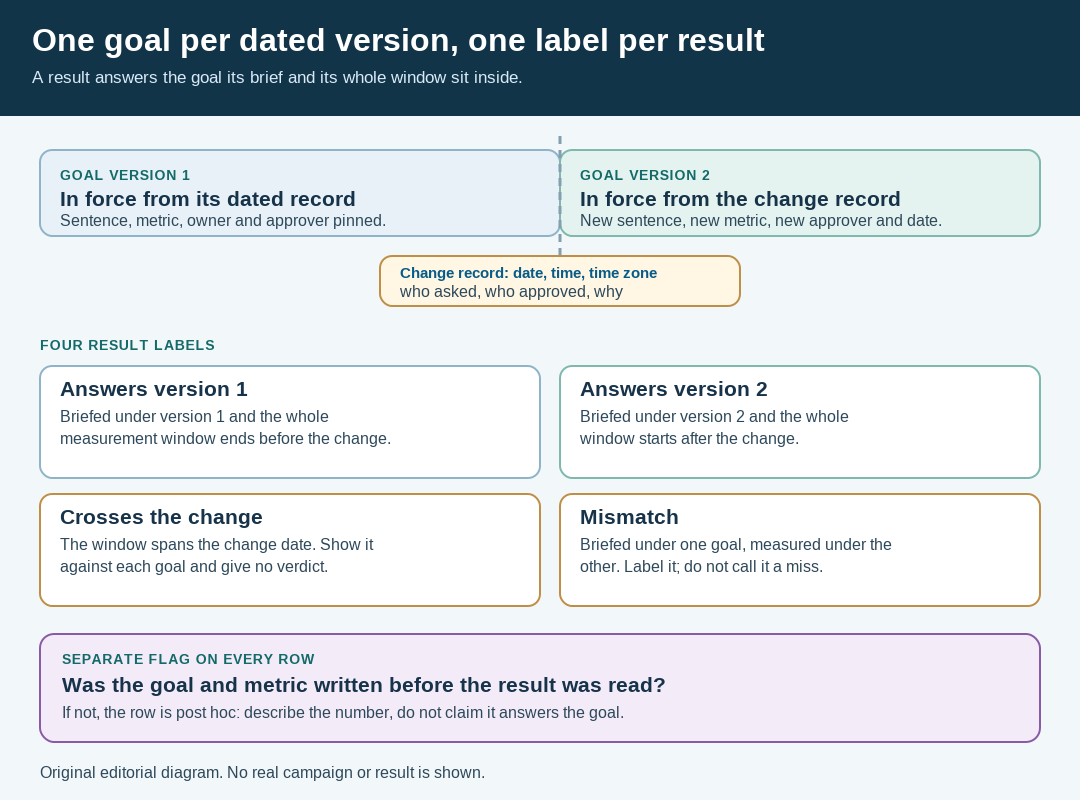
An original editorial diagram. A result answers the goal its brief and its whole window sit inside.
Original visual by Superdirector editorial team. Creation date not recorded.
Walk through a fictional goal change
Fictional exercise: no real brand, creator, campaign or result was inspected, and no figure appears. Brand A runs a creator campaign with four posts. Version 1, agreed on day 0, asks: “How many visits to the product page came from creator links?” On day 15 the client messages that the campaign is now about qualified sign-ups. The account owner records that message as the request, a call on day 16 as the approval, and chooses day 16 as the effective moment, writing the reason as the client stated it. Version 2 is opened with its own sentence and metric, and version 1 is closed at the same moment.
The reviewer lists the work. Post 1 was briefed on day 1 under version 1 and its window ran from day 2 to day 9: it answers version 1. Post 2 was briefed under version 1, went live on day 12 and has a window to day 19: it crosses the change, so its visits are shown beside the version 2 metric with no verdict. Post 3 was briefed on day 17 under a brief that states the new goal, with a window from day 20 to day 27: it answers version 2. Post 4 was briefed on day 10 under version 1 but only went live on day 20: it is a mismatch, reported as recorded with a note that its brief asked for visits.
Two rows get extra care. Post 1 has no sign-up record, so its version 2 cell reads “not recorded under this metric”, not zero. Post 3’s goal sentence was written before its result was read, so its post-hoc flag says no. The scenario predicts nothing about any real campaign.
Report each goal on its own line and list the unknowns
Write the client report with one line per goal version: the goal sentence and its dated version, the work that answers it, and the result as recorded with its source and date. Put crossing and mismatched items in a short separate block, labeled as such, and add no total that mixes goals. If the client asks for the combined picture, show the two lines side by side and say plainly that they answer different questions.
Then add an unknowns list: results not recorded under the new metric, windows that cross the change, goals that were reconstructed, any version with a post-hoc flag, and any change date you could only bracket. For late exports and revisions to a delivered number, use the rules in the report freeze guide so a figure is stamped as of one moment. For costs spread across goals, keep the components visible as in the cost ledger guide.
Finish with a decision line the client can inspect: which goal the next piece of work will serve and which result will be read against it, stated before the work starts. If the answer is another change, the same method opens version 3. For deciding what to do with the creator relationship once results are in, see the renewal decision guide.
What platform records can and cannot hold
Platform tools can help date a change, but they are not your goal record. TikTok’s Ads Manager help page on editing ad settings, last updated in November 2025, says that after a campaign, ad group or ad is created you can only change a listed set of settings, and at the campaign level it lists the campaign name and budget. TikTok: How to edit ad settings. It does not list the campaign objective among them, and we did not read a statement either way about changing it, so check your own account instead of assuming. The same page says that if you change the conversion event at the campaign level, existing ad group and ad information will be reset. Take that as a reason to export the old setup and results before any paid-side change, and record the export date beside the version.
TikTok’s campaign set-up page lists starting a campaign by clicking Copy under an existing campaign as one of its starting points. TikTok: How to set up an ad campaign. That page does not say that copying is the way to change an objective, so we make no claim about that route. It does say that for Reservation campaigns, changing the objective, campaign type or special ad category resets ad group settings, and we make no claim about other campaign types.
Google Analytics 4 lets an Analyst or above add annotations to reports: a title of up to 60 characters, a description of up to 150, and a single date or a date range, with up to 1,000 annotations per property; Google may also create some of its own. Google Analytics Help: Annotations. Use one to mark the effective date of a goal change where your team reads the report, and write the version ID in the title. The limits show why it cannot hold the record: the goal sentence, the approver and the reason will not fit, so keep them in your own timeline and let the annotation point to it.
If you run Google Ads, its change history page says the tool shows when a change was made and who made it (an email address for changes made in the interface, or a tool or system name otherwise), including items such as previous budget amounts, but only for the past two years, and that not every change is listed and the details shown are limited. Google Ads Help: About change history. A platform log can corroborate the date of a paid-side edit. It cannot show what the client decided, and it may have expired or omitted the entry by the time you need it. Copy the facts you rely on into your own record on the day.
What this page does not decide
This method decides which goal a result may speak to. It does not say whether the new goal is better, whether the change cost the campaign anything, or whether any result is good or bad. It also does not turn a label into a conclusion about the creator. Whether a mixed result supports renewing a creator is a separate judgment, and this page offers no benchmark, rate or typical result, because we have none to cite.
It differs from nearby pages in what it produces. The client decision guide writes the goal before any creator is briefed; this page starts after that goal has been replaced. The observation window guide fixes the dates for counting an outcome inside one goal; here the dates that matter are the goal-version dates. The report freeze guide handles data that arrives late for one report, not a question that changed. The past learning guide carries a learning into a new brief, and the next-test guide plans a follow-up from one result. The artifact here is the goal-version timeline and its four result labels.
Whether a change of goal alters what a creator owes or is paid depends on the agreement, and this page gives no legal advice. If it turns on contract wording, send it to counsel. We read only the four platform help pages cited above for this article, so we state nothing about how other platforms record campaign edits.