How-To Guide
When to freeze a creator campaign report if platform data arrives after the client deadline
Fix the freeze rule before launch, log each export’s arrival, stamp the report as of one moment and keep late platform data in a separate ledger.
By the Superdirector editorial team. Google Analytics, YouTube and Meta pages reviewed October 30, 2026.
At a glance
When should an agency freeze a creator campaign report if platform data arrives late?
Freeze at a moment you chose in writing before launch, not at the moment the last export happens to arrive. Stamp the report with a version ID and an as-of date, time and time zone, name the arrival time of each export it uses, and mark any missing cell as pending as of that moment. Keep every later export in a separate late-data ledger beside the frozen value, and never write over a delivered figure. Then decide per late arrival to leave it, footnote the report or issue a new dated version.
- Write the deadline, the required sources and the freeze rule before the campaign starts.
- Log each export’s arrival time and scope, and quote any delay the platform states.
- Keep the frozen report unedited and record late data as ledger rows with a decision.
Direct answer
Short answer: freeze the report at a moment you chose in writing before launch, stamp it as of that moment, and keep everything that arrives afterwards in a separate late-data ledger. Do not freeze at the moment the last platform export happens to land, because you cannot know when that will be. Do not edit a delivered report when late data arrives, because then nobody can show what the client was told on the deadline. The report says what was known as of the stamp. The ledger says what came in later, when, and what you decided to do about it.
This is for an agency or brand marketer who owes a client a creator campaign report on a fixed date, while some of the numbers come from platform exports, creator screenshots or analytics tools that may not be ready by then. The decision is narrow: when to stop collecting for this version of the report, and where to put what arrives after that. It does not decide whether a late number is right, how to show a missing number or how to align clocks. Those have their own pages, linked in the boundary section below.
The reason to set the rule early is that data arrival is outside your control. Google’s own analytics help says some data can arrive late and that reported figures may change while it is processed, and the second step below quotes the page. A rule written before launch cannot be bent by whichever number is awkward on the day. Use the blank freeze and late-data card, the CSV register and the as-of timeline to keep the records in one place.
Set the deadline and freeze rule before launch
Write four things on the card before the first post goes live. First, the client deadline: the date, the time and the time zone, and where it is written, such as the statement of work or an email you can quote. Second, the sources the report needs: each platform export, creator-supplied screenshot, analytics report or click report, one per line. Third, for each source, the latest arrival you will wait for, or “not essential”. Fourth, who stamps the freeze, and what happens if that person is away.
Mark each source as essential or not essential to the client’s question. If the client’s decision cannot be made without a figure, such as the one outcome the campaign was built to move, that source is essential, and the rule says how long you wait and what you do if it has not arrived. If a source only adds colour, it is not essential, and the report goes out without it, marked pending. The goal decision guide is the place to settle what the client’s decision is.
Set the freeze moment earlier than the deadline, with room to assemble and check the report. If you stamp the report at the same minute you send it, any export that arrives during assembly forces a choice with no rule behind it. Tell the client the rule in the first message: “We will stamp the report as of this date and time. Anything that arrives later will be listed separately.” Agreeing to that in advance is what turns a late export from an argument into a ledger row.
Log each platform export as it arrives
Open one block on the card for every export. Record the source and platform, the scope (which post or account, which date range, which filters), the time it reached you with its time zone, and who received it. Add the cell or figure in the report that the export feeds. The arrival time is the new fact here. A report that cites a number without saying when you had it cannot be placed on a timeline later.
Separate three clocks that are easy to blur. The period the data describes, the moment the platform produced the figure and the moment it reached you are different. A creator may send an export on Monday that describes the previous week and was generated on Sunday. Log all three if you can, and always log the last. The first two are covered by the time-zone alignment guide, which is about putting reports on one clock rather than about arrival.
Where a platform states its own delay, quote it with the page name and note when you read it. Google’s Analytics Help page on data freshness says data processing can take 24-48 hours, that data in reports may change during that time, that some data can arrive late, potentially up to 7 days delayed, and that attribution credit for key events can change for up to 12 days after the event. Under its offline events heading, it adds that Google Analytics ignores events that arrive more than 2 calendar days, plus today, after they are triggered, although app first_open events may be processed after that period. The same page says its timing is not a guarantee, an SLA or an SLO. Data freshness and Service Level Agreement constraints. That describes Google Analytics only. It does not describe any social platform’s own analytics.
For YouTube, Google’s YouTube Help page on checking your analytics data, written for Content Manager partners, says there can be a delay of a few days before data is viewable in YouTube Analytics, and that estimated earnings data has a delay of approximately 2 days. Check your YouTube Analytics data. A separate YouTube Help page on audience retention says that data typically takes 1–2 days to process. Measure key moments for audience retention. These are statements about specific YouTube reports, so write each beside the figure it concerns and not as a general rule for all channels.
We did not find an official TikTok or Instagram help page that states how long in-app analytics take to update, so this article makes no statement about their delays. Third-party tool pages describe lags, but they describe those tools’ own connections, not the platforms’ screens. Where you have no stated delay, write “none found” on the card. That is more useful to the next reader than a guess. Meta’s developer page on Instagram insights adds one point that suits the same habit: its account insights limitations say the API will return an empty data set instead of 0 for individual metrics. Instagram Platform insights. Read it as one platform’s API behavior, and treat an empty value as unknown rather than as zero.
Freeze the report and stamp it as of one moment
At the freeze moment, take every export logged so far and build the report from those and only those. Put a version ID and an as-of stamp on the first page: the date, the time and the time zone, plus who froze it. Next to each figure, name its source export and the time it arrived. A reader who sees “as of 14:00 Pacific on the stamped date, from export B received at 09:40” knows what the number can and cannot claim. The as-of timeline shows how the freeze sits between arrivals and the deadline.
For every source that has not arrived, put the cell on the page and write “pending as of freeze”, with the reason you hold, such as “export requested, not received”. Do not leave the cell blank and do not enter zero. A blank looks like an omission and a zero is a claim that nothing happened. How to show unknown, withheld and delayed cells without distorting totals is the subject of the missing analytics guide; here the point is that the pending label belongs to the stamp, so it can be checked against the ledger afterwards.
Check that a stamped report stays stamped. Save it in a place where it cannot be silently overwritten, keep the exact file you delivered and note the time you sent it. If a screenshot supplied by a creator is part of the evidence, apply the checks in the screenshot evidence guide before it enters the report, so the screenshot’s own capture time is on the page as well.
When enlarged, scroll horizontally to read the diagram.
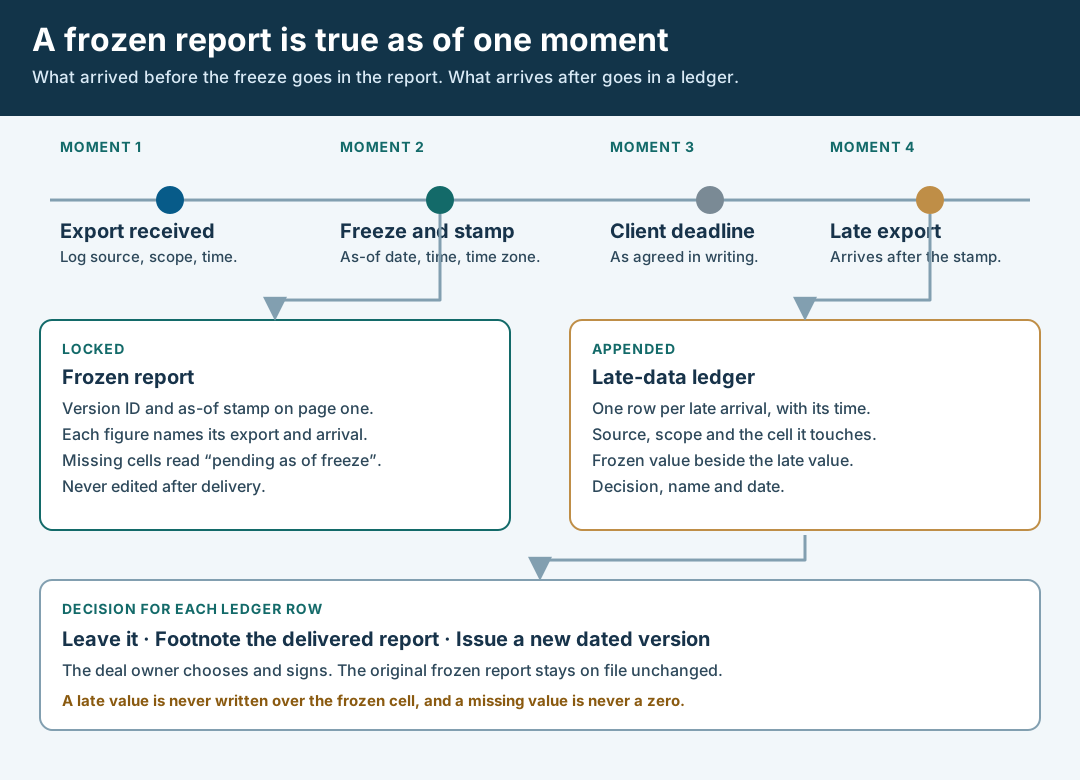
An original editorial timeline. The frozen report is true as of one moment, and later data goes in a ledger.
Original visual by Superdirector editorial team. Creation date not recorded.
Keep late data in a separate ledger
When an export arrives after the stamp, do not touch the frozen report. Add one row to the late-data ledger with the source and scope, the arrival time with its time zone, the cell it touches, the value in the frozen report (or “pending”) and the value as received late. Write the difference as two values side by side. Do not call either one an error, and do not write that the late value is more accurate, because the late export may describe a different scope, date range or processing state than the figure in the frozen report.
| Ledger column | What goes in it | What stays out | Why it matters |
|---|---|---|---|
| Source and scope | Platform, post or account, date range, filters | A bare number with no scope | A late figure with a different scope is a different measurement |
| Arrival | Date, time and time zone it reached you | The date the platform says it generated it, unless logged separately | Only your arrival time puts it on your timeline |
| Frozen value | The value in the delivered report, or “pending as of freeze” | A recalculated version of the old figure | Keeps the original readable beside the new one |
| Late value | The value exactly as received | Rounding, merging or adjustments you made | Anyone can compare it with the export itself |
| Decision | Leave, footnote or new version, with a name and a date | A verdict that the frozen report was wrong | Separates what arrived from what you chose to do |
Keep the ledger append-only. If a later export supersedes an earlier late one, add a new row that points to the earlier row and do not overwrite it. If the late data describes the same order or conversion that another report already counted, the one-order ledger guide explains how to avoid counting it twice, and the GA4 and click report guide covers matching a late analytics row to a creator-supplied count.
Decide what each late arrival changes
Give every ledger row one of three decisions, a name and a date. Leave it means the row stays in the ledger and the client is not told unless they ask, which fits a late value that moves no figure the report relied on. Footnote the delivered report means you tell the client, in writing, that a late export is in the ledger, with the frozen and late values, but the delivered report is unchanged. Issue a new dated version means a new report with a new version ID and its own as-of stamp, while the original stays on file.
Choose by what the late value touches. A late figure for a cell that was pending, or one that changes a conclusion the client acted on, points to a new version. A late figure that differs slightly from a value already in the report, with no effect on any conclusion, may be a footnote or just a ledger row. The report owner makes this call, because it depends on what the client decided and what the agreement says. The observation window guide helps when the late data falls inside a window you set for outcomes, since it concerns the dates that bound a conversion count.
Whatever you choose, tell the client and write down when. If a late value contradicts something already said, such as a sentence in the delivered summary, say which sentence and give both values. If you issue a new version, send it with a short note that states what changed, which ledger rows it uses and that the earlier version remains available. Do not delete or replace the earlier file.
Walk through a fictional late export
Fictional exercise: no real brand, creator, platform export or result was inspected, and every value is a placeholder. A made-up agency, Agency W, owes Brand A a report on one post by Creator Q by 17:00 on a Friday. Before launch Agency W writes the rule on the card: the report is stamped as of 12:00 Friday, and the creator’s platform export and the brand’s own analytics report are both marked “not essential”, because the client’s question is whether the post reached the right audience, and Agency W will report what it has.
On Friday morning the analytics report has arrived, with its scope and arrival time logged. The creator’s export has not. At 12:00 the report is stamped with version v1, the as-of time and time zone, and each figure names its source and arrival. The creator-export cell reads “pending as of freeze: export requested, not received”. The report goes out at 15:30 with an explanatory line: figures are as of the stamp, and later arrivals will be listed separately.
On Monday Creator Q sends the export. Agency W adds a ledger row: source, scope, arrival time, the cell it touches, frozen value “pending” and late value as received. The report owner reads it, sees it fills a pending cell and changes no conclusion the client acted on, and chooses to footnote the delivered report. A short written note goes to Brand A with both values and the arrival time. The scenario is a teaching device. It predicts nothing about any real creator, platform or timing.
What this page does not decide
This method decides when a report stops collecting and where later data is recorded. It does not decide whether a number is correct, what a missing cell should look like, whether a window is right or whether a screenshot is acceptable. Five existing pages cover neighbouring decisions. The missing analytics guide is about how to display a missing metric without a zero; this page is about when the report stops waiting and where the late value goes after it arrives. The observation window guide fixes the dates that bound a conversion count, which is not the same as the day you stamp a report.
The time-zone alignment guide puts a post and its reports on one clock, and the screenshot evidence guide tests whether one capture can enter a report. The Instagram Collab metrics guide reconciles captures for one post type. None of them says when to freeze a report whose inputs are still arriving, or how to log an arrival time, a stamp and a ledger of later data. That sequence is the artifact here.
Nothing on this page measures how often platform data is late, how late it typically is or how much it moves a final number. Those figures are not available to us and are not claimed. We did not find an official page stating TikTok or Instagram in-app analytics delays, so we say nothing about them. The Google statements above are about the products and reports they name, as read on October 30, 2026, and platforms change their documentation. If a point turns on the meaning of your agreement or on law, send it to counsel instead of settling it in a comment thread. The page is an editorial method for keeping a stamped report, arrival records and later data apart.