How-To Guide
What should change in an approved creator brief when the product changes before release?
Map each line of an approved creator brief to the product change record, then amend by creator stage and keep a dated, versioned record of what was sent.
By the Superdirector editorial team. FTC pages reviewed October 30, 2026.
At a glance
What should change in an approved creator brief when the product itself changes before release?
Change only what the product change touches, and prove which lines those are. Pin the approved brief and the product team’s change record, mark every brief line affected, unaffected or cannot tell with its evidence, then act by creator stage: a revised line for creators who have not started, a review for delivered cuts, a decision for approved or live posts. Send each creator a dated amendment with the old line, the new line and the action, and issue a new brief version once the lines are settled.
- Mark every brief line against the change record, including the lines you leave alone.
- Match the action to the creator’s stage, not to the change alone.
- Send a dated amendment, keep the reply as written and issue a new brief version.
Direct answer
Short answer: change only the brief lines the product change touches, and be able to show which those are. Start with two pinned records: the approved brief, version and date, with every line quoted, and the change record from whoever owns the product change. Then mark each brief line affected, unaffected or cannot tell, with the evidence for the mark. Finally, act by creator stage, because the same changed line asks something different of a creator who has not started than of a creator whose post is live.
This is for an agency or brand marketer whose creator brief was approved, and then the product moved: a feature was renamed, a plan changed, a screen was redesigned, a launch date slipped. The decision is narrow: which brief lines to revise, which to leave, and what each creator has to do about it. It does not decide whether a creator’s existing claim is supported, whether the new product behavior is good, or whether an agreement allows the change. Those questions have their own pages, listed in the boundary section.
The artifact is a change-impact map: one row per brief line, one mark per row, one action per creator. Use the blank change-impact card, the CSV register and the change-impact map to keep the work in one place. A blanket “please update everything” note makes creators guess which parts matter.
Pin the approved brief and the change record
Pin the brief as approved, not as you remember it. Record the version, who approved it, the date, time and time zone, and paste every line exactly: the product name and version the brief refers to, each claim or capability the creator may mention, the screens or demo steps it asks for, any offer, plan or price it names, the link or destination, the dates or publication window, the assets you supplied and the do-not-say limits. Give each line an ID so you can refer to it later.
Then pin the change record. This is the product or release owner’s own account of what changed: a release note, a ticket, a changelog entry or a written message from the person who owns the decision. Copy it as written, with its date, who owns it and where it lives. Note what it states and what it leaves out. A change record that says “export moves to the paid plan” does not say when, for whom or whether existing users keep it, and you should not fill those gaps yourself. If the only source for the change is a conversation, ask the owner to put it in writing before you build the map. The same discipline sits behind the versioned product facts guide, which settles disagreements between teams before a handoff; here the disagreement is gone and you are working from one change that happened after approval.
Also quote what the agreement says about changes to an approved brief, or write “none” on the card. Some agreements require the creator to be told in writing, some allow rework at a cost and some say nothing. Do not assume a rule that you did not read.
Mark each brief line affected, unaffected or cannot tell
Walk the brief one line at a time, in the same order each time, and put exactly one mark beside each: affected if the change record shows the line is no longer true or no longer complete, unaffected if you can name the evidence that the line still holds, and cannot tell if the record does not settle it. “Cannot tell” is a legitimate result. It is better than a guess, because it tells the owner a question remains and tells the creator that the line is open.
The mark needs evidence and a date checked. Write what you looked at: the change record’s sentence, the current product screen you opened, the plan page you read. A line is not unaffected merely because nobody mentioned it. The map shows where the marking sits between the two pinned records and the creator stage sort.
| Brief line type | What to check against the change record | Typical mark when the record is silent | Who can settle it |
|---|---|---|---|
| Claim or capability | Does the record change what the product does, for whom or on which plan? | Cannot tell | The product or release owner |
| Screen or demo step | Does the record change the layout, label, path or default the creator is asked to show? | Cannot tell; open the current build to check | Whoever can open the release build |
| Offer, price or plan | Does the record change what is offered, to whom, or from when? | Cannot tell; do not restate a figure from memory | The commercial owner |
| Link or destination | Does the record change where the link should land or what the page says? | Unaffected only after you open the link and read the page | The owner of the destination |
| Date or window | Does the record move the release date or the publication window? | Cannot tell | The deal owner |
| Do-not-say limit | Does the record add a new thing creators must not say, or remove a limit? | Cannot tell | The claim owner |
Note that a line may be affected without being wrong. A renamed feature makes an old line outdated while the claim underneath is still true. The mark records the effect on the brief, and a separate check decides whether any claim needs proof, which is the job of the claim verification guide.
Where the change touches visible product screens, the question of whether a creator’s footage still matches the release belongs to the outdated product UI guide. This step only decides whether the *brief’s instruction* about those screens is still right.
When enlarged, scroll horizontally to read the diagram.
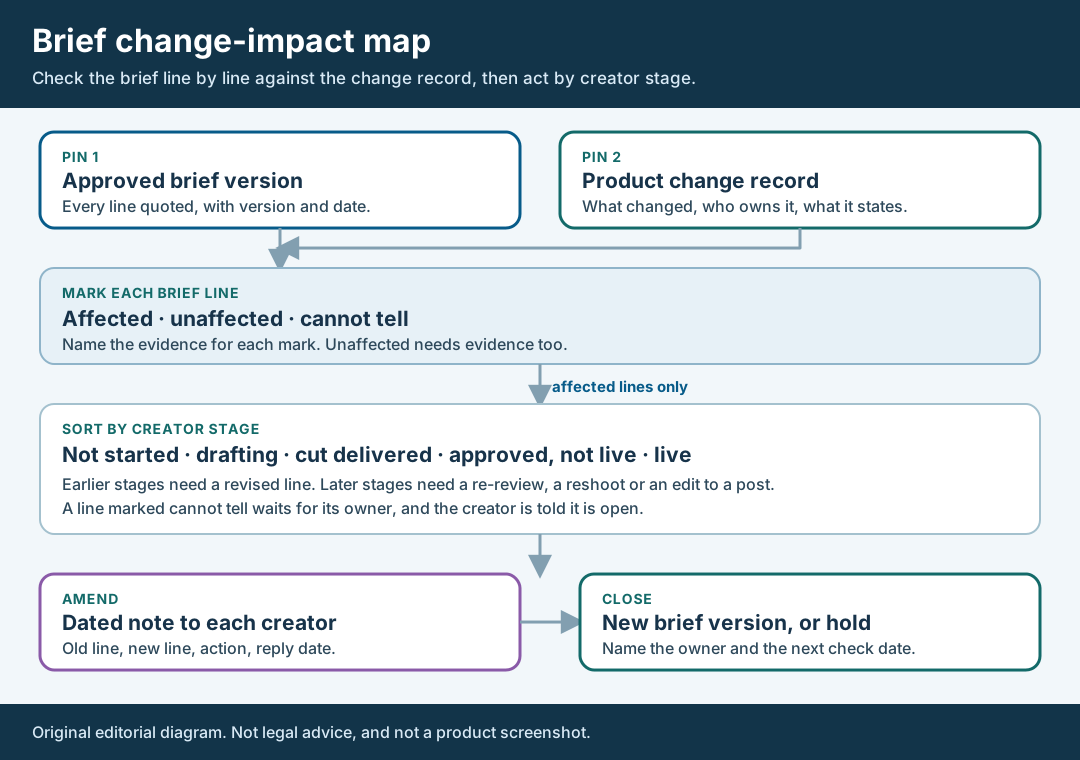
An original editorial map. Mark every brief line against the change record, then act by creator stage.
Original visual by Superdirector editorial team. Creation date not recorded.
Sort affected lines by how far each creator has got
For each affected line, list every creator and put them in one of five stages: not started, drafting, cut delivered, approved but not live, or live. The stage, not the size of the change, decides the ask. A creator who has not started simply receives the revised line. A creator who is drafting needs the revised line and a note on which parts of the draft it touches. A creator whose cut is delivered needs the cut re-reviewed against the new line, and a creator with an approved cut needs the approval looked at again before it posts.
A live post is a different case. You cannot retract an approval you already gave, and you cannot assume a creator will edit a public post because you asked. A live post goes to the owner as a question with options: leave it, ask the creator for a specific edit, or ask for a replacement. If the line is a claim about the product, the live-post correction guide covers the request and the receipt. If the creator’s edit will change what is on the page, keep the before and after the way the post edit retention guide describes.
The FTC’s endorsement guidance gives a reason to take the stage seriously. Its question-and-answer page says that an endorsement implying the endorser currently uses the product can stay only while the company has good reason to believe that is still true, and that if the product has changed it is best to get new endorsements. FTC Endorsement Guides: What People Are Asking. That passage is about endorsements a company keeps displaying, not about a brief that has not yet produced a post, so treat it as a reason to check, not as a rule for your brief. The same page says training material should describe what endorsers can and cannot say about the product, which is the job the amendment in the next step does for a changed line.
Record each creator’s stage with the date you read it, because it changes.
Walk through a fictional product change
Fictional exercise: no real brand, creator, campaign or result was inspected. Brand A makes a made-up note-taking app, Product X. Its approved brief has five lines: L1 says the creator may mention a PDF export; L2 asks for a screen showing the export button on the toolbar; L3 gives a setup step; L4 names the free plan as the way to try it; L5 gives the publication window. The release owner then writes a change record: the export button moves into a menu, and export will be offered on a paid plan from a stated later date. The record says nothing about existing free users and does not mention the setup step.
The reviewer marks L2 affected, because the button has moved. L1 cannot tell, because the record does not say whether export is still available to someone trying the product during the window. L4 affected, because the free plan is named as the way to try the feature, and the record puts the feature elsewhere. L3 unaffected, with evidence: the reviewer opened the current build and the setup steps matched. L5 unaffected, because the record states a later date for the paid plan and does not touch the window. Each mark carries its evidence and the date it was checked.
Three fictional creators sit at different stages. Creator Q has not started, so Q gets revised L2 and L4, and a note that L1 is open. Creator R has delivered a cut that shows the old toolbar, so R’s cut is re-reviewed against the new L2, and the question of a reshoot goes to the deal owner with the agreement clause attached. Creator S’s cut is approved but not live. S’s approval is reopened for the same two lines, and the owner decides before it posts. Nobody has a live post yet; if one did, it would go to the owner as a question, as described above. The scenario predicts nothing about any real creator or product.
Send a dated amendment, not a rewritten brief
Send each creator an amendment that can be read on its own. It has the brief name and version it amends, the date and time with time zone, then for each affected line: the old line quoted, the new line, the action for this creator’s stage, and the date you need a reply by. List the open lines separately and say they are open. Do not silently replace the old brief; the creator would have to compare two documents, and you would lose the record of what they were first told.
Keep the wording of each new line to what the change record supports. Do not invent reasons, benefits or dates to make the note read better. If the owner has not said when a thing will be available, the amendment says the date is not yet confirmed. Where a line is a claim, use the wording the claim owner approved; the FTC’s substantiation policy statement, dated November 23, 1984, says advertisers and agencies must have a reasonable basis for advertising claims before they are disseminated. FTC Policy Statement Regarding Advertising Substantiation. That is a reason to route a new claim to its owner, not a test you can apply inside the amendment.
Save the creator’s reply as written, with the date, time and time zone you received it, and record it as theirs. If there is no reply by the date you set, record the date you sent, the date you chased and that none came. Do not read silence as agreement. Creators also need the facts that their own claims depend on, and the FTC’s influencer guide says influencers cannot talk about experience with a product they have not tried. FTC Disclosures 101 for Social Media Influencers. A creator who has not seen the changed product cannot speak from experience of it, so give creators access to the version the post will describe, where you can.
Release a new brief version or hold the open lines
When the lines are settled, issue a new brief version with its own number and date. The old version stays on file unchanged. In the new version, list the changed lines and, for each, the amendment that carried it. For a line that is still cannot tell, do not publish a guess. Hold it, name the owner of the answer and set a date to ask again.
Then set the next check. A product change record can itself change, and a dated release can slip. Write who will re-read the change record, when, and what would reopen the card, such as a new entry, a moved date or a creator question you cannot answer. The FTC’s endorsement rule lists guidance, monitoring and corrective action as steps for advertisers, and says good faith is not a safe harbor. 16 CFR 255.1 has the exact text. A dated card is a record of the guidance you gave; it does not settle anyone’s liability.
Keep the whole file together: the approved brief version, the change record as copied, the map with its marks and evidence, each amendment, each reply, the owner’s decisions and the new version. This page does not say how long to keep it, because the sources we read gave no period. Set that from your agreement, your records policy and counsel.
What this page does not decide
This method produces a change-impact map for one approved brief. It does not decide whether a product claim is supported, whether a screen in a creator’s cut matches the release, or whether anyone breached an agreement. The nearest existing pages answer different questions. The versioned product facts guide settles conflicts between sales and product statements before the first handoff and also covers a fact that changes; this page starts after approval and works through the brief line by line, then by creator stage. The outdated product UI guide checks a creator’s final export against the release build, while this page checks whether the brief’s own instructions are still right. The claim verification guide decides whether proof supports a creator’s exact claim, and the live-post claim fix handles a claim already public. The first-cut review guide sorts comments on a delivered cut against a signed brief.
Nothing here says how often briefs need amending or what a late change costs; no such numbers are claimed. We also did not read any platform’s help pages for this article, so it states nothing about what a creator can edit on a platform after posting. If a point turns on law or on the meaning of your agreement, send it to counsel instead of settling it in a message thread.