How-To Guide
Set the conversion observation window before a creator campaign begins
Fix a creator campaign's outcome reporting dates before launch. Record the separate TikTok ad and GA4 attribution settings, time zones, and report revisions.
By the Superdirector editorial team. Sources reviewed October 28, 2026.
At a glance
When should a team fix its conversion observation window for a creator campaign?
Fix the outcome inclusion rule after naming the business event and its evidence source, but before the first creator post or paid ad is live. State an inclusive start, exclusive end, time zone, authority, report as-of point and revision rule. Record TikTok ad attribution and GA4 lookback separately; neither establishes causal lift.
- Choose a business outcome and the record that confirms it.
- Fill actual dates from verified post or ad receipts without changing the pre-agreed rule after seeing results.
- Keep organic and paid reporting lanes, platform credit settings and later corrections distinct.
Direct answer
Fix the rule for the conversion observation window after the team has named the outcome and its evidence source, but before the first creator post or paid ad is live. Write what starts the reporting period, what ends it, the time zone, which event is counted, which business system confirms it, and when the report will be read again for late or corrected data. The actual times can be filled from verified publication and event receipts as they occur. Do not wait to see a favorable conversion curve and then choose the window that makes it look best.
This campaign rule is a decision made by the team. It is not the TikTok Ads Manager ad attribution window, and it is not Google Analytics 4's key-event lookback window. Those products use their own rules to decide which prior touchpoints may receive credit. They do not choose the client report's calendar boundary or prove that the campaign caused an outcome. Use the blank window-decision card to keep the three definitions together without merging them.
Three windows that answer different questions
| Rule to record | Anchor and owner | What it decides | What it does not decide |
|---|---|---|---|
| Campaign outcome observation period | Team-agreed inclusive start and exclusive end rule, such as a first public-by observation followed by a declared number of complete calendar days after the last verified post; reporting time zone stated | Which dated outcomes the client report will include for this campaign question | Whether a platform attributes an outcome to a particular click or view, or whether the campaign caused it |
| TikTok paid-ad attribution window | The effective setting, event source and reporting view for the matching TikTok paid ad, if there is one | Which later events TikTok may credit to an eligible ad click or view under its own method | A window for an organic creator post with no TikTok ad, or a site/business-system outcome ledger |
| GA4 key-event lookback window | The GA4 property's actual key-event attribution settings and event type | How far back a prior touchpoint can be eligible for credit in GA4 reports | The campaign's calendar outcome period, proof that a sale occurred, or a fixed setting for one creator only |
Google defines its key-event lookback window as how far back a touchpoint can be eligible for attribution credit. For most key events the documented default is 90 days, with 30- and 60-day alternatives; the first_open and first_visit events default to 30 days and engaged-view key events to three days. Those are product defaults to verify, not a recommendation to watch every creator campaign for 90 days. Google says lookback changes apply going forward across the property, and the chosen key-event lookback also applies to session attribution. Record the property's current value and the event type rather than silently changing a shared setting for one campaign.
For paid TikTok activity, TikTok Attribution Analytics distinguishes actions after clicks and views and provides a comparison of results under different attribution windows. Its Performance Comparison guide also offers an ad-impression-time or real-time date filter. Those are choices about TikTok attributed ad reporting. TikTok's September 2026 auction guidance describes different web attribution behavior depending on Advanced Matching, so record the effective setup for the particular ad and event source instead of importing an app-specific setting or an old default. If the effective rule is not visible in the account record, mark it unresolved and ask the ad operator for its source.
When enlarged, scroll horizontally to read the diagram.
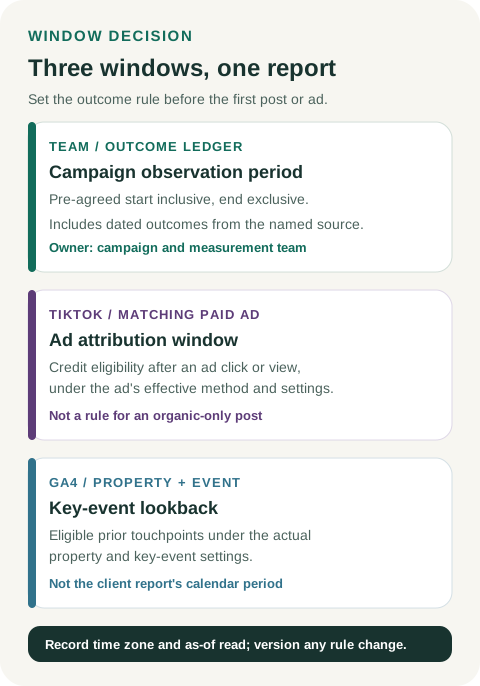
Original three-window diagram. Set the business outcome rule before launch and record platform settings separately.
Original visual by Superdirector editorial team. Creation date not recorded.
Freeze a date rule, not a convenient result
Write the start and end as a reproducible rule in the measurement plan. For example: “include confirmed lead submissions timestamped at or after the first dated public-post observation and before 00:00 UTC on the day after the fourteenth complete calendar day following the last verified post date.” The start is inclusive and the end is exclusive, so every timestamp on the last included day still counts. Fourteen days here is merely a possible team choice; it is not a platform standard or a conversion benchmark. Starting at the first observation conservatively excludes any unobserved earlier exposure; it does not prove the post first appeared at that time. The right duration depends on the campaign question, decision deadline and the brand's evidenced buying or qualification cycle. If those inputs are unknown, state the uncertainty and choose a clearly provisional rule before launch.
Keep planned dates apart from observed dates. A scheduled creator post is not a public post; a configured Spark Ad start is not evidence of delivery. Save the exact public post URL and dated verification. The first observation proves only that the post was public by then. If a reliable earlier publication timestamp later appears, preserve both receipts and record the revised start rule explicitly rather than quietly replacing the original.
Use one named report time zone. GA4's property setup guidance says its reporting time zone determines the date assigned to a visit; TikTok's account time-zone guide says the account zone affects report data and delivery settings. A creator's local publication clock can cross midnight differently from either report. Store the original timestamp and zone, then derive the report date in the declared zone. Do not compare daily rows until both windows are expressed on the same basis.
Record platform attribution without calling it the campaign window
If the campaign has only creator organic posts and tagged links, there is no TikTok Ads Manager ad-group attribution window for those posts. The team can still set its own outcome observation period and record what the site or business system sees. If it later runs a Spark Ad, add the exact ad identity, paid start evidence, effective click-through and view-through rules, event source and report view to a new version of the card. Decide the paid lane's own outcome period, or explicitly revise a combined team rule, before ad delivery; retain the original organic rule and report instead of silently extending its end date.
For the same paid activity, TikTok and GA4 can assign credit under different rules. TikTok's Performance Comparison guide explicitly lets the operator view by ad-impression time or the actual event time; it recommends ad-impression time when comparing with Ads Manager. GA4's attribution settings specify the model, channels eligible for credit and key-event lookback. In GA4, the reporting attribution model affects event-scoped traffic dimensions, while session-scoped dimensions such as Session source are unaffected by that model change. Write down the exact report and dimensions used, not merely “GA4 conversions.”
This does not require forcing the two platforms to agree. An ad exposure can qualify for a platform's credit while the event falls outside the campaign's chosen outcome dates, or while GA4 credits another touchpoint. Conversely, an outcome in the business window might have no supported TikTok attribution. Neither mismatch alone measures incremental effect. Do not add the two platform totals or treat one as a person-level reconciliation of the other.
Decide when a number is preliminary and how to revise it
Record an as-of export time and the source's completeness state. Google's data-freshness guidance says GA4 processing can take 24–48 hours and key-event attribution credit can change for up to 12 days after a key event is recorded. Those are platform processing limits, not an automatic declaration that every order or CRM outcome is final after 12 days. A client report issued earlier can be useful if it is labeled preliminary and its coverage is explicit.
If a creator posts late, an ad starts later, a link is repaired, or the client changes the outcome definition, append a dated version of the window rule with the reason and effective period. Preserve the earlier rule and any already-sent report. Do not quietly slide the end date because later conversions looked attractive, or erase a missed period because the result disappointed. A later export can update the observation while retaining the original as-of value. The blank CSV provides one record for each reporting lane and decision version.
Fictional plan with no campaign result
The following dates and team decisions are fictional teaching data. No Superdirector client, creator, TikTok account or GA4 property was measured. A fictional team wants to count CRM-accepted inquiries for a two-post creator campaign. Before posting, it agrees that the organic report will include inquiries whose CRM acceptance timestamp is at or after the first dated public-post observation and before 00:00 UTC on the day after the fourteenth complete calendar day following the last verified post date. It will list the CRM record as the business authority, keep generate_lead as a site diagnostic, and name UTC as the report zone. The 14-day choice reflects this imaginary team's decision deadline; it is not a recommended duration.
Suppose the two fictional posts are first verified public on 3 November 2026 at 10:00 UTC and 5 November 2026 at 12:00 UTC. Under the stated rule, the outcome period would start at 3 November 10:00 UTC, inclusive, and end at 20 November 00:00 UTC, exclusive; all of 19 November is included. These are observation and reporting boundaries, not proof that either post first appeared at its check time. If the second post were instead first verified on 7 November, the exclusive end would move to 22 November 00:00 UTC, and the team would keep both the planned and observed post times in the card. No lead or sale count is supplied in this example.
If a paid Spark Ad is added, the team records its separate effective attribution rules and the source/date basis of its TikTok export. The fictional organic report does not automatically expand: a paid outcome lane needs its own pre-agreed dates, or an explicitly revised combined rule, before delivery. A hypothetical 7-day click setting would not convert the campaign's calendar report into a “7-day campaign,” and a GA4 property lookback would not extend the CRM period. The values remain separate even if one vendor later credits a conversion to an earlier interaction. The window-decision card shows the three rules side by side; its CSV provides blank fields for a separate record per lane and decision version.
Use the decision card before the first post
Open the window-decision card with the campaign owner and measurement owner. Name the outcome, source and rule first; then copy the TikTok and GA4 settings that actually apply. If a platform does not apply, write “not applicable” with the reason. Save the blank CSV template beside the brief and source receipts; add one record for each reporting lane and decision version. The team should be able to reproduce the same inclusion rule after launch without remembering what the dashboard looked like on decision day.
Editorial source note
Editorial source note: Google's Analytics documentation supports the key-event lookback, scope of attribution settings, property time zone and data-freshness limits. TikTok's help pages support the distinction between click/view attribution windows, available comparison views and account time-zone effects. The campaign outcome window, versioning rule and fictional calendar example are original editorial methods, not a platform feature or an observed campaign result. Sources were checked on 2026-10-28. Search volume and difficulty were not measured; the saved, privacy-limited GSC export has no exact window-query row, which does not establish zero demand. The working phrase is an intent hypothesis.