How-To Guide
Define the one conversion event before a creator posts anything
Write the business action, its system of record, event name and counting rule on one card before the first creator post, so later numbers keep one meaning.
By the Superdirector editorial team. Google Analytics Help and developer pages reviewed October 30, 2026.
At a glance
Which conversion event must an agency define before the first creator post?
Define one primary business action, in a sentence the client can check against its own records, before any creator posts. Then name the system that records it, the moment it is written, the analytics event that signals it, the event’s name and parameters, and whether repeats count once per event or once per session. Mark the event as a key event, fire a labelled test, and freeze the card with a date. Google says marking an event as a key event affects reports from that point and does not change historic data, so the event has to exist and be marked before the first post if that post’s results are to be read through it.
- One primary action, written as a sentence a client can verify.
- Name the record, the moment, the event name and the counting rule.
- Mark and test it before post one; a later change is a new version.
Direct answer
Short answer: before a creator posts, write down one primary business action, where it is recorded, which analytics event signals it, and how repeats are counted. Put all four on one card, mark the event as a key event, fire a labelled test, and date the card. A conversion event is not a metric you pick when the report is due. It is a definition you fix first, so that the same words mean the same thing on the day of the first post and on the day of the client call.
This is for an agency or brand marketer who has agreed a creator campaign and has not yet decided what a successful visit looks like in the data. The decision here is narrow: which single event the campaign will be read through, and what exactly that event does and does not mean. It is different from choosing between awareness, inquiries and sales, which the measurable objective guide covers, and different from diagnosing a drop after a visit, which the visit-to-signup guide covers. Here the objective is already chosen, and the job is to turn it into one precise, testable event.
The reason to do this early is that definitions drift. Left alone, “conversion” can mean a button click to the creator, a thank-you page to the analyst and a paid order to the client’s finance team, and each of them is right in their own system. Use the blank event-definition card, the CSV register and the definition map. All three are blank or fictional teaching aids, and none represents a real campaign, brand or result.
Write the business action as one sentence
Start with the action, not the tool. Write one sentence in the form “a person [did something specific], and the business [recorded it in a specific way].” The sentence must be checkable by someone who has never seen the analytics account. “A person submitted the consultation request form and the studio’s booking system created a request with a reference number” can be checked against the booking system. “Engaged with the offer” cannot be checked against anything.
Then write the exclusions in the same breath. Which submissions should not count: staff tests, duplicates from the same person, requests the business will reject for a rule it already knows, such as an unsupported region? You do not need to guess how often each happens. You need the rule to exist before the numbers do, because a rule written after you have seen the totals is shaped by the totals. If the client cannot say whether a case counts, record that as an open question with an owner and a date rather than choosing silently.
Keep it to one primary action. A campaign can report arrivals, form starts and other stages as supporting lines, but one action carries the result, and you choose it now. Google’s help page on key events defines a key event as an event that measures an action that is particularly important to the success of the business. Notice the phrase: the importance belongs to the business’s success, which only the client can judge. If the client names two actions with the same weight, the honest output is a short conversation about which one this campaign is for, and not a combined event that nobody can interpret.
Name where the action is recorded
An analytics event is a signal about an action. The action itself lives somewhere else: an order system, a booking tool, a CRM, a membership database. Name that system of record on the card, name the person who can read it, and write the moment it writes the action: when the form is accepted, when payment settles, when the account is confirmed. The moment matters because a browser event can fire at a different point from the record. A tag that fires when a visitor clicks “Send” will count an attempt the server later rejects.
Then choose the trigger for the analytics event so that it fires as close as possible to the record being written. A confirmation page that only appears after the server accepts the request is usually closer to the record than a button click. Google’s walkthrough for a key event makes a similar point from the other direction: it uses a thank-you page URL to create an event from page_view, because the page_view event on its own would mark every pageview. Whether a thank-you page is the right trigger for your site is a technical question for whoever owns the tag; the card only asks you to say which moment the trigger stands for and to be able to check it.
Finally, record what the analytics event cannot see. Visitors who block measurement, requests made by phone, and actions that complete on another device will each be missing or split. You do not need to quantify them. You need to list them, so the client reads the count as “what the event recorded” and not as “everything that happened.” Later reconciliation against the record, for example with a coupon-code check, is a separate job, and it only works if the record was named in advance.
Specify the event, its name and its counting
Now turn the sentence into an event that Analytics can collect. Check Google’s recommended events reference first, because it already documents events for common actions. It describes sign_up as indicating that a user has signed up for an account, with an optional method parameter, and generate_lead as a lead generated, for example through a form, with optional lead_source. Its purchase event lists transaction_id among the parameters it requires. Using a documented name where one fits the action saves a debate; where none fits, a custom event is fine. The reference does not say a documented event is better for your campaign, only that it is documented.
Follow the naming rules on the card. Google’s event naming rules say event names are case sensitive, must start with a letter, and should use only letters, numbers and underscores, with no spaces; the collection limits page says an event name over 40 characters cannot be reported as a key event. So consult_request_sent and Consult_Request_Sent are two different events, and you should write the exact spelling once on the card and copy it everywhere. Do not give a creator-specific name to the event. The creator belongs to the traffic source, which is a separate field, and a new event name for every creator makes the campaign impossible to compare.
Decide the counting method now. Google’s counting-method page describes two: “once per event,” marked as recommended, which counts a key event every time it fires, and “once per session,” marked as legacy, which counts it once within a session. It gives the example of an event firing five times in one session: five key events under the first method, one under the second. The same page says key events created from Universal Analytics goals, in an automatically created property or through the Setup Assistant migration tool after April 2023, default to once per session, every other key event defaults to once per event, and a change applies only to future key events, not past data. For a form that can be submitted twice by accident, the choice changes the count, so write down which one you chose and why.
Last, decide whether the event carries a value. The reference page says currency is required if you set value, and its generate_lead entry recommends setting value when you mark the event as a key event. A recommended field is not a reason to invent a number. Add a value only when the client has a number it will stand behind and can name the source of, such as a stated order total. Never invent a value to make a report look complete, because a made-up number will be summed, charted and eventually quoted. If the client has no agreed value, leave it off and say so on the card.
When enlarged, scroll horizontally to read the diagram.
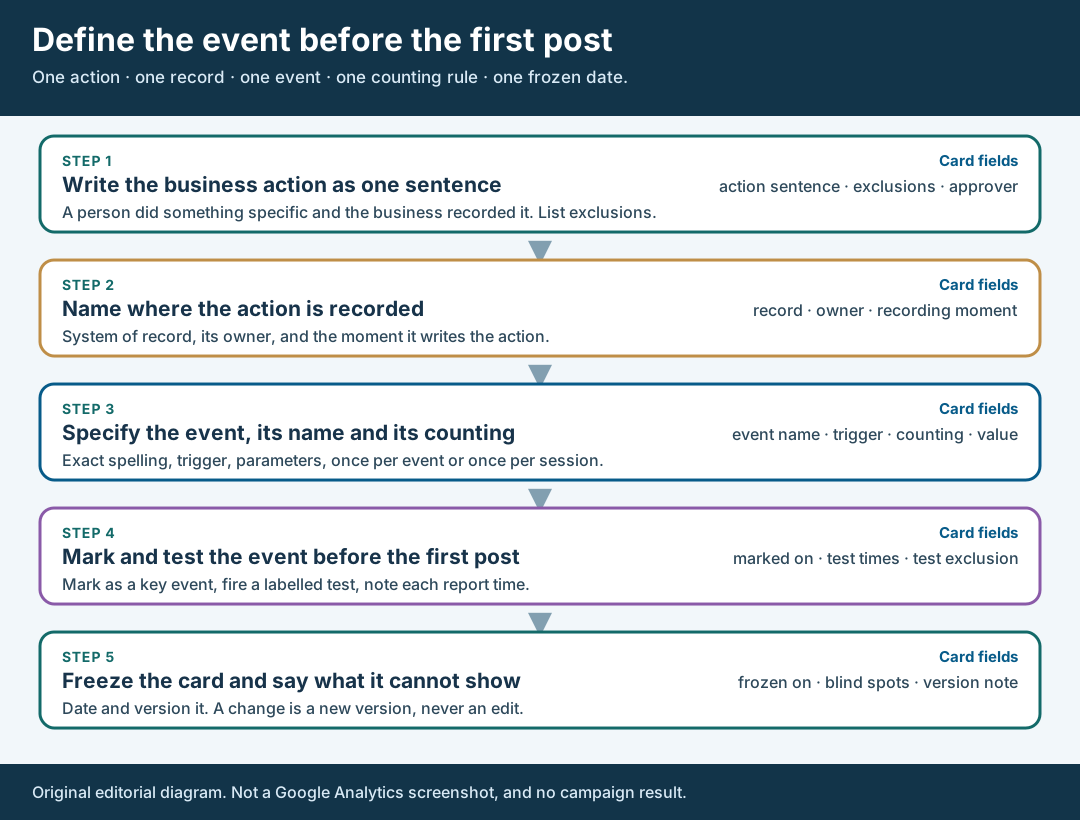
An original editorial definition map. Each field must point to something a person can check.
Original visual by Superdirector editorial team. Creation date not recorded.
Mark and test the event before the first post
An event only becomes a key event when someone marks it. Google’s page on marking events says a standard property can have up to 30 key events, that an existing event is marked with the star in the Events list, and that you need to be an Editor or above at property level to mark an existing event (Marketer or above to create a new one as a key event). It also says marking affects reports from the time of creation and does not change historic data, and that standard reports can take up to 24 hours to show it, while realtime reports update a few minutes after a user triggers it.
Those details set the schedule. Google’s key event setup example builds a custom event from the built-in form submission event, narrows it to one form, and explains that because the new event has no data yet, you mark it as a key event up front so Analytics treats it as one when it first receives it. The scheduling rule that follows from both pages is ours rather than Google’s: create, mark and test the event before the first post goes live, and write the date next to the card. If you wait until visitors are arriving, the first and often busiest hours of the post will have no data under the definition you meant to use.
Test it like a visitor would. Submit the real form once from a phone on a mobile connection, using a clearly labelled test entry, and confirm three things: the system of record shows the action, the analytics event appears in realtime, and the event shows in the standard report within the delay Google describes. Write down the time of each. Then record how the test will be excluded from the campaign count, for example by a known test email or a time window noted on the card. Without that note, the first row in your result is your own test. The mobile tracking-link test covers the link side of the same rehearsal.
Walk through a fictional event definition
Fictional exercise: no real brand, creator, campaign or result was inspected. A made-up studio, Brand A, plans a creator campaign for a consultation service. Its agency drafts an action sentence: “A person submitted the consultation request form and the booking system created a request with a reference number.” The client’s only listed exclusion is staff tests. The agency also notes that its first idea, a click on the “Request” button, would count people whose submission the system later refuses.
The agency writes the system of record (the booking system), its owner (the studio’s coordinator), and the recording moment (when the request is accepted). It picks a trigger on the confirmation view shown only after acceptance, names the event consult_request_sent and checks the spelling against the naming rules. It chooses once per event because the studio wants every accepted request counted, and it leaves value empty because the studio has no stated number for a request. It marks the event, submits a labelled test from a phone, and records the three times it checked. Nothing in this exercise has a count, because there is no real data.
Now suppose the studio’s coordinator later says phone requests also create booking records. The card does not change quietly. The agency adds a version 2, dated, that names the phone gap as a blind spot of the analytics event and keeps the web event as defined. Counts under version 1 and version 2 are labelled, never pooled. The scenario does not predict that any real creator would drive requests, and it carries no benchmark.
Freeze the card and say what it cannot show
When the test has passed, freeze the card: record the date, the version and who at the client agreed to the action sentence. Send it before the first post, not after. The point of freezing is to make a later disagreement short. If the number is lower than hoped, the question is whether the event worked as defined, which the card can answer, and not whether the event should have been defined differently, which can never be settled.
Handle change by versioning, not editing. If the client wants to count a second form, change the counting method or adjust the exclusions, write a new version with the date it takes effect and label the numbers before and after it. Google’s counting-method page says a change applies to future key events only, which is exactly why you note the date: a report spanning the change mixes two definitions unless you split it. Do the same for any change to the trigger.
Then write what the event will not show. It will not show which creator caused a person to act, whether the post changed anyone’s mind, or what would have happened without the campaign. It reflects the actions the tag recorded, in the reports you will open. Use the plain action in the client agreement and name the Analytics event beside it. Google’s conversions-versus-key-events page says Analytics renamed important business events as key events and that “conversion” now refers to an action used to measure ad performance, so a bare “conversion target” in a contract can be read two ways.
What this page does not decide
This method defines one event before a campaign starts. It does not choose whether the campaign should aim for awareness, inquiries or sales; the measurable objective guide covers that, and the client-decision guide covers how the request was framed in the first place. It does not set how long to watch for the event after a post; the observation-window guide covers that.
It also does not explain a weak result afterwards. If visits arrive and the event stays quiet, the visit-to-signup guide walks the stages, and the next-test guide covers choosing a change. Both depend on the event having a definition you froze here.
Nothing here measures how often teams skip this step, how many events a typical campaign defines or how much an early definition improves results. Those numbers are not available to us and are not claimed. The page is an editorial method for fixing what an event means before the first post, and it asks only that each field on the card point to something a person can check.