How-To Guide
Reconcile creator coupon-code orders with tagged-link visits
Compare owned orders that used a creator’s code with GA4 tagged-link evidence. Classify each order by what both signals show and report only supported credit.
By the Superdirector editorial team. Google Analytics, Shopify and Stripe documentation reviewed October 30, 2026.
At a glance
How should a team reconcile creator coupon-code orders with tagged-link visits?
Treat the code and the tagged link as two independent signals and start from owned orders. For each order, record the discount code the order system stored and whether GA4 or your own landing record shows the creator’s UTM values for the same visit. Then classify the order as code and link agree, code only, link only, conflicting creators, or unresolved. Report each class separately. A code use shows a customer entered or received that code; a tagged visit shows a session arrived with those parameters. Neither alone proves the creator caused the order.
- Join from the order list; GA4 and discount dashboards are views, not the ledger.
- A code use and a tagged visit are different evidence and fail in different ways.
- Report five classes from your own data; do not fold code-only or link-only orders into one creator total.
Direct answer
Short answer: build the comparison from your order records, not from a dashboard total. For each order that could belong to a creator, attach two separate facts. The first is the discount code the order system recorded. The second is whether a visit carrying that creator’s tagged-link parameters can be found for the same customer journey in your own analytics or landing record. Then classify the order: code and link agree, code only, link only, conflicting creators, or unresolved. The code tells you which discount the order used. The tagged visit tells you how a session was classified when it started. Neither one is, by itself, proof that a creator caused a sale.
This guide is for a brand or agency that gives each creator both a personal discount code and a tagged link to its own website, and has a web order system plus a GA4 web stream. The decision it supports is how to describe creator-linked orders to a client and which orders need a human ruling before anyone is paid on them. It does not estimate a conversion rate, say which signal is more accurate, or claim that Superdirector connects to your store or GA4.
Use the two-signal order ledger diagram, the blank classification card and the blank CSV order ledger while you work. They contain no store data, no order, no customer and no result.
What this page is not
Three nearby questions already have their own pages, and this one is different from each. The TikTok Ads purchases versus GA4 guide compares an ad platform’s attributed purchases with GA4 purchases. The Spark clicks versus GA4 sessions guide explains why click and session counters differ. The live creator link redirect test checks that a published link survives its redirects. This page starts after those: you already have orders, some with a creator’s code and some arriving through a creator’s tagged link, and you must decide what the overlap and the gaps allow you to say.
It also does not decide the observation window for an entire campaign; the conversion window guide covers that, and you should fix that window before you begin here.
Verify that each signal can be captured at all
A signal that was never captured looks like a signal that never happened. Test both before reading any totals.
The code side. Place a test order in your own store using one creator’s code and confirm where the order system stored it. In Shopify, customers enter a discount code during checkout, you can set an overall usage limit and a one-use-per-customer restriction, and the admin’s Discounts list has a Times used filter (Shopify: managing discount codes). Shopify also documents a Sales by discount report that shows how often each code is used on the discount-codes page; check your plan and report timing in your own admin before relying on it, because this guide has not verified every plan’s report availability. In Stripe, a promotion code is the customer-facing code that wraps a coupon, can be limited to a specific customer, to first-time transactions or to a minimum amount, and each redemption counts toward the coupon’s max_redemptions limit.
The link side. Open the exact tagged URL on a phone in a fresh browser state and confirm the parameters survive to the page that loads. The redirect trace guide covers this. Then confirm in your GA4 property that a test visit appears with the intended session source and campaign. Google’s session documentation says the session_start event carries the attribution data, such as UTM parameters, that determines the session’s source. Because that attribution is set when the session starts, a purchase in a session that began another way can sit under a different source than the tagged link a customer tapped earlier. That is our inference from the definition, not a measured rate.
The bridge. Google’s event reference lists coupon as an optional event-level parameter of the GA4 purchase event, described as the coupon name or code associated with the event, and transaction_id as the unique transaction identifier. Google’s dimension reference says the Order coupon dimension is populated by sending the event-level coupon parameter with an online-sales event. So GA4 can show a code only if your site or tag setup sends it. If your purchase event omits coupon, GA4 cannot join the code to the session for you, and the code evidence must come from the order system. Check your own implementation; do not assume it is on.
Join on owned orders, not on dashboards
Export the order list for the frozen window. For each order keep an internal order ID, the order time, the discount code or codes the order system stored, and any refund or cancellation. Do not paste customer names, emails or addresses into the ledger; an internal ID is enough, and Google’s data-redaction help page describes how GA4 can remove chosen URL query parameters and likely email addresses before events are sent, though it finds email addresses on a best-effort basis. Add one column that says which creator, if any, the stored code is mapped to.
Then look for the link side. The strongest source is a value your own system wrote at order time, for example the landing-page UTM values captured with the cart or order, because it joins to the order directly. The next is the GA4 purchase event matched by transaction_id to the order, read with the session source and campaign dimensions. A weaker source is a GA4 exploration row that shows tagged sessions and purchases in aggregate: it can tell you how many purchases carried a creator’s session source, but it cannot tell you which of your orders they were unless the transaction ID is available in the report. Write the source type in the ledger next to every link-side value, so a reader can see how strong each join is.
Do not hide a mismatch by loosening the join. If an order has a code but you cannot find the matching purchase event, the row stays code-only with the missing-event reason. Possible reasons include a consent choice, a blocked tag, a purchase completed outside the web stream, or an order type your site does not send as an event. This guide cannot tell you which applies to your store; it can only make you write the reason down as an observation or as an open question.
Classify each order by what both signals show
The table below is an editorial classification method, not a platform status. It names the readings your own data can support and the action each one asks for.
| Class | What the ledger shows | What it can support | Next action |
|---|---|---|---|
| Code and link agree | The stored code maps to a creator and a tagged visit for the same creator is joined to the order | Two independent signals point to the same creator; still not proof of cause | Report under that creator, label it as two-signal |
| Code only | Stored code maps to a creator; no tagged visit is joined | The creator’s code was used on the order; the route to it is unknown | Report separately; record why the link side is missing if known |
| Link only | A tagged visit is joined to the order; no creator code was stored | A session classified to that creator’s link produced an order without their code | Report separately; do not infer the customer ignored a code |
| Conflicting creators | The code maps to one creator and the tagged visit to another, or two codes are stored | Both exposures exist; the data does not rank them | Hold for the agreement’s credit rule or a named human ruling |
| Unresolved | Order, code or visit cannot be read reliably, or the window or time zone do not align | Nothing | Name the missing source and its owner |
Several facts about codes and links keep the classes honest. A code is a string a person can pass on: Stripe’s own documentation says that if you do not want customers to share a promotion code, you should set limits on it or apply a coupon directly. A Shopify shareable discount link applies its discount to the customer’s next checkout cart and combines with other cart discounts under your combination rules, so a code-bearing link may create a code use without any typing (Shopify). Stripe notes that multiple discounts can stack on a subscription, and you cannot pass a coupon and a promotion code created from the same coupon together, so check whether an order carries more than one stored discount before you map it to a single creator.
On the link side, remember that GA4 attributes a session by its start, and a customer can see a creator’s post, return later by search and buy with the creator’s code. In that case the code is present and the tagged session may be absent. That is a plausible reading, not an observed one; the ledger records only the missing join.
When enlarged, scroll horizontally to read the diagram.
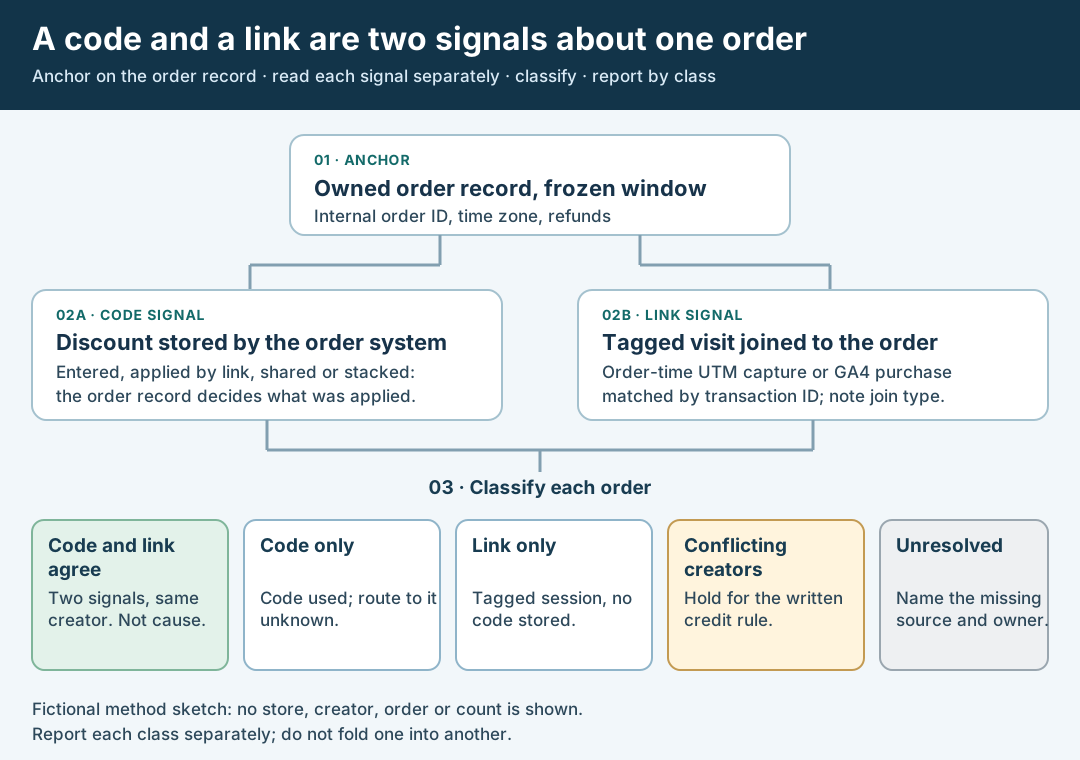
An original diagram of the two-signal classification. It is a method sketch, not a dashboard and not a result.
Original visual by Superdirector editorial team. Creation date not recorded.
Walk through a fictional ledger
Fictional exercise: no real store, creator, order or result was inspected, and no counts are implied. A brand gives Creator A the code ALPHA-DEMO and a link tagged utm_source=creator-a. It gives Creator B the code BETA-DEMO and a link tagged utm_source=creator-b. The ledger has five orders, each described only qualitatively.
Order 1 stored ALPHA-DEMO, and the order system captured utm_source=creator-a at order time: code and link agree. Order 2 stored ALPHA-DEMO and no tagged visit can be joined: code only. Order 3 stored no code, but its GA4 purchase shares a transaction_id with the order and the session source is creator-b: link only. Order 4 stored BETA-DEMO and its joined session source is creator-a: conflicting creators, held for the agreement’s rule. Order 5 has a stored code, but its order time falls outside the frozen window once the two time zones are aligned: unresolved until the window is corrected.
The client sentence for this ledger is not “Creator A drove two orders.” It is a set of classes: one two-signal order for Creator A, one code-only order for Creator A, one link-only order for Creator B, one held conflict and one unresolved row. The ledger diagram shows how each class arises from the two signals.
Report the classes and the decision they support
Write the report in the same order as the ledger: the anchors (order authority, window, time zones, code map, tagged URL), then the count in each class from your own data, then a short list of what remains unknown. A sentence that holds up reads like this: “For orders placed [window, time zone], the order system stored [creator]’s code on [n] orders; [m] of those also joined to a session whose source was [creator’s tagged value]. [k] orders carried the tagged session source and no code.” Leave the numbers to your own export. This page deliberately provides none.
Then state the decision. If most of a creator’s activity is code only, the code is doing the finding, and the tagged link may be unused, stripped or too rarely tapped; the redirect trace is the next check. If activity is mostly link only, check whether customers saw the code at checkout and whether it applied. If there are conflicts, change nothing about payment until the agreement’s credit rule is applied. If the deal paid on one signal, say which one in the report so nobody reads a code-based number as a link-based number.
Keep refunds, cancellations and discounts that were applied then removed in their own column. A Shopify customer can remove an applied link discount at checkout, and reopening the link reapplies it, so the stored order is the authority for what was actually discounted. For the separate question of paid media attribution, use the organic and paid results guide, and do not add paid-attributed purchases to the creator total without checking the overlap.
What remains unknown
This method identifies agreement and disagreement between two records. It cannot tell you incrementality, which orders would have happened without the creator, or how many people saw the code without using it. It cannot tell you whether a customer got the code from the creator or from a coupon site. Search volume for this question is N/A here, since no keyword-tool data was available for this page. If your client needs a causal claim, that is a different study with a holdout or a pre-agreed test design; the decision this guide supports is narrower and honest: what each record shows, and which orders need a person.
Frequently asked questions
If an order used a creator’s code but GA4 shows no tagged visit, was the creator’s code misused?
Does a GA4 purchase with a creator’s UTM campaign prove the creator’s code was used?
coupon parameter only if your site sends it, and the Order coupon dimension is populated from that event-level parameter. A purchase can have the tagged session source and no coupon value. Treat it as link only until the order system’s own discount record says otherwise.