How-To Guide
Should you change App Store screenshots or price when the acquisition report lacks impressions or source?
When App Store Connect lacks impressions or shows source Unavailable, find the cause first, test screenshots only if you can, and hold price.
By the Superdirector editorial team. Apple help pages read November 6, 2026.
At a glance
Should you change App Store screenshots or price when the acquisition report lacks impressions or source?
Usually no. Missing impressions or an Unavailable source is a gap in visibility, not evidence that screenshots or price are wrong. Find the cause, then change only what you can measure: screenshots through a product page optimization test your traffic can finish. Keep price unchanged until source data shows where downloads come from.
- Unavailable sources include gift cards, promo codes, MDM and pre-April 15, 2017 downloads.
- Campaign metrics appear only at 5 or more in the date range, no sooner than 24 hours after launch.
- Screenshot tests need five first-time downloads to show and 90% confidence to call a winner, within 90 days.
Do not change price on a blank report; test screenshots only if traffic allows
Usually no. Missing impressions or a source row marked Unavailable is a gap in what you can see. It does not show that your screenshots or your price are wrong, so it is not a reason to change either one. First work out why the data is missing. Then change only the thing you can measure afterwards. For screenshots, that is an App Store product page optimization test. Apple's own analytics reports impressions and conversion for each variant in that test. For price, you can rarely isolate the effect at all when source data is missing, so leave it alone until you can.
The rest of this page is the order we would work in: find the reason the cell is blank, check the numbers you do have, decide whether a screenshot test can finish with your traffic, and keep price out of it. Every rule below comes from Apple's App Store Connect help pages, read on November 6, 2026.
Find out why the impressions or source data is missing
There are four common reasons, and each points to a different next step. Apple's acquisition help and its campaign link help describe them:
| What you see | Likely reason in Apple's help | What to do |
|---|---|---|
| Source shows Unavailable | The download came through an App Store gift card, a promo code or Mobile Device Management, or happened before April 15, 2017. Plan changes in Manage Subscriptions also lose the source. | Count how many of your downloads came from codes. If you just ran a promo-code push, the Unavailable row is expected. |
| Campaign row or metric missing | A campaign metric only appears once it reaches 5 in the selected date range, and campaigns appear no sooner than 24 hours after launch. | Widen the date range before reading anything into a blank. |
| Rows missing in an exported detailed report | Detailed reports may withhold or combine rows for very small groups of users. | Use the standard dashboard total for the same period and treat the export as partial. |
| Web traffic shows up as an app referrer | On iOS, taps from non-Safari browsers such as Chrome are credited to that browser app under app referrers. | Add the browser apps to your web total before saying web traffic fell. |
Two more details change what a source row means. A manual redownload resets the source, so later purchases go to the new source. And when someone taps more than one campaign link within a given timeframe, only the most recent link gets credit for later sales. A creator link tapped first can lose that credit to a campaign link tapped after it.
Check the numbers you do have against Apple's own definition
Even with gaps, you usually have downloads and some impressions for the whole app. Before you blame the page, make sure you are reading conversion the way Apple calculates it. Apple's analytics overview gives the ratio as total downloads divided by unique impressions. Its example is 100 unique impressions and 50 total downloads, which is a 50% conversion rate.
Not every guide uses that definition. AppConsul's guide says conversion is first-time downloads over product page views and is "not downloads divided by impressions". That is a different ratio, and it can make the same week look much better or much worse. AppStoreStatistics also points out that some people download without opening the product page, so impressions, page views and downloads are not one closed funnel. Pick Apple's definition, write it at the top of your notes, and use it every week.
Then split the drop you are worried about. If impressions fell and conversion held, people are seeing the app less often; new screenshots will not fix that. As AppStoreStatistics puts it, a decline in impressions "does not by itself establish that screenshots became less convincing." If impressions held and conversion fell, the page itself is a fair suspect.
When enlarged, scroll horizontally to read the diagram.
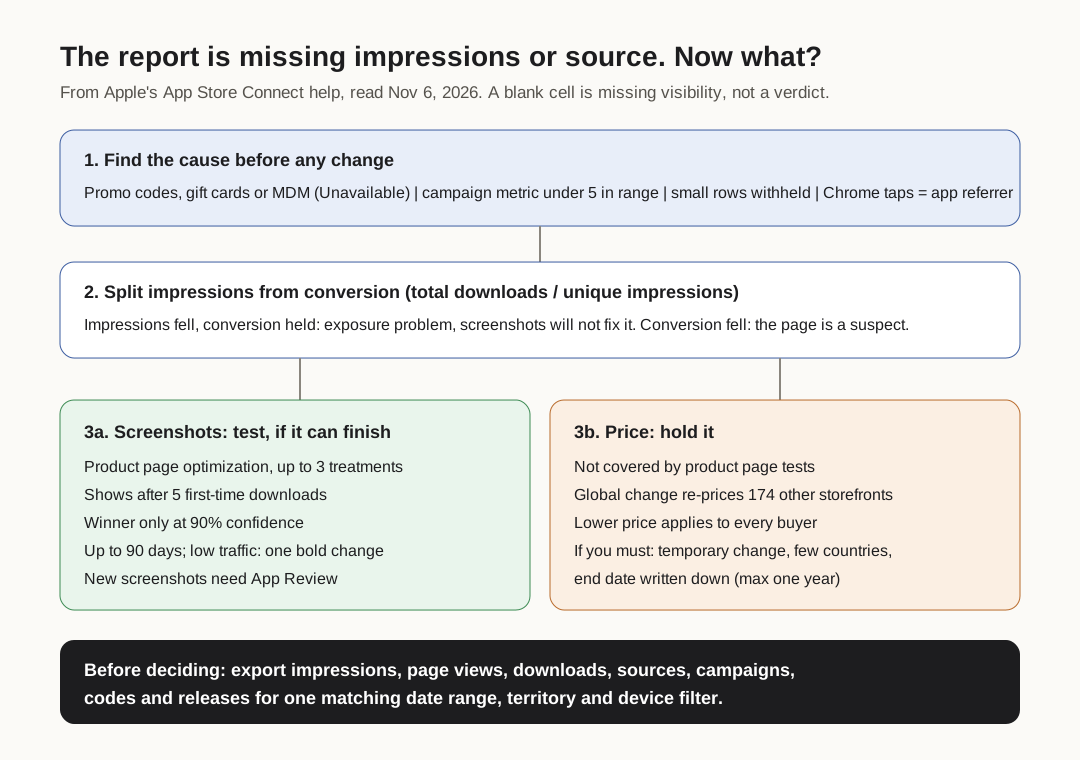
Original editorial diagram from Apple's App Store Connect help, read November 6, 2026.
Original visual by Superdirector editorial team. Creation date not recorded.
Change screenshots only through a product page test that can finish
A screenshot change is the one you can measure even with patchy source data, because product page optimization shows each variant to a random share of App Store visitors and reports impressions, conversion rate, percent improvement and confidence for each treatment against the original. The rules that decide whether a test is worth starting:
- Up to three treatments against your original page; each one shows only on iOS 15 and iPadOS 15 or later.
- Results appear in Analytics once at least five first-time downloads are attributed to the test, per Apple's PPO help.
- A treatment may be labelled Performing Better or Performing Worse once it reaches 90% confidence.
- A test runs for 90 days unless you stop it sooner. If current traffic suggests a test will not reach 90% confidence in that time, Apple's PPO help says it may be marked Likely to be Inconclusive, and suggests extending it beyond 90 days where possible.
- New screenshots in a treatment must be approved by App Review, per Apple's PPO page. And per Apple's test overview, releasing a new app version mid-test may affect the results if that version changes the assets or metadata under test.
- Apple lets you run one test at a time and you cannot change a test once it has started, so settle the treatments before you publish it.
If your app gets few impressions, test one bold change against the original rather than three small ones. Apple's own troubleshooting answers suggest a more dramatic change or a busier period when a test is heading for inconclusive. And be ready to lose: in one of the developer stories on Apple's page, the original page without a preview video beat the version with one.
If you cannot run a test (no traffic, or a release is due), changing screenshots directly is still allowed, but log the date and treat the next weeks' conversion as a guess, not a result.
Leave price alone until you can see where downloads come from
Price is the riskier change on missing data, for three reasons.
- It is not one market. A global price change in your base country sets comparable prices on the other 174 storefronts, per Apple's pricing help. A drop in one source or one country does not justify moving all of them.
- It is not tested like a product page. Product page optimization covers icons, screenshots and previews, not price. Any price comparison is before-and-after, so it is exposed to every other change that week.
- It changes revenue on downloads you already get. A screenshot test that loses can be dropped; a lower price applies to everyone who would have paid the old one.
If you still need to learn about price, use what Apple offers for a bounded trial: a temporary price change has a start and end date, and can last at most one year. Pick specific countries, write the end date down, and do not start a screenshot test or a creator push in those countries at the same time.
Pull these before you decide
Before a meeting about screenshots or price, get these from App Store Connect for the same date range, territory and device filters:
- Unique impressions, product page views and total downloads for the whole app, by week.
- The same three by source type, with Unavailable shown as its own row.
- Campaign rows for any creator or social links, with the date range widened until each metric clears Apple's threshold of 5.
- A list of promo codes, gift cards and price changes in the period, because they move the Unavailable row and the conversion rate.
- App versions released in the period, since a release can change the page during a test.
A downloadable checklist has these as rows with a column for what you found. If the creator side is where traffic should be coming from, our guide to measuring creator traffic that ends at an App Store page covers the link setup, and choosing an App Store experiment when the signals disagree covers what to test first.