How-To Guide
Find where counted creator visitors stop before they sign up
Split the route from landing page to confirmed account into stages, cut the gaps by device, and hand-test one path to name a breakpoint you can check.
By the Superdirector editorial team. Google Analytics and web.dev guidance reviewed October 30, 2026.
At a glance
Why do creator visits produce few signups?
A thin signup count after counted creator visits has no single known cause. Define what counts as signed up, fix the visit cohort, then split the route into landing view, signup start, signup submit and signup confirmed. Compare each stage with the next, cut the gaps by device and entry page, and hand-test the route on the device the numbers point to. Record one candidate breakpoint, such as a page mismatch, a demanding form, a device problem, an account step outside the page or a broken event, with evidence for and against and what is still unknown.
- A drop between stages is a place to look, not a cause.
- Check that the stage events fire before trusting any count.
- End with one candidate, one owner and one dated next check.
Direct answer
Short answer: start after the visits are already counted, and ask only one question: at which stage between the landing page and a confirmed account do the counted visitors stop? Write down what “signed up” means, split the route into a few measured stages, compare each stage with the next for the same cohort, cut the gaps by device and entry page, then walk the route by hand on the device the numbers point to. The output is a candidate breakpoint with its evidence and what is still unknown. It is not a cause.
This is for a brand marketer or agency analyst who has creator traffic that the analytics tool does count, and a signup number that looks small next to it. It does not ask whether the views became visits, whether the spoken call to action matches the page, or whether a consent banner changes what is measured. Those are separate pages, listed in the boundary section. Here the visit is a given and the visit-to-signup step is the whole subject.
A drop between two stages is a place to look, not an explanation. People leave for many reasons that no event records, and the same drop can come from a page problem, a form problem, a device problem or a broken event. Use the stage map, the blank diagnosis sheet and the blank CSV register. All three are blank teaching aids with no real funnel in them.
Fix the signup moment and the visit cohort
Begin with two definitions written in plain words. The first is the signup moment: the single thing that must exist for a visitor to count as signed up. It might be an account record, a confirmed email address, or a completed first step inside the product. Pick the one your team already treats as the real result. If the team holds two meanings, say a form submit and a confirmed account, write both and keep them as separate stages instead of letting one stand in for the other.
The second is the visit cohort: which counted visits you are examining, defined by the source, medium and campaign values your tracked creator links carry, over a stated date range. Record the analytics property, the date range and the time you pulled it. Keep the cohort fixed for the whole review. If you switch from one definition to another halfway through, every later comparison mixes two groups and tells you nothing.
Then check how the signup moment is reported. Google lists sign_up as a recommended event with one optional parameter, method (GA4 event reference). Google also states that recommended events are not sent automatically, because they need extra context to be meaningful (recommended events help). So the first factual question is whether anyone built the event, where it fires, and whether it fires on a confirmed account or on a button press. Write the answer on the sheet. Google describes a key event as an event that measures an action particularly important to the business (key events help); whether your signup event is marked that way is a configuration fact to record, not a quality signal.
Last, decide the denominator out loud. “Few signups” is only meaningful against a stated group: all counted visits, visits that reached the form, or visits from one device type. Different denominators answer different questions, and the sheet asks for the cohort so no one quietly swaps them. No benchmark rate appears on this page; none is claimed.
Split signup into measured stages
Break the route into the fewest stages that still separate different problems. A workable minimum is four: landing view (the page loaded for a counted visit), signup start (the visitor reached or touched the form), signup submit (a submit left the browser) and signup confirmed (the account or record exists). Your product may need more, for instance an email-confirmation step or a first-run step, and each extra stage should answer a question the neighboring stages cannot.
The reason to split is that one big gap hides different failures. If landing view is large and signup start is tiny, the question is whether the visitor ever met the form. If start is large and submit is small, the form itself is the first suspect. If submit is large and confirmed is small, look at what happens after the button, such as a verification email, a review step or a server-side failure. Those are three different owners and three different fixes.
Google’s funnel exploration is one way to see the stages together. Its help page says the tool lets you visualize the steps users take to complete a task, that each step has a name and one or more conditions based on events or dimension values, that steps can be indirectly or directly followed, and that you can define up to 10 steps (funnel exploration help). It also separates open funnels, where users can enter at any step, from closed funnels, where users must enter at the first step. For this question a closed funnel keeps the cohort pinned to people who started at your landing page, while an open one can add people who joined mid-route; record which you used so a reader can reproduce the counts.
The same page says that if one user completes the funnel’s steps more than once in the date range, only the first sequence is reported. Read that as a limit: a visitor who returned on another day and finished then is judged by the rules of the exploration you built, and the counts are not a headcount of every attempt. Google’s own lead-generation walkthrough builds a four-step funnel from page_view, form_start and form_submit with a form name filter, and says new events may take up to 24 hours to appear in Explorations (lead generation form help); use it as a model for the shape, not as proof that your form is wired the same way.
Check each stage event before trusting its count. Google’s enhanced measurement page lists form_start as the first time a user interacts with a form in a session and form_submit as firing when a form is submitted, and says form parameters can be used in reports only if you create custom dimensions for them (enhanced measurement help). A form that submits through script, or inside an embedded frame, may not produce those events the way a plain form does. Treat that as something to test with your own form rather than assume either way.
When enlarged, scroll horizontally to read the diagram.
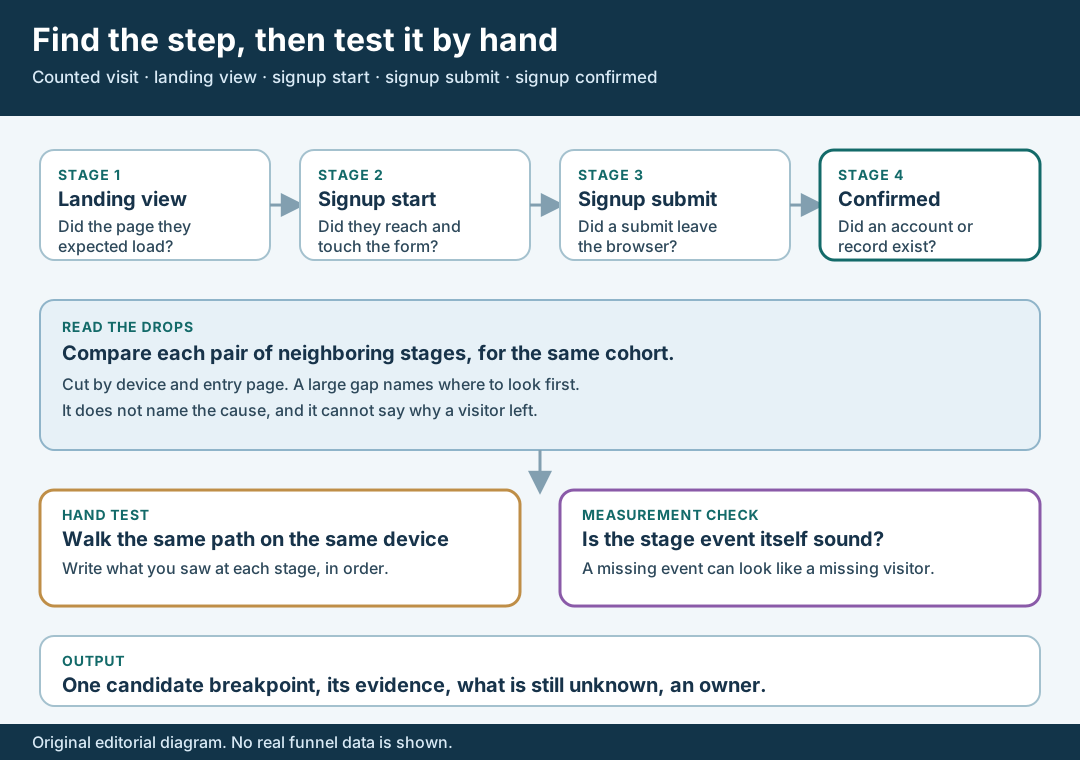
An original editorial stage map. A drop between stages is a place to look, not a proven cause.
Original visual by Superdirector editorial team. Creation date not recorded.
Cut each stage by device and entry page
With the stages in place, compare each stage with the next one for the same cohort, and write the gaps as counts of users, not as a single rate. Then cut the same funnel by the two things most likely to separate one problem from another: device category and entry page. A gap that appears on one device only points toward the layout or behavior on that device. A gap that appears on one entry page only points toward that page’s promise, form or redirect.
Google’s funnel tool supports this directly. Its help page says you can apply up to four segments and add a breakdown dimension such as device category, that each user is attributed to the first breakdown value they had when entering the funnel, and that a “rows per dimension” setting limits how many series show (funnel exploration help). The attribution rule matters for creators, because people often see a creator video on a phone and finish later on a laptop. A user who started on the phone is counted under the phone even if the signup happened elsewhere, so a low phone figure may partly reflect that handoff and not a failure on the phone.
Also turn on the tool’s elapsed-time view when you have it. Google describes it as the average time between steps, calculated by summing the elapsed time from the previous step and dividing by the users who reached the current step (funnel exploration help). A long average between two stages can be a clue that visitors paused, left and came back. It cannot tell you why, and an average can be pulled by a few long gaps.
Keep the cuts few. Each cut shrinks the group, and a small group makes any gap look dramatic. If a cut leaves you with a handful of users, say so on the sheet and treat the pattern as a prompt for the hand test, not a finding. If the cohort is too small to read at all, the honest result is “not enough counted visits to locate the step yet,” and that is a valid entry for the sheet.
Walk the signup path as the visitor would
Numbers locate; a hand test looks. Take the device, browser and entry page your cuts point to and walk the route from the counted landing page to a confirmed account, as a new visitor would, with a fresh email address you control. Write what you see at each stage in order: what the page asked for, what the keyboard did, what each error said, what happened after submit, and what arrived afterwards. Do not enter real customer data, and do not complete a test on a live production flow if creating an account has side effects your team has not approved; use a test environment or a test address agreed in advance.
Watch for the ordinary form frictions. Web.dev’s sign-up guidance says to avoid gating features behind login where possible, to ask for as little as possible on sign-up, not to double up inputs, to use the right input type so the phone shows a suitable keyboard, to use autocomplete values such as new-password and username, to show problems inline and explain how to fix them, and to test sign-up forms on the platforms most common for your users (web.dev sign-up form best practices). That is a checklist of things to notice, written for sign-up forms in general. It does not say that any one of them is why your visitors left, and it does not give an expected completion rate.
Look for the quieter breakpoints too. Is a required field asked for that a visitor from a short video would not have to hand? Does a password rule reject a reasonable entry without saying why? Does the confirmation email arrive, and does its link return to the right place? Does a social sign-in button open and then fail on a mobile browser? Does the page keep a promise the creator made, such as a free trial with no card, or does it ask for payment details first? Each of these is a hypothesis to check by looking, and the most useful hand-test note is the exact words on the screen at the moment you would have stopped.
Then reconcile the hand test with the counts. If the hand test reaches a confirmed account but the signup event never fires, the problem may be measurement, and the low signup count may be partly a recording gap. If the hand test is blocked, the stage is the likely place to fix. If the hand test works and the event fires, the counted drop could still be real, and you keep the question open rather than call it solved. One hand test is one path on one device; it is evidence about that path only.
Walk through a fictional visit-to-signup review
Fictional exercise: no real brand, creator, campaign or result was inspected, and the figures are deliberately omitted. A made-up product, Product A, ran one tracked link with Creator Q. The team defines the signup moment as a confirmed account and the cohort as counted visits from that link over a stated week. They build four stages: landing view, signup start, signup submit and signup confirmed.
The review notes show a small group at signup start on one device category and a larger group on another, while the later gaps look similar on both. The team does not conclude that the first device is broken. It writes a candidate: “the form may not be reached on that device,” records the evidence for (the cut) and against (the group is small and some users may have finished elsewhere), and lists what is unknown, including how many people moved to another device.
A hand test on that device finds the form sits below a long block of text and an email field asks for confirmation twice. The signup start event fires only when a field is touched, so a visitor who scrolls and leaves is never counted at that stage. The team records two possible contributors, form placement and extra input, plus one measurement note, and assigns the page owner to move the form and the analytics owner to confirm what the start event records. The scenario predicts nothing about any real product and carries no performance claim.
Name the breakpoint and its next owner
Close the review by writing one candidate breakpoint on the sheet in a fixed shape: the stage pair where the gap sits, the type of candidate, the evidence for, the evidence against, what is still unknown, the next owner and the next check with a date. The types on the sheet are page did not match the promise, form asks too much, form error or validation, device-specific problem, an account step outside the page, measurement gap, and “cannot tell yet.” “Cannot tell yet” is a respectable answer.
Match the owner to the type. A page promise or layout issue goes to whoever owns the landing page. A form field or error message goes to the product or growth engineer. A verification email or review step goes to whoever runs account setup. A missing or misfiring event goes to the analytics owner. A question about the creator’s wording belongs with the person who manages the creator relationship, and it should be raised only after the page and form have been ruled in or out, so the creator is not asked to change a line that the page was the real reason for.
Write the next check as something small and observable: a retest on the same device after the change, the same funnel over the next stated range for the same cohort, or a repeat of the hand test. Say in advance what result would change your mind. Do not report an improvement from a single before-and-after pair of counts, since traffic mix, device mix and timing all shift between periods; report the new counts beside the old ones with their ranges and let the reader see how little or how much they say.
What this page does not decide
This method starts after visits are counted and ends at a named breakpoint. It does not replace the checks around it. Whether views became counted visits is covered by the views-without-qualified-visits diagnostic. Whether the creator’s spoken promise matches what the first screen shows is covered by the CTA first-screen rehearsal. How a tagged link behaves on a phone before and after a consent choice is covered by the mobile consent link test.
Testing the destination before any post goes out is in the pre-post destination test. If your signup route runs through an app store or a deep link, the iOS signup route check covers the part this page leaves out.
Nothing here measures a typical visit-to-signup rate, how many signups a creator should drive, or how much any fix improves a funnel. Those numbers are not available to us and are not claimed. A funnel report is a count of what your tags recorded; it is not a record of what visitors thought, and it is not proof of cause. The page is an editorial method for turning a thin signup count into one checkable breakpoint, one owner and one next test.