How-To Guide
Test a creator tracking link on a phone in each consent state before launch
Open the tagged creator link on a phone before any consent choice, after accepting and after declining. Log what each state shows and can prove.
By the Superdirector editorial team. Google Analytics documentation reviewed October 30, 2026.
At a glance
How should a team test a creator tracking link on mobile with consent?
Open the exact staged link on a real phone in three states: before any consent choice, after allowing analytics and after declining. In each, record the banner, the address, whether the promised task is reachable and what your own analytics can show. Label every cell observed, not observed or not observable, because an empty analytics view in a declined state can be expected under consent mode. Give the link one verdict, ready under stated conditions, fix and retest, or hold, and list what stays unknown so the client report repeats those limits.
- Test three states on a phone, changing only the consent choice.
- Observed, not observed and not observable are different entries.
- The verdict states conditions and unknowns; it is not a tracking guarantee.
Direct answer
Short answer: before a creator posts a tracked link, open that exact link on a real phone three times, once for each consent state a visitor can be in: no choice made yet, analytics accepted and analytics declined. In each state record what the viewer sees (does the consent banner cover the page's main button, and can the viewer still do the promised task), what the address carries, and what your own analytics can and cannot show. Then write one verdict per state: observed, not observed or not observable. Only then decide whether the link can go to the creator.
This is for an agency or brand marketer who owns, or can ask the site owner for, a campaign link tagged with UTM parameters and a website with a consent banner. The decision is narrow: does this link, on this page, behave honestly in each consent state, so that the report you promise the client later says only what the collection setup can support? It does not decide whether visitors should be asked for consent, what the law requires in any market, or how many people will click. Those need the site owner and legal counsel.
The reason to test the states separately is that a single happy-path check hides the most common surprise. A tester usually has already accepted the banner on their own phone, so the page they see is not the page a first-time viewer sees. Use the consent-state trace map, the blank trace card and the blank CSV register. All three are blank teaching aids; none records a real site, creator or result.
Freeze the link, the page and the consent setup
Write down five things before touching a phone. First, the exact link the creator will receive, character for character. Google's campaign URL guidance says that when you add parameters you should always use utm_source, utm_medium and utm_campaign, that parameter values are case sensitive (so utm_source=google differs from utm_source=Google) and that a strict lowercase naming convention is the recommended practice. Check your link against that page and record the convention you used. A link that differs by one capital letter from the report's naming scheme will not fail visibly; it will just appear as a different row later.
Second, the landing page the link should reach and the task the creator will promise there, in the creator's words. Third, the site owner who can change the banner, the tag setup or the page, and who can answer questions about them. Fourth, the phone and browser you will use: model, operating-system version, the browser or in-app viewer that actually opens the link, and the date. Record the viewer that opens the link rather than the one you wish opened it; if the creator's platform opens links in its own viewer, the prelaunch check should start from a staged post or message where that is possible, and otherwise should mark the platform's viewer as unverified.
Fifth, a clean starting state. A phone that has already stored a consent choice for the site will skip the banner. Use a fresh browser profile, a private window or cleared site data, and write down which one you used and that you confirmed the banner appeared. If you cannot get the banner to appear, the first state is not observable for this device. That is a valid entry, and it is better than silently testing only the accepted state.
Also ask the site owner for the consent setup in plain words: which choices the banner offers, whether the analytics tag loads before the viewer chooses or only after consent, and who maintains it. Google's consent mode overview describes two patterns that behave differently: in a *basic* setup the Google tags stay blocked until consent is granted, and in an *advanced* setup they load first and send limited, cookieless measurements when analytics storage is denied. Record which one the owner says is in place. You are not judging it; you are naming the thing you are about to observe, and noting that the owner's answer is a claim until a trace supports it.
Open the link on a phone before any consent choice
Now open the staged link in the clean state. Write down what happens in the order it happens, with the clock time in a stated time zone. The trace card has one block for each state.
| Observation | What to record | Why it matters |
|---|---|---|
| First address | The link as the phone shows it, before and after the page loads | Shows whether the campaign values arrived on the page the viewer lands on |
| Banner | Whether it appears, its choices, and whether any control the viewer needs is covered | A banner that hides the page's only button is a task failure, whatever the analytics say |
| Page behind the banner | Whether the offer and the creator's promised task are visible without choosing | Some viewers will not choose before they read |
| Choice labels | The exact words of each choice | The report must not describe a choice the banner did not offer |
| Evidence available | What your analytics shows, or marks as unavailable, before any choice | Nothing visible is not the same as nothing sent |
Screenshot the banner at the phone's real size. Then, before pressing any choice, try the promised task: does the call to action still work with the banner showing? This is a usability observation for the site owner, not a measurement.
Next, check the address. Campaign values can be lost at several points on the way to the page: a redirect that drops the query string, a banner flow that reloads the page without it, or a page script that rewrites the address. Record the full address once the page settles and again after any reload. Do not require the values to stay printed in the address bar forever; a site may legitimately remove them after reading them. What matters is whether the values were still there when the tag could have used them, which the owner or a trace must confirm. The live creator link guide covers reading redirect chains on a published post. This page starts earlier, with a staged link and the consent state.
If your team is authorized to inspect the page's network requests, for example through a desktop inspector connected to the phone, record whether any analytics request is sent before a choice and what it is. If you have no such access, write “network not inspected” and stop there. Do not infer from a silent screen that nothing was sent; in the advanced pattern described above, limited requests are expected even when the viewer has declined.
Repeat the path after accepting and after declining
Reset to the clean state and repeat the whole path twice more: once choosing the choice that allows analytics, once choosing the choice that declines it. Keep every other variable fixed, including the phone, browser, link, network and time of day, so that a difference between states can only come from the choice. If the banner offers more than two choices, such as a settings screen with separate switches, test the combination your campaign most depends on and list the others as not tested.
After the choice, record what changed. Does the banner leave? Does the page reload, and did the address keep its campaign values through the reload? Does the promised task now work, and does it work the same way in both states? A site that completes the task only after acceptance has a problem the report would otherwise blame on the creator. Note it with the screenshot and send it to the site owner as a defect, not as a campaign finding.
Then look for your own evidence. For the accepted state, check the owner's analytics for an event from your test device. Google's DebugView page explains that debug mode can be turned on from Tag Assistant, which adds a parameter to the website address, or with a debug_mode setting in the tag. That means a debug-enabled test visit may not have exactly the address the creator's viewers will get; note when you used it. The same page says events do not appear in DebugView when client-side privacy controls are implemented, or when consent mode is implemented and users have not given consent for analytics cookies. So an empty DebugView in the declined state is expected under those conditions and proves nothing about whether the link works.
Keep test visits out of campaign totals: write down how analytics will exclude the test device, and who verified it. If no one can, record the contamination in the register.
Compare what each consent state may collect
With three traces on the card, fill the comparison table. Each cell takes exactly one of three words. Observed means you saw it yourself in this test. Not observed means you looked where it should have appeared and it did not. Not observable means you had no way to look. Mixing the last two is the main error to avoid: “not observed in DebugView” in a declined state and “the link is untracked” are very different claims.
| Question | No choice yet | Accepted | Declined |
|---|---|---|---|
| Banner visible and CTA reachable | Observed, not observed or not observable | Same | Same |
| Campaign values on the landing address | Record the address | Record the address after reload | Record the address after reload |
| Promised task completes | Yes, no or not tried | Yes, no or not tried | Yes, no or not tried |
| Analytics request sent (only if inspected) | Describe it, or write “network not inspected” | Describe it | Describe it |
| Event visible in the owner's analytics | Record the owner's tool and view | Record where you looked | Expected to be absent in DebugView under consent mode; say where you looked |
| Campaign source label in reports | Not checked until real data | Check later with real data | May be unavailable or modeled; ask the owner |
Google's campaign URL page adds one detail to remember when you later check reports: UTM information is left out of the landing-page-plus-query-string and page-path-plus-query-string dimensions and appears in the page location dimension instead. If you look for your tagged address in the wrong dimension, you may conclude it is missing when it is simply elsewhere. Record the dimension you used.
For the declined state, the consent mode help page says that when analytics storage is denied, the tags do not store cookies and instead can send minimal information, and that Google Analytics can fill gaps with modeling that relies on those signals. It also says that in the basic pattern no data is collected from declining visitors. Read both statements as descriptions of the mechanism, not as a promise about your site. Whether the owner's setup does either is a question for the owner and for a trace. Your report should therefore never convert a declined-state gap into a number of lost visitors.
Last, keep this table apart from other reconciliation questions. If the later question is why an ad platform's clicks and a site's sessions differ, use the Spark Ad and GA4 session guide. If it is how coupon-code orders relate to tagged visits, use the coupon and tagged-link guide. This test happens before either number exists.
When enlarged, scroll horizontally to read the diagram.
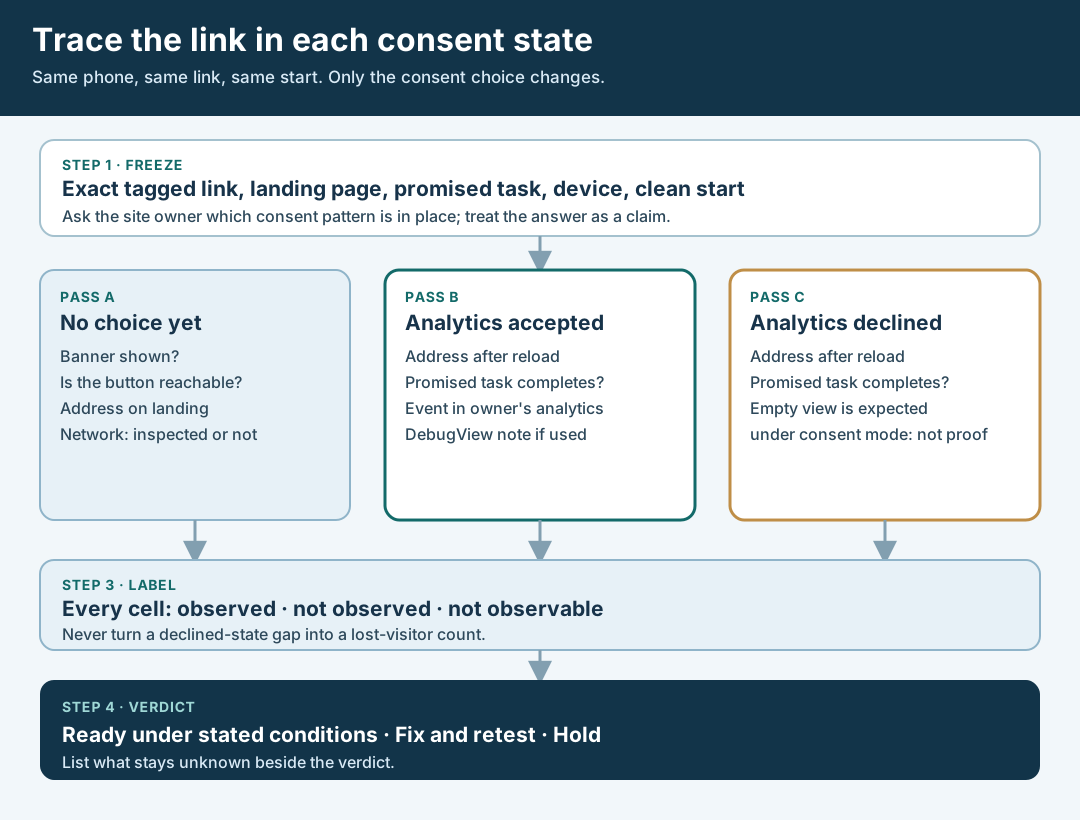
An original editorial trace map. Each state is observed separately and each cell is observed, not observed or not observable.
Original visual by Superdirector editorial team. Creation date not recorded.
Record the verdict and what stays unknown
Write one verdict for the link as a whole, plus a line per state. Use three verdicts and nothing more elaborate. Ready under stated conditions: in all three states the page was reachable, the promised task was possible, the campaign values behaved as the owner described, and the unknowns are written down. Fix and retest: a specific defect has an owner, such as a banner covering the button, a reload that drops the values, or a task that works only after acceptance; keep the failed trace beside the later one. Hold: the task cannot be completed in some state and no repair is scheduled, or the owner cannot say what the declined state collects.
When the campaign runs, the client report should repeat the limits instead of papering over them. A safe sentence says that visits from visitors who declined analytics may be missing or modeled in the site's reporting, so site sessions are not a count of everyone who tapped the link. An unsafe sentence converts the gap into a percentage, or says the tracking works. You tested three paths on one device on one day; say that. The first-party numbers that matter later come from the owner's analytics, and this test only prepares you to read them honestly.
Fictional worked example: a banner that covers the button
Everything in this example is invented. Harbor Loom is a fictional brand; its .example domain, device, times and observations are teaching data. No real site, creator, banner, analytics property or result was tested for this article.
A fictional creator will say: “Book a free fitting.” The staged link is https://harborloom.example/fitting?utm_source=instagram&utm_medium=creator&utm_campaign=autumn-fitting&utm_content=creator-a. The tester uses an imaginary phone, a fresh private window, and writes down that the banner appeared. The site owner says, in this story, that analytics tags load only after the viewer accepts.
Pass F-HL-01, no choice yet. The banner fills the lower half of the screen and its panel overlaps the page's “Book” button; the viewer can scroll the button above the banner but only by a small margin. The address still shows all four values. The tester does not press a choice and marks the task as reachable with difficulty. Network was not inspected, so “analytics request” is not observable.
Pass F-HL-02, accepted. The page reloads once after the choice; the final address has lost utm_content but kept the other three. The booking task completes. The owner's DebugView, used with a debug-enabled test visit, shows the booking event. The tester records the dropped value as a defect for the site owner, because the report was meant to separate creators by that value.
Pass F-HL-03, declined. The booking task completes in the same way. No event appears in DebugView, which the tester marks not observed in DebugView, expected under the owner's stated setup, not a measurement. The owner's claim about the basic pattern stays a claim; the register says so.
The imaginary verdict is fix and retest: the banner placement and the dropped value each have an owner. The imaginary client sentence for later reads: “Site sessions in the report exclude visitors who declined analytics; creator-level splits depend on the content value surviving the page reload, which was repaired and rechecked.” The example proves no result. It only shows how three short traces turn into one decision. The first-cut review and the destination rehearsal apply the same evidence-first habit to other checks.
What this page does not decide
This is an editorial method for testing a link, not a legal opinion. It does not say whether a banner is required, which choices it must offer, or what any regulator expects. It does not certify a consent setup, and it does not show that analytics is working for all visitors. Whether the mobile task itself completes end to end, including forms and confirmations, is the subject of the destination rehearsal guide. Whether a published post's link still goes where it should is the subject of the live link redirect guide.
Nothing here measures how often links lose values, how many visitors decline analytics, or how much data a modeled report recovers. Those figures are not available to us and are not claimed.
Editorial source note: Google's campaign URL page supports the required parameters, case sensitivity and the dimensions where UTM data appears. Google's consent mode help page supports the descriptions of basic and advanced patterns and of denied analytics storage. Google's DebugView page supports how debug mode is enabled and when events are not shown. The three-state method, the verdict words and the Harbor Loom case are original teaching material. Pages were read on October 30, 2026; platform behavior can change, so reread them before relying on a detail.