How-To Guide
Which product limitation belongs in the creator’s demonstration, not only in the fine print?
Mark each claim moment in a creator demo, write the limit behind it, then place it in the shot, beside the claim or on a labeled page, and check the cut.
Which product limitation belongs in a creator’s demonstration instead of only in the fine print?
A limit belongs at the moment of the claim when a viewer could take something from that shot that the limit contradicts or materially changes. Mark every claim moment, write the limit behind it with a dated source, and place it by four questions in order: does it contradict the claim (rewrite or reshoot), does it change what the shot shows (put it in the shot), does it change the viewer’s choice (say and show it beside the claim), or is it detail (a specifically labeled page). The FTC’s digital advertising guidance says to build limits into the claim when practical, to keep disclosures close to the claim, and that a disclosure cannot cure a false claim.
- One shot, one claim moment, one limit, one placement.
- A limit that contradicts the claim means changing the claim, not adding a note.
- Whatever stays in fine print needs a recorded reason, and the video must stay true without it.
Direct answer
Short answer: a limitation belongs in the demonstration, at the moment of the claim, when a viewer could take something from that shot that the limitation contradicts or materially changes. Everything else can live on a page that is named for what it holds. To sort them, build a limitations storyboard: one row per claim moment, the limit behind it with a dated source, and one of four placements chosen by four questions asked in a fixed order.
This is for an agency or brand marketer who is briefing a creator to demonstrate a product and who already knows, or can find out, where the product stops. The decision is narrow: for each known limit, where does it appear in the video, or why does it not? It does not decide whether a limit is legally required in an ad, whether a disclosure is sufficient, or whether a claim is true. Those belong to the claim owner and, where the law is involved, to counsel.
The reason to do this per shot is that a viewer meets the demonstration one moment at a time. A brief that says “mention the limitations” invites a closing sentence that arrives long after the shot that implied the opposite. FTC guidance on digital advertising says that when practical, advertisers should incorporate relevant limitations and qualifying information into the underlying claim rather than rely on a separate disclosure, and that the closer a disclosure is to the claim it relates to, the better. .com Disclosures: How to Make Effective Disclosures in Digital Advertising (FTC, March 2013). That document is written for advertisers and for online advertising generally, and it is thirteen years old, so treat it as a source for the reasoning rather than a ruling on your post. Use the blank limitations card, the CSV register and the placement map to keep it in one place.
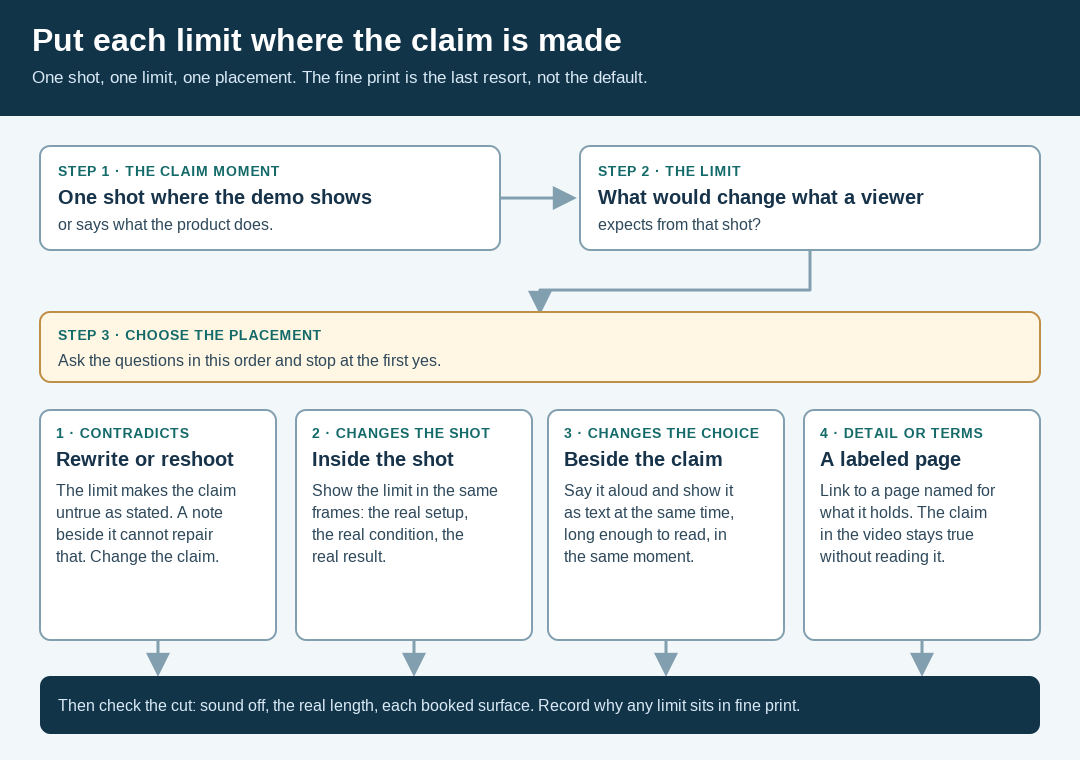
An original editorial map. Ask the four questions in order and stop at the first yes.
Open the blank limitations storyboard card (HTML)Download the blank limitations register (CSV)
 Superdirector
Make it work for your brand
Find it. Remake it. Post it. Superdirector turns the viral formats in your niche into your brand's carousels, X posts and video scripts, and keeps the calendar full.
Mark each moment where the demo makes a claim
Start from the planned shots, not from the product’s feature list. Number each shot of the demonstration and write, in one line, what a viewer will see or hear the product do in it. A claim moment is any shot where the video shows a capability working, a result appearing, a step being easy, or a creator saying so. A screen recording of a button being pressed is a claim moment. So is a spoken “it just syncs.” So is a fast cut that skips the setup and lands on the finished result, because the cut itself implies that nothing happened in between.
Write the claim as the viewer would restate it, not as your team intends it. “Shows the export button” is what the camera sees. “You can export everything in one click” is what a viewer might take away. The second line is the claim moment, and it is the one a limitation has to answer. If you have already listed what the camera can honestly show and what a viewer might infer, reuse those lines from the product demo brief instead of starting again.
Mark creator-voiced lines too. The FTC’s influencer guide says endorsers cannot talk about their experience with a product they have not tried. FTC Disclosures 101 for Social Media Influencers. That page is chiefly about disclosing material connections, so it does not set a rule for product limitations. It is a reminder that the creator’s own words about what the product does should come from the creator’s own use, which is why the storyboard separates what is shown from what is said.
Write the limit that would change what a viewer expects
For each claim moment, write one limit: the condition, plan, platform, volume, region or case where what the shot shows stops being true. Ask the product owner, and attach a source and a date. A limit with no source goes in the row as unknown, and the claim behind it stays out of the brief until it is answered. The claims sheet guide shows how to collect that source, and the versioned facts guide covers conflicting statements from sales and product.
Pick the limit that changes what a viewer would expect, not the longest one. A good limit is something a reasonable viewer would act on differently if they knew it: a feature that exists only on one plan, a task that works on one device but not another, a result that needs a setup step the video skipped, a part of the workflow the product does not do. Pile every caveat in and the one that matters is buried among the ones that do not.
Check the limit against the build the creator will film. A limit that was true for an earlier release may have gone, and a new one may have arrived. Footage of an old screen carries an old limit, as the outdated UI guide explains. Write the product version and the date next to the limit so the row can be reread later.
Keep to what the product owner can state. Do not rank the limit by how often it comes up or how many viewers it affects unless you hold a source for that number. For this page, whether a limit is important is a judgment about the shot, and it needs no statistic.
Choose where each limit appears in the video
Ask four questions in this order and stop at the first yes. The four placements are our own editorial sorting method, not categories defined by the FTC or any platform. They are built on the FTC guidance quoted above. The placement map shows the order.
| Question, in order | If yes, place the limit here | What that means in the cut |
|---|---|---|
| 1. Does the limit make the claim untrue as stated? | Rewrite the claim or reshoot | Change the spoken line or the shot. A note beside a false claim does not fix it. |
| 2. Does the limit change what the shot itself shows? | Inside the shot | Film the real setup, the real condition and the real result in the same frames. |
| 3. Does it change the viewer’s choice without changing the shot? | Beside the claim | Say it aloud and show it as text in the same moment, long enough to read. |
| 4. Is it detail or terms that a viewer may want later? | A specifically labeled page | Link to a page named for what it holds. The video stays true without it. |
The first row matters most because it is the one people skip. The FTC guidance says a disclosure can only qualify or limit a claim to avoid a misleading impression, that it cannot cure a false claim, and that when a disclosure contradicts a material claim the claim itself must be modified. If your limit contradicts the line the creator will say, the fix is a different line, or a different shot, before filming. If the video is already live, the repair route is in the live post claim guide.
For the second row, showing the limit usually costs one extra beat: the creator opens the plan screen before the feature, or films the step the first draft skipped. For the third, match the form to the claim. The same guidance says audio claims should be matched by audio disclosures and written claims by written ones, so a spoken claim with a limit that exists only as small text is mismatched. For the fourth, the guidance says disclosures that are integral to a claim should not be communicated through a hyperlink, and that labels such as “fine print” or “details” are likely inadequate. Name the page for what it contains, for example “which plans include export,” and keep the claim in the video accurate without it.
If you have two limits on one claim, place each by the same four questions. They may land in different places. Do not combine them into one catch-all sentence, because the longer the sentence, the less of it a viewer takes in during one shot.
Check that each limit survives the cut
Placing a limit in the plan does not place it in the video. Edits cut the moment where a limit was spoken, captions get shortened, and crops hide on-screen text. Watch the finished cut with the sound off, then with sound, at its real length, and on each surface you booked. For every row, answer one question: can a viewer still read or hear this limit while the claim is on screen?
Use the FTC’s multimedia points as the checklist. It says that for audio claims the disclosure should be in a volume and cadence a reasonable consumer can hear and understand, that written claims should be paired with written disclosures instead of placing them only in an audio or video clip, and that visual disclosures in video should appear for a duration sufficient to notice, read and understand them, adding that fleeting disclosures are not likely to be effective. FTC .com Disclosures. The influencer guide adds that a disclosure should be in the video itself and not only in the description. FTC Disclosures 101. Both pages concern disclosure generally, so use them as a test for whether your limit is visible, not as a statement of what your post must contain.
Look specifically for these failures: the limit text sits where an interface overlay or a crop would hide it, the limit is only in the spoken track and the video is watched muted, the on-screen text appears for less time than it takes to read it aloud, and the claim was moved in the edit but the limit stayed behind. The crop review guide covers placement-specific crops. If the limit is lost, return to step three and place it again.
Log the result on the card: surface checked, sound off or on, how long the limit is visible or audible, and yes or no. If the checking is done by someone other than the person who placed the limit, they will catch more than the author would, because the author remembers what was meant.
Record what stays in the fine print and why
Some limits will rightly stay on a page. For each one, write one sentence of reason on the card: why this limit does not change what any shot implies, and why a viewer who never opens the page is not misled by the video. If you cannot write that sentence, the limit does not belong on the page alone, so go back to the questions in step three.
Then record who decided and when, and keep the unknowns visible. A row with an unknown limit is not a finished row. Keep the card together with the brief, the final cut and the live post record, so a later reviewer can see what was known when the placement was chosen. If a limit changes after the creator has filmed, treat it as a product change and use the brief amendment guide before the video goes out.
Include the creator in the card’s purpose, but not as the last stop. Send the shot-by-shot placements with the brief so the creator can film them in. The FTC’s endorsement rule says advertisers are subject to liability for misleading or unsubstantiated statements made through endorsements, and it calls good faith guidance, monitoring and remedial action “not a safe harbor.” 16 CFR 255.1. This page does not decide any liability. It records that your team knew a limit, chose a place for it and checked that it survived.
Walk through a fictional storyboard
Fictional exercise: no real brand, product, creator or result was inspected. Brand A sells a made-up invoicing app. It briefs Creator Q on a 40-second demonstration with three claim moments. The limits below are invented for teaching only.
Shot 2 shows the creator tapping Export, with the line “you can export all your invoices in one click.” The limit, per the invented product note dated that week, is that export handles one invoice at a time. That contradicts the claim, so question one is yes: rewrite. The line becomes “you can export an invoice to PDF in one tap,” and the shot is reshot to show a single invoice. No caption note could have kept the original line true.
Shot 4 shows the phone version of the app marking an invoice as paid. The limit is that the phone version in this build is view-only. That also changes what the shot shows, so it goes inside the shot: the creator films the same step on the desktop version, and a phone shot of the invoice list is labeled as viewing only. Shot 5 shows a reminder email going out, with a limit that the reminder schedule is a plan feature. The shot is accurate, but the limit would change a viewer’s choice, so it is beside the claim: the creator says “reminders come with the paid plan” while the same words show as text for a duration the reviewer timed with the sound off.
One further limit, that the app’s import accepts only certain file types, changes nothing any shot implies, so it goes on a page labeled “which files import accepts,” with a reason sentence on the card. A reviewer then watches the cut muted on the booked feed placement and finds the shot-5 text is hidden by the interface overlay, so the text is moved. Nothing here predicts how any real post would perform.
What this page does not decide
This method decides where a known limit goes in a demonstration. It does not decide whether a limit is legally required, whether a placement satisfies the law or whether a claim is true. The FTC’s endorsement rule also speaks to endorsements that convey what consumers generally achieve. Its paragraph (b) says an advertisement with a consumer’s experience on a central or key attribute will likely be read as representing what consumers will generally achieve, and it addresses clearly and conspicuously disclosing the generally expected performance in the depicted circumstances. 16 CFR 255.2. That is a matter for the claim owner and counsel, so this page only flags that a creator’s unusual result is a claim moment worth a row.
Several pages sit near this one, and each answers a different question. The product demo brief starts from what the camera can show and what a viewer might infer, then writes allowed, banned and unknown wording. This page starts from limits you already hold and decides where each appears. The claims sheet ties each allowed claim to proof. The claim verification guide checks one creator claim against evidence. The software proof screens guide plans the screens that show a task working. The live post claim guide handles a claim already published, and the disclosure check covers sponsorship disclosure, a separate subject from product limits.
Nothing here measures whether showing a limit lowers or raises results, how many viewers read on-screen text, or how long text should stay up. Those numbers are not available to us and are not claimed. The sources are advertising guidance and a federal rule, read as of October 30, 2026, and we did not read platform-specific help pages for caption length or text overlays. The page is an editorial method for putting each limit where the claim is made and keeping a record of why.