How-To Guide
How to catch outdated product UI in creator footage before publication
Compare visible product screens in a creator's final cut with the intended release build. Log timecodes, classify material mismatches and request exact fixes.
By the Superdirector editorial team. Official sources reviewed October 28, 2026.
At a glance
How should an agency catch outdated product UI in creator footage before publication?
Compare each distinct product screen in the creator’s final export with the audience-facing release and account conditions planned for publication. Record timecodes and the claim each frame conveys; repair any change in access, action or outcome, then recheck the revised file.
- A genuine beta recording does not prove that a production audience has the same feature.
- Judge the action and implied promise, not the number of changed pixels.
- Keep the final export identity and dated product reference beside each decision.
Direct answer
Short answer: compare the *exact final cut* with a product reference pinned to the build, audience, account conditions and intended posting date. At every distinct screen state, record the timecode, visible action and what the narration or caption asks a viewer to believe, then replay that action in the release the viewer will actually get. An older color or moved icon may be harmless; a screen that promises a removed, gated or differently behaving feature needs a precise fix. Keep the comparison with the final export so a revised file does not inherit an earlier pass.
This is a review of finished software-product footage, not a shot list for filming it. A creator can honestly record what they saw and still send a cut that has become inaccurate by release day. For U.S. paid endorsements, the FTC's guidance to advertisers and agencies says the endorsement must be truthful, and recommends reviewing paid posts before posting. If the footage is to become a TikTok ad, TikTok's ad-consistency policy separately requires the ad's video, text and call to action to fit the promoted product and destination. Those sources back a truth check; we present the six-step version comparison below as our own operator method, not a platform certification.
Use the blank version-comparison card and CSV register for one finished asset. The fictional comparison diagram shows how a small-looking screen change can alter the claim. Keep real captures, access details and customer data in your own approved workspace; the public templates contain none.
Define the release target before judging the cut
Ask the product owner for a dated release reference: product and build or release identifier, environment, feature or workflow being shown, intended publication window, and the account conditions under which a viewer can use it. Record the relevant plan, user role, market and device, plus any feature that only some accounts have. A screenshot from a staging workspace does not show what a production viewer can do. “The current UI” does not work as a reference if the campaign will post after a planned rollout.
Separate two questions. Was the creator's captured interaction genuine for the build they used? And will the depicted action and claim be true for the audience at publication? The answers can differ. For the second, save a dated reference capture or reproducible path from the owner, with its access conditions. If the release target is still undecided, name the comparison as unknown and request the missing reference; do not silently assume staging equals production.
A version label alone falls short. The same build may show different controls to an admin and a viewer, or under different plans or markets. The product owner should say which conditions apply to the advertised audience. This is a practical evidence requirement; it makes no claim that every software product uses the same rollout system. The served claim-to-evidence guide handles support for spoken or written product claims; this review binds the visible interface to the release itself.
Index visible UI and implied claims by timecode
Open the final exported file as well as the editable project. Note its file identity, revision and duration. Watch it at normal speed once; then pause at every *distinct product state* that communicates an action or result. A useful row has: timecode, screen or overlay, visible label or output, accompanying spoken/subtitle claim, and the viewer action it suggests. Include the thumbnail, end card and caption if they repeat a feature promise. The index covers meaningful states and transitions; it does not call for one spreadsheet row per video frame.
Start with the frames that answer the buyer's question. A cursor entering a menu may be merely connective footage. A button called “Auto-send,” a completed export, an integration badge, an available plan label or a saved result can be the proof of the entire video. Mark those first. If a quick cut makes a state unreadable, inspect the original capture for help, but judge by what the *published cut* actually communicates.
Do not confuse product UI with platform UI. The served crop-review guide checks whether a placement cuts off or covers the approved frame. This review asks whether the product screen inside that frame is current and truthful even when fully visible. Run both reviews when the same asset needs both.
Reproduce the promised action in the matching product context
For each marked state, use the product owner's release reference to replay the task with the same relevant role, plan, region and device. Start at the screen the video implies; follow the visible action; record the actual next screen or output. Check action, access and result before cosmetic details. If a label moved but the same audience can still complete the same task, the cut may need a small visual or narration fix. If the task no longer exists, requires a different entitlement, or produces a different result, the old screen cannot support the old promise.
Keep a short evidence pair: the footage timecode and the dated current-product capture or owner-confirmed path. Name who checked it and when. Avoid copying customer names, messages or live account secrets into a public review sheet. If the product owner cannot provide a matching account context, write unknown and do not write a pass. If the creator used a beta, demo or sandbox, label that provenance and ask whether the audience-facing release supports the same action. A polished overlay cannot turn an unavailable feature into a real one.
For a paid TikTok placement, the destination matters too. TikTok's ad-consistency rule says the video and call to action must be consistent with the promoted product or service on the landing page. Open the intended destination in the target market and compare the named action there; a correct product recording paired with an outdated destination is still an unresolved audience path. This TikTok rule covers ads; it does not automatically cover every organic creator post.
Classify the mismatch by what the viewer would believe
Go by what the viewer will likely understand; a pixel-difference score does not decide it. The classification below is an editorial decision aid, with no standing as a legal safe harbor or a platform approval rule.
| Difference in the final cut | What to verify | Practical decision |
|---|---|---|
| Color, icon shape or spacing changed; the same action, entitlement and result remain | Can the intended audience still follow the demonstrated task without a misleading instruction? | Pass if the screen does not imply an outdated capability; note the accepted cosmetic difference. |
| Label or route changed; the feature and outcome still exist for the same audience | Can a targeted insert, revised caption or short rerecording show the real path without changing the creator's honest experience? | Repair the exact timecode and review the revised export. |
| The cut shows a feature, plan access, price, result or integration the release does not offer under the stated conditions | Is there current evidence for a narrower truthful claim, or does the central promise have to go? | Remove or replace the scene and affected words; do not keep a capability claim on the strength of an old capture. |
| Build, account conditions or final cut cannot be verified | Which source or file is missing, and who owns it? | Unknown until the comparison can be made. |
This matters even when no sentence states the feature explicitly. The FTC's endorsement guidance notes that a picture or video of product use can itself convey a message. TikTok's misleading-content policy for ads likewise addresses false or misleading visual elements. Neither source says that every older-looking interface is deceptive; the material question is what this footage, in its actual context, leads a reasonable viewer to expect.
Fictional case: a screen that promises a missing action
Fictional teaching example — not a Superdirector product test or a real creator campaign. A made-up app called ExampleDesk has a creator cut recorded on an imaginary beta build b42. At 00:08, the screen shows an “Auto-send report” control while the voiceover says, “Your report goes out automatically.” The intended fictional production release r43 has only “Download report” for the audience's plan. The older control is not a harmless icon change: the visible action and spoken line together promise an automated delivery that the specified release does not provide.
The reviewer records 00:08, b42, r43, the plan condition, the owner-provided current reference and the decision replace. A truthful repair could show the creator downloading a report in r43 and change the line to the action they actually performed. A static label pasted over b42 would not fix it if the cursor and outcome still depict automatic sending. The creator should perform or verify the replacement action, and should not be handed words that imply an experience they did not have. The diagram visualizes this invented comparison; it contains no captured product screen or measured result.
When enlarged, scroll horizontally to read the diagram.
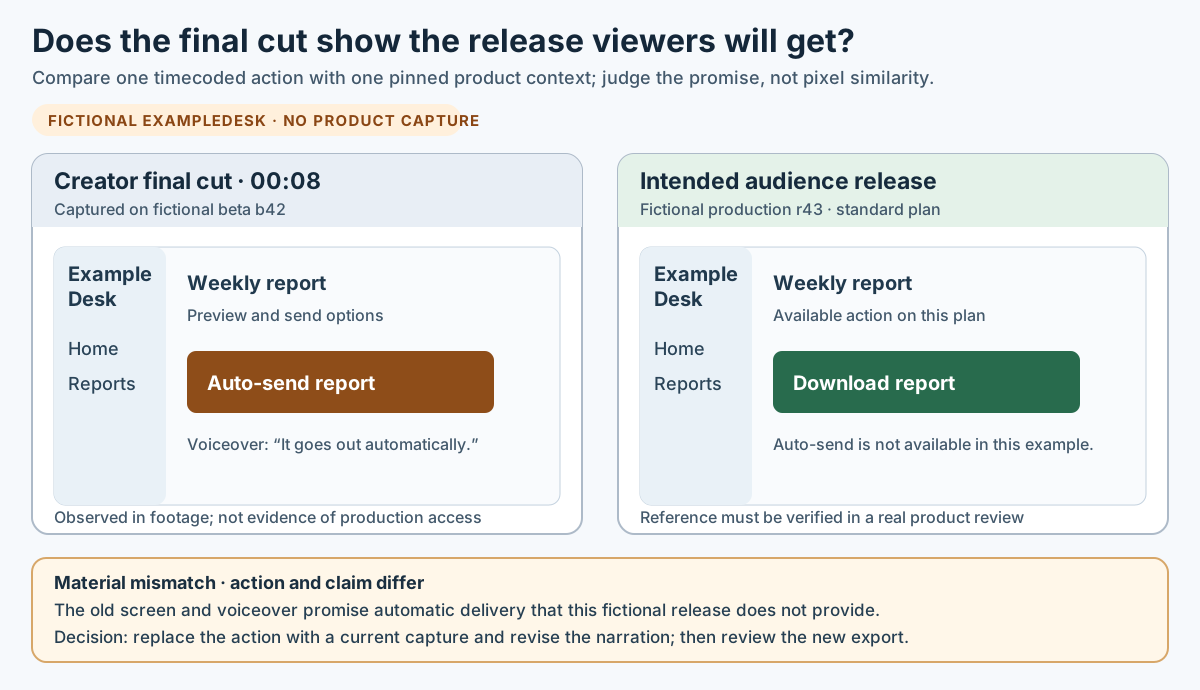
Original fictional version-comparison diagram. A changed capability needs a new truthful scene and wording, not a cosmetic overlay.
Original visual by Superdirector editorial team. Created 2026-10-28.
Ask for the smallest truthful correction
Send a revision note that a creator can act on: timecode → old evidence → current evidence → viewer risk → requested edit. Say, for example, “At 00:08, the final cut shows ‘Auto-send report’ and the narration says it sends automatically. The intended release for this plan offers ‘Download report.’ Please replace that action with a current capture of the download and adjust the sentence to describe what you did.” Avoid a vague “UI is old” comment that forces a full reshoot without showing the actual defect.
Keep the correction narrow when the workflow remains true. A short pickup or a changed screen caption can often fix a moved menu, while a removed feature or changed entitlement may require a new scene and a different promise. Do not rewrite the creator's opinion or imply they personally used a release they never touched. The FTC's endorsement FAQ says an endorsement must reflect the endorser's honest experience. Ask the creator to verify the new demonstration, or to drop the experience claim if they cannot.
If a team uses TikTok One's creator project flow, its current project instructions describe feedback on a submitted video before it becomes “Video ready to publish.” In that workflow this is a concrete place to send the timecoded correction; we do not claim that every creator arrangement uses TikTok One. For a pulled Spark Ad, TikTok explains that the ad uses an authorized organic post and its text is drawn from that post; review the correct post and final wording before authorizing paid reuse.
Recheck the exact export at the publication boundary
When a revision arrives, identify the new exported file and rewatch the repaired scene in context. Check narration, subtitles, on-screen text, thumbnail, caption and destination against the release reference; a corrected screenshot can still sit beside an obsolete voiceover. Record which final asset you reviewed, the date of the comparison, the product build, the owner and the result. The version-comparison card keeps those fields together; its CSV register is a blank companion for an owned review record.
Check whether the product release or the scheduled post changed between review and posting. If the build, feature access or destination changed, revisit the affected timecodes instead of relying on yesterday's approval. Once the post is live, inspect the published version and keep a dated correction path for any material mismatch you find. This is especially useful when a creator post later becomes a paid creative: TikTok's Spark Ads description ties the ad to the selected organic post, so the authorized post is part of the asset identity. A passed internal review does not itself prove what the platform finally displayed.
Source and scope note
We checked official FTC and TikTok for Business guidance on 2026-10-28. The FTC guidance is about U.S. endorsements and advertiser or agency responsibility; TikTok ad rules apply where the creator footage is used as an ad, and TikTok One/Spark instructions apply only to those named paths. The six-step comparison, classification table and ExampleDesk case are original editorial methods and fictional teaching material. We observed no product account, creator final cut, release ledger, private customer screen, actual mismatch or campaign outcome for this article. Always use the product owner's current release evidence and the intended platform's current rules for a real publication decision.