How-To Guide
How to write a creator claims sheet: what to avoid, and the proof behind what is allowed
Turn a vague brief line into a claims sheet: list each allowed, ask-first and disallowed claim, with proof, source date, conditions and a replacement phrase.
By the Superdirector editorial team. FTC pages and rule text reviewed October 30, 2026.
At a glance
How can a brief name the claims a creator must avoid and tie each allowed claim to proof?
Use one claims sheet with three lists. Each allowed claim gets exact wording, a proof ID, a source date, the product version and the conditions the proof covers. Each disallowed claim gets the exact wording to avoid, a one-line reason and replacement wording the creator may use. Claims nobody has decided yet go on an ask-first list with an owner and a date. Put the dated sheet in the brief, and reopen a line when a product fact or a proof changes.
- No proof ID beside a claim means it is not on the allowed list.
- Every ban needs a replacement phrase the creator can actually say.
- An ask-first list stops creators improvising on questions nobody has decided.
Direct answer
Short answer: replace the brief’s general warning with a claims sheet that has three lists. The allowed list holds each claim as the exact wording a creator may use, with a proof ID, the date of the source, the product version and the conditions the proof covers. The disallowed list holds the exact wording to avoid, a one-line reason, and a replacement phrase the creator can say instead. The ask-first list holds anything nobody has decided yet, with a named owner and a due date. A claim with no proof ID beside it is not on the allowed list.
This is for an agency or brand marketer writing a brief for creators who will talk about a product they did not build. The decision is narrow: which claims go on which list, and what must sit beside each one. It does not decide whether a claim is lawful, whether the proof is good enough, or whether a finished video complies. Those checks have their own pages, and the boundary section below says how this page differs from them.
Why bother? A creator writes in their own voice, and many sentences in a good script are claims without sounding like claims. A line such as “avoid exaggerated claims” does not tell a creator whether “saves hours every week” is on or off the table. Use the blank claims sheet card, the CSV register and the claims map to keep every claim, its list and its proof in one place.
Inventory the claims a viewer could take away
Start from the product, not from the creator’s script, which does not exist yet. List every statement a viewer could reasonably take away: what the product does, what result it produces, how it compares with another approach, what it costs, where and when it is available, who it is for, and anything about other people’s experience with it. Include claims made by pictures and on-screen text as well as by speech. A screen recording of a finished result can say “this is easy” without a word being spoken.
Write each one as a plain sentence a viewer might hear, and mark it express if the creator would say it outright or implied if the viewer would infer it. The FTC’s endorsement rule says endorsements may not convey any express or implied representation that would be deceptive if made directly by the advertiser. 16 CFR 255.1(a). Looking for the implied version is the useful habit: the sentence “I used it on Monday and finished by lunch” is a personal account, but a viewer may hear a promise about their own week.
Take the facts from one place. If sales decks, the website and the product team disagree, settle that first with the versioned product facts guide; this sheet should quote the settled version rather than re-argue it. Where a claim concerns a screen or a workflow, the proof screens guide shows how to plan what the viewer actually sees.
Record to produce: a numbered list of claim IDs, each with the sentence, express or implied, and the product and version it concerns. Do not sort anything yet.
Write each allowed claim beside its proof
A claim moves to the allowed list only when you can fill every cell beside it. Write the exact wording the creator may use, not a topic. Add the proof ID, which points at a record in your own evidence register. Add the owner of that proof and the date of the source. Add the product version and audience the claim covers, and the conditions the proof does not reach: the setup it was observed on, the time window, the kind of user. The FTC’s Endorsement Guides say an advertiser must possess and rely upon adequate substantiation for claims conveyed by endorsements, and they say consumer endorsements themselves are not competent and reliable scientific evidence. 16 CFR 255.2(a). So a happy customer’s quote is a claim to be supported, not the support itself.
The FTC’s question-and-answer page puts the same idea plainly: the advertiser is responsible for substantiating objective product claims, and endorsers should not make claims about a product that would require proof the advertiser does not have. FTC Endorsement Guides: What People Are Asking. That page is guidance and not a table of which proof suits which claim, so this method does not claim to tell you what counts as enough. It only makes the link visible: every allowed sentence points to a record someone can open.
Narrow the wording until the proof fits it. If the proof shows that a feature exists in a given version, the allowed line is “the app has X in version Y”, not “X makes your workflow faster”. If you only have a creator’s own experience, say so in the conditions cell: “one person’s account, not evidence that others will get the same.” The sheet then helps you spot when a creator’s sentence quietly widens the claim beyond its proof. The Endorsement Guides discuss that widening, where an endorsement about a key attribute of a product will likely be read as saying the endorser’s experience is representative of what consumers will generally achieve, in 16 CFR 255.2(b).
Record to produce: for each allowed claim, one row with the wording, proof ID, proof owner, source date, product version, audience and conditions. If any cell is empty, the claim stays out of this list.
Write each disallowed claim with a swap
A claim goes on the disallowed list for one of three reasons, and the sheet should say which: you have no proof, the proof you have contradicts it, or the claim is outside what the brand wants said whatever the proof. Write the exact wording to avoid, then add the words that mean the same thing: if “cuts your editing time in half” is out, so is “twice as fast” and a before-and-after timer graphic. Creators work from meaning, and a list of banned phrases invites a near synonym.
Then give the creator something to say. Beside every banned line, write a replacement phrase drawn from the allowed list. A creator told only what not to say will either leave out the point, which weakens the video, or improvise a new sentence on the same theme. The swap keeps the point and moves it onto ground the sheet has already supported. The FTC’s influencer guide also reminds creators of limits of their own, such as that they cannot talk about their experience with a product they have not tried. FTC Disclosures 101 for Social Media Influencers. Put the brand-side limits on the sheet, and keep the creator’s personal-experience limits in your conversation with them.
State the reason in a single line a creator can read without a lawyer, and avoid language that could read as a ruling. “We have no study behind a time saving; say what you did in the demo instead” is enough. Do not write “this is illegal” unless counsel has told you so in writing; this page does not tell you that any given claim is or is not.
Record to produce: for each disallowed claim, one row with the wording to avoid, nearby wordings, the reason category, a one-line explanation and a replacement phrase.
When enlarged, scroll horizontally to read the diagram.
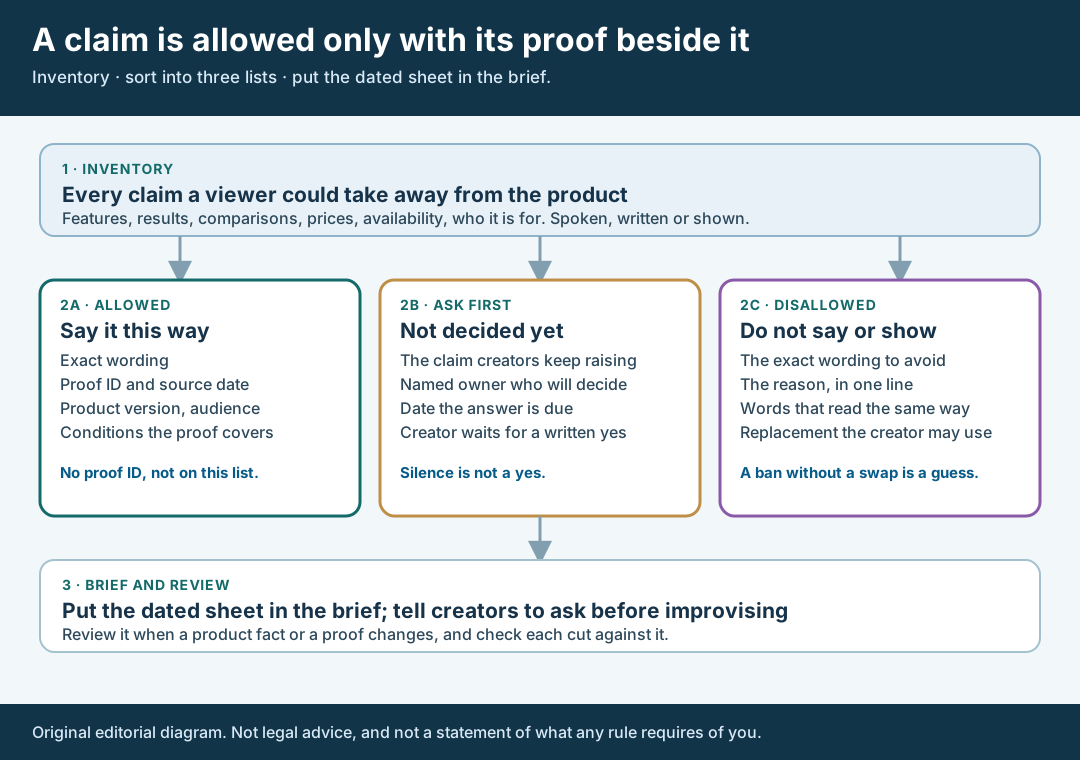
An original editorial map. A claim is allowed only when its proof sits beside it.
Original visual by Superdirector editorial team. Creation date not recorded.
Keep an ask-first list for what is undecided
Most real sheets need a third list. Some claims are neither supported nor refused, because nobody has decided: a comparison a creator is keen to make, a number from a sales call, a use case the product team has not confirmed. Put them on the ask-first list with a named person who decides and a date by which they will answer. The rule for the creator is one line: wait for a written yes. Silence is not a yes, and neither is a thumbs-up on a call that nobody recorded.
An ask-first list is where the sheet earns its keep, because creators will raise claims you did not anticipate. Give them a single route to ask, such as one email address or one thread, and log each question with the answer. If the answer is yes, the claim moves to the allowed list with its proof. If the answer is no, it moves to the disallowed list with a swap. If the answer is “we do not know yet”, it stays where it is, and the creator keeps waiting or uses the swap.
This differs from the claim verification guide, which starts when a creator has already put a specific line in a script. The ask-first list handles the stage before that, when a claim is only a possibility.
Walk through a fictional claims sheet
Fictional exercise: no real brand, product, creator, test or result was inspected. A made-up brand, Brand A, sells Notely, a notes app. Its inventory lists four claims. C1: “Notely has a search box on the home screen.” C2: “Notely finds your notes faster than other apps.” C3: “Notely works offline.” C4: “Every user I know loves it.”
Brand A’s product owner can point to a dated release note for version 4.2 that lists the search box, so C1 goes on the allowed list with proof ID P1, the note’s date, the version, and the condition that it covers the mobile app only. C2 has no comparison test behind it, so it goes on the disallowed list with the reason “no test behind a comparison,” near-matches “beats the competition” and “fastest search,” and the swap “In version 4.2 there is a search box on the home screen.” C3 is undecided because the offline mode was changed in a recent build and nobody has confirmed the current behavior, so it goes on ask-first with the engineer as owner and a due date. C4 is a creator’s social claim about other people. Brand A puts it on the disallowed list because it cannot back it up, with the swap “I like it because the search box is where I expect it.”
A week later the engineer confirms offline behavior for version 4.2 on two operating systems and links a test record. C3 moves to the allowed list as P2 with the condition “two named systems, version 4.2, read-only notes.” The scenario predicts nothing about any real product, creator or video.
Date the sheet, send it and review it on change
Put the date, the product version and the name of the person who owns the sheet at the top. Paste it into the brief, or attach it, and say in the brief that the three lists are part of the instructions, not an appendix. The FTC’s rule lists steps advertisers can take: providing guidance to endorsers, monitoring their compliance, and taking action to remedy non-compliance and prevent it in future. It adds that good faith is not a safe harbor. 16 CFR 255.1(d). The sheet is the written form of the first of those steps; it does not do the other two.
Use the same sheet at review. When a cut arrives, compare each spoken, written and shown claim with the three lists, using the first-cut review guide for the review itself. The FTC’s question-and-answer page says there is no one-size-fits-all standard for how often to monitor, and advises advertisers to periodically check what network members are posting and to make a reasonable effort to know what they are saying. FTC Endorsement Guides: What People Are Asking. Choose a rhythm you can keep and write it on the sheet.
Reopen a row when the product version changes, when a proof is replaced or goes out of date, when the audience or market changes, or when a creator’s question exposes a claim you had not listed. Send creators a dated change note naming the rows that moved, and the brief update guide shows how to amend a brief without rewriting it. Keep old versions of the sheet so you can show later which one a creator had on the day they posted.
What this page does not decide
This method writes down which claims a creator may use and what backs each one. It does not tell you whether your proof is adequate, whether a claim is deceptive, or whether a creator’s finished video complies. The sources above are the FTC’s rule text and two FTC guidance pages, read on October 30, 2026; they are not a substitute for counsel, and other rules can apply to some products and markets. For sector-specific or regulated claims, such as health or financial ones, take advice before you place a claim on the allowed list.
How this differs from nearby pages. The claim verification guide checks one proposed line in a creator’s script against dated evidence; this page writes the lists before any script exists. The live-post correction guide handles a claim that has already gone public. The versioned product facts guide settles conflicting statements about the product itself, and the brief update guide amends a brief after a change. The disclosure check is about sponsorship disclosure, not product claims. This page’s own artifact is the three-list sheet with its proof column.
Nothing here measures how often creators exceed their briefs, how many claims a sheet should hold, or whether a sheet changes campaign results. Those figures are not available to us and are not claimed. The page is an editorial method for keeping an exact claim, its proof and its decision on one row so that nobody has to guess which was meant.