How-To Guide
Which software screens should a creator capture to prove one workflow?
Plan the exact screen states that show a real software task from setup through saved result. Give creators a proof-shot list without scripting their voice.
By the Superdirector editorial team. Official FTC and platform guidance reviewed October 29, 2026.
At a glance
What exact software screens must a creator capture to prove a workflow in a short video?
Capture the task's real entry screen, the decisive input or selection, the visible action, and the resulting state. Add a saved-object reopen or destination view if the claim is about persistence or handoff. Pin the audience-facing product version, role, plan, market and device in the private shot card; use safe sample data. A simple read-only task may need fewer states, but the viewer must be able to connect cause to result without trusting a montage.
- Capture the real entry, decisive input, action and resulting state for one supported task.
- Add a reopen or destination shot only when the claim promises persistence or handoff.
- Pin audience conditions privately and use safe sample data; preserve raw capture for later review.
Direct answer
Short answer: name one audience-relevant software task, rehearse it in the product version the audience can use, then ask the creator to capture the minimum screen states that establish starting context, relevant input, the action, the resulting state, and a way to confirm that result. The exact screens depend on the task. A read-only search may need a query and result; a save-and-share claim needs the saved object and its destination or a successful reopen. Pin account role, plan, market, device and release conditions in the private shot card. Use a demonstration account with safe sample data, preserve the raw sequence, and let the creator decide how to narrate it in their own voice. A polished montage of dashboards or a cursor hovering over a button does not show that the promised task happened.
This is pre-filming proof planning. The served UGC brief guide covers the campaign objective, hook, guardrails, format and rights. This page turns one approved software claim into exact screen states a creator should capture. Later, the outdated-UI review compares the finished cut with the audience-facing release; it cannot reconstruct a missing action or saved result that was never filmed. Use the blank proof-shot card, CSV, and screen-evidence map to hand off the task without sharing credentials or private customer data.
Choose one task whose result a viewer can inspect
Start with a single sentence: “A viewer in [role and plan] can [action] using [input] and reach [result] on [device or surface].” That sentence is a candidate product claim, not a script line. The product owner must be able to point to a current, supported audience-facing path. “Our platform makes work easier” is too broad to plan screen proof. “A team member can turn a selected template into a saved checklist and reopen it” names an action and a result. If the task is “compare two plans,” the proof is different: the creator must show the chosen plan context and the comparison, not a save confirmation that the product never promises.
Write the smallest *task boundary* before listing shots. Where does the viewer begin? What input or choice makes this a real workflow rather than a generic animation? What visible state would count as completion? Which condition could make the same task unavailable to a viewer: account permission, plan, market, feature rollout, device, or data prerequisite? Record those constraints privately. A creator's personal admin account can expose controls ordinary buyers will not see. A seeded demo environment can be useful, but the video should not imply that a synthetic result is a customer's actual outcome or that an internal-only feature is generally available.
For a sponsored endorsement, the creator should actually use the product path that the video suggests they used. The FTC's endorsement guidance says an endorsement must reflect the endorser's honest experience and cannot assert a product claim without support. A brand-provided screen recording can illustrate a product, but it cannot be edited into a creator's first-person experience if they did not perform it. Ask the creator which steps they personally tried, and revise the phrasing if a feature was only supplied as a brand demonstration.
Freeze the audience-facing rehearsal before writing the shot list
Have the product owner or an authorized operator run the proposed task on the version intended for publication. Save the release or build reference, observed date, account role, plan, region, language, browser or device, and any relevant feature setting. The output is a version-pinned rehearsal record, not a demand that the video display an internal build number or private configuration. It gives the creator the correct starting context and gives the later reviewer a source for what the screens should mean.
If the product is changing soon, name the planned publish window and the owner who will confirm the audience-facing path at that time. A rehearsal on a preview build may help plan staging, but label it preview; do not use it as proof that a public buyer can perform the same path. If the task needs a paid tier, say so in the brief and avoid showing the result as a free-tier outcome. If it needs a connected account, a populated workspace or a specific permission, write that prerequisite next to the shot that depends on it. This is especially important for software where an empty new account displays a very different page from the team's populated demo workspace.
The rehearsal should produce one *owned reference* for each material screen state: a dated capture or short raw recording, a concise description of the visible text/control, and the condition under which it appeared. The creator does not need the brand's internal credentials or production customer data. Provide a safe demo account or arrange a permitted, supervised capture. Before filming, remove or replace names, email addresses, payment details, tokens, private messages and identifiable customer content. Blurring after filming may be necessary for an accidental exposure, but a clean demo workspace is easier to verify and less likely to leave a secret in the raw file.
Map the minimum screen states to the claim
Build the shot list from the task's proof chain, not from a fixed number of scenes. The five state labels below are a planning method; several may fit in one continuous capture, and a simple task may need fewer. The important question is whether a viewer can connect the visible cause to the result without being asked to trust a title card.
Starting context: show enough of the real product page to identify where the task begins: a relevant project, object, template or feature entry. The private card records the role, plan and version even if those details should not appear in the public frame. Avoid a beautiful but contextless dashboard if the claim concerns a particular tool. For a link-based workflow, the entry may be the object or destination that will be acted on; for an app, it may be the named screen and selected workspace.
Relevant input or choice: show the field, source object or option that makes the result attributable to this task. The audience need not read every character, but they should see the decisive selection. Use fictional or authorized sample values and record them exactly so the later output can be matched. If a creator says “I selected this template,” the selected template should be visible. If the product creates a summary from a document, the video must not imply that an unrelated prewritten summary came from a document the product never saw.
Action: capture the control being activated and the immediate response. A cursor hovering over “Generate” proves only that the button exists. A cut straight from an empty editor to a finished slide can be an ordinary edit, but if the narration claims the software produced the slide, the raw evidence needs the command and ensuing state. Where an operation takes time, a labeled time jump is clearer than implying instant completion. Keep enough before and after the cut to show which task is continuing.
Result: capture the screen that contains the promised output or changed state. This is the strongest on-screen answer to “Did the workflow happen?” If the output is a draft, call it a draft; if it is a recommendation, do not call it a completed business decision. If a result is only visible to a privileged account, the claim must name that condition. A generic success toast may support a save claim, but it may not show the actual object, destination or content the viewer was promised.
Confirmation: decide what extra state would establish persistence or handoff. A saved object reopened from a project list, an export visible in its permitted destination, or a status page tied to the same object can provide confirmation. This state is not mandatory for every claim: a read-only comparison might be adequately shown in the result screen. But a video claiming “I saved the plan for my team” needs more than a modal saying “done” if the team never receives or can reopen it. Record the exact confirmation method in the shot card; do not stage a fake notification to stand in for it.
The original proof-screen map visualizes these states as a chain, not as invented product UI. It shows which screen can be combined with another and why the result or confirmation matters. One source-bound shot list is more useful than five decorative screen recordings. Leave room for the creator's face, reaction and language around the proof; this list asks for *what must be visible*, not a compulsory camera angle or word-for-word script.
When enlarged, scroll horizontally to read the diagram.
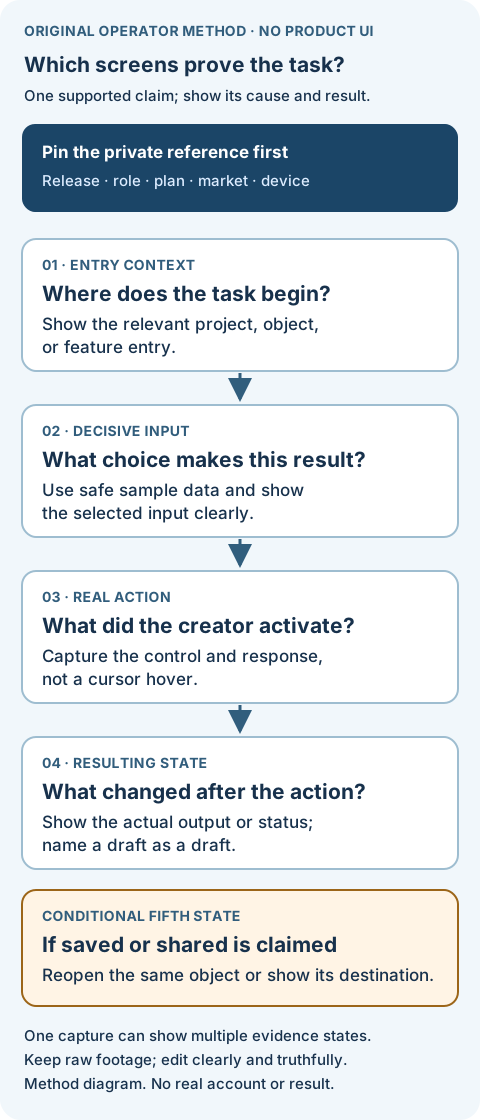
Original proof-screen map. The evidence states can be combined in fewer scenes; the task claim determines what must be visible.
Original visual by Superdirector editorial team. Created 2026-10-29.
Make the screen proof legible in the intended short-video surface
Desktop software may have many tiny panels. A full-width recording shrunk into a vertical phone video can render the decisive field unreadable. Decide before capture which part of the interface carries the proof, then use a capture area or approved crop that preserves the product label, input, action and result. Do not crop away a prerequisite or error that changes the meaning of the screen. Ask the creator to view a rough cut at phone size, with captions and platform controls present, and confirm that the significant text can actually be read long enough to matter.
If the video will run as a TikTok ad, TikTok's creative guidance recommends vertical 9:16 production, at least 720p, and keeping important content within the UI safe zone. Those are TikTok ad recommendations, not universal rules for every organic placement or desktop product. TikTok's ad-format policy also lists incomplete or illegible text in ad images and buttons, gestures or text that portray unsupported functionality among the things that are not allowed, and says a non-compliant ad may be rejected. For a YouTube Short, YouTube's Shorts visual guides show where viewer controls may cover added text. The practical shot decision is to protect the actual control and result at the placement the team intends to use; don't quote a single fixed safe-zone rectangle for every device or ad format.
Legibility must not become a misleading edit. A magnified field can help the viewer, but an unlabeled composite that puts a control next to a result it did not produce changes the story. If a form has five steps, a short video can compress the middle. Keep the raw task capture, identify cuts, and show enough anchors that a viewer can understand the sequence. Do not animate a fabricated “success” screen. A product owner should be able to replay the same path from the same conditions and recognize the final state. This is an editorial standard we propose for proof, not a guarantee of platform approval or viewer conversion.
Give the creator a proof brief, not a voice script
Hand the creator one page containing the task sentence, access conditions, five possible state labels, the minimum required frames, safe sample data, recording method, and the result that must be visible. Mark each frame as required for this claim, helpful context, or not needed. Include the product owner's reference capture and the person to contact if the observed screen differs. Do not ask the creator to guess whether a new button, empty state or permission error is “close enough.” If the task cannot be reproduced under the agreed viewer conditions, change the claim or choose a different task before filming.
The creator owns their own pace and words. They can narrate a genuine surprise, show a failed first try, or choose a different hook as long as the final audience-facing claim remains true and the proof states are present. The served UGC creator brief template has general “must-show” fields and deal terms. This narrower card names the actual product states needed for one software task; it should sit beside the brief rather than replacing campaign scope or usage rights.
If the creator is being paid, gifted access or otherwise materially connected to the brand and the post is an endorsement directed at U.S. consumers, plan disclosure in the video as well as the platform workflow. The FTC's Disclosures 101 says video disclosure should appear in the video rather than solely in the description, and that audio plus visual disclosure is more likely to be noticed. A proof-shot card should reserve readable space and timing for that disclosure; do not assume a platform toggle alone settles it. This article does not decide disclosure law for every jurisdiction or platform.
Fictional worked example: one checklist saved and reopened
Entirely fictional teaching case. “Slateforge” is an invented software product; its project, screens, version and result below do not exist as a verified customer workflow. No Superdirector account or creator footage was inspected. The example shows how an operator would choose proof states, not that any product performed this task.
Imagine Slateforge's fictional audience-facing web release 4.2 lets a team member create a project checklist from a template, save it, and reopen it. A product owner has hypothetically rehearsed the path in a safe demo workspace called “Launch Week,” using a team-member role in an eligible plan. The proposed video claim is narrow: “I used the Kickoff template to make and save a checklist for our Launch Week project.” It does not say that the app automatically completes the checklist, improves project outcomes, or works on every plan.
The shot card asks for four captured states. A: the Launch Week project page with the New checklist action and the team-member context; the private card holds the full plan/build details. B: the template picker with Kickoff visibly selected and sample project values that contain no personal data. C: the creator activates Create checklist, then records the checklist detail page showing the selected template and resulting draft items. D: the creator returns to the project list and opens that same saved checklist. The resulting item title must match across C and D. If the screen is too wide for a short video, the creator may capture the important pane in a readable crop while retaining the identity of the project and action.
Suppose the filmed version never reaches D. If the video only claims “I created a draft checklist,” C may be sufficient, subject to the actual product behavior. If it says “I saved it so my team could use it later,” the missing reopen or authorized destination evidence matters. A smiling reaction, a generic “success” toast, or a storyboard frame cannot fill that gap. The team can ask for a pickup of the exact saved object or narrow the wording. This is a decision about what the footage supports, not a claim that a fictional product succeeded in a real trial.
The fictional shot list keeps the creator free to tell a genuine story around the screen proof: what they were trying to organize, why the template mattered, what they noticed. It does not dictate their exact words or guarantee a performance result. If the product owner changes the plan entitlement before publication, the team must update the claim and shot card; that later version check belongs to the finished-footage UI review.
Review the raw sequence and hand it to the later UI check
Before the edit is treated as a deliverable, compare the received raw capture with the shot card. Identify the actual creator-operated action, the input/output join, and the result or confirmation the claim requires. Record a missing state plainly. If the creator needs to use a brand-supplied clip for a portion, label its source and avoid first-person narration that implies they performed an action they did not. Keep the reference and raw evidence in the authorized project system, not in a public template.
Then review the cut as a viewer would: captions, voiceover, on-screen claim, thumbnail and landing destination can all alter what the screens appear to promise. TikTok's policy on misleading ad content applies to TikTok ads and prohibits exaggerating product effects. That policy does not certify an organic post, but it reinforces the need to keep the filmed task and words aligned when the asset is used as an ad. For U.S. endorsements, the FTC's honest-experience rule applies to the creator's represented experience as well as the brand's intended wording. The outdated-UI guide provides the separate final-cut comparison to the release at publication time.
If the proof fails, repair the specific gap: capture the missing action, show a truthful result, remove an unsupported “saved/shared/automatic” claim, or choose a supported task. Keep the creator's raw attempt and the final accepted shot references together. A late pickup should include enough context to establish it belongs to the same product/task, while the editor may still make the video concise. The product owner should sign off on the task claim and its reference conditions; the creator should sign off on any statement about their personal experience. This handoff yields a truthful asset and a traceable later review, not a fabricated customer outcome.
Source and scope note
Official FTC endorsement guidance, FTC Disclosures 101, TikTok ad creative guidance, TikTok ad-format policy, TikTok misleading-content policy, and YouTube Shorts visual guides were checked 2026-10-29 UTC. FTC guidance is U.S.-specific; TikTok policy applies to the named ad context; YouTube's visual guides describe its own Shorts editor. The five evidence states, shot card and Slateforge exercise are original editorial methods. No live Superdirector workflow, customer result, creator footage or search volume was measured for this page.