How-To Guide
How to revise a creator campaign when the post misses the approved launch window
List every date-bound item in an approved creator post, recheck each as of the new posting day, then post, revise, re-approve or hold, and record the change.
By the Superdirector editorial team. FTC, Shopify and YouTube pages reviewed October 30, 2026.
At a glance
How should a team revise a creator campaign when a post misses the approved launch window?
Do not let the old approval carry the post by default. Write down the approved window and the new date, list every item in the approved post that depends on a date, recheck each one as of the day the post will actually be public, and decide for the post: go as approved, revise the wording, re-approve, or hold. Then tell the creator in writing, keep the reply as written and add a new approved version. Lateness changes what is true on the posting day, not what was approved earlier.
- List offers, prices, product statements, date references, links and schedules that depend on a date.
- Check each against its own source as of the new posting day, and allow “cannot tell”.
- Name one decision and one approver, and keep the revised version separate from the old one.
Direct answer
Short answer: when an approved creator post misses its window, recheck the facts, not the creator’s schedule. Do four things. First, write down the approved window, the new posting date and the creator’s reason as they gave it. Second, list every item in the approved post that depends on a date: an offer or code, a price, a product statement, a mention of a day or event, the link’s destination, and any paid-use schedule. Third, check each item as of the day the post will really be public, and mark it still true, changed or cannot tell. Fourth, decide for the post: post as approved, revise the wording or link, re-approve before posting, or hold. Then record it.
This is for an agency or brand marketer whose creator has missed, or is about to miss, the launch window in the brief. The decision is narrow: is the approved post still true and still pointed at something that works on the new date, and who says so? It does not decide whether the delay is a breach, whether the creator is owed or owes anything, or whether the campaign is still worth running. Those belong to the deal owner and to counsel.
The reason to do this on a schedule is simple. An approval belongs to a moment. Once the post slips, the approval stays the same while the world moves: a code can stop working, an offer can end, a product can change and a day the caption names can pass. Use the blank delay impact card or the blank CSV register so each check leaves a record.
Write down the window and the new date
Start with facts you can quote. Copy the approved window: its start, its end, and the time zone in which each was written. Then write the actual or proposed posting time with its own time zone. Count how late it is from the end of the window, and say which two dates you counted between. If the window was a single day with no time, write that down rather than inventing an hour.
Record why the creator says it is late, as they said it, with the date, time and zone you received it. If they gave no reason, write “none given”. Do not write a reason on their behalf and do not rank reasons as good or bad here. The reason does not change what is true on the new date, so the checks below are the same whatever it was.
Quote any agreement clause on timing, late delivery or re-approval, or write “no clause” if there is none. This page does not interpret it. Put the clause on the card so the person who owns the contract can read it beside the facts. If the delay is still only a risk, because the creator has said they may slip, run the same steps as a rehearsal. The availability guide covers asking about dates before they are fixed. This page starts from a date that has already been missed.
List every approved item that carries a date or dependency
Open the approved version of the post, the one a person signed off, not the creator’s latest draft, and read it line by line for anything that depends on a date or on something that can change. Do not start from the campaign calendar. Start from the post, because the post is what viewers will read. Each item you find goes on the card as its own row, with the source that sets it and the person who owns that source.
| Item | Where it hides in the post | Source that sets the fact | Why a delay can matter |
|---|---|---|---|
| Offer or code | Caption, spoken line, on-screen text, link | The discount or promotion setting and its dates | The offer may have ended, or the code’s valid dates may no longer include the posting day |
| Price or price comparison | “Now”, “only” or “was” wording | The product page and your price record | The price the post names may no longer be the current one |
| Product version or availability | Features shown, names used, “available now” lines | Your versioned product facts | A release, rename or stock change may have landed in the gap |
| Reference to a date, event or season | “This weekend”, “tomorrow”, “for the holidays” | The calendar and the event itself | A day or event named in the words may have passed |
| Destination page | The link or link sticker | The live page the link reaches | The page may have changed, moved or been retired |
| Paid-use or ad schedule | Your planned boost or ad run | The ad plan and the rights record | The planned start may now fall before the post exists |
| Measurement window | Report dates, attribution settings | The measurement plan | A fixed reporting window may now cut off part of the post’s life |
Two items on the list have their own pages. If the change touches product statements, the versioned product facts guide and the brief update guide cover how to settle the fact and who re-approves. If the delay moves the first public date away from the planned ad date, the two-clock guide keeps the post date and the paid date as separate records. Here you only need to notice that those rows exist and put them on the card.
Check each item as of the new posting date
Now test each row against its own source, as of the day the post will be public. Not today, if the post is still some days away. Write the date you are checking for, the date you actually checked, who checked and what the source showed. Mark one result per row: still true, changed or cannot tell. “Cannot tell” is a real answer. If nobody owns the source, or the owner has not replied, say so rather than marking the row true on a hunch.
For an offer or code, look at the dates the offer is set to run. As one documented example, Shopify’s help page for discount codes lists the dates for which the code is valid among the settings you can choose, and says a discount with a start and end time uses the time zone selected in the store’s admin. Shopify Help: discount codes. Read that as a reason to check the end time and its zone against the new posting time. Other systems differ, and we did not read their help pages for this article, so make no assumption about them. Test the code or link itself where you can, and note the time you tested.
For a price or comparison, check what the post claims against the current price record. The FTC’s Guides Against Deceptive Pricing treat a comparison with a former price as one that rests on the former price being genuine. 16 CFR 233.1. This page does not apply that rule to your post. It only tells you why a “was” or “now” line is worth re-reading when the price may have moved during the delay, and whether the line is acceptable is a question for your counsel.
For a product statement, compare the words with your current product facts, not the version that existed at approval. For a date reference, read the words as a viewer on the new day would read them: “this weekend” may now refer to a weekend that has passed. For the destination, open the live link as a viewer would and note where it lands. The live link guide covers tracing redirects once the post is public, and the first-post destination guide covers testing before it is. For an ad schedule, compare the planned start with the expected posting time, and leave the paid-use terms to the usage term guide.
When enlarged, scroll horizontally to read the diagram.
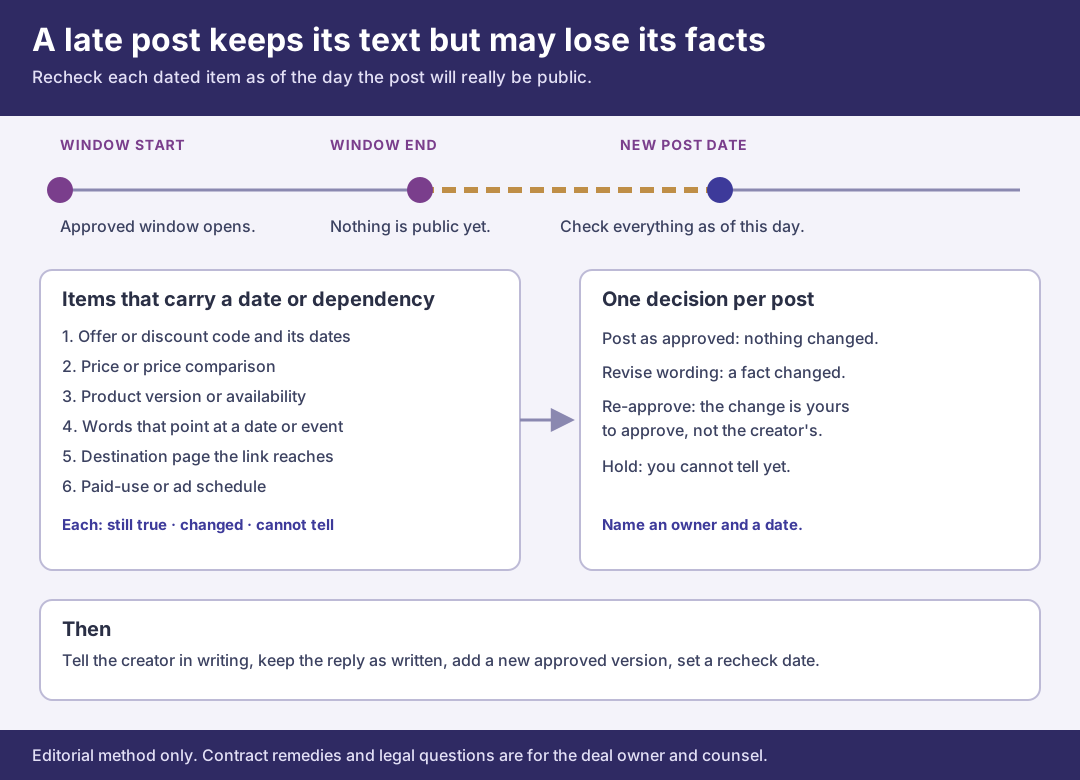
An original editorial map. A late post keeps its approved text but may lose the facts that text depends on.
Original visual by Superdirector editorial team. Creation date not recorded.
Choose go, revise, re-approve or hold for the post
Turn the rows into one decision for the post, written next to a name and a date. There are four outcomes, and the table shows what each one needs. The point of naming them is that “just post it” stops being an invisible default.
| Outcome | When the checks point to it | What you send the creator | What the record gets |
|---|---|---|---|
| Post as approved | Every row is still true on the new date | A go-ahead that names the approved version and the new time | The checks, their dates and a line saying nothing changed |
| Revise wording or link | A row changed and a small, specific edit fixes it | The exact replacement words or link, as one change | A new approved version and the approver’s name |
| Re-approve before posting | Several rows changed, or the change alters what the post promises | The updated version for approval, not for posting | The old version, the new one and the reason for the new one |
| Hold | A row is “cannot tell” and the answer is still outstanding | A short note saying the post waits on a named check | The open row, who owns it and the date you will look again |
A revision should be as small as the fact requires. If the code’s dates no longer cover the new day, the fix may be a different code or a different sentence, not a new video. Say exactly what changes and leave the rest of the creator’s work alone. On YouTube, the Help page on changing video details lists the title, description and thumbnail among the details a creator can change in YouTube Studio after upload. YouTube Help: change video settings. We did not read an equivalent page for other platforms while preparing this article, so we make no statement about what can be edited after posting there. Check the post’s own menu before you promise a creator that a fix is easy.
Be wary of a creator-led revision. If the creator offers to fix a line themselves, ask for the replacement words before the post goes public so an approver sees them. An unapproved fix creates the next record problem, which the edit retention guide covers. The reason to insist on approval is that the advertiser can be held responsible for what an endorsement says. The FTC’s endorsement rules state that advertisers may face liability for misleading claims in endorsements even if the endorser is not liable. 16 CFR 255.1. Whether a given post is misleading is a legal question this page does not answer.
Tell the creator and update the record
Send the decision in writing, with the approved version attached or named and the new posting time written out with its time zone. Keep the tone factual. “The offer in the approved caption ends on a date before the new posting date, so please use this replacement sentence and post at the new time once you confirm.” Keep the delay and the fix as separate questions.
Save the creator’s reply exactly as written, with the date, time and zone you received it. If they push back, record that as their statement. If they do not reply, record the date you asked, the date you chased and that no answer was received, and keep the post on hold if a row depends on it. Do not treat silence as agreement to a revision.
Then update the approved record by adding a new version with its own date and approver, rather than overwriting the old one. Point the new version to the checks that justified it. Set a recheck date and an owner for any row that can change again before posting, and, once the post is public, capture it as the post edit guide describes. The FTC’s question-and-answer page on the Endorsement Guides says it is much easier to review posts before they go live than to search for them afterwards, and that there is no one-size-fits-all standard for how often to monitor. FTC Endorsement Guides: What People Are Asking. A late post is a good moment to act on the first half of that.
Walk through a fictional late post
Fictional exercise: no real brand, creator, campaign or result was inspected. A made-up brand, Brand A, approved one video from Creator Q with a launch window that ended on a Friday at noon. The approved caption named a discount code “for this weekend”, showed a price with “now” in front of it, and linked to a product page. Creator Q posts on the following Monday, so the card records the window, the new time with its zone and the reason Creator Q gave, quoted as written.
The reviewer lists three items. The code is checked against the promotion’s dates, which in this made-up case ended on the Sunday: changed. The price line is compared with the current price record and still matches: still true. The words “this weekend” refer to a weekend that has passed: changed. The destination page is opened and still shows the product: still true. The reviewer marks the row for the ad schedule cannot tell, because the media planner has not yet said whether the boost is still planned for Monday.
The decision is revise, with the boost held. The reviewer asks the approver for replacement words that name no weekend and a code that is valid on Monday, sends only that change to Creator Q, keeps the reply and records a new approved version. The ad row stays open with an owner and a date. The scenario predicts nothing about any real creator, offer or post.
What this page does not decide
This method decides whether the approved post is still true and useful on a later date, and records who said so. It does not decide whether the delay is a breach, whether a fee changes, whether to end the relationship or whether a disclosure or price claim is lawful. The FTC Endorsement Guides and pricing guides are quoted only to show why the checks exist, and any reading of them for your post is for counsel.
Several nearby pages answer different questions. The availability guide is for asking about dates before a date is missed. The observation window guide fixes the dates on which results are counted. The post edit retention guide keeps evidence of changes after a post is public, and the live claim correction guide handles an unsupported claim in a post that is already live. The brief update guide re-aligns a brief after a product change. None of them starts from a missed window and asks which dated items in the approved post need rechecking before it goes public. That is the artifact here: a delay impact sheet that pairs each date-bound item with its source and a decision.
Nothing here measures how often creators miss windows, how long delays usually last or how lateness affects results. Those numbers are not available to us and are not claimed. We also did not verify posting or editing behavior on Instagram or TikTok, and the examples are fictional. The page is an editorial method for keeping an approved post honest when its date moves.