How-To Guide
What to keep when a creator edits a sponsored post after you approved it
Pin the approved version of a sponsored post, capture the live post on set dates, compare it field by field and keep the creator’s answer when it changes.
By the Superdirector editorial team. FTC and platform pages reviewed October 30, 2026.
At a glance
What should a brand keep when a creator edits a sponsored post after approval?
Keep four things for each post: the exact version you approved, dated captures of the live post, a field-by-field comparison of each capture against the approved version, and the creator’s own answer about any difference, plus the decision you made. Date a change only by the two captures that bracket it unless the platform shows its own edit record. A missing edit label is not proof that nothing changed. Approval belongs to one version, so an accepted change should become a new approved version in writing.
- Pin the approved words, link, tags, label, disclosure and media first.
- Date a change by the captures around it, not by a guess.
- Save the creator’s answer as written and update the approved record only on a written decision.
Direct answer
Short answer: keep four records for every sponsored post you approve. First, the approved version, pinned exactly: the words, link, tags, paid-relationship label, disclosure and media. Second, dated captures of the live post, taken the same way each time. Third, a field-by-field comparison of each capture against the approved version, with each field marked unchanged, changed or cannot tell. Fourth, the creator’s own answer about any difference and the decision you made. Together they let you say what was approved, what was visible on which date, what differed and who accepted or refused it.
This is for an agency or brand marketer whose approved post is now public and who needs to know whether it still says what was approved. The decision is narrow: what to retain, and how to describe a change without overclaiming. It does not decide whether an edit is acceptable, whether a disclosure is sufficient, or whether the creator breached an agreement. Those calls have their own pages, listed in the boundary section below.
The reason to keep records on a schedule is that an approval belongs to one version of a post. Once the creator can change it, “we approved it” stops being a complete statement. Without a pinned version you cannot show what you approved, and without dated captures you cannot show what was live when. Use the blank edit retention card, the CSV register and the retention map to keep the records in one place.
Freeze the approved version before it posts
Capture the approved state before the post goes live, while you still hold the draft. Write down who approved it, the date, the time and the time zone, and which draft or cut they approved. Then paste the approved words exactly as they were approved, the link and the page it should reach, every approved handle, tag and paid-relationship label, the approved disclosure wording and where it was meant to appear, and the file name and version of the approved media, cover or thumbnail. A paraphrase becomes your reading of the approval, and you will later compare the live post with your summary rather than with the thing that was approved.
Quote what the agreement says about changes after approval. Some agreements say nothing, some require the creator to ask first and some allow small corrections. If the agreement is silent, write “no clause” instead of assuming a rule. The same discipline applies in the first-cut review guide; here you pin the finished, approved post.
Keep the approved record somewhere the creator cannot edit and your own team does not overwrite. If a later change is accepted, add a new version with its own date rather than altering the old one. If product facts are in the post, compare them with your own versioned product facts.
Capture the live post on fixed dates
Decide the capture dates before the post is live and write them on the card. A workable minimum is a capture when you first see the post public, one at a later planned check and one when the campaign window ends. More captures narrow the span in which a change could have happened. Fewer captures widen it. Choose by how costly an unnoticed change would be for this post, and record the choice rather than improvising after a problem appears.
Use the same method every time. Record the capture time with its time zone, who captured it, and whether they were signed in or signed out, because what a viewer sees can differ from what an account owner sees. Capture the words as they appear in the feed and on the post’s own page, the visible link or link sticker if any, the handles, tags and any paid-relationship label, the disclosure where it appears, the media and cover, and whether the post is public at all. Save the post address with each capture. A screenshot with no address and no time is a picture, not a record.
Be honest about what a public capture can show. It shows the state visible to that viewer at that moment. It does not show what the post said earlier, who changed it, or whether anything changed in between. Platforms differ in what they expose. As one documented example, X’s developer documentation says posts on X can be edited within 30 minutes of posting, up to five times, that each edit creates a new post ID, and that the history lists the IDs oldest first; it also says engagement metrics are attributed to the version that was visible when the engagement occurred. X API: edit posts. That describes X’s documented behavior only. It tells you nothing about any other platform, and we could not load X’s consumer help page for the edit label, so this page makes no claim about what the label looks like to a viewer.
For YouTube, the Help page on editing video settings lists the details a creator can change in YouTube Studio after upload, including the title, description, thumbnail and a branded content setting. YouTube Help: change video settings. Read that as a list of what can change, so your capture should cover each of those fields that matters to the approval. It does not say whether a viewer can see a record of earlier values, and we are not claiming that it does. The YouTube-specific route for fixing a published video is in the YouTube correction guide.
We did not read a loading Help Center page on post editing for Instagram or TikTok while preparing this article, so we make no statement about what a creator can change on those platforms after posting, or what viewers are shown when they do. Treat that as unknown until you check the post’s own menu and the platform’s current help page, and record what you saw and when.
Compare each capture to the approved record
Compare one field at a time, in the same order each time, and write one of three results for each: unchanged, changed or cannot tell. “Cannot tell” is a legitimate answer. If the link is only visible after a tap you did not make, or the media is a crop you cannot match to the approved file, say so rather than guessing. The retention map shows the order of the records and where a change can be dated.
| Field | What the approved record holds | What a capture can show | If it differs |
|---|---|---|---|
| Words | Caption, title or description as approved | The text visible now, and whether an edit marker is shown | Record both texts side by side; do not summarize the change |
| Link | The approved address and the page it reaches | The visible link and, if you follow it, where it lands | Record the new address and where it landed, with the time you tested |
| Handles, tags and label | Accounts tagged and any paid-relationship label | Which of them are visible to this viewer | Record what is present and absent; a label can depend on the viewer |
| Disclosure | The approved wording and where it appears | Where a disclosure appears now, in the video, caption or both | Route to the disclosure check; do not judge sufficiency here |
| Media and cover | The approved file version and cover or thumbnail | The video and cover as shown now | Record what differs; a swapped cut is a new approval question |
| Visibility | Public from the agreed date | Whether the post is still public, restricted or gone | Record the state and time; ask before assuming removal |
Notice what the table avoids. It does not say that a changed field is a violation, and it does not say that a disclosure is adequate. Whether a disclosure is clear, and on which surface, is the subject of the disclosure check guide. It also leaves open whether the creator is still the author of the post you approved. If a post’s address or author looks different, check it against the account proof guide before treating the difference as an edit.
When a field has changed, date it by the span between captures: after capture A showed the approved state and on or before capture B showed something else. If a platform shows its own edit record you can add that, labeled as the platform’s record and with the date you read it. Never write an edit time that no capture or platform record supports. The FTC’s endorsement rule says an advertiser may be liable for a deceptive endorsement even when the endorser is not, and it names guidance, monitoring and corrective action as steps advertisers should take, while stating that good faith is not a safe harbor. 16 CFR 255.1 holds the exact text. A dated comparison is a record of the monitoring your team did; it does not by itself settle liability.
When enlarged, scroll horizontally to read the diagram.
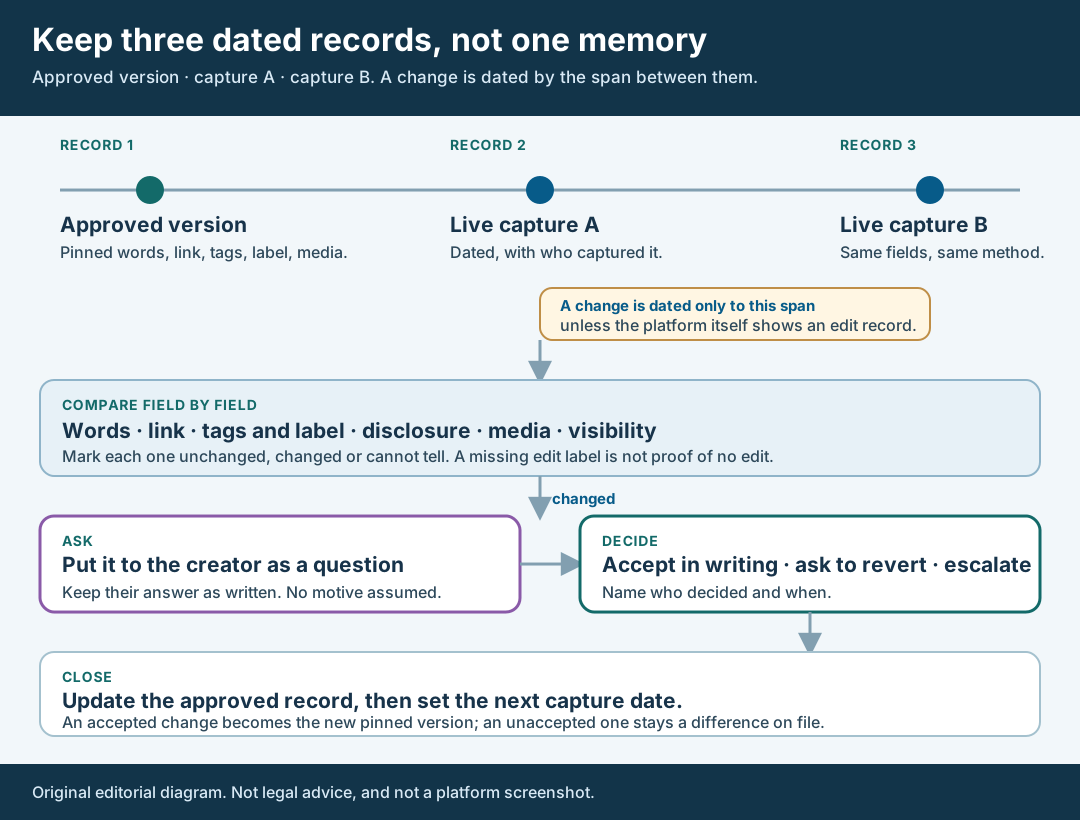
An original editorial map. A change is dated by the captures around it, not by a guess.
Original visual by Superdirector editorial team. Creation date not recorded.
Ask the creator and keep the answer as written
Send each difference to the creator as a question with the two versions attached: “The approved caption read X; the capture on this date shows Y. Can you tell us what changed and why?” Name the capture and its time. Do not say the creator broke the agreement, do not guess at a reason and do not claim you know when the edit happened. Creators correct typos, fix broken links and react to comments, and the record should leave room for every ordinary explanation.
Save the reply exactly as written, with the date, time and time zone you received it. If the creator describes an edit history from their own account, record that as their statement, labeled as theirs, unless you have seen the platform’s record yourself. If they do not reply, record the date you asked, the date you chased and that no reply was received. An unanswered question is a fact about the process, and it should not be turned into an assumption about the post.
Keep this exchange with the capture it concerns. Where the change touches a product statement, send the claim through the claim verification guide instead of arguing about it in the thread.
Walk through a fictional edit
Fictional exercise: no real brand, creator, campaign or result was inspected. A made-up brand, Brand A, approved one post from Creator Q: a caption of two sentences, one tracked link, a paid-relationship label and a spoken disclosure in the video. The approver recorded the approval time, the caption word for word, the approved link and the file version of the cut. Capture A, taken when the post was first seen public, matched every field. Capture B, taken at the planned check two days later, is signed out and shows the caption’s second sentence shortened and the link pointing to a different page address.
The reviewer marks words: changed, link: changed, disclosure: unchanged, media: unchanged, label: cannot tell, because the signed-out capture may not show what a signed-in viewer sees. The change is dated to the span between capture A and capture B, since no edit record was visible. The reviewer asks Creator Q about both differences, attaches both versions and quotes the reply as written. Suppose the reply says the old address stopped working and the new one was substituted. That is the creator’s statement, kept as such, and the reviewer tests the new address and records where it lands and when.
The deal owner then chooses: accept the corrected link in writing, ask for a revert, or escalate. If accepted, the approved record gets a new version that names the accepted link and the date, and the next capture is set. The scenario predicts nothing about any real creator or post.
Close with a decision and a next-check date
Close each difference with one decision, one name and one date. The decision is one of four: accept the change in writing, ask the creator to revert it, escalate it to the deal owner or counsel, or leave it open because the evidence is not enough yet. Record who made the decision and when. If it is accepted, add a new approved version and point to the written acceptance. If it is not accepted, leave the difference on file as a difference and keep the instruction you sent.
Then set the next capture date and who will do it. A closed difference does not end the monitoring, because the creator can edit again. The FTC’s question-and-answer page on the Endorsement Guides says it is much easier to review posts before they go live than to search for them afterwards, and that there is no one-size-fits-all standard for how often to monitor. FTC Endorsement Guides: What People Are Asking. That page does not set a capture schedule for you, so choose one you can keep and write it down.
Finally, keep the whole file together: the approved version or versions, every capture with its address and time, each comparison, the creator’s answers, the decision and the next-check date. This page does not state how long to keep it, because the sources we read did not give a period. Set that from your agreement, your records policy and counsel. A post that passed every check is also worth keeping; a file that shows nothing changed is evidence too.
What this page does not decide
This method keeps a record of change for a sponsored post. It does not tell you whether a change is acceptable, lawful or a breach. Whether a disclosure is clear enough is for the disclosure check, and the FTC’s influencer guide, dated November 2019, says a disclosure should be hard to miss and that in a video it should be in the video itself and not only in the description. FTC Disclosures 101 for Social Media Influencers. That page places the disclosure duty on the influencer, so this page does not turn your capture into a ruling on it.
Other checks sit next to this one. Proving the post is on the contracted account is in the account proof guide. Rights to boost an organic post are in the paid-use agreement guide. Writing a brief that says what may change after approval is in the UGC content brief guide. If a point turns on law or on the meaning of your agreement, send it to counsel instead of settling it in a comment thread.
Nothing here measures how often creators edit approved posts, how many edits are normal, or how an edit affects results. Those numbers are not available to us and are not claimed. We also did not verify Instagram or TikTok behavior after posting, or X’s consumer help page, so this article states nothing about them. The page is an editorial method for keeping an approved version, dated observations, a comparison and a creator’s answer apart, so each claim about a change rests on its own evidence.