How-To Guide
How to stop a creator ad before its usage term runs out
Tie a stop date to each creator asset and ad placement, match the platform end clocks and log the switch-off before the usage term in the agreement ends.
By the Superdirector editorial team. TikTok and Meta documentation reviewed October 30, 2026.
At a glance
How should a team stop a creator ad before its usage term ends?
Give every live or scheduled ad its own row tied to one exact asset and one placement. Copy the term end and its start trigger from the signed agreement, or write NO END WRITTEN. Then compare three clocks: the agreement end, any platform permission end and the ad schedule end. The earliest becomes that placement's stop date, with a named person and a switch-off deadline. Sweep on fixed dates, record evidence that delivery stopped, and count an extension only when it is accepted in writing.
- One row per ad, asset version and placement, not one date per creator.
- Carry the agreement end into the ad system yourself; do not expect it to know.
- Log dated evidence that each ad stopped, and treat an extension as a new row version.
Direct answer
Short answer: give every live or scheduled ad its own row, tied to the exact asset and version it runs and the placement it runs from. Copy the term end and what started it from the signed agreement, or write NO END WRITTEN. Then compare three clocks for that row: the agreement's term end, the end of any platform permission the ad depends on, and the ad's own schedule end. The earliest of the three, or an earlier date your team chooses, is the row's stop date. Name the person who switches the ad off and the date by which it must be done. Check on fixed dates that delivery actually stopped, and keep the evidence.
This is for an agency or brand marketer who holds a counsel-reviewed creator agreement and an inventory of ads that use the creator's work. The decision is narrow: for this ad, on this placement, what is the last day it may run, and who is responsible for stopping it? It does not decide what the agreement means, whether a use was permitted in the first place, or what an extension should cost. Those calls sit with counsel and the deal owner, and the boundary section below links the pages that cover the neighbouring questions.
The reason to track ads rather than creators is that one agreement usually feeds many ads. The same video can run as several ad variants, on more than one account, under different schedules and different platform permissions. A single “rights end” date per creator hides which of those ads is about to cross the line. Use the blank rights-expiry card, the CSV register and the stop-date map. All three are blank teaching aids, and none represents a real agreement, creator or campaign.
List each live and scheduled ad by asset and placement
Start from the ad inventory, not from the contract. Export or copy the list of ads that are running now or scheduled to run, from every ad account that uses creator work. Write one row per ad, or per ad set if the ad system schedules at that level. Each row holds the ad or ad set ID, the platform and account, the asset ID and version the ad uses, and the placement or handle it runs from. If a creator delivered three cutdowns and two of them are in ads, that is two asset rows, not one “creator video” row.
Use the same asset IDs you gave the files when you recorded their rights. If you have not done that, the asset rights guide shows how to give each file a row and quote its grant. A file that was re-cut, re-captioned or re-exported may be a different version, and the approved-cut receipt guide shows how to say exactly which file was approved. Here the point is simpler: the ad row must point to one file, so that the question “which term governs this ad?” has one answer.
Copy the term end and its trigger from the signed words
Next to each row, paste the term clause exactly as written, with the agreement name, version and signed date. Do not paraphrase it. A paraphrase quietly turns your reading into the record, and the tracker then reports your reading as if it were the creator's grant. If no clause names this asset or this placement, paste nothing and write “no clause names this”. The row then cannot be marked safe by default; it becomes a question.
Record two things about the term: when it starts and when it ends, each with the trigger that fixed it. A term that starts on “first posting” has a date that comes from your verified posting record, which is its own check. The two-clock guide explains why a creator's post and an ad launch are separate events, and the term may be counted from either, depending on the words. If the clause gives a length but no event that starts it, you hold a length with no calendar. Write that on the row and do not compute an end date.
Where the agreement is silent on an end, write NO END WRITTEN in capitals, and treat the row as an open question for the creator and, if the answer turns on meaning, for counsel. Do not fill the cell with a typical length that seems normal. This page does not offer a typical term, because we have no source for one and none would apply to your agreement. The tracker's job is to show you which rows have a real date and which rows are still waiting for one.
Set one stop date and one switch-off owner per placement
For each row, write down three dates side by side. The first is the agreement term end from the previous step. The second is the platform permission end, if the ad depends on one; a creator authorization for a boosted post is the common case, and an ad that runs from the brand's own upload has none. The third is the ad schedule end as currently set in the ad system. The stop-date map shows the three clocks feeding one decision.
| Clock | Where the date comes from | What it controls | Common gap to check |
|---|---|---|---|
| Agreement term end | The signed words, quoted on the row | Whether the use is permitted by the agreement on a given day | NO END WRITTEN, or a start trigger you cannot date |
| Platform permission end | The authorization or permission record in the ad platform | Whether the platform lets the ad use the creator's post or handle | A permission that ends before the ad, or one that outlasts the agreement |
| Ad schedule end | The end date set on the ad or ad set | When the ad system stops delivering | No end date at all, or a date set for the budget rather than the term |
The stop date is the earliest of the three, unless your team picks an earlier date on purpose. The agreement end is the one that matters for the permission to use the work, so a platform permission that outlasts it does not extend anything: it is a setting, and the row's term still governs. A platform permission that ends sooner is the clock that will stop the ad first. An ad schedule that ends later than both is the dangerous case, because the ad system will keep delivering unless somebody changes it.
Then add two fields that make the date actionable. The first is a named switch-off owner: one person, not a team alias, who is responsible for turning the ad off. The second is a switch-off deadline that sits before the stop date by a lead you choose. Pick the lead from your own process: who has to act, whether another approver is involved and whether the ad account can be reached at the weekend. We have no benchmark for how long that takes in a given team, so the card asks you to write your own lead and test it at the first sweep. Record every date with its time zone, because an ad system may count its end of day in the account's time zone while your agreement counts in another. The time-zone guide covers why that mismatch happens for analytics, and the same discipline applies here.
When enlarged, scroll horizontally to read the diagram.
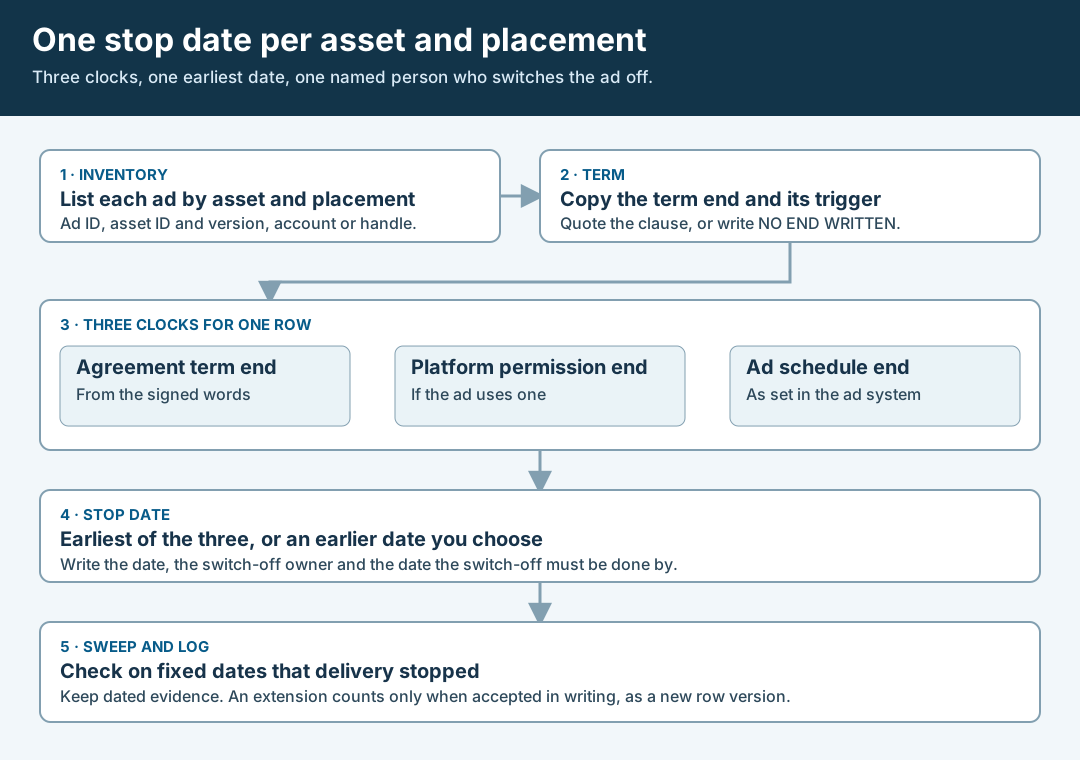
An original editorial map. One row per ad, three clocks, one earliest stop date and one named owner.
Original visual by Superdirector editorial team. Creation date not recorded.
Match each platform's own end clock to the stop date
Now set the ad system so that it does not depend on someone remembering. Each platform has its own way of ending an ad, and the details differ. This section describes only what the platform pages we read say; it does not describe other platforms or the current look of any screen.
On TikTok, a creator's video used as a Spark Ad carries an authorization with its own duration. TikTok's Smart+ guide tells advertisers to select the authorization duration (7, 30, 60, or 365 days) when authorizing a post. The page does not say what happens when that period ends. TikTok's error notifications page lists an “Authorization expired” error with the suggested fix to contact the creator to extend the authorization, and an “Authorization ends before the ad's end time” error with the suggested fix to contact the creator to adjust it. Read those as evidence that the authorization is a separate clock from the ad's end date, and that a mismatch is something the platform reports. They are not evidence that the platform knows your agreement. Choose an authorization length and an ad end date that both land on or before your stop date, and record the authorization end date on the row.
TikTok's Spark Ads page also says a video must be un-authorized as a Spark Ad before it can be deleted from the organic account. That matters at the end of a term: if the creator is asked to remove the post, the un-authorize step comes first, and your log should show who did it and when.
On Meta, the Marketing API reference for the ad set endpoint says an end time is required when a lifetime budget is specified, and that for a daily budget you can specify end_time=0 to make the ad set ongoing with no end date. The practical point is the second one: an ongoing ad set has no end date unless somebody sets one, so a daily-budget ad that uses a creator's work needs its end date set deliberately to your stop date. We read the API reference, not the Ads Manager screens, so this page says nothing about how the same setting appears in the interface. Meta's account-level permissioning page says an app can revoke a creator's partnership ad permissions with a POST call, and its example response shows REVOKED as a creator approval status. That page does not describe permission expiry or say that ads stop when a permission is removed, so do not rely on a revoke to end delivery until you have seen it do so in your own account, and write what you saw on the row.
Sweep on fixed dates and log that delivery stopped
Put the sweep dates on the calendar when you set the stop dates. A workable minimum is one sweep a planned interval before the switch-off deadline, to catch rows that are still missing a date, and one sweep right after the stop date, to confirm that the ad has stopped. Add a sweep whenever the inventory changes.
At each sweep, open the ad system and look at the row. Record the date and time with its time zone, who looked, what the ad's status was, and whether delivery had stopped, using three words only: yes, no or not checked. Keep a capture or a report export as the evidence and note where it lives. “Not checked” is a legitimate answer and is better than a guess. A row that says it stopped without a dated capture is a claim, not a record.
Handle an extension as a new row version. If the creator agrees to a longer term, the change counts when it is accepted in writing and the accepted words are pasted into the row, with the new end date and the date of acceptance. A friendly message that says “fine to keep it up” is a message, not an accepted change, and the card has a cell for the reference of the written acceptance so the difference stays visible. Until that reference is there, the old stop date stands. Ask the question in a form the creator can answer in one sentence, naming the asset ID, the placement and the end date you want.
Walk through a fictional rights-expiry tracker
Fictional exercise: no real brand, creator, agreement or result was inspected. A made-up brand, Brand A, holds an agreement with Creator Q. The inventory shows three ads. Ad 1 runs asset A1 version 2, a vertical video, as a Spark Ad from Creator Q's handle. Ad 2 runs the same asset on a different ad account managed by a partner. Ad 3 is scheduled and uses A3, a still image, on Brand A's own page.
The made-up clause for A1 reads: “The brand may use the final video in paid advertising for a period following first posting.” The start trigger is first posting, and the verified posting record gives a date, but the clause gives no length. The reviewer writes NO END WRITTEN for A1 and sends Creator Q a one-sentence question naming A1, paid advertising and the end date wanted. Until the answer arrives in writing, the row's stop date is set by the earliest clock the team can honestly defend, which here is a date the team chose and wrote as provisional.
For Ad 1, the authorization ends after the provisional stop date, and the ad schedule has no end, so the reviewer sets an end date on the ad and names the account owner as switch-off owner. For Ad 2, the partner's ad has a schedule end later than any stop date, so the row is flagged and the question goes to the partner. For Ad 3, the made-up clause says nothing about stills, so the row reads “no clause names this” and the scheduled start waits for a written answer. After the sweep, Ad 1 is recorded as stopped with a capture, Ad 2 as “not checked” because the partner has not replied, and Ad 3 as not started. The scenario predicts nothing about any real creator or ad.
What the sources say and do not say
Each platform statement above rests on one page and stops where that page stops. TikTok's Smart+ Spark Ads guide supports the four authorization durations. TikTok's error notifications page supports the two error messages and their suggested fixes. TikTok's Spark Ads page supports the un-authorize-before-delete note. Meta's ad set reference supports the end-time requirement for a lifetime budget and the end_time=0 option for a daily budget, and Meta's account-level permissioning page supports the revoke call and the REVOKED status shown in its example response.
None of these pages says what a usage term in your agreement means, what happens legally when an ad runs past it, or how long a switch-off takes. We make no claim on those points. These sources can change; they were read on October 30, 2026, and the card asks you to record where each platform setting lives so you can check it again before you rely on it.
What this page does not decide
This method tracks stop dates for ads that already use a creator's work. It is different from the pages closest to it. The asset rights guide records what the signed words grant for each file by channel, term and territory, before any ad is chosen; this page starts from the live ad inventory and asks who stops each ad and when. The organic-to-paid guide covers what to agree before a post is boosted for the first time. The two-clock guide separates a creator's posting date from an ad's launch date; this page uses those dates only as inputs to a term. The music paid-reuse guide covers a different rights layer inside the video.
It also does not say whether your agreement is enforceable, what a clause means, whether a use outside the term is a breach, or what an extension should cost. Those are questions for counsel and the deal owner. If a point turns on law or on the meaning of your agreement, send it to counsel instead of settling it in a spreadsheet cell.
Nothing here measures how often ads run past a term, how long switch-offs take, or what an overrun costs. Those numbers are not available to us and are not claimed.