How-To Guide
Test a creator campaign destination before the first post
Test one creator link on mobile before the first post. Verify redirects, the promised task, confirmation and event receipt, then send, repair or delay.
By the Superdirector editorial team. Sources reviewed October 28, 2026.
At a glance
What should an agency test at the destination before a creator sends the first viewers?
Rehearse the creator’s exact link and promised task from the intended mobile surface. Record redirects, final offer, form feedback, visible confirmation and the configured event receipt. Send the checked link only if the viewer can complete that task; otherwise repair and retest or delay it.
- Keep the CTA wording, tagged URL, device, locale and offer version with the test record.
- A page load or analytics event alone does not prove the promised task succeeded.
- Verify test-event exclusion before publishing campaign totals, and repeat the rehearsal after a material change.
Direct answer
Rehearse the exact link and task the creator will promise, on a mobile device under the intended locale and offer conditions. Record the creator's CTA, every redirect and final page, the form or checkout path, the visible completion state, and the source receipt for the configured analytics event. If the viewer cannot reach the promised result, repair and repeat the same path before sending traffic. A successful page load, click, or analytics event alone does not prove the task was completed. Save one dated rehearsal card so a later destination change has a known path to retest.
The decision is deliberately narrow: send this link, repair it and retest, or delay this link. A campaign can have a polished script and still lose the only viewer who wanted to act if the destination points to the wrong offer, asks for an unavailable product, or ends without a usable confirmation.
Freeze the promise before checking the page
Write down the exact sentence the creator will say and the exact URL a viewer will open. “Get the free planner” asks for a working planner delivery, while “Join the waitlist” asks for an accepted registration and clear confirmation. Those are different tasks even if both use the same landing-page template. Put the link beside the CTA in the creator brief; the UGC brief guide covers creative direction, while this rehearsal checks what happens after the viewer acts.
The record should also name the relevant offer or product version, intended market and language, and the owner who can fix the destination. Test the conditions the creator's audience is supposed to encounter. If availability or eligibility varies by market, a passing test in another market does not answer the campaign's question. Do not use a real customer's personal information; use harmless test data or an authorized test account.
If the post uses a profile link, story link, short URL, affiliate route or platform wrapper, start with the link the viewer will actually receive where a prelaunch preview permits it. Otherwise open the exact proposed URL and mark the platform wrapper as unverified until it can be checked. Record the first URL and each redirect response before the final page. The final page can be technically reachable while the original CTA has been lost along the way.
Follow one mobile path from CTA to confirmation
The destination rehearsal card provides a printable path and a blank record. Walk it in order. For each step, record the observation, not just a tick mark.
| Checkpoint | Evidence to retain | A finding that changes the decision |
|---|---|---|
| Creator CTA and first URL | Exact wording, proposed link, campaign tag, surface, date | CTA promises a task the landing page does not offer |
| Redirects and final URL | Each hop, status and final address; where tags are captured or lost | Link resolves to an old offer, wrong locale, error page, or strips tags before collection |
| Landing and task | Offer version, price/availability if relevant, required steps, mobile viewport | Product unavailable, unexpected account requirement, hidden action, or blocked form |
| Feedback and completion | Labels, one error path, success message, actual file/booking/order or other promised result | Form submits but gives no understandable error or confirmation; promised artifact never arrives |
| Measurement receipt | Configured event name, observed test receipt and its scope | Page view or submit event is mistaken for the finished task, or the expected event never appears |
Google's campaign URL guidance explains that UTM parameters identify referring campaigns in Analytics when the link and collection work. Freeze the tag convention with the link. If the site removes visible UTMs after capturing them, verify the capture in the owned analytics record; do not demand that parameters remain printed in the final address. If a redirect removes them before collection, fix the route or measurement. Google documents redirects, URL rewrites and absent tags as reasons Google Ads clicks and Analytics sessions can diverge; that troubleshooting page is about Ads, so these are technical failure modes to investigate for a creator link, not a creator-specific discrepancy rate.
A mobile task test also needs the form's invalid path. Try one harmless invalid entry and see whether the control is labeled and the error tells the viewer what to correct. Then use authorized test data to complete the intended task. The W3C WAI labels tutorial calls for identifiable, associated labels; its notification guidance says users need understandable error and success feedback. This rehearsal is a practical check of one path, not a claim of full accessibility conformance.
The final step must match the CTA. A “Thank you” page after a promised download is not enough if there is no file or delivery confirmation. A booking request needs a recognizable request receipt or confirmed booking, according to the promise. For a paid order, verify the order or payment authority rather than inferring payment from a click. Record exactly which state was reached; do not upgrade a submitted form into a completed sale.
When enlarged, scroll horizontally to read the diagram.
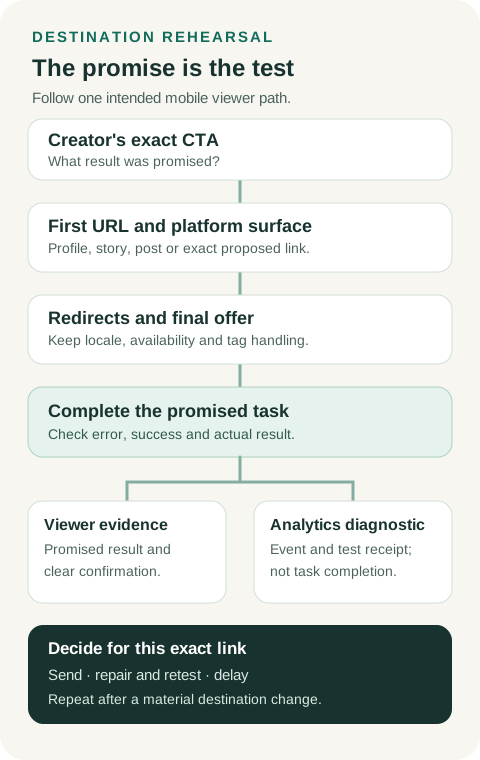
An original viewer-path diagram. Use the rehearsal card to record the tested device, URL, task result and event receipt.
Original visual by Superdirector editorial team. Creation date not recorded.
Check the event without substituting it for the task
After the user-facing task is observed, look for the configured event in the analytics property, with test identity, timestamp and expected campaign parameters where available. For GA4, DebugView can show events from a debug-enabled device; its visibility depends on setup and consent. An event receipt supports the narrower claim that the configured event was collected for that test device. It does not prove every future viewer will be counted or that a form event corresponds to a completed download, booking or payment.
Keep the test out of campaign performance totals. The prelaunch rehearsal has no creator-post click count, because the post has not run. Once it does, platform clicks, site sessions, completed tasks and business outcomes are separate observations. Google's clicks-versus-sessions guidance explicitly distinguishes those units for Ads; by the same logic, a creator platform click should not be treated as a one-to-one GA4 session. Investigate a mismatch through the actual link, redirects, site tag, consent and event path. Do not fill an unobserved step with a conversion estimate.
Performance belongs in a separate diagnostic row. PageSpeed Insights reports lab and, when sufficient data exists, real-user field information. A new or low-traffic page may show origin-level field data or none for that page. Record whether a result is mobile lab, page field or origin field, and the URL/date tested. A score can help prioritize a slow path; it does not show that the viewer completed the promised task. Do not invent a universal speed threshold to replace the functional rehearsal.
Fictional worked example: a form event without the promised file
Everything in this example is invented. Morrow Pantry is a fictional brand; its .example domain, test IDs, form responses and analytics observations are teaching data. No Superdirector signup, customer journey, production destination or actual analytics property was tested for this article.
A fictional creator's CTA is: “Download the free pantry restock planner.” The proposed Instagram profile link is https://morrow-pantry.example/r/creator-a?utm_source=instagram&utm_medium=creator&utm_campaign=autumn-planner&utm_content=creator-a. Its intended audience is U.S. English-language mobile viewers; the promised artifact is planner PDF version 3. In both imaginary passes, the operator opens the creator's staged profile link from within Instagram on a phone, using a 390-pixel in-app browser view in en-US and synthetic test data. No separate platform-wrapper URL is exposed in this fictional trace; the first observable destination is the exact tagged URL, followed by a 302 from /r/creator-a to /planner/v3 on the same .example domain. The tag values are retained in the illustrative final URL and test analytics record. A real operator must record any wrapper hop their actual surface exposes; this example does not assert that Instagram always follows this route.
In fictional pass F-MP-01 at 2026-10-28 10:05 America/Los_Angeles, the landing page names the free v3 planner. Its email field has a visible “Email address” label; an invalid entry receives the message “Enter a valid email address.” A synthetic valid submission reaches a page that says “Thanks,” and a configured generate_lead event appears in the imagined GA4 DebugView. But the page has no planner link, and no file is delivered in the fictional test. The event proves neither the promised download nor a usable confirmation. The decision is delay this link and assign the confirmation/file route to the destination owner.
After that fictional repair, pass F-MP-02 at 11:20 repeats the same staged Instagram profile link, observable redirect, device conditions and form path. The confirmation now says “Your pantry restock planner is ready,” offers a clearly named v3 PDF link, and the tester opens that file. A separate illustrative planner_download event is visible for the synthetic test device. The operator records send this exact profile link under the checked conditions. That decision does not claim all browsers, locales, future sessions or real viewers will behave the same way. The event remains a diagnostic beside the observed file opening. No GA4 filter or reporting exclusion is verified in this fictional case; the measurement owner must keep both synthetic receipts out of any later campaign total and verify that exclusion before reporting a number. A later change to the profile link, redirect, offer, form, file or analytics setup would require another rehearsal.
This example has no PageSpeed run or field result. “Performance not measured in this case” is a complete entry in the card; the functional pass is not a speed claim. The fictional filled CSV preserves the two passes, while the blank CSV can be copied for a real, authorized destination.
Decide what the test actually permits
Send the link when the promised task completes from the intended creator surface under the intended conditions, the final state is recognizable, the configured event has the expected test receipt if measurement is part of the campaign, and the owner has recorded any remaining coverage limits. Verify a rule that excludes test receipts before publishing campaign totals. This is a decision about a checked path, not a guarantee of conversion.
Repair and retest when a specific defect has an owner and a repeatable path: an old offer, broken redirect, unclear form error, missing file, or absent configured event. Keep the failed receipt beside the later result so the repair is inspectable. Do not relabel a failed first pass as if it had always worked.
Delay this link when the promised task cannot complete and no verified replacement is ready. A 503, inaccessible critical form or missing confirmation is a failed readiness observation. Rehearse the corrected public path after it is available; a development preview cannot establish that the live viewer route works. The broader product launch guide covers campaign sequencing and having a link ready; this page supplies the narrower evidence for one link.
Editorial source note
Editorial source note: Google Analytics documentation supports UTM meanings, technical causes of click/session gaps and DebugView's event scope. W3C WAI supports labels and understandable feedback; PageSpeed documentation supports the lab/field distinction. The checkpoint order, decisions and Morrow Pantry case are original teaching material. The fictional observations do not establish any Superdirector feature, signup result or measured conversion.