How-To Guide
How to ask a creator about availability when the launch date is still uncertain
Write an availability message for a launch with no fixed date: ask about a span of dates, say nothing is reserved, name the trigger and keep the reply.
By the Superdirector editorial team. FTC and W3C pages reviewed October 30, 2026.
At a glance
How can a brand ask a creator about availability when the launch date is still uncertain?
Say honestly where the date stands, then ask about a span of dates instead of a single day. Give the start, the end and the time zone, and state in one plain sentence that nothing is reserved and nothing is owed until you confirm dates in writing. Name what will confirm the date and the day you will write again. Keep the creator’s answer as written and read it as could work, not as a booking. Reserve no creator time until a real date is agreed.
- Label the date: no date yet, a target window or confirmed.
- Ask about a span with a start, an end and a time zone, never one invented day.
- State that nothing is reserved, name the trigger and set the day you will write again.
Direct answer
Short answer: when the launch date is not fixed, write a message that says so. Tell the creator where the date stands, ask whether work in a span of dates could be possible, say in one plain sentence that nothing is reserved, name what will confirm the date and when you will write again, and keep their reply exactly as written. The message asks a question about the creator’s calendar. It does not take a slot from it.
This is for an agency or brand marketer who needs to know early whether a creator could do the work, but who cannot yet say the day. The product may be waiting on a release, a client may not have signed off, or a budget may be unconfirmed. The decision is narrow: what to ask, and how to word it so that neither side believes a date has been agreed. It does not decide which creators to approach, what to pay or whether the launch should move. Those have their own pages, linked in the boundary section below.
The reason to be careful is that a vague message produces a vague yes. “Are you free in January?” sounds harmless, but the creator may hear a request to hold time, and you may later treat a friendly reply as a commitment. The method below keeps three things apart: the date state (what you know), the question (what you are asking) and the reservation (which does not exist yet). Use the blank availability window card, the CSV register and the window map as you work.
Say where the launch date stands before you write
Before you draft a word, put the launch date into one of three states and write the state on the card. No date yet means nobody has proposed a day. A target window means your team has a span in mind that it expects to hit but has not committed to. Confirmed means a named person has agreed the dates in writing. Most outreach that goes wrong skips this step and writes as if the date were confirmed because the draft calendar looks tidy.
Next, write what is still undecided in one line, and who decides it. “The product release is not final” is a reason. “The client has not signed off the schedule” is another. Name the person or role that can change the state, because step four asks you to tell the creator what will confirm the date, and you cannot do that without knowing. If nobody can say what would confirm it, you are not ready to send an availability message. You are ready to find that out first.
Finally, check who the message goes to. A creator’s manager or agent may be the right recipient, and whether that person can speak for the creator is a separate check in the manager authority guide. An availability question sent to someone who cannot answer for the creator only adds delay.
Ask about a span of dates, not a single day
Ask about a span, with a start, an end and a time zone. A span is honest about what you know. A single day that you invented to make the message look precise invites the creator to plan around it, and when it moves they have planned around nothing. Make the span as wide as the real uncertainty. If the plan is that the launch falls somewhere in a six-week stretch, ask about that stretch, and say that the exact day is not set.
Write the dates so they read the same everywhere. Use year, month and day in a fixed order and put the time zone beside each start and end. A W3C note on date and time formats, dated 1998 and published for discussion, shows a year-month-day form such as 1997-07-16 and shows a time zone written as Z for UTC or as an offset such as -05:00, with two example times that name the same instant. You do not need the full time format for an availability question. The useful lesson is that a date with its zone beside it cannot be read two ways by two time zones.
Then phrase the question so that the answer cannot be mistaken for a booking. Compare these two. “Can you do a video on 18 January?” asks for a day you do not have. “Would work between 2027-01-11 and 2027-02-19 be possible for you, in your time zone, and how much notice would you need after we confirm?” asks for what you actually want to learn. The second also invites the creator to say what notice they need, which is often the more useful answer, because it tells you how early you must confirm.
| Date state | What the message may ask | What the message must not do | What a yes means |
|---|---|---|---|
| No date yet | Whether the creator takes this kind of work, and how much notice they usually need | Name a day or a week | Interest in the kind of work, nothing more |
| Target window | Whether work in a stated span could be possible, and what notice they would need | Ask them to hold the span, or treat a yes as a booking | Could work in the span, as of the day they answered |
| Confirmed | Whether they accept the dates, with deliverables and terms in writing | Rely on an earlier could-work reply as if it were this agreement | Only what the written confirmation says |
When enlarged, scroll horizontally to read the diagram.
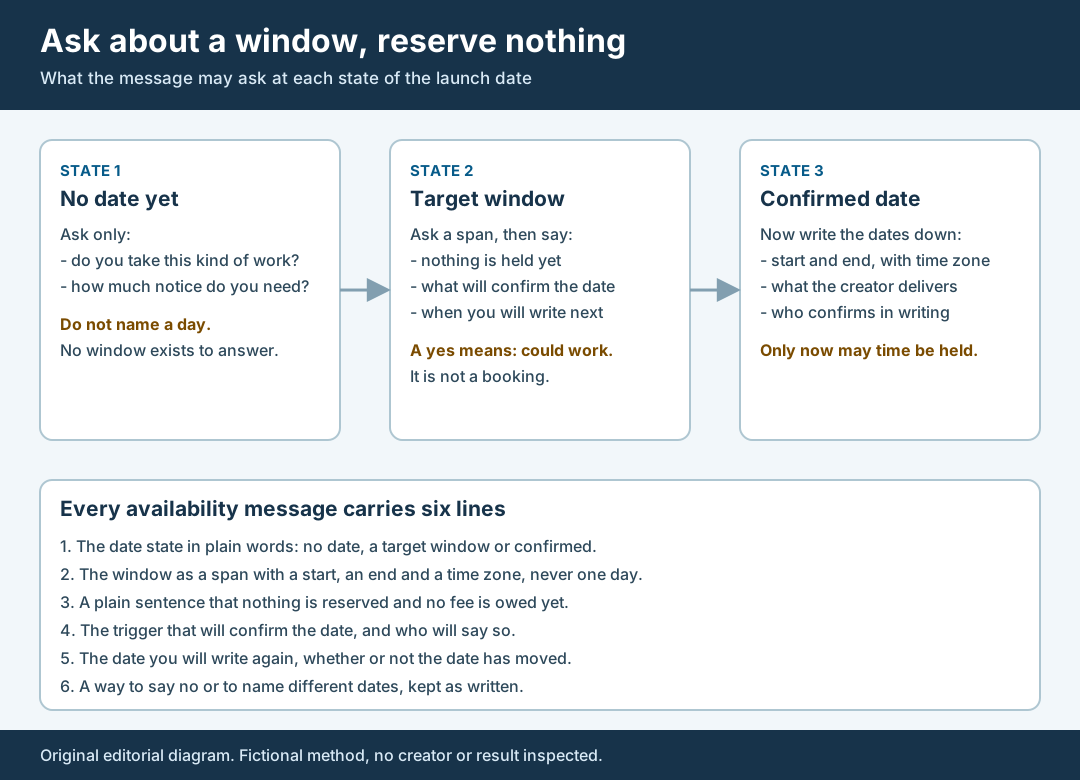
An original editorial diagram. Ask about a span, say nothing is reserved and write again on a fixed date.
Original visual by Superdirector editorial team. Creation date not recorded.
State plainly what you are not reserving
Add one sentence that says what this message does not do. For example: “This is a question about availability. We are not reserving your time, nothing is owed yet, and no dates are agreed until we confirm them in writing.” A sentence like that protects the creator, who may otherwise turn down other work on the strength of a hint, and protects you, who will not be asked later why a slot was not honoured. Place it where it is hard to miss, not in a footer.
Write it in your own plain words and keep it consistent with what you will really do. If you say nothing is reserved, then do not behave as if a slot were held: do not tell a client that a creator is “locked in”, do not turn down a second creator on the strength of a first creator’s could-work reply, and do not send a calendar invite for a date that is only a target. The sentence is a promise about your own behaviour as much as a description of the message.
If your team sends this outreach by email, read the FTC’s CAN-SPAM Act compliance guide for business. It says the law makes no exception for business-to-business email, and it lists duties that include accurate header information, subject lines that are not deceptive, a clear and conspicuous disclosure when a message is an advertisement, a valid physical postal address, a clear way to opt out, honouring an opt-out within 10 business days, and the point that hiring another company to send your email does not remove your legal responsibility. Whether a particular availability question is a commercial message is a question for your counsel, and this page does not answer it. What it does tell you is practical: a subject line that says “booking confirmation” on a message that confirms nothing is the kind of mismatch to avoid, so name the subject for what the message is.
Name the trigger and the date you will write again
Tell the creator what will confirm the date and who will say so. “We will confirm once the client signs off the release schedule, and that decision sits with our account lead” gives the creator something to wait for and something to ask about. A message that says only “we will let you know” leaves them guessing, and it leaves you with no test for when to write. If the trigger is outside your control, say so.
Then set a date to write again, and keep it whether or not the launch date has moved. A creator who hears nothing for three weeks cannot tell whether the campaign has been cancelled, delayed or forgotten. A short note on the promised date that says “still not confirmed, next note on this date” costs you a minute and shows respect for their calendar. Put the date on the card and put an owner next to it. If the trigger arrives sooner, write sooner.
Ask for a latest answer date too, but make it a request about your planning, not a deadline on the creator. “If you can tell us by 2026-11-20 whether the span could work, we can plan around it” is honest. “Reply by Friday or we will move on” turns an availability question into a pressure test, and it is not what you want if the creator is the right fit and simply slow. If you will approach others after the latest-answer date, say so in plain words and keep your promise not to treat a late could-work as a reservation.
Keep the reply and release or confirm on the trigger
Save the creator’s reply exactly as written, with the date, time and time zone you received it. Then read it for what it says, and write one of four results on the card: could work in the window, cannot in the window, prefers other dates or no reply. If the reply names other dates, copy them verbatim and ask which time zone they mean before you compare them with yours. If the reply asks for notice, record the notice.
Do not read more into a reply than it says. A friendly “sounds great” to a message that explicitly reserved nothing is a could-work. An enthusiastic reply that never mentions the dates does not tell you whether the window is possible, so ask the question again in one line. A reply from someone other than the creator is a statement by that person, labelled as theirs, until you have checked their authority. An unanswered message is a fact about the process: record the day you asked, the day you wrote again and that no reply came.
When the trigger arrives, act on it at once. If the date is confirmed, send the dates in writing with a start, an end and a time zone, with what the creator delivers and the terms, and ask for acceptance in writing. Only an accepted written confirmation reserves time. If the launch is cancelled or has moved outside the window, release the creator in a short note that says so, and thank them. A release is not an apology for asking. It is the end of a question you asked in good faith.
If the date slips, send a new message with a new span and the same sentence about what is not reserved. Do not reuse an old could-work as if it applied to the new dates; ask again and record the new reply. Keep the whole file together: the date state at the time, each message, each reply, the trigger, the release or confirmation and who made the call. That one folder lets a colleague see who was asked what, when, and on what understanding.
Walk through a fictional message
Fictional exercise: no real brand, creator, campaign or result was inspected. A made-up brand, Brand A, plans a product release that its client has not yet scheduled. The account lead writes the date state as target window, with the span 2027-01-11 to 2027-02-19 in her own time zone, the undecided item as “the client has not signed off the release schedule”, and herself as the person who will confirm. She does not know the day, so she names no day.
Her message to a made-up creator, Creator Q, has six parts. It opens with the date state: “Our launch date is not confirmed.” It asks the question: “Would one short video between 2027-01-11 and 2027-02-19, in your time zone, be possible for you, and how much notice would you need after we confirm?” It adds the sentence: “This is a question about availability. We are not reserving your time, nothing is owed yet, and no dates are agreed until we confirm them in writing.” It names the trigger: “We will confirm once our client signs off the release schedule; I will be the one to tell you.” It sets the next note: “I will write again on 2026-11-20, whether or not that has happened.” It closes with an exit: “If these dates do not suit you, or you would like to suggest others, tell us and we will note it.”
Suppose Creator Q replies that late January could work, that early February is not possible and that they would want three weeks of notice. The account lead records the reply verbatim, marks it could work in part, and notes the three weeks. She does not tell her client that Creator Q is booked. When the client signs off, she checks the confirmed date against the stated notice and writes the dates down. If the confirmed date falls inside early February, she releases Creator Q with a short note instead of asking again. The scenario predicts nothing about any real creator or campaign.
What this page does not decide
This method writes a question about availability for a launch that has no fixed date. It does not tell you whether to approach a creator, whether a creator is the right fit, what to offer or whether a message forms a commitment. Whether a message is covered by email rules, and what it commits either side to, are for counsel. The CAN-SPAM guide and the W3C note are cited for what they say about email duties and date formats; neither speaks to creator outreach or availability as such.
It differs from the closest existing pages. The sample scheduling guide sets creator windows around one physical unit and its custody, once you hold something that can ship. This page comes earlier, before any item or date exists, and produces a message and a date-state record instead of a custody chain. The manager authority guide checks who can answer for the creator, and this page assumes you have already addressed the right person. The observation window guide fixes the dates on which results are read after a launch. This page deals with the dates before it, which may not be fixed at all.
Nothing here says how many creators reply, how long a reply takes, how much notice creators usually need or how often launch dates move. Those figures are not available to us and are not claimed. The page is an editorial method for keeping three things apart: what you know about the date, what you are asking and what you are not reserving. Reserve no creator time until a real date is agreed.