How-To Guide
How to test a creator's live bio or post link after redirects
Trace the exact published creator link through redirects to its final landing page. Check UTM collection, owned event evidence and a dated repair decision.
By the Superdirector editorial team. Official technical sources reviewed October 29, 2026.
At a glance
How should a team test a creator's live bio or post link after redirects and tracking parameters?
Open the exact published profile or post as the intended viewer, tap its actual link, and record the visible URL sequence, redirect evidence, final page and observed context with a timestamp. Compare that page with the current CTA. Check the expected UTM values at each observable hop and, if authorized, look for a narrowly identified event in the owned analytics property. Classify the destination and tracking evidence separately, repair a specific defect, and retest from the live surface.
- Start from the exact live tappable post or bio control, not a draft URL.
- Record observable redirects, final page and UTM state with viewer context and time.
- Keep destination proof, analytics collection and attribution as separate findings.
Direct answer
Short answer: start at the *published, tappable surface* a viewer sees, follow the link in the intended viewer context, and record the supplied link, each observable redirect, the final page and the campaign parameters at the point the owned site can collect them. Compare the landing page with the post's actual promise. If analytics is part of the campaign and authorized property access exists, pair the browser trace with a dated owned event check; do not infer collection from a UTM string alone. Classify the live path as verified under stated conditions, repair and retest, or unresolved. Save the trace because a profile link or redirect rule may change after publication.
This is the post-publication check for one creator bio link, link sticker or other actual tappable post destination. The served prelaunch destination rehearsal asks whether a proposed link lets a test viewer complete the promised task before traffic starts. This guide starts *after* the creator has published, when a copied draft URL may no longer be the URL on the platform. It reads the live tap and its present redirect chain. It does not compute attribution, count signups or certify every future viewer path.
Use the blank live-link trace card, its CSV register, and the fictional redirect map as an operator record. They contain no linked account, campaign result or customer data.
Start with the published tap, not a draft URL
Write down the creator account and exact published post or profile URL, the link surface and its visible call to action. A post caption that merely prints a URL is not the same as a working tappable link; a profile may expose one or several current links, and a story or ad may expose a separate button. Name the specific control a viewer can activate. If the creator said “link in bio,” open the creator's *current public profile* from that post and identify the actual link that phrase now points to. A bio link is mutable: yesterday's approval of a draft does not establish today's destination.
Record the supplied post URL, account/profile reached, visible link text, and the platform path used to tap it. If the link is private, region-limited or requires login, say which observer context was used and whether that context matches the intended audience. If no tappable link is present under the checked conditions, that is an observed usability issue. Do not manufacture a redirect trace from an agency spreadsheet URL that a viewer cannot reach from the live post.
This is also where the two-clock publication guide helps: it separates the observed public post from later ad setup and delivery. A paid ad button can have its own destination; do not use a profile-link result as proof for a separate ad CTA. For this audit, freeze one surface and one viewer context per trace.
Capture one dated viewer-context trace
Choose a device and account state representative of the audience you need to check: platform app or mobile web, signed-in or signed-out status, market, language and relevant privacy/consent setting. Record the local time with time zone, app/browser version if it affects the route, and whether the tester had ordinary public access. Reopen the live post or profile and tap the visible link. Note the first URL the browser exposes, the final URL and the page the viewer actually sees. If the platform wrapper never exposes its intermediate address, mark that hop not observable rather than inventing it.
A browser network export or an authorized redirect log can add exact response codes and Location targets, but it is supplementary to the tap. Do not put live cookies, authorization headers, signed URLs or personal identifiers into a public worksheet. If the app opens an external browser, app store, deep link or login screen, record the transition as observed rather than assuming every path is a simple website GET. For a web link, the HTTP Semantics standard describes 3xx responses and Location targets; it does not promise that a platform's in-app view will expose every hop to an operator.
Do a second controlled observation only when a relevant audience condition could change the answer, such as a different market or a signed-out view. Label it a separate run. A single successful tap establishes what happened *there and then*, not a universal availability guarantee. Conversely, a single failed tap on a logged-out tester may not prove a link is broken for the intended logged-in audience; it identifies the context to investigate.
Read the redirect chain without trusting status alone
For each observable hop, record the request URL, mechanism, response status or browser transition, Location target if present, and the next URL. The HTTP standard says a 301, 302, 307 or 308 can direct a client to a different URI through Location, and a relative Location is resolved against the current request URI. Its redirection section (15.4) also says a client should detect and intervene in cyclical redirections. The exact status helps a developer fix a rule, but the business decision is whether the viewer reaches the promised place. RFC 9110, Location and redirection.
A final 200 means the HTTP request was handled successfully; it can still be the wrong offer page, a stale product, a generic homepage, a login wall or a page that says “not available in your country.” Treat “200” as transport evidence, not a verdict on the creator's CTA. Likewise, a 301 or 302 is not by itself a defect; many legitimate short links redirect. A 404, 410, 5xx, loop or unexpected external domain is a concrete route problem under the observed conditions, but keep the final visible page and context beside the status.
A command-line HEAD probe is useful for metadata, but do not clear the live viewer path with HEAD alone. The HTTP standard's HEAD definition says it transfers no response content and permits some header differences from GET. More importantly, it cannot show the actual page text, app handoff or form state. Follow the live tap with a normal browser request, then use a network trace if exact hop diagnostics are needed. If a page uses JavaScript navigation rather than an HTTP 3xx response, record it as a browser-level transition, not a fabricated Location header. Google's redirect troubleshooting specifically includes JavaScript and server-side changes as possible measurement issues.
When enlarged, scroll horizontally to read the diagram.
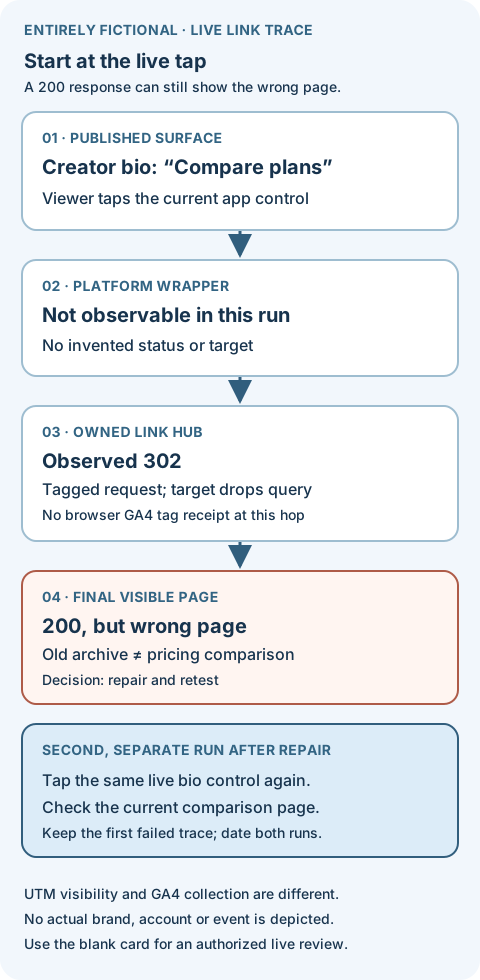
Entirely fictional live-link trace. A 200 response on the wrong page needs repair. Keep the first failure and the retest as separate dated receipts.
Illustrative worked example by Superdirector editorial team. Created 2026-10-29.
Compare the final page with the live promise
Read the creator's current spoken or written instruction next to the page reached by the tap. Record the final domain, page title or clear on-page identity, offer or product version, audience market and first available action. If the creator says “see the pricing comparison” but the live bio link now lands on an archived feature announcement, the link has a semantic defect even if every response is 200. If the promise is a download, booking or purchase, this trace checks that the viewer enters the *correct current route*. The prelaunch destination rehearsal explains the separate, deeper test of completing that task and its confirmation.
Look for an unexpected login requirement, expired offer, wrong locale, broken mobile rendering or a link hub that sends the viewer to a different campaign. Record what a viewer sees before entering private information. If the page's promise differs from the creator's live claim, the content owner may need to repair the destination, update a permitted caption or bio link, or correct the post's claim. Do not silently replace the destination with a new URL in your report; the published route is the object of this test.
The page may intentionally choose a different path by market or device. An honest result can be “verified for signed-out U.S. mobile web; Canadian in-app route unresolved.” That is more useful than a single green check with no context. When a link is owned by a third-party shortener or creator-controlled link hub, record who can change it and the current target rather than assuming the brand controls every hop.
Separate link proof from analytics proof
The browser trace establishes a dated route and page observation. If the brand has authorized access to the destination's analytics property, check whether a controlled test device produced the expected owned landing event or page_view under the correct web stream. Google's page-view guidance says a page_view can be sent when a page loads and that page_location defaults to the page URL, subject to implementation. Its DebugView guide says debug-enabled events and parameters can be inspected for one device; client privacy controls or ungranted consent can prevent visibility. Note the property, stream, device, time and observed event or say not checked.
A DebugView event is not a campaign conversion, and its responsive attribution view is limited. Google itself directs users to acquisition reports for more accurate attribution interpretation. A page_location value may also be configured or redacted; it is not an infallible copy of every pre-tag redirect. Record the exact event and parameter actually seen, then distinguish “page loaded,” “event collected,” and “session attributed to creator source.” If no analytics access exists, the link can still be judged for visible destination correctness, while tracking collection remains unresolved.
Handle test traffic honestly. Google documents that an active developer-traffic exclusion filter can keep debug-mode events out of ordinary reports; a filter in Testing state merely labels them. Debug mode alone is not proof of exclusion, and an active exclusion is a permanent data-processing choice. Confirm the existing property rule with its owner before claiming a test visit was removed from campaign totals. Google's developer-traffic filter guidance.
Decide, repair and schedule a recheck
Write one decision for the exact surface and checked context. Verified under stated conditions means the published tap reached the intended current landing page and any claimed tracking receipt was actually observed. It does not certify all users, final task completion or sales. Repair and retest names a concrete issue—wrong page, broken hop, parameter loss before collection, stale offer or unsupported locale—and an owner. Unresolved is appropriate when a wrapper hop is hidden and its effect cannot be checked, the target requires unavailable access, consent blocks analytics visibility, or the team cannot establish whether parameters were collected. Do not convert “unresolved” to zero results.
For a repair, preserve the failing trace and open a new trace after the link owner changes the rule, page or creator surface. Keep the old and new targets separate. If the platform does not permit editing the relevant posted link, the content owner must choose an authorized correction visible to viewers; do not assume a comment or a changed agency spreadsheet alters a live button. Recheck the *actual public tap* after the change, not merely the destination URL in isolation.
Trigger a fresh observation when the creator changes a bio link, the link hub or shortener changes its target, the offer/page expires, a destination owner deploys a redirect, or a paid placement starts using a separate CTA. At the client-report cutoff, reopen the exact surface and state its then-current status. This is a small event-driven check, not a claim that a one-time trace monitors the link forever.
Fictional case: a live bio link drifts after publication
Entirely fictional exercise. “OrbitNote” is a made-up software brand, the domains ending in .example are placeholders, and all timestamps, statuses and analytics states below are invented to teach the method. No Superdirector creator account, live post, GA4 property, click or signup was checked.
A fictional creator's published video says, “The pricing comparison is in my bio.” The team's approved route was a link hub entry to the current comparison page. In the imagined first read at 2026-10-29 09:40 America/Los_Angeles, a reviewer opens the creator's public profile in the platform app and taps the visible Compare plans link. The platform's internal wrapper is not exposed to this reviewer, so its hop is recorded not observable. The first URL the browser shows is https://links.orbitnote.example/maya?utm_source=instagram&utm_medium=creator&utm_campaign=fall-demo. The owned link hub returns an imagined 302 to https://orbitnote.example/archive, without the query string. The final page responds 200 but is an old feature archive, not the pricing comparison. The reviewer can verify the wrong destination. Nothing in this trace shows a tagged page_view before the query disappears; the observed 302 alone does not establish one. Any separately implemented collection would need its own receipt.
The first decision is repair and retest. The link owner updates the fictional hub target to the current comparison page and preserves the agreed tags. At 10:30, the reviewer starts again from the *same live bio control*, not from a pasted new URL. In the imagined second run the hub's 302 points to https://orbitnote.example/compare?utm_source=instagram&utm_medium=creator&utm_campaign=fall-demo; the current page is visible under the checked U.S. mobile context. If a properly consented, debug-enabled test device then shows a page_view with the intended page_location in the owned property, the reviewer may record that narrower event receipt too. The example does not assert that such an event was actually collected, that GA4 assigned creator source, or that anyone bought a plan. If analytics was not checked, the decision remains “destination verified; collection unknown.”
The two runs belong on separate rows of the blank trace card or CSV, with the first failure retained. A link can be technically live, redirect cleanly and still miss the promise; repairing the shortener is only proven when the public tap reaches the current page.
Put the precise observation in the client report
A useful private report line is: “At [time and time zone], from [creator account/post and tappable surface], a [viewer context] tap reached [final page] through [observable hop references]. The live CTA promised [task/page]. The destination decision was [verified / repair / unresolved] because [evidence]. Expected tags were [present/changed/absent/not observable] at [named point]; owned analytics showed [exact event and property or not checked]. Recheck due [trigger/date].”
The bracketed fields are a template, not a campaign result. Do not call a page_view a lead, a UTM a sale, or a redirected browser tap a person-level attribution. The served Spark-to-GA4 traffic guide explains why platform clicks, loaded pages and GA4 sessions answer different questions. N10026-062 produces the dated live route receipt that should exist before such comparisons are interpreted.
Source and scope note
Official IETF HTTP semantics, Google Analytics campaign URL guidance, Google redirect troubleshooting, GA4 page-view documentation, DebugView guidance, and developer-traffic filter guidance were checked 2026-10-29. Their technical rules do not establish a Superdirector account connection or a real campaign result. The trace order, decisions and OrbitNote case are original editorial teaching material. The page does not claim that a shortener, in-app wrapper, site tag or analytics property behaved in any particular way for a real creator link.