How-To Guide
How do I run ads through a creator’s handle on Instagram, Facebook and TikTok?
Get the creator’s permission, match the contract window to the ad flight, and set up Meta partnership ads or TikTok Spark Ads step by step.
By the Superdirector editorial team. Meta developer, TikTok Ads and FTC pages read November 1, 2026; Instagram and Ads Manager click paths come from a practitioner guide and are labelled.
At a glance
How do I run ads through a creator’s handle on Instagram, Facebook and TikTok?
Three dates have to line up: the contract’s paid-use window, the platform permission, and your ad flight. Sign the paid window first. On Meta, the creator gives either a post-level ad code or an account-level permission that they accept in the Instagram app, and a professional account is required. On TikTok, the creator generates a Spark Ads code for a length they choose, and a code that ends before the ad does stops it with error 900010. Build the ad in your own ad account, expect a pending state until permission lands, and keep a register of every code, status and end date.
- Meta states no expiry for an ad code or permission on the pages we could read, and practitioner guides conflict, so record the issue date instead of assuming one.
- TikTok lets the creator pick 7, 30, 60 or 365 days; Content Suite requests default to 365.
- The FTC says a platform’s disclosure tool is not enough, so the creator’s post still needs its own disclosure.
Direct answer
Short answer: running ads through a creator’s handle needs three dates to line up. The contract’s paid-use window says how long you may use the content as an ad. Next comes the platform permission, which says how long the platform lets you. Last is the ad flight, the days you want the ad to run. Sign the window first, get the permission to cover the whole flight, and keep a register so the earliest end date is on a calendar.
This is for a brand or agency marketer who has a creator’s post that works and wants to put budget behind it from the creator’s handle. It covers the names, what the creator approves, the order of steps on Meta, TikTok’s code and its errors, contract terms, scaling, disclosure and a dated example.
What it does not do: we could not read any Meta Help Center or Instagram Help page, so the Instagram and Ads Manager menu paths here come from one practitioner guide and are labelled. Meta’s developer documentation is the official source we could read, and it states no expiry for an ad code or a permission.
When enlarged, scroll horizontally to read the diagram.
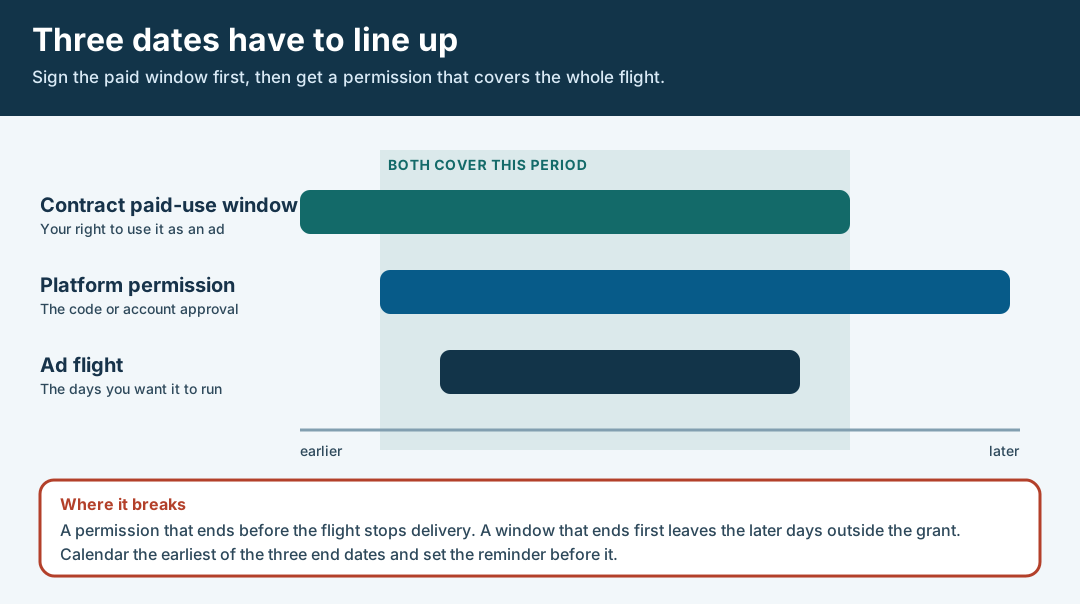
An original editorial diagram. The bars are not to scale and show no platform default.
Original visual by Superdirector editorial team. Creation date not recorded.
What partnership ads, whitelisting and Spark Ads mean
Whitelisting is vendor shorthand, and the Meta and TikTok pages we read use other names. Meta’s developer documentation defines partnership ads as ads that run from a creator’s or other partner’s handle on Facebook and Instagram. A February 2024 newsroom post from Meta uses partnership ads for what were previously called branded content ads. TikTok’s Spark Ads page describes a native format that uses organic TikTok posts as ads, and posts by other creators need their authorization.
| Term you will hear | Platform | What it means in practice |
|---|---|---|
| Whitelisting | Vendor shorthand | Running paid ads through a creator’s handle |
| Partnership ads | Meta (Facebook and Instagram) | Ads from a creator’s or partner’s handle; the current name |
| Branded content ads | Meta | The earlier name for partnership ads, per Meta’s February 2024 post |
| Spark Ads | TikTok | An organic post, with the creator’s authorization, run as an ad |
Do not assume one permission carries across platforms. A practitioner guide (Evolve Media) says a Meta permission covers Meta only, and that TikTok or website use needs separate written terms. That is a sensible reading of how the two systems are built, and it is a reason to write each platform into the contract.
Settle the paid window in the contract first
- Paid social named explicitly, with the platforms, the dates and the territories. Ad permission and usage rights are separate: a creator can approve the ad in the app while the contract never granted the right, or the right can lapse before the campaign ends.
- An end date for the right that is later than your flight, with the buffer you want written in.
- Edit rights. Whether you may cut, caption or add a call to action, because the post is the creator’s asset in the creator’s account.
- Music. One guide says music licensed for organic use only can block an ad; ask which tracks are cleared for paid use.
- Early termination. What happens to running ads if either side ends the agreement or revokes the permission.
- A renewal point. One guide suggests booking the renewal conversation about two weeks before expiry.
Several of these come from practitioner guides (Spark UGC, MediaNug, Evolve Media) and not from a platform or a regulator, so treat them as a checklist for your own counsel to review. For pricing the paid window, see the guides on choosing a paid usage term and usage rights fees.
Choose post-level or account-level permission on Meta
Meta’s documentation splits permission into two levels. Post-level permission covers one organic post, and it applies only when no account-level permission exists between you and the partner. Account-level permission covers the creator’s handle: the brand requests it, and it takes effect when the creator accepts the request in the Instagram app. Meta’s March 2025 developer post says creators or partners must have a professional account. The permission rules are on the pages for ads creation and account-level permissioning.
For a single post there is also an ad code. The creator generates a partnership ad code for media they own, and the code can be used to create ads in Ads Manager or through the Partnership Ads API. A creator can also delete the code. The page on ad codes says how to delete one and does not say what happens to ads already running on it.
| Route | Who starts it | What the creator does | Source |
|---|---|---|---|
| Post-level, ad code | The creator | Generates a code for the post and hands it to the brand | Meta developer docs |
| Account-level request | The brand | Accepts the request in the Instagram app | Meta developer docs |
| Same business | Not needed | Accounts owned by the same business can run partnership ads without permissions if one employee has ads access to both | Meta developer docs |
On the brand side, the API route needs a user with the ADS, CREATOR_MANAGEMENT or CREATOR_CONTENT role, which a business admin assigns in the People tab of Meta Business Suite. If your agency runs the ads, check the roles before the creator is waiting on you.
Check the account, then follow the Meta order
Meta’s documentation does not give one numbered path for a brand. This order is ours, built from what the pages state and from one practitioner guide for the click paths.
- Contract first. Name paid social, the dates, the territories, edit rights and music terms. A practitioner guide (Spark UGC) lists the same items.
- Check the account. Ask the creator for the account type. Meta says creators and partners must have a professional account.
- Pick the scope. One post with a code, or the whole handle with an account-level request.
- Exchange the permission. For a code, the creator generates it and you paste it into the ad; for an account-level request, you send it and the creator accepts in the app.
- Build the ad in your ad account. If you publish before permission exists, Meta publishes the ad in a pending delivery state, the creator receives a request, and the ad delivers once it is approved.
- Confirm delivery and log it. Record the code issue date, the permission status, the contract end and the post link in your register.
A third-party guide (Reshift Media, March 11, 2026) gives menu paths for both sides: the creator opens the post, then Partnership label & ads, adds the paid partnership label and turns on Get partnership ad code; the brand turns on the partnership ad toggle in Ads Manager and enters the ad code or post details. For an account-level request it points to a Partnership Ads Hub in Ads Manager and, for the creator, a Pending requests list under the profile menu. We could not confirm these labels on a Meta page, and Meta changes its menus, so use them as a map and trust the screen in front of you.
If the creator’s identity does not appear when you build the ad, check two things. The creator may not have granted the permission that lets you create ads with their identity, and a permission change can take a few minutes to show (one guide, Leadsie, says 10 to 15). Neither point is on a Meta page we could read.
Record how long approval lasts and what ends it
On Meta we cannot give a number. The developer pages we read record a permission status such as approved, revoked or pending and document revoking a permission and deleting a code, and none states an expiry period. Practitioner guides disagree: Evolve Media reports that one vendor says 60 days unless revoked and another gives none, and says it could not confirm either. Do not promise a client a validity period for a Meta code.
What you can do is make the unknown visible. Record the issue date of every code, ask the creator to confirm the permission is live before you build a campaign on it, and set your own review date. One guide (AdsSensor) advises a permission term at least 30 days longer than the campaign calendar, and says that a lapsed permission stops delivery and loses what the ad has learned. That is practitioner advice, but the buffer costs nothing on a contract.
On TikTok the length is explicit. The creator chooses it when generating the code. TikTok’s own error list names the three ways it goes wrong, described under the TikTok heading below.
Get the TikTok code with an end date past the flight
The creator opens the post’s three-dot menu, goes to Ad Settings, turns on the ad authorization toggle, taps Generate, picks 7, 30, 60 or 365 days, and copies the code to the advertiser. In Ads Manager the advertiser applies it under the Creative library, and can authorize up to 20 codes at a time. These steps come from TikTok’s Smart campaign help article, which is undated. Requests sent from TikTok Content Suite default to 365 days (TikTok help).
| What you see | What it means | What to do |
|---|---|---|
| Error 4025, authorization expired | The authorization ended | The creator renews it |
| Error 900010 | The authorization ends before the ad’s end time | The creator changes the authorization end date to cover the flight |
| auth_code_not_found | The code has been deleted | The creator makes a new code |
Those three are from TikTok’s page on Spark Ads code errors. Two more rules are on its Spark Ads page: each Ads Manager account can support up to 10,000 Spark Ads, and a video must be un-authorized as a Spark Ad before it can be deleted from the organic account. TikTok’s Smart campaign help article adds that a video code can be deleted only when all the ads using the video are deleted.
Who pays, and what you can measure
No platform page we read says who pays the creator. Because the ad runs from the brand’s own ad account, the media spend is the brand’s. The creator’s fee for the content and for the paid usage is a contract term, kept separate from the platform permission. Two other guides, usage rights fees and UGC price per video, cover how to read those lines.
On measurement, TikTok’s Spark Ads page says the views a boost earns are attributed to the organic post, so read the paid reporting separately from the post’s own count. The same page lists paid likes, paid followers, paid profile visits and paid clicks, with likes and followers counted over a 1-day window after a user sees the paid ad. TikTok’s Spark Ads FAQ suggests choosing posts that already have established organic likes and views. For Meta we did not read an official measurement page, so keep the ad account’s results separate from the creator’s organic numbers and label which is which in your report.
Calendar the end date and keep a register
The failure at scale is losing track of dates, not the ad format. Keep a register with one row per creator and post: platform, code or permission type, issue date, permission status, contract end, ad flight end, post link and the person who checks it. Review it weekly and sort by the earliest of the three end dates.
The platforms help in places. TikTok lets an advertiser authorize up to 20 codes at a time. Meta’s Content Discovery API lists partnership content, such as branded content, UGC, affiliate posts and collabs, for a brand’s Page or Instagram account, with a page size of at most 50. Neither one tracks your contract dates, so the register stays yours.
Disclosure still applies to a boosted creator post
The FTC’s endorsement Q&A says responsibility for disclosure rests with the influencer and the brand, not the platform, and that a company is ultimately responsible for what others do on its behalf. Its Disclosures 101 tells influencers not to assume a platform’s disclosure tool is good enough. For video, the Q&A says the disclosure should be made at least visually and that viewers are more likely to miss one at the end. We could not find a Meta page that ties the paid partnership label to FTC sufficiency for a boosted ad, so do not treat the label as the disclosure. See the guide on checking a creator’s disclosure. This page is not legal advice.
Walk through a fictional TikTok flight
Fictional exercise: the dates are invented, but the weekdays and day counts are computed. A brand wants a Spark Ads flight from Monday, November 9, 2026 to Sunday, December 6, 2026, which is 28 days with both ends counted, using a creator’s video. The creator generates the code on Monday, November 2, 2026. Which length covers the flight?
| Length chosen | Ends about | Covers the flight end, December 6? |
|---|---|---|
| 7 days | Mon, Nov 9, 2026 | No. It ends the day the flight starts. |
| 30 days | Wed, Dec 2, 2026 | No. Four days short, which is the error 900010 case. |
| 60 days | Fri, Jan 1, 2027 | Yes, with 26 days to spare. |
| 365 days | Tue, Nov 2, 2027 | Yes. |
The flight ends 34 days after the code is generated, so 30 days is not enough. If the contract adds a 30-day buffer after the campaign, as one practitioner guide advises, the permission has to reach at least Tuesday, January 5, 2027. That is 64 days from the grant, so 60 days still falls four days short and 365 is the only listed option that fits. No page we read says whether a 30-day authorization ends on day 30 or day 31, or in which time zone, so treat the end dates as approximate and read the real one in Ads Manager.
The renewal reminder for the 30-day case, two weeks before a December 2 end, lands on Wednesday, November 18. On Meta the same order applies without a length to pick: contract with the paid window, professional accounts, permission or code, ad built, pending state cleared, delivery confirmed, register updated.
How this differs from nearby pages
This page is about getting and keeping the permission to run a creator’s post as an ad. Pricing the rights is covered in the guides on usage rights fees and UGC price per video, and measuring the click-through in UTM tracking for influencer campaigns. Keeping one ledger row per authorization is in log Spark authorization expiry per post, and ending an ad on time is in stop creator ads before the usage term ends. For the handoff checklist, see branded content on TikTok.
Limits of what we read. We could not read any Meta Help Center or Instagram Help page, TikTok’s authorization-code help page or its API documentation, so menu labels outside the TikTok article cited are unconfirmed, and no code was tested on a live account. A report that Meta made partnership ads mandatory for creator content in spring 2026 comes from secondary sources only, so we say nothing about it. Check the screen in front of you.