How-To Guide
How to record a TikTok Spark authorization code and its expiry against one creator post
Keep one ledger row per Spark authorization: the exact post, route, expiry as shown, ad end date, renewal ask date, and a new row when a code is replaced.
By the Superdirector editorial team. TikTok help pages reviewed October 30, 2026.
At a glance
How should a brand record a Spark Ads authorization code and its expiry against one creator post?
Keep one ledger row per authorization, naming one post and one advertiser account. Record the route, the period label, the start and the expiry exactly as the screen showed them, with a dated receipt and a private reference to the code instead of the code. Add your own planned ad end date, a renewal ask date with a reason and fixed check dates, and compare the ad end with the expiry. When a creator renews or a new code replaces an old one, close the old row with its last observed state and open a new one. The row proves a permission was shown for a window, not that an ad ran.
- One post and one advertiser account per row, with one named owner.
- Copy the expiry as shown; never edit it to fit the ad plan.
- A replacement code is a new row, and the code itself stays out of the ledger.
Direct answer
Short answer: keep one ledger row per Spark authorization, and let each row describe one exact post for one advertiser account. The row holds the route the permission came through, the period label and the expiry exactly as the platform screen showed them, a private reference to the code (never the code), the dates your own plan needs, and a status. When a creator renews, or a new code replaces an old one, you do not edit the old row. You close it with its last observed state and open a new row. The result is a record that can answer one question on any day: *does the permission we hold today cover the post and the dates this ad needs?*
This is written for an agency or brand marketer who has a creator’s TikTok post that a brand wants to run as a Spark Ad, or already runs. The decision is narrow: what to record about an authorization and when to ask for more time. It does not decide whether the creator agreed to paid use, what the usage term is, or whether the ad delivered. Those sit in other records, and the boundary section says which. For the handoff checklist, see branded content on TikTok.
Why a ledger and not a note in the campaign sheet? An authorization is a permission with its own end date, which the pages we read describe as chosen by the creator or set by a platform default, and which is not read from your contract. TikTok’s own error notification page lists “Authorization expired.” and “Authorization ends before the ad’s end time.” as separate messages, each with a suggested fix that starts with the creator. A row with a renewal ask date starts that conversation before the error, with an owner.
Name the one post and the one advertiser account
Start the row with identity, because everything later is compared with it. Write the post address, the creator’s handle, and the post ID if the screen shows one. Write the advertiser account that is meant to use the post: its name and its ID, not “our TikTok.” A row that names only the post, or only the advertiser, cannot be checked against what the ad screen shows.
Keep one post per row. TikTok’s Spark Ads creation guide says you can batch authorize up to 20 video codes at a time. That is a convenience for entering codes, and we treat it as twenty authorizations, not one fact. A period is chosen per post in the creator’s ad settings, so give each post its own row. If any route in your account grants permission for several posts at once, log only the posts the campaign selected, one row each.
Write the agreement term reference in its own cell, as a pointer to your contract record and not a copy of its words. The platform window and the contractual term are different clocks. If you want to compare them, the usage-term tracker guide is where the contract end is handled, and the paid-use guide covers the written change that comes before you ask for any code. This ledger starts after that decision. It does not make it.
Record the route, the period and the expiry as shown
Next, record how the permission arrived. TikTok’s help pages describe more than one route, and they are not interchangeable in what they tell you. In the Smart+ Spark Ads guide, the creator is told to “select the authorization duration (7, 30, 60, or 365 days)” in their ad settings, and the advertiser then enters the video code in Ads Manager under Tools, Creative library and Spark ads posts, using Apply for Authorization. The creation guide says the creator generates the code in the TikTok app from the video’s ad settings. That is the post-code route.
The Content Suite guide describes a different one. The advertiser clicks Request authorization on a video, and the page says all Spark authorization requests are defaulted to 365 days. A TikTok One page mentions Request authorization and Extend authorization actions for a specific video. A third route is the brand-partner tag: TikTok’s content disclosure page says tagging a brand partner lets you provide ads and anchors for Spark Ads usage by default for 60 days. We did not test those screens, so the ledger records what your screen showed on the day.
The pages also name different durations in different places: a list of four options on one, a 365-day default on another, a 60-day default on a third. We therefore do not state a single standard period on this page. Record the period label as displayed beside the post, then the start and expiry as displayed, each with a time zone, and a screen or receipt reference saying who captured it and when. If the screen shows a period but no end date, write “expiry not shown” in that cell. Do not compute one yourself; that records your arithmetic as the platform’s statement.
Treat the code itself like a credential. Do not paste it into the ledger, the card, a chat or a shared sheet that people outside the deal can open. Write a private reference (for example, where it is stored and who holds it) and keep the code in your password store or the ad platform. The blank assets deliberately have a reference field and no code field.
| Cell | What to write | Leave blank or write “not shown” when |
|---|---|---|
| Route | Post code, Content Suite or TikTok One request, account authorization, brand-partner tag, or other | You cannot tell how the permission arrived |
| Period label | The wording on the screen beside the post, copied as shown | The screen shows an end date only |
| Start and expiry | Dates and time zone, copied as shown | The screen shows neither; do not infer |
| Receipt reference | Who captured it, when, and where the capture is stored | Nothing was captured; take one now and date it today |
| Private code reference | Where the code is held, never the code | No code exists on this route |
When enlarged, scroll horizontally to read the diagram.
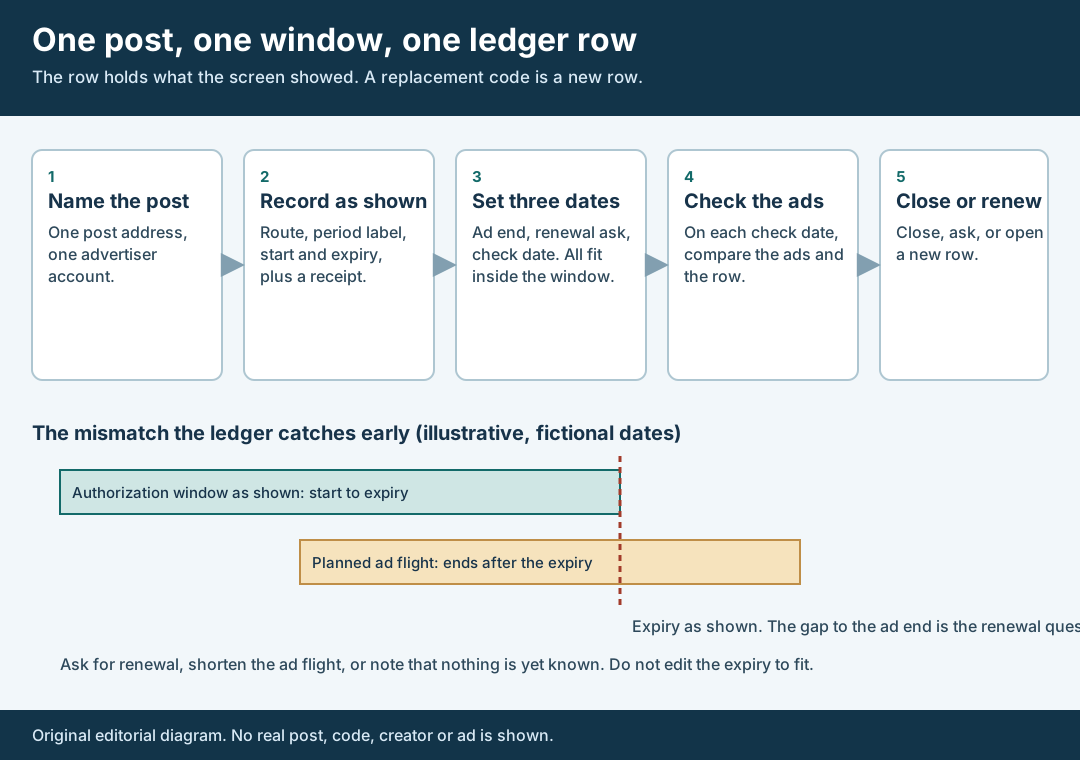
An original editorial map. The row holds what the screen showed; a replacement code is a new row.
Original visual by Superdirector editorial team. Creation date not recorded.
Set the dates that must fit inside the window
Now add the dates that your plan needs. They are yours, so they go in separate cells from the platform’s dates. There are three. The planned ad end date is the last day each ad that uses this post is meant to run. The renewal ask date is the day the named owner asks the creator for more time if the planned end date falls after the expiry. The check date is a fixed day on which someone compares the row with the ads. Decide them before the ad is configured.
Choosing the renewal ask date is a judgment, and this page gives no standard lead time. We found no source stating how far ahead a creator should be asked, and a creator may reply in a day or in a month. Consider how long your last request took and what happens if the answer is no, then write the date and the reason.
The error page gives you the comparison to make. Its “Authorization ends before the ad’s end time.” message is paired with a suggested fix of having the creator adjust the authorization. So the question for each row is simple: is the planned ad end on or before the expiry as shown? If yes, write “fits” and the date you compared. If no, there are three honest options. Ask the creator for a longer period, shorten the ad’s planned flight, or record that the answer is not yet known and keep the renewal ask date. What you should not do is change the expiry cell to match the ad. The ledger map shows the same mismatch as two bars, one window and one ad flight that runs past it.
Check the row against the ads on fixed dates
On each check date, open the ads that use the post and the place where the authorization is shown, and write down what you saw. Use the platform’s words as written. If an ad shows a status or error, copy the text. If everything looks normal, write “no error shown on this date” and nothing more. That sentence means what it says. It does not mean that the ad delivered, or that the authorization will last until the next check.
Know what the error pages say and what they leave out. The error page lists, besides the two authorization messages above, “The code has been deleted.” with the suggested fix to ask the creator to generate a new code, and “The post code is incorrect.” with the suggestion to check the code with the creator or get a newly generated one. It does not list a message for a revoked authorization, and the page we read does not say what a viewer sees or what an ad does at the moment an authorization ends. We make no claim about that. If your ad stops, or does not, record that as an observation from your own account with the date.
The creation guide says a video code can only be deleted when all the ads that use the video are deleted in Ads Manager. The Spark Ads page says a video must be un-authorized as a Spark Ad before it can be deleted from the organic account. Those two lines matter at the end of a deal. If the creator is asked to remove the post, the order is ads first, then un-authorize, then delete, and the ledger should show who did each step and when. If a deleted code is reported, make a new request and a new row.
Walk through a fictional ledger row
Fictional exercise: no real brand, creator, code, post or result was inspected. Brand A wants to run Creator B’s post about a reusable lunch box as a Spark Ad. The written paid-use decision is already recorded elsewhere. Row 1 names Creator B’s post, advertiser account “Brand A Main,” and an owner. The route is “post code.” On 3 November, Creator B sends a code. The owner enters it in Ads Manager, captures the screen beside the post and writes what it shows: a period label of “30 days” and an expiry of 3 December. These are invented values; the point is where they are written.
The campaign sheet plans two ads that use the post. One is planned to end 28 November, and the other, a later retargeting flight, to end 15 December. The owner compares each planned end with the expiry as shown. The first fits. The second ends twelve days after the expiry, so the row says “does not fit,” gives the date of the comparison, and sets a renewal ask date of 20 November with a reason: the creator’s last answer took five working days, and the retargeting flight should not be configured before it is settled. The owner does not edit the expiry to 15 December.
On the first check date, 14 November, the owner looks at both ads and writes “no error shown on this date.” On 20 November the owner asks Creator B, in writing, to extend the authorization for that one post to cover through 15 December, and records the ask with the time. Creator B replies the next day with a new code and says the earlier one is no longer needed. The owner closes Row 1 with its last observed state and “replaced by Row 2.” Row 2 gets the new code reference, the new period label and the expiry the screen now shows, a new receipt, and its own check date. The old row remains as history: what was observed, when, and what replaced it.
Close, renew or replace as a new row
A row ends in one of four ways. It can close at expiry with no renewal, because the plan ended on time. It can be renewed (the creator extends it, and you record a new observation), replaced (a new code or request, so a new row) or abandoned (the deal changed, the post was removed or the creator declined). In every case write a status and the last thing you saw, with a date.
The renewal case deserves care about wording. TikTok One’s page, as we read it, mentions an Extend authorization action, and the error page’s suggested fix for an expired authorization is to contact the creator to extend it. Neither page, in the text we could read, says what the extension does to the old code or whether an extended authorization keeps the same code. So do not assume. After a renewal, capture the screen again and record whether the code reference and the expiry changed. If the expiry moved and the code did not, update nothing in the old row except its status; add a new observation row or a dated note that links to it. When in doubt, a new row costs one line, and an overwritten row costs the evidence.
Keep the renewal request narrow and in writing: name the post, the advertiser account and the end date you need, and ask the creator to confirm what they did. Save the reply as written. If the request widens the use, such as a longer paid run than the written paid-use decision allowed, send it to the deal owner first, because an extension on the platform does not amend the agreement.
Do not report an authorization as results. A row says a permission was shown for a window, not that an ad ran. For organic and paid reporting, use the organic and paid results guide.
What this page does not decide
This page keeps a record of one platform permission. It does not decide whether a creator may be asked for paid use, what the paid term should be, or what the creator should be paid for it. The closest existing pages cover neighbouring decisions. The two-clock guide separates the public post, the authorization and the ad delivery, and treats the authorization as one dated event. This page takes that event and gives it its own row, its own renewal date and its own lifecycle. The usage-term tracker sets the stop date from the agreement and matches the platform end clocks to it; this page does not set a stop date and says only that the two clocks should be compared in separate cells. The paid-use guide comes first in a deal and records the commercial change. Here the commercial change is a pointer, not a subject.
Several things are unknown here and are not claimed. We did not read a TikTok page that states how a creator revokes an authorization, what an ad shows when its authorization ends, whether an extension keeps the same code, or how early a creator may extend one. Third-party guides make claims about those points, and we did not rely on them; one said the process had moved to a different portal with different durations, which we could not confirm in TikTok’s documentation. The cited pages also did not agree on one period, so we give none. Check the current screens in your own account and write down what they show.
Nothing here measures how often authorizations lapse before an ad ends, how long creators take to reply, or how a lapse affects results. Those numbers are not available to us and are not claimed. Search demand for this topic was not measured. The page is an editorial method for keeping a platform permission, a plan and an observation apart. It is not legal advice, and a question about the meaning of your agreement or the rights in a post belongs with your counsel.