How-To Guide
How do I track influencer links in GA4 so each creator and post shows up?
Tag one link per creator and placement, click-test it, add an Influencer channel group in GA4, and read creator results in a free-form exploration.
By the Superdirector editorial team. Google Analytics, YouTube, TikTok, Instagram and FTC pages read November 1, 2026; practitioner guides are labelled as such.
At a glance
How do I track influencer links in GA4 so each creator and post shows up?
Give every creator and every placement its own link, tagged with values you fix in advance: utm_source is the platform, utm_medium is influencer, utm_campaign is the campaign name and utm_content is the creator plus the placement. Keep every value lowercase, because GA4 treats Instagram and instagram as two values. Click each link before the post goes live and read the final address. In GA4, add a custom channel group with an Influencer channel, then read creator and post results by manual ad content in a free-form exploration, since the Traffic acquisition report does not list that dimension.
- Google advises one utm_source per platform, so the creator belongs in utm_content and not in utm_source.
- Practitioner guides say Instagram captions do not click, so the tagged link has to sit in a Story link sticker or a bio link.
- A discount code is a second path that survives a device switch; send it to GA4 in the purchase event’s coupon parameter.
Direct answer
Short answer: make one tagged link for every creator and every place a link will sit, using four fixed values. utm_source is the platform (instagram, tiktok, youtube). utm_medium is influencer. utm_campaign is the campaign name. utm_content carries the creator and the placement, for example maya-reels_story-sticker. Click the link yourself before the post goes live, set up an Influencer channel group in GA4, and read results by manual ad content.
This is for a brand or agency marketer who pays creators to post and wants GA4 to say which creator, and which post, sent visitors. It covers naming, where links can be clicked, testing, the channel group, reading the report, discount codes, what GA4 will credit, and why your numbers will not match a link tool or TikTok.
What it does not cover: we could not read Instagram’s or Meta’s Help Center, so what Instagram allows in captions comes from practitioner guides and is marked that way. We did not run a test in a live GA4 property. Menu paths are copied from Google’s help pages as read on November 1, 2026, and those pages carry no date. The click test in step four is the only proof you get for your own links.
Fix the naming rules before you make a link
Google’s help page on campaign URL parameters sets the rules that matter here. Always set utm_source, utm_medium and utm_campaign. Values are case sensitive, so utm_source=Instagram and utm_source=instagram report as two rows. A campaign name has to match exactly on every link, because Google’s own example is that SpringSale and Spring_Sale count as different campaigns. A parameter you leave out shows as (not set).
| Parameter | What to put | Why |
|---|---|---|
| utm_source | The platform: instagram, tiktok or youtube | Google advises one utm_source for each platform |
| utm_medium | influencer, on every creator link | Google advises one utm_medium per channel |
| utm_campaign | The campaign, spelled the same everywhere, such as winter-launch-2026 | A different spelling is a different campaign row |
| utm_content | Creator and placement, such as maya-reels_story-sticker | It fills the manual ad content dimension and leaves Source and Medium alone |
Write every value in lowercase and join words with hyphens. A space has to be URL encoded, and Google’s example is a plus sign. One practitioner guide (KaloIQ) reports that two encodings of a space can turn one campaign into two rows, so a hyphen avoids the question. Parameter order does not matter. utm_creative_format and utm_marketing_tactic are accepted in a URL, but Google says they are not currently reported in Google Analytics properties, so they cannot label creators.
Where the creator goes is the one place the guides disagree. Google says to use one utm_source for each platform. That is why this page puts the creator in utm_content: Session source / medium then reads instagram / influencer, tiktok / influencer and youtube / influencer, and the creator and post appear in manual ad content. InfluenceFlow and Influencer Marketing Hub put the handle, or a creator_ prefix, in utm_source so that one dimension lists every creator. That works for a creator list, but Source / Medium then has one row per creator and the by-platform view is gone. Pick one scheme before the first link goes out, because changing it mid-campaign splits the history.
Keep the sheet as the single place the links live: one row per link with creator, platform, placement, the full URL, the discount code, the planned post date, and who clicked it and when.
Make one link per creator and placement
A creator who posts twice needs two links. If both posts carry the same string, GA4 can tell you the creator worked but not which post did. KaloIQ suggests a version suffix in utm_content for repeat posts. Naming the placement does the same job, and you add -v2 only when the same placement repeats.
https://www.example-brand.com/products/glow-serum?utm_source=instagram&utm_medium=influencer&utm_campaign=winter-launch-2026&utm_content=maya-reels_story-stickerTwo cautions come from TikTok’s ads documentation. Everything after a # in a URL is omitted, so the UTM string has to come before any fragment. And TikTok warns that, in third-party analytics, a repeated UTM key can resolve to the last value, which matters if a creator’s own link tool adds a parameter you already set. TikTok’s UTM pages are written for TikTok Ads and say nothing about organic creator links, so use them for URL hygiene only. See TikTok’s UTM best practices.
When enlarged, scroll horizontally to read the diagram.
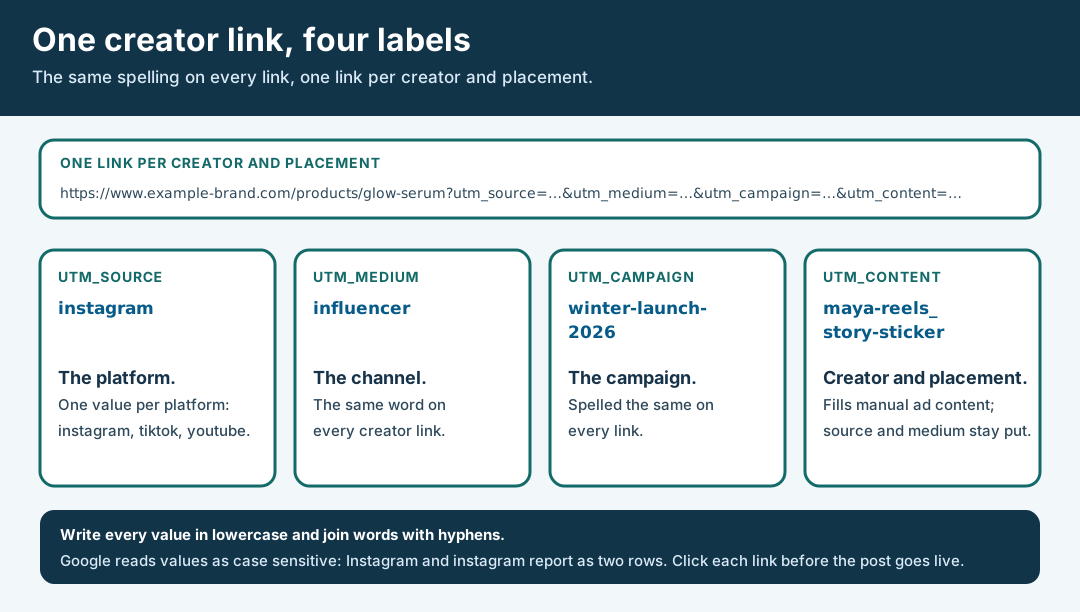
An original editorial diagram. It shows the four labels, not a required naming scheme.
Original visual by Superdirector editorial team. Creation date not recorded.
Put each link where a visitor can click it
A tagged URL counts only if someone can open it. Here is what we could verify and what we could not.
| Placement | Clickable? | Source |
|---|---|---|
| Instagram Story link sticker | Yes for most accounts. Instagram opened it to all accounts in October 2021, except new accounts and accounts that repeatedly break its Community Guidelines. | Instagram announcement, October 2021 |
| Instagram feed or Reel caption | Reported as not clickable | Practitioner guide (KaloIQ); not confirmed on an Instagram page |
| Bio link on Instagram or TikTok | Clickable when the account has a link field. TikTok’s eligibility rules for a profile link are unverified here. | Practitioner guides; TikTok’s support page did not load for us |
| YouTube Shorts description or comment | No | YouTube Help |
| YouTube long-form description | Ask the creator to confirm on their account | Not verified here |
Because the caption claim comes from practitioners, ask each creator which link surfaces their account actually has before you agree the placement, and put the answer in the sheet.
A bio link identifies whatever URL sits in the bio when the visitor clicks, not the post that sent them. If Maya posts a Reel on Saturday with that Reel’s link in her bio and swaps it back on Monday, visits through her bio link between the two moments carry the Reel’s tag. If she leaves one evergreen link up through three posts, GA4 cannot separate them. Ask the creator to swap the bio link on the day of the post, and log the time of each swap in the sheet. When a swap is not possible, give the post its own discount code and read the code as a second path.
Click every link before the post goes live
Google lists the usual ways a tagged link loses its tags: redirects, URL shorteners, links without UTM parameters, and ad blockers. Traffic that loses its source lands in (direct) / (none). Any link tool, short link or bio page is a redirect, so test the link the way a visitor will use it. This checklist is our advice, built on Google’s list.
- Open the link from the surface the creator will use (the sticker, the bio page or the short link), not the long URL you pasted into the sheet.
- Read the final address in the browser. All four UTM values should be there, in lowercase, and before any # fragment.
- Check that no key appears twice. A repeated key can resolve to the last value.
- Find the session in GA4 after the click. Session source / medium should read platform / influencer and the manual ad content should be your utm_content. If it reads (direct) / (none), a redirect or shortener dropped the tags, so fix it before the post goes live.
- Write who tested the link and when in the sheet.
One reporting trap: UTM values do not appear in the Landing page + query string or Page path + query string dimensions. Google says to look in Page location instead. If you search the wrong dimension you will think the tags are missing when they are not.
The practitioner advice to click-test the short link and read the final address agrees with this (KaloIQ). One more claim you will meet, that TikTok’s and Instagram’s in-app browsers strip UTM parameters, is not in any Google page we read and the guide that makes it also says the parameters travel in the URL, so test inside the app instead of trusting either version.
Make GA4 recognise an Influencer channel
GA4 sorts sessions into a default channel group by fixed rules, described on Google’s page on the default channel group. Organic Social matches a source on its list of social sites or one of its social mediums, and influencer is not among the mediums. Affiliates is keyed on the medium affiliate. Paid Social needs a social source and a paid-type medium. Anything that matches no rule is Unassigned. Channel definitions ignore case, they cannot be edited, and the UTM values themselves are still case sensitive.
You will read that utm_medium=influencer always lands in Unassigned. Google’s rules say otherwise for a source on its social list: instagram / influencer would match Organic Social through the source if instagram is on that list. We could not read Google’s list of social sources, so we do not say where each of your sources lands. Look at the Session default channel group for your own test click. Either way, the default group has no Influencer channel, which is why you add one.
- In Admin, under Data display, open Channel groups and create a custom group (a standard property can hold two).
- Add a channel named Influencer where Medium exactly matches influencer.
- Put Influencer above the other channels. Traffic goes to the first channel whose definition it matches.
- Apply the group to your reports. Google says custom channel groups can be applied to reports retroactively.
Do not borrow the medium affiliate to get a channel without setup. Google’s Affiliates channel is keyed on that exact medium, so creators would sit with your affiliate partners. The steps above come from Google’s help page on custom channel groups.
Read creator results in GA4
Open Reports, then Acquisition, then Traffic acquisition. It defaults to Session default channel group, and its dimensions describe the visitor’s most recent session. Switch the primary dimension to Session source / medium to see instagram / influencer, tiktok / influencer and the rest, or to your new Influencer channel to see all creators together. Google’s page on the Traffic acquisition report lists six cross-channel session dimensions, and none of them is manual ad content, which is where utm_content lands.
So the creator and post split needs an exploration. In Explore, choose Start a new exploration and then the Free form template. Add the session-scoped manual ad content dimension as rows, and add sessions and your key events as values. We did not confirm the dimension’s exact name in the live picker, so look for the session-scoped one. See Google’s page on free form explorations.
Check the report against your sheet. Every link you tested should appear with its utm_content. A link in the sheet that never shows up either was not posted, was not clickable where it sat, or lost its tags. If an agency reports these numbers to clients, compare social media reporting tools for agencies by networks, client access and delivery first.
Add a discount code as the second path
Links lose people. A visitor who taps a creator’s link and buys later on a laptop arrives as direct traffic, and GA4 credits direct only when the whole path is direct. A code typed at checkout survives a device switch, as Make Influence puts it (a practitioner claim, though it follows from where the code is entered).
Give each creator one code, or one code per placement if you want the placements apart. In the worked example below, Maya’s two placements share MAYA10, so redemptions cannot tell her Story from her Reel.
To see codes in GA4, send the code in the purchase event’s coupon parameter. Google’s ecommerce guide shows an event-level coupon on purchase events and requires a transaction_id on purchases and refunds. The code then fills the Order coupon dimension, which Google lists under Monetization reports. Ask whoever maintains your store tags whether the purchase event already carries the coupon. A coupon row can show recorded code use even when no matching tagged visit appears in the report. Check the order, code rules and available path evidence; these reports alone do not establish which post caused the order or why the visit is missing.
What GA4 will and will not credit
- Lookback. Google’s default window for most key events is 90 days, and you can pick 30 or 60. A change applies only going forward, so set it before launch. See Google’s page on attribution lookback windows.
- Direct visits. Every GA4 attribution model leaves direct visits out of credit unless the whole path is direct. A direct return inside the window is credited to the earlier referral under last non-direct click, as Google’s page on unwanted referrals explains.
- Models. Only data-driven, paid and organic last click, and Google-paid last click remain. First click, linear, time decay and position-based were retired in November 2023, so you cannot ask GA4 for first-touch influencer credit. See attribution models.
- Two reports, two answers. Session-scoped dimensions such as those in Traffic acquisition do not change with the reporting attribution model, and event-scoped ones do. Totals from two reports can differ for that reason alone.
If checkout runs on another domain, such as a hosted checkout, the checkout domain can show up as the referrer and take the credit from the creator. Google’s answer has two parts. Cross-domain measurement carries the same user and session IDs across domains in a _gl URL parameter, and the unwanted referrals list can hold up to 50 domains per data stream. Ask whoever set up GA4 to check both before launch. The pages are Google’s help on cross-domain measurement and unwanted referrals.
Why GA4, your link tool and TikTok disagree
A session is not a click. By default GA4 ends a session after 30 minutes of inactivity, so one visitor clicking twice can count once, and a click can happen without the page ever finishing loading. Add the losses Google lists, redirects, shorteners and ad blockers, and a link tool will usually report more clicks than GA4 reports sessions. TikTok’s own attribution uses its own windows and needs the TikTok Pixel on your site, so its totals will not equal GA4’s either. Compare direction, not totals.
| Number | Illustrative value | What it tells you |
|---|---|---|
| Clicks in the link tool | 1,240 | Every click, including ones that never loaded |
| GA4 sessions from the same links and dates | 806 | What survived the redirects and the session rules |
| Sessions divided by clicks | 65% (806 / 1,240) | Your own baseline for this link setup |
These figures are invented to show the arithmetic. We found no published benchmark for the ratio, so use it as your own baseline: track it from the first week and investigate when it moves, for example after someone adds a new redirect.
Walk through a fictional winter launch
Fictional exercise: the brand, creators and links are invented. A brand runs a winter launch with three creators. The weekdays are checked.
| Date | Creator and placement | Where the link sits | utm_content | Code |
|---|---|---|---|---|
| Mon, Nov 9, 2026 | maya.reels, Instagram Story | Link sticker | maya-reels_story-sticker | MAYA10 |
| Tue, Nov 10, 2026 | jonas.tests, TikTok video | Bio link | jonas-tests_bio-video1 | JONAS10 |
| Thu, Nov 12, 2026 | ana.reviews, YouTube video | Description | ana-reviews_desc-video1 | ANA10 |
| Sat, Nov 14, 2026 | maya.reels, Instagram Reel | Bio link, swapped on the day | maya-reels_bio-reel2 | MAYA10 |
All four links share utm_medium=influencer and utm_campaign=winter-launch-2026, and each source is its platform. If every link survives, Session source / medium reads instagram / influencer, tiktok / influencer and youtube / influencer, and a free-form exploration by manual ad content separates the four posts. MAYA10 is shared by two placements, so if the brand needs her Story and Reel apart, only the links can do it.
The lookback arithmetic for the first link, clicked on Monday, November 9, 2026: with a 30-day setting, and counting that day as day 1, credit is available through Tuesday, December 8. With the 90-day default it runs to about Saturday, February 6, 2027. Google’s own example counts both the first and the last day of the window, so treat the last two days as a boundary and do not promise either to a client.
What tracking does not change
A tagged link or a code measures a post. It does not disclose anything. The FTC’s Disclosures 101 page says to disclose a financial, employment, personal or family relationship with a brand, and it does not mention tracked links or codes, so the creator’s post still needs its own disclosure. The disclosure review guide covers the caption and the video. This page is not legal advice.
How this differs from nearby pages
This page covers links to a website measured in GA4. If the link ends at an app store, measure creator traffic that ends at an app store page. If views are high and visits are low, diagnose creator views with few qualified visits. If the creator’s own screenshots disagree with yours, reconcile Instagram collab metrics. Once orders come in, reconcile coupon codes with link visits and compare GA4 sources with a creator click report cover the two reconciliations this page only sketches.
Limits of what we read. Google’s help pages carry no date and we did not run a test property. We could not read Instagram’s or Meta’s Help Center, TikTok’s profile-link page or Google’s list of social sources. Platform behaviour changes, so click-test your own links.