How-To Guide
Reconcile Instagram Collab metrics when creator and brand captures differ
Compare Instagram Collab metric captures by exact post, source, scope and cutoff. Keep creator, brand and paid observations distinct in a client report.
By the Superdirector editorial team. Official Meta sources reviewed October 29, 2026.
At a glance
How should an agency reconcile Instagram Collab metrics when creator and brand screenshots differ?
First verify that both refer to the same exact post. Retain each screenshot’s account, interface, metric label, content scope, date range or cutoff, and capture time. Select a value for the client report only when it answers the declared question under comparable conditions. Otherwise show the sources separately and mark the unresolved comparison.
- Join captures on an exact organic post permalink or media ID; two screenshots are not automatically additive.
- Keep source account, interface, metric label and unit, content scope, window and capture time with each observation.
- Report one supported reading for a defined cutoff, and leave mismatched or missing evidence unresolved.
An Instagram Collab can appear on a creator’s profile and a brand’s profile after the invitation is accepted. A creator’s post screenshot and a brand’s account overview may show numbers that look related even though the captures cover different content and different dates. Start with the exact post identity, keep every metric observation with its source and window, and choose the report row only after those fields match.
This guide begins *after* a Collab has been published and its exact link is known. It does not explain how to send or accept an invitation, verify which account originally published it, or promise that a collaborator can see the same private Insights as the author. Use the original observation-join diagram, blank capture card and CSV register to keep a defensible client-report decision. The assets contain no real campaign numbers.
Direct answer: one metric question, separate observations
Do not add a creator-side capture and a brand-side capture simply because the Collab is visible on two profiles. Meta describes Collabs as coauthored feed posts, carousels or reels that appear on each accepted collaborator’s profile grid. That makes the exact post permalink or media ID the useful join key for the metric captures. The rule to keep observations separate is our reporting method, not a claim that Meta produces a particular combined Insights screen. Meta’s Collabs announcement establishes the multiple-profile appearance.
Keep metric captures as separate observations. Each needs its exact source account and interface, post identifier, metric label and unit, content scope, date window or cumulative cutoff, capture time with time zone, and private evidence reference. Only compare or select values that answer the same question. If the source hides a field or the views disagree without a known reason, write unresolved rather than turning a missing value into zero or adding the screenshots together.
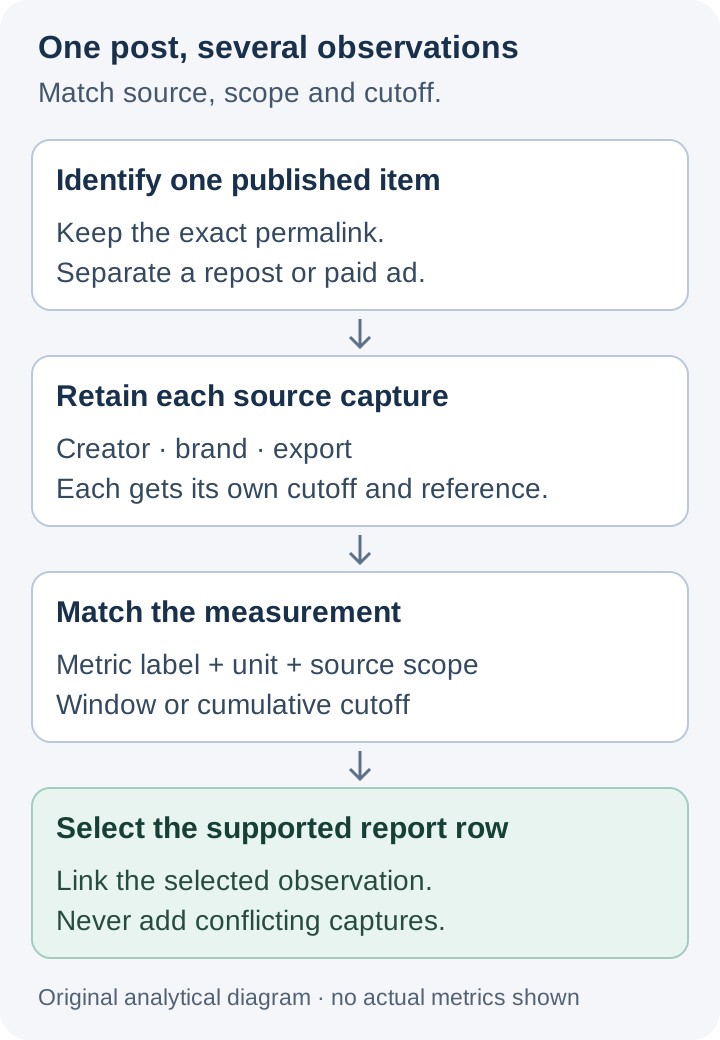
One Collab item can have several captures. Join them by exact post identity and compare scope and time before reporting. Original diagram; no performance data.
Original visual by Superdirector editorial team. Created 2026-10-29.
Pin the exact Collab item before opening Insights
Take the already checked delivery receipt as an input. Use its public post permalink or platform media ID as the metric item key. Confirm whether the creator-side and brand-side captures refer to that same item. If they show different links or IDs, do not merge the readings; one may be a separate repost, another cut, or an ad-derived item. Resolve the relation before comparing numbers. Verifying acceptance, publisher origin and the agreed creator account belongs to the separate delivery check.
The Collab invitation itself is not a performance measurement. Meta says that after acceptance the content appears on each collaborator’s grid and can reach each audience. It does not, in that announcement, assign each collaborator a separate slice of reach, specify which account can see every private Insights field, or give an arithmetic rule for summing two screenshots. Keep those points unknown unless the actual permissioned report makes them clear. Meta’s product description.
In the metric register, distinguish at least three identities: the organic Collab post, any brand repost with its own permalink, and any paid ad created from or around the content. Each can have its own observations and reporting scope; sharing a creative file does not make their results interchangeable.
Capture the report source, not only the cropped number
A screenshot of a big number is weak evidence if the metric name, account, selected date range or content scope is cut off. Ask the creator for the smallest permissioned capture that includes those labels. A brand-side operator should make its own capture from the relevant authorized account or Meta Business Suite view and record the selected asset and date range. Keep screenshots private; the public worksheet is blank.
| Field to retain | Why it changes the interpretation |
|---|---|
| Exact post permalink or media ID | Joins observations to one organic item; distinguishes a repost or ad. |
| Source account and interface | Creator’s in-app post view, an available brand-side post view, Business Suite overview, export and ad report can have different scopes. |
| Metric label and unit | “Views,” “Interactions,” “Follows” and a count of accounts are not interchangeable. Copy the label shown rather than renaming it. |
| Content scope and filters | One post, a selected set of content, the whole account, or a paid campaign answer different questions. |
| Date range or cumulative cutoff | A 28-day account view is not automatically a post’s lifetime count. |
| Capture time and time zone | A later screenshot can reflect more elapsed time or changed reporting, even if the label looks the same. |
| Evidence reference and access limit | Makes the row auditable without putting a private screenshot or account credential in a public template. |
Meta’s Business Suite Insights overview explicitly focuses on the past 28 days, requires permission for the selected Facebook Page or Instagram account, and shows account-level Views, Interactions and Follows. That overview is useful context, but it is not an automatic substitute for a post-level Collab observation. Meta defines Views in that overview as times content was played or displayed; it does not make that account figure a creator-only or brand-only contribution to a specific Collab.
Match metric, scope and time before choosing a report row
Work through the captures in this order:
- Same item? Match the exact Collab permalink or media ID. If a screenshot does not identify the item, request a wider capture or leave its join unresolved.
- Same metric and unit? Preserve the displayed label. Do not treat likes, interactions, views, accounts reached and follows as synonyms.
- Same scope? A post-level observation, a 28-day account overview and a paid ad report remain separate even when they mention the same creative.
- Same window? Record the selected period or cumulative cutoff and the actual capture time. Two post screenshots days apart need not match. Do not subtract them to claim incremental growth unless they truly use the same cumulative metric, filters and item identity.
- Supported answer? Select the source-bound observation that answers the client’s declared report question at the agreed cutoff. Preserve another compatible but earlier capture as history. If the two readings conflict under apparently equal conditions, retain both and state the discrepancy instead of averaging them.
For example, a creator might supply a screenshot from the organic post’s Insights page, while a brand colleague supplies a Business Suite account overview with a past-28-days selector. Even if both display a word such as “Views,” the first is tied to one post and the second may cover the selected account’s content. The team should not add them, pick the larger one, or call the difference “brand lift.” It should request a comparable post-level observation if that would change the client report. This is an illustrative source-scope mismatch, not data from a real account.
Instagram and Meta reporting labels can change. Meta said in 2023 that it updated Reels Plays to include replays along with initial plays. That historical change is a practical reason to preserve the *exact label and capture date* instead of silently mapping an old screenshot onto today’s wording. It does not authorize converting a historic Plays value into a current Views value. Meta’s Reels insight update.
Keep organic Collab and paid delivery separate
A brand may later run a paid ad connected to the same creative. That does not make an Ads report another organic Collab post observation. Meta’s Business Suite ad-performance guide has its own selected account, ad status, platform filter, date range and paid metrics. If paid activity is in scope, give it a separate row keyed to the ad and its reporting window. Do not add a paid Views column to the organic post’s Views without an explicitly justified, nonoverlapping measurement definition; the default report should show them as separate lines.
Nor should a screenshot of post engagement be called a sale, attributed lead or unique person reached. The screenshot supports only the label, scope and time it actually shows. If the client asks for visits, signups or purchases, use the campaign’s owned destination measurement with its own limitations rather than inventing a conversion from Collab reactions.
Fictional report repair: two captures answer different questions
Entirely fictional teaching case, with no invented metric values. An agency’s draft report has two performance cells under one organic Collab permalink. The first cites a creator-supplied post-level capture. The second cites a brand colleague’s Business Suite account overview. The draft labels both “Collab Views” and proposes to add them.
The editor restores the source labels and windows. They retain the creator’s post-level capture as one observation at its stated cutoff. The brand overview stays in a separate account-context row because Meta’s documented overview covers its selected asset and past 28 days. The editor asks for a comparable post-level brand reading only if it would resolve a real client question; the article does not assume that the brand has the same private Insights access. The report says “organic Collab performance at [source and cutoff]” only when that source actually supports it. A missing comparable capture remains unknown.
The blank capture card records references to the two screenshots as separate observations with one explicit report decision. If the agency later observes a distinct repost or paid ad, it adds a new item or paid row with that exact identity. No real post, profile, API connection or campaign metric was measured for this example.
Put a precise evidence line in the client report
A usable line is: “For organic Collab [exact permalink/media ID], the reported [exact metric label and unit] for [post-level scope] came from [authorized source] for [range or cutoff], captured at [timestamp and time zone]. A second capture [agreed/conflicted/was not comparable] because [reason]. The report uses [selected observation or unknown] at [client cutoff].” The bracketed text is a template, not a completed campaign statement.
Keep the supporting captures in the authorized client system. The blank CSV has headers only; it gives every screenshot its own row and joins only on a verified item key. The visual observation-join diagram shows why two account views are not automatically two results.
The broader social media reporting guide can use this checked metric line alongside other campaign results. Preserve its source and cutoff when moving it into a client report.
Sources and scope
Official Meta Collabs product guidance, Business Suite Insights overview, Business Suite ad-performance guidance and Meta’s Reels insight update were reviewed October 29, 2026. The one-item join rule, capture fields, fictional report repair, diagram and blank worksheets are original editorial methods. The cited Meta pages do not establish that all Collab coauthors see identical private post insights or that a brand can attribute a share of reach to its own followers. This article claims neither and reports no real performance outcome.