How-To Guide
What makes a platform screenshot usable evidence in a client campaign report
Check owner permission, date range, filters, capture time and notices before a platform screenshot enters a client report, then caption only what it shows.
By the Superdirector editorial team. YouTube, Meta and TikTok help pages reviewed October 30, 2026.
At a glance
What makes a platform screenshot usable evidence in a client report?
A platform screenshot is usable evidence when a reader who was not there can tell whose account it shows, which content and metric, which dates and filters, when and by whom it was captured, and what it does not show. Get the account owner’s permission, capture the whole frame including the header and controls, keep a capture record beside the image, mask private items on a copy while keeping the original, and caption only what the frame displays. It proves what one screen showed at one moment, not that the number is final or caused by the campaign.
- Scope in the frame: account, metric, dates, filters, notices.
- Provenance beside it: who, when, where, which file.
- Caption as “displayed,” never “proves.”
Direct answer
Short answer: a platform screenshot is usable evidence in a client report when a reader who was not there can tell whose account it is, which content and metric it shows, which dates and filters applied, when and by whom it was captured, and what the image does not show. If any of those is missing, the image is decoration: it can illustrate a number but cannot support one. A screenshot proves one thing, that *one screen displayed these values to one person at one moment*. It does not prove the number is complete, final, caused by the campaign or comparable to another platform’s number.
This is for an agency analyst or account manager who holds a creator’s dashboard capture and must decide whether it can go into a client-facing report. The decision is narrow: does this image carry enough scope and provenance to support the sentence printed beside it? It does not choose the metric, report cells nobody could capture, or verify who published a post. Those have their own pages, linked in the boundary section.
The method has five moves, one per step below. Use the blank evidence card, the CSV register and the annotation frame. All three are blank or fictional teaching aids. The frame is our own drawing, not a platform screenshot, and no example here is a real campaign, creator or result.
Get permission and name the screen’s owner
Start with a question that has nothing to do with pixels: whose screen is this, and may it go to the client? TikTok’s information page on TikTok Analytics describes the reporting as aggregated and anonymous and says it is provided only regarding the account holder’s own account. That is a statement about whose data the screen shows, and a good reason to treat the account holder, usually the creator, as the party whose permission matters.
Write the owner’s name and handle on your evidence card, then record how permission was given: the creator’s sentence, the channel and the date. If the agreement already covers sharing performance screens with the client, quote the clause and its version, as the first-cut review guide does for a brief. If not, ask in writing before the image travels further.
We did not find, and do not claim, a platform rule on whether a creator may share a capture of their own analytics with a client. Platform terms, the agreement and local law can each bear on it, so check them for your platforms and markets. This page treats permission as a question you settle and record, not one the screenshot answers.
Also record the role that produced the screen: the creator from their own login, your analyst through delegated access, or someone retyping numbers from a call. Those are three kinds of evidence. A screen only described to you is not a screenshot; treat its number as unconfirmed.
Capture the whole frame, scope included
A tight crop of a chart is the commonest way a screenshot becomes useless, because the number that matters is often the one left out: the date range, a filter, the metric’s name or the small notice under the chart. Ask for the whole analytics view, header and controls included. If the screen scrolls, capture controls and figure in one frame, or take overlapping frames.
Check six zones, drawn in the annotation frame. The table says what to look for in each and why the platforms’ own help pages make it matter.
| Zone | What the frame must show | Why it matters | Source |
|---|---|---|---|
| 1. Account and content | Account name and the exact video or post | A channel-wide figure and a single-video figure can look alike | Editorial rule |
| 2. Metric name | The metric as the screen words it | Platforms define metrics differently | Editorial rule |
| 3. Dates and time zone | Start and end date, or the preset’s name, plus any time zone | A figure without its window supports no claim. Meta’s help says you pick a preset or custom start and end date; YouTube’s says the date is changed under Controls | Meta insights help; YouTube Advanced mode |
| 4. Filters and comparison | Every filter, breakdown and comparison that was on | A filter can narrow a number below the claim. YouTube’s help lists filters such as geography and subscription status and an Add comparison option; TikTok’s guide describes a compare toggle | YouTube Advanced mode; TikTok Ads Manager guide |
| 5. Notices on screen | Any limited-data or delay notice, as written | YouTube says limited data can appear as dashes, zeros or missing values | YouTube limited data |
| 6. Capture strip | Not in the image: who, when, how, file name | The platform view records none of it | Next step |
Two details deserve a closer look. A moving preset such as “last 28 days” describes a different window tomorrow, so a capture showing only a preset name needs its capture date and time recorded; fixed start and end dates are stronger for a campaign window. And the time zone: the Meta help page I read does not say which time zone its insight dates use, and neither does TikTok’s analytics information page. Record the capturer’s own time zone and write “time zone not stated by the screen” rather than guessing.
The frame also tells you when to refuse the image. A cropped date range, an unexpected filter or a missing metric label means ask for a recapture. That costs a day; an unscoped number in front of a client costs more.
When enlarged, scroll horizontally to read the diagram.
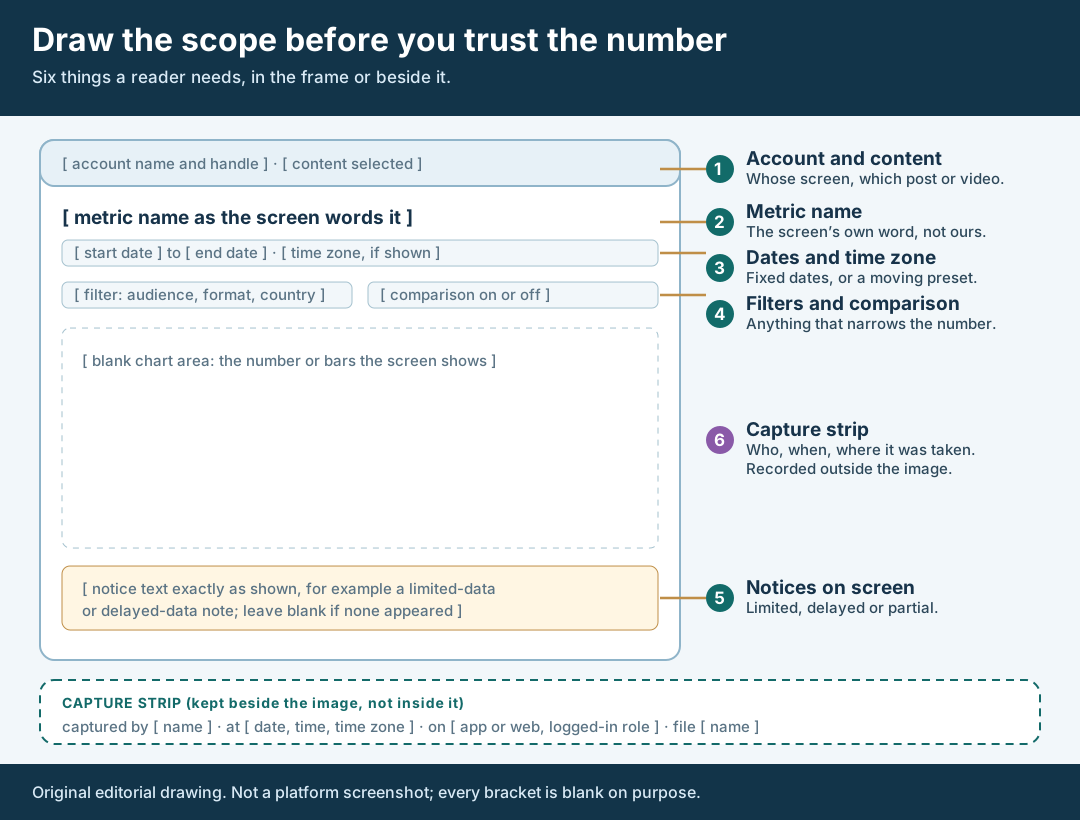
An original editorial drawing, not a platform screenshot. A capture supports a claim only when these six things are visible or recorded.
Original visual by Superdirector editorial team. Creation date not recorded.
Record provenance beside the image
Provenance never appears in the picture. It is a short record kept beside the image, in the same row of your CSV register: who captured it, when, on which surface, in what role and under what file name. Fill it when the file arrives, not weeks later.
Record the capture time with its time zone, because platform data can lag. Meta’s reference for Instagram media insights says the data used to calculate metrics can be delayed up to 48 hours, and that when requested data does not exist or is currently unavailable the API returns an empty data set instead of 0. That page describes the API, not the app screen, so the app may differ; the lesson is only that a very recent window may not be final and a blank is not a zero.
Record the surface. A post’s public counter, a creator’s in-app analytics screen and an ads dashboard are different sources, each with its own row. TikTok’s Ads Manager guide says you may need to choose an active campaign, ad group or ad to see a breakdown, so an ads figure depends on the level selected. Our guide to separating organic and paid results covers how those numbers relate.
Store the original file and, if your team can, a checksum. A checksum shows the file has not changed *since you computed it*; it cannot show the image was genuine, because a screenshot can be edited, staged or taken from the wrong account. That is why the record names the capturer and role, and why a weighty number deserves a second source. Where a platform offers an export, such as Export current view in YouTube’s Advanced mode or Export data in the TikTok Ads Manager guide, attach it and note the limits: YouTube says downloaded reports are limited to 500 rows. Meta’s help page says content-level export is available on certain Meta One plans, as a CSV, so do not assume every creator can supply one.
Mask private details, keep the original
Client reports travel further than their authors, so look for what the capture exposes beyond the number you need: other posts and their metrics, audience details, earnings or payout lines, contact details, other brands’ names. Decide what the client is entitled to see for this claim and mask the rest on a copy.
The rule: mask what is private, never what is scope. The date range, metric name, filters and notices must stay visible because they make the image evidence. If a private item shares a band with a scope item, retake the capture with the private item scrolled out of view instead of patching over the scope.
Keep three files, named so they cannot be mixed up: the original, untouched and stored where report authors cannot overwrite it; the masked copy, showing only what the client may see; and an annotated copy with arrows or numbered callouts, made from the masked one. Say in the register what you masked and which copy appears in the report. Never alter, retype, recolor or redraw a figure on any copy; if a number looks wrong, ask the owner or recapture.
Walk through a fictional capture
This example is invented to teach the decision. It is not a Superdirector campaign, customer result or platform screenshot, and contains no real figures. Harbor Lamp, a fictional lamp brand, commissioned one short video from a fictional creator, Creator A. The agency wants one report sentence: “the video had [number] views in its first week.” Creator A sends a cropped image of a chart.
The analyst checks the six zones. Zone 1 is half there: the title shows but the account name is cropped. Zone 2 is missing, because the metric label is outside the crop. Zone 3 shows a preset name with no dates, and the file arrived two weeks after posting. Zones 4 and 5 are not visible, and there is no capture record. The image supports no sentence about the first week.
The analyst asks Creator A in writing for permission to show the screen to Harbor Lamp and for a recapture with the header and controls and a fixed first-week range. The new capture shows the metric label, fixed dates, one audience filter and no notice. Now the problem the first image hid is visible: the filter narrows the figure to one audience group, so it is not all views. The sentence becomes “with the [audience group] filter on, the screen displayed [number] for [start] to [end],” and an unfiltered capture is requested as a separate row.
The analyst files the original, masks a creator-earnings line lower on the screen, adds numbered callouts matching the frame on a copy, and completes the capture strip. The report carries the masked, annotated copy beside a one-line caption. None of this predicts what a real creator’s screen would show, and none of its numbers is real.
Caption only what the frame supports
The caption is where a good capture can still mislead. Write it from the frame, not from what you hoped it showed. A workable pattern: *“On [capture date, time and zone], [capturer or role] captured [surface] for [account and content], showing [metric as worded] of [number as displayed] for [date range as displayed], with [filters or none].”* Then add one sentence on what the image does not show.
That second sentence is the honest part. Typical entries: the window may still have been updating; the screen showed a limited-data notice; the figure uses the platform’s own metric definition; the image covers only the filter named; paid and organic activity are not separated. YouTube’s limited-data page adds a reminder for tables: the total row can exceed the rows listed, because rows with unavailable data are dropped from the list but still counted in the total, and thresholds are not published. Do not add up visible rows and call the sum the total.
Keep the verbs modest. “The screen displayed” describes a screenshot; “proves,” “confirms” and “delivered” belong to other evidence, such as a verified post or a reconciled export. If the number carries weight, pair the image with an export or a live check through authorized access and name the pairing in the caption. Usually the body of the report cites each image by ID and the masked, annotated copies sit in an appendix; the social media report guide covers the report’s own structure.
What this page does not decide
This method judges one image as evidence for one sentence. It does not pick the report’s metrics. It does not say how to present cells with no capture; the missing analytics guide does. It does not verify who published a post; see the account-to-post proof guide. And it does not reconcile organic and paid figures, which the organic and paid results guide addresses.
Nothing here measures how often screenshots are wrong, how many a client wants or how an evidence format affects trust. Those figures are not available to us and are not claimed. The page is an editorial method that asks only that a report sentence not claim more than its image shows.
Sources and scope note
Sources read on October 30, 2026: Learn how to use Advanced mode for analytics reports (YouTube Help) for the date under Controls, filters, Add comparison, Export current view and the 500-row limit; Understand limited data in YouTube Analytics for the limited-data notice, dashes or zeros, unpublished thresholds and total-versus-visible rows; View account and content insights on Instagram with Meta One for preset and custom date ranges and the CSV export on certain plans; the Instagram media insights reference for the 48-hour delay and the empty-data-set statement; the TikTok Ads Manager performance guide for the compare toggle, the need to choose a campaign, ad group or ad for a breakdown, and Export data; and Information about TikTok Analytics for the aggregated, own-account description.
Not read: TikTok’s “How to use TikTok Analytics” support FAQ and Creator Academy analytics pages did not load their text for us, so this page says nothing about TikTok Studio’s date presets, download limits or time zone. We found no primary-source statement of the time zone behind Instagram’s in-app or TikTok’s analytics dates. Platform screens change, so confirm the view your creator actually sees. This is an editorial method, not legal advice or platform policy.