How-To Guide
What are the best influencer tracking tools for a brand that wants to measure creator posts?
Compare eight influencer tracking tools for post capture and sales reports, with dated vendor prices and checks for links, codes and survey data.
By the Superdirector editorial team. Vendor pages and Google and Shopify help pages read November 4, 2026.
At a glance
What are the best influencer tracking tools for a brand that wants to measure creator posts?
Start with the evidence your brand needs: a saved post, its views, visits to your site or paid orders associated with a creator. Buzzlytics is a candidate for public post metrics on an existing roster; Modash publishes Shopify attribution and plan prices; HypeAuditor names other store connections. Compare their capture and export rules before buying. This shortlist uses vendor pages read November 4, 2026; we did not test the products.
- A post tracker and a sales attribution tool answer different questions. Public views are not unique people, and an order credited to a link or code does not prove the creator caused the sale.
- For price visibility, Buzzlytics lists Starter at $29 monthly, Modash Essentials at $199 monthly billed yearly, and GRIN Free at $0 plus a 20% wallet-deposit fee. These have different limits and billing bases.
- Use the trial checklist below to check untagged posts, creator-provided Stories, timestamps and order exports. Survey answers remain self-reported evidence; combine them with orders only when you can match the records.
Direct answer
Short answer: choose a post tracker when your report needs proof of publication and post metrics; choose a tool with a store connection when it also needs creator-level order records. Buzzlytics publishes a $29 monthly brand plan for public metrics. Modash describes Shopify sales attribution at a published annual-billing price. HypeAuditor names Shopify, WooCommerce, Magento and custom storefront connections. None of those statements tells us how completely a product captures posts or how closely its order export matches your store. The checks below show what to verify.
Disclosure and scope: we sell Superdirector and have excluded it from this comparison. This page is about capturing creator posts and reading measurement evidence after publication. Our broader influencer marketing platforms comparison covers finding creators and running relationships. Vendor facts here come from each vendor's own pages read November 4, 2026; prices and availability can change. No subscription, dashboard or live campaign was tested.
Define the evidence your report needs
Bring the question from your reporting meeting to the buying decision. If the team only needs to archive a known roster's published posts, a store integration adds little to that task. If finance needs paid orders by creator, a view dashboard cannot supply the missing order records.
| Report needs | Evidence to ask for | Keep separate |
|---|---|---|
| Did the agreed post go live? | Post URL, creator identity, publication date and captured copy or media | A submitted URL alone does not show that software captured or measured it. |
| How did the post perform? | Metric name, platform, observation time and whether the figure is public or creator-provided | Views, impressions and unique reach are different units. Missing metrics are unknown, not zero. |
| Did people visit the store? | Tagged-link visits in analytics, with creator naming and a stated reporting window | Visits are not orders or unique buyers. |
| Which paid orders are associated with a creator? | Order IDs, payment/refund state and the link, code or other rule that assigned credit | Attributed orders do not establish incremental sales. |
| Do buyers remember this creator? | Survey question, answer count and matched order IDs where available | A response is not automatically a distinct paid order. |
For example, a post with 10,000 views need not have reached 10,000 different people. Preserve the platform's metric name instead of renaming every counter “reach.” Ask for creator-provided analytics when the metric you need is not public, and record how it was obtained.
Know what each tracking method can prove
There are five useful evidence methods below. The first measures a post; the others help associate visits, orders or remembered exposure with a creator. A vendor may bundle several methods, but they do not become interchangeable when they appear in one dashboard.
| Method | What the record shows | Main limitation | Examples on pages read |
|---|---|---|---|
| Creator-shared analytics | The metric and period in the creator's native analytics or uploaded evidence | Does not connect a post to a sale; availability depends on access and format. Buzzlytics says reach, saves and Stories generally need a connection or screenshots. | Creator-provided evidence; HypeAuditor describes personal links for Story uploads. |
| UTM link | Traffic arriving through a tagged URL in analytics | A buyer may search later or use another device. Tracking also depends on the analytics setup. | Google Analytics; Modash; Sprout Social |
| Promo code | Code use on recorded orders or discount redemptions | The code can circulate beyond the creator's audience, and some buyers never use it. | Modash; Aspire; HypeAuditor; Upfluence |
| Affiliate link | Credit assigned under the affiliate system's link and attribution rules | Credit depends on the window and model; a credited sale is not proof of extra demand. | Refersion; Modash annual Performance; Sprout Social |
| Post-purchase survey | What respondents say introduced them to the brand | Nonresponse, recall and question wording affect the answers; responses require a record match before becoming order evidence. | Fairing; KnoCommerce |
Google's campaign URL documentation explains that UTM parameters identify referring campaigns in acquisition reports and that values are case-sensitive. Agree on one creator naming convention before links go out. Our GA4 guide for influencer UTM tracking covers setup; this comparison concerns which software can use those records.
Shopify's discount documentation lists “Times used” as a discount filter and explains shareable discount links. Use the order record to check payment and refunds, rather than presenting a code count as completed sales. A redemption records code use; it does not tell you whether the buyer would have purchased anyway.
Standalone affiliate software is another buying option when orders matter more than collecting social posts. Refersion's pricing page, outside our eight-tool shortlist, describes unique links, coupon codes and manual credit. Its Launch card includes a subscription charge plus 3% of affiliate-driven sales. The retained page displayed two subscription figures without an unambiguous billing-term label, so confirm the term and total with Refersion. We did not establish a post-capture method from that page.
For self-reported evidence, Fairing shows a “How did you hear about us?” question with follow-ups for Instagram, an influencer and the influencer's name. Its pricing page lists a free tier for 0–200 monthly transactions, Core at $49 monthly for 201–500 and an Advanced Attribution add-on from $99 monthly. KnoCommerce lists monthly plans at $19, $119 and $299. Neither pricing page supplies an expected survey response rate for your store. Report the number who answered alongside the eligible transaction count; do not extrapolate to everyone who bought.
Reconcile orders without claiming incremental sales
Maintain separate counts for views, visits, paid orders and survey responses. An order can contain a creator code, receive link credit and have a survey response naming the same creator. Adding those totals counts the same order more than once. Even a deduplicated total measures recorded association, not how many sales the creator caused.
- Set the reporting window and the observation date. State the post dates, order window, data-as-of time and refund treatment. Later purchases may still arrive; the right follow-up period depends on your buying cycle. Upfluence gives the example of a buyer searching for a brand a week later, which illustrates a blind spot rather than a universal seven-day cutoff.
- Join like records. Match code-attributed and link-attributed paid order IDs, then add survey-linked order IDs only when the match is available and appropriate. Count each order once. Do not mix orders with visits, respondents or unique buyers.
- Leave unmatched evidence separate. If the survey export has only answer totals, report those totals alongside orders. Do not call the larger number a floor of true creator-driven sales.
- Keep causal claims out of this report. Equal before-and-after windows can describe a change, but seasonality, promotions and other channels can explain it. A tool's attributed revenue is not an incrementality experiment.
Invented reconciliation example, not a campaign result: a creator's code appears on 12 distinct paid orders, nine survey responses name that creator, and the tagged link records 40 visits. With no order match for the survey, report those three figures separately. If you can verify that the nine responses belong to nine distinct paid orders and six of those order IDs are already in the code set, the union is 12 + 9 − 6 = 15 associated paid orders. The 40 visits still remain a traffic metric. The 15 orders are neither necessarily 15 unique buyers nor 15 incremental sales.
Upfluence explicitly warns that codes and links can miss buyers who later search for the brand, and calls the measured result a floor. That is the vendor's framing. It does not justify a numerical lower bound for creator-caused sales: codes may spread, attribution rules assign credit, and survey recall is imperfect. Keep the narrower label that your actual records support.
Build a shortlist for your reporting need
| Tool | Reporting need | Price as published | How it finds posts | Links or codes | Sales tied to creator |
|---|---|---|---|---|---|
| Buzzlytics | Counting public views on creators you already have | Starter $29 a month ($276 billed yearly), Growth $79, Scale $199 | Creator handle or post link, no creator login | None; says it does no link attribution | No |
| Modash | Shopify brands that want posts and codes, with payouts and affiliates on annual Performance | Essentials $199 a month billed yearly ($2,388); Performance $499 billed yearly ($5,988); Enterprise from $14,700 a year | Tags, mentions, keywords, or all content | UTM links, QR codes, promo codes | Yes, through Shopify |
| Upfluence | Stores that want revenue by creator and fixed fees | Custom quote, no figure on its pages | Mention and hashtag listening, per its analytics page | Promo codes, affiliate links, UTMs; affiliation and discount on Scale Programs and above | Yes, on Scale Programs and above |
| GRIN | Roster post tracking with a free plan and wallet fees | $0 plus 20% of wallet deposits; Starter $200 plus 10% | Posts from program creators, found automatically | Not stated on the pages we read | Not stated |
| HypeAuditor | Tag-and-mention capture plus store orders | No plan price; demo, with free media and campaign tools | Mentions, hashtags or keywords; creator uploads for Stories | Creator-specific promo codes | Yes, through a connected store |
These are candidate fits based on published descriptions, not rankings from product tests. “Not stated” means the reviewed pages did not establish the detail; it is not a feature-absence claim. Check the exact platform, format, store integration and plan you need. Aspire, Sprout Social and CreatorIQ follow in a separate section because their reviewed pages leave more of this buying checklist to a demo.
Buzzlytics: counting public views on creators you already have
Buzzlytics suits an agency or small brand team that already has its creators and needs post views in a client report. Its own guide says you paste a creator's public handle or a post link, or send creators a submission link, and that no creator has to log in. It names eight platforms: TikTok, Instagram Reels, YouTube Shorts, X, Snapchat, Facebook, Threads and Bluesky. The guide and the Buzzlytics home page both say you pick a refresh per dashboard, from hourly to weekly.
What it measures. Its guide describes public metrics and says it does no sales or link attribution, does not track Stories and does not send creator payments. The home page clarifies that payout features calculate and export reports rather than sending money. Its discovery wording is broader than the guide's “not for finding creators” description, so ask about discovery if it matters to you. For this shortlist, the supported use is measuring an existing roster's public posts. The guide says private metrics such as reach and saves generally require creator access or screenshots; we did not verify native Instagram or TikTok permissions.
Price and limit. The pricing page lists Starter at $29 monthly or $276 paid yearly, with 100 monthly unlocks and one seat; Growth at $79 monthly with three seats; Scale at $199 monthly with 25 seats. One unlock opens a new profile or refreshes a tracked one, so 100 unlocks is not the same allowance as 100 creators refreshed without limit. The guide also describes a $9 Creator plan for tracking one's own accounts; it is not the brand-team offer used here. Compare the $29 monthly term separately from Modash's annual commitment.
Modash: a Shopify store that wants posts, codes and payouts
Modash is a candidate for a Shopify store that needs content and sales records in one product. Its pricing page describes a sponsored-content collector using tags, mentions or keywords, plus an all-content collector for posts without those markers. Its own tracking guide, published October 13, 2025, explains the missed-tag case and disclosure alerts. The pricing page uses “real-time” language for content analytics; that is a marketing description, not a latency we measured. Ask which formats the all-content option captures on your plan.
What it attributes. The pricing page describes Shopify discount-code and tracking-link attribution, automatic UTM links, QR codes or promo codes, and manually logged creator sales. Treat manually entered sales as a different evidence source in an export. If you use another storefront, ask how its order records would reach Modash; the attribution workflow on this page describes Shopify.
Price. Essentials is $199 monthly billed yearly, or $2,388 for twelve months by multiplication, with two team members and content from 100 tracked creators. Performance is $499 monthly billed yearly, or $5,988, with five team members and 250 tracked creators. Enterprise starts at $14,700 yearly through sales. Those are the annual-billing figures on the pricing page, not month-to-month quotes.
Payouts and affiliates. The Performance card lists Payments with a 0% fee up to $10K a year, a limit the card says covers payments and affiliates combined, with 5% above it; the FAQ states the same allowance for Performance Annual. Affiliate management is on Performance Annual and Enterprise plans only. So affiliate links need annual Performance or Enterprise, payouts are listed on Performance, and the fee-free allowance is quoted for the annual plan.
Upfluence: revenue by creator, with fees that do not grow with sales
Upfluence suits an online store that wants a sales dashboard by creator and a platform fee that is not a share of creator-driven sales. The analytics page says the platform tracks every post, every engagement and every sale, and tells brands to use its integrated social listening to monitor branded mentions and hashtags and track post-level engagement. The plan grid lists a Social listening Stream on Scale Programs and Auto-pilot, not on Find Creators. We count that as mention and hashtag capture; the pages we read do not say how it finds a post with neither.
What it attributes. The analytics page tells brands to start by assigning unique promo codes, affiliate links or UTM parameters to each influencer, then map each sale to a code or link. That is advice to the brand, not a statement that the tool makes them. On the plan grid, Affiliation and discount and the sales analytics dashboard are marked unavailable on Find Creators and available on Scale Programs and Auto-pilot.
Its stated blind spot. The analytics page says links and codes miss some buyers who later search for the brand without clicking a creator link. It suggests mention tracking and post-purchase surveys as additional evidence. Those can add context, but they do not automatically turn missing attribution into a measured sale; the reconciliation section above explains how to keep the units straight.
Price and commitment. The pricing FAQ says pricing is modular and custom-quoted, its platform fee is fixed rather than a percentage of creator-driven sales, and the minimum contract is 12 months. Ask for the cost of the plan containing the sales dashboard and social listening, not a discovery-only quote.
GRIN: a gifting or affiliate program that starts free
GRIN is a candidate for a brand that wants roster tracking alongside gifting or affiliate operations and accepts wallet-deposit fees. Its pricing page says it picks up posts by creators in a program without manual entry and reports impressions and engagement. That description establishes the program-roster use case; it does not establish coverage of every unregistered account mentioning a brand.
What it attributes. The pricing page lists a Shopify integration and affiliate commissions on every plan. In the text we read, it names no per-creator links, codes or sales reports, so ask GRIN how a sale is tied to a creator before you rely on it. Two GRIN pages also differ: the pricing page lists social listening under "On the roadmap. Not available yet," while a separate GRIN page describes real-time mention tracking of metrics, hashtags and posts. We did not check which is current.
Price. The pricing page lists Free at $0 monthly plus 20% of wallet deposits; Starter at $200 plus 10%; Growth at $500 plus 7%; and Scale at $1,500 plus 5%. To compare these platform charges, use plan fee + wallet deposit × deposit-fee rate. Our arithmetic examples: on a $500 monthly deposit, Free adds $100 and Starter $250; on $2,000, both add $400; on $5,000, Free adds $1,000 and Starter $700. These figures exclude the deposited principal used to pay creators and any other processing charges. The $2,000 break-even also ignores differences in plan limits, which still matter.
HypeAuditor: tag-and-mention capture plus store orders
HypeAuditor is a candidate for tag-and-mention capture with a connected store. Its home page says it tracks Instagram, TikTok and YouTube posts using selected hashtags, mentions or keywords, can collect posts published up to 90 days before campaign setup, and lets creators upload Instagram Stories through personal links. Distinguish those uploads from automatic capture in a trial. Ask how an untagged post is handled; the described marker-based workflow does not answer that question.
What it attributes. The home page says an e-commerce brand can connect Shopify, WooCommerce, Magento or a custom storefront to track clicks, orders and revenue attributed to each creator, and that it can generate creator-specific promo codes and calculate commissions from tracked sales.
Price. The pricing page offers a demo and free media plans, campaign management and demo versions of other features. It does not list a numeric plan price. Confirm the connected-store and content-capture features in the quote.
Aspire, Sprout Social and CreatorIQ: vendors that sell by demo
The following reviewed pages describe relevant capabilities but leave numeric influencer-plan pricing to a demo or sales conversation.
Aspire says it generates unique tracking links for every creator and campaign, distributes promo codes that tie back to creator performance, and has a Convert feature that follows every post from click to checkout, with a Sales Dashboard connecting revenue data to creator activity. Its home page names a Content Hub and a Social Dashboard that shows which posts, creators and formats drive the most value, but not how a post is captured. It shows a Book a Demo button and no price.
Sprout Social's influencer page says its attribution connects creator content to revenue with affiliate links, UTMs or pixels, and its pricing page repeats that it can track conversions from influencer content with UTMs and pixels. That page lists "Pay creator fees," notes that no Sprout plan is required and offers a demo. Sprout's social plans on the same page are priced per seat for the social suite, and we do not treat those as the influencer price. We found no statement of how it finds posts.
CreatorIQ explicitly positions itself as enterprise infrastructure and addresses operations spanning multiple brands, markets or teams. Its home page describes an analytics agent using a brand's own campaign data and hundreds of metrics, and offers a demo. That supports an enterprise evaluation candidate; it does not establish post-capture mechanics, per-creator links or codes, or pricing from this page. Ask to see the exact reporting workflow instead of treating “enterprise” as evidence of accuracy.
Narrow the candidates with your actual constraints
- Existing roster, public metrics for a client report: evaluate Buzzlytics against a set of known posts. Its $29 monthly plan is a useful price reference, but unlock consumption can change the cost of frequent refreshes.
- Shopify order reports plus content: evaluate Modash, then compare Upfluence's sales-dashboard plan and Aspire's stated link/code workflow. Ask each for an order export with the attribution rule visible.
- WooCommerce, Magento or a custom storefront: HypeAuditor explicitly names these connections. Verify the specific integration and fields your store needs; a logo or platform name does not prove your order sync.
- Gifting with wallet payments: compare GRIN's deposit fee against your likely funding amount and ask how creator-level order credit is exported.
- A social-suite purchasing process: Sprout describes affiliate links, UTMs and pixels. Its influencer offering does not require a Sprout social plan, so do not substitute the suite's per-seat price for a quote.
- Several brands or markets: CreatorIQ's positioning warrants a demo if shared reporting and governance are the buying constraint. It still needs the same capture and reconciliation checks.
- No new subscription yet: keep known post URLs, obtain needed native metrics, use consistent creator links and codes, and add a survey only if you can report its responses accurately. Our influencer marketing platform comparison covers published pricing and fit for different team sizes.
Plan limits use different units. Buzzlytics Starter has 100 monthly unlocks; Modash Essentials covers content from 100 tracked creators; GRIN adds fees to wallet deposits. Price a realistic roster and refresh pattern rather than treating all three “100” or dollar figures as equivalent capacity.
Test post capture and order exports before buying
This is our suggested acceptance exercise, not a test we ran. Bring a small set of posts you are entitled to review and several owned order records to the vendor trial or demo. Decide what counts as a satisfactory result for your reporting task.
| Check | What to record | What a discrepancy means |
|---|---|---|
| Known tagged and untagged posts | Post URL, platform/format, publication time, capture method and captured-at time | A missing post is a capture question. Ask whether the marker, format, date or plan caused the gap. |
| Public and creator-provided metrics | Exact metric name, source, metric-updated-at time and observation window | Different refresh times or definitions can explain disagreement. A blank is not zero. |
| A creator-provided Story | Whether it was uploaded, connected or automatically collected; what evidence remains | An upload workflow has different creator effort and completeness from automatic collection. |
| Your store's paid and refunded orders | Order ID, creator credit, attribution rule/window, payment/refund state and export date | Check whether refunds reverse credit and whether two mechanisms credit the same order. |
| Reproducible report export | Rows you can reconcile to the selected posts and order IDs, with missing fields named | A dashboard total alone may not supply the audit trail your team needs. |
Ask how far back capture starts, what happens when a post becomes unavailable, and how long evidence and exports remain accessible after cancellation. A demo using your known records is stronger buying evidence than a list of supported platforms. Keep the vendor's answers and your observed gaps with the report; do not claim that this exercise establishes incremental revenue.
What we could not check
We did not buy, install or run these tools, so we cannot compare capture completeness, refresh speed, export quality or reconciliation accuracy. The reviewed Upfluence, HypeAuditor, Aspire, Sprout Social and CreatorIQ pages did not provide numeric influencer-plan prices. Native Instagram and TikTok analytics permissions were not verified here. GRIN's separate social-listening page and pricing roadmap disagree about availability. These are limits of this source review, not proof that a product lacks a feature. Recheck current plan terms and the workflow in your trial.
How we picked the eight and what the grid shows
We selected candidates from comparison pages cited in AI-search answers to this question on November 4, 2026, including Influencer Marketing Hub, Buzzlytics' guide, Modash's guide and Streamforge's analytics comparison. Several are vendor-published lists. We used them for candidate selection and page structure, then read the individual vendors' pages for their own prices and features. This article covers post capture and measurement, not discovery or outreach software.
The original grid records five narrow documentation checks: a described post-collection method, per-creator links or codes, creator-associated sales or conversions, a displayed numeric plan price, and an explicit product limitation. Filled dots mean the reviewed pages answered the check; empty dots mean the review did not establish it. Counts are not product scores: a demo-led site can answer fewer questions while offering a capable product. The grid cannot compare accuracy, reliability or value.
When enlarged, scroll horizontally to read the diagram.
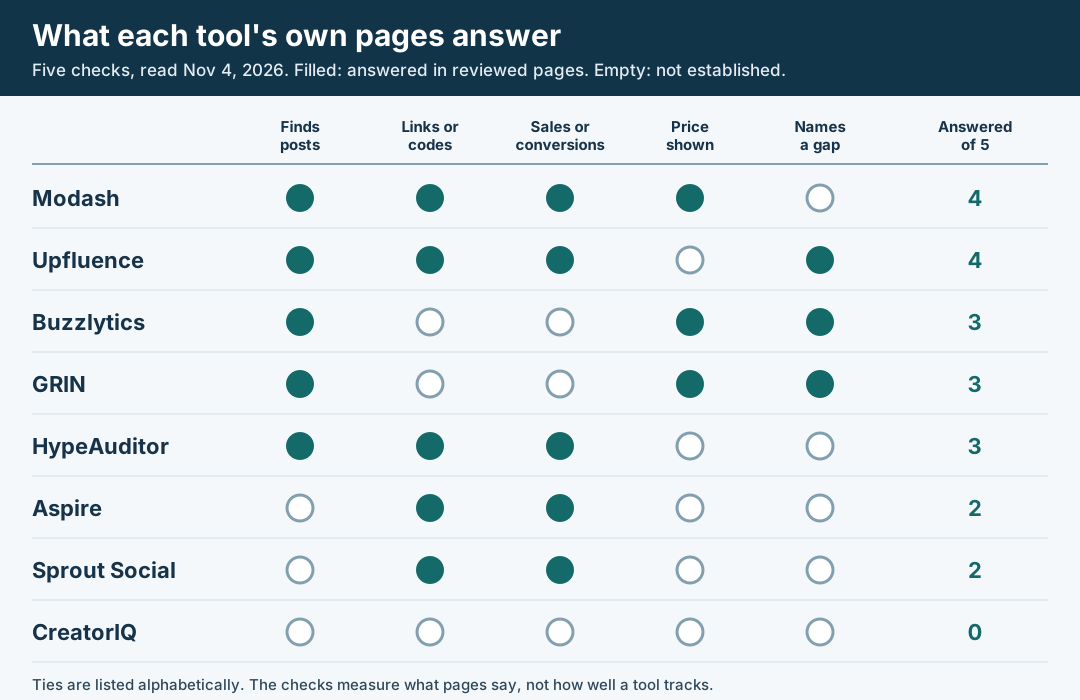
Original editorial diagram of five documentation checks on pages read November 4, 2026. Dots describe the source review, not tested capability or product quality.
Original visual by Superdirector editorial team. Creation date not recorded.