How-To Guide
Count one order once when it appears in both a code report and a link report
Merge a code report and a link report into one ledger row per order ID, so a shared order is counted once and each report's evidence stays attached.
By the Superdirector editorial team. Google Analytics and Shopify documentation reviewed October 30, 2026; transaction-ID guidance rechecked November 5, 2026.
At a glance
How can a team avoid counting one order twice across a code report and a link report?
Make the order ID the key and build a ledger with one row per order. Write the ID in the same format in both reports, collapse repeat rows for the same ID, join on the key and keep a row count and a yes or no from each report. Count distinct keys, not rows, and take order value from the order system only. Rows with a blank or reused ID are held and listed, not guessed into the total. An order that appears in both reports is one order with two pieces of evidence, and who gets credit for it is a separate decision.
- Count distinct order IDs, not report rows.
- Normalize the ID first, then join, then check the arithmetic.
- Held rows are listed beside the total, never guessed into it.
Direct answer
Short answer: make the order ID the key and build a ledger with one row per order. Put the code report and the link report in as two pieces of evidence about that row, not as two lists to add together. Clean both IDs to the same format, collapse repeat rows for the same order, join on the key, and count the distinct keys. An order that appears in both reports is one order with two pieces of evidence. A row with no usable ID is held aside and listed, not guessed into the total.
This is for a brand or agency that runs creator campaigns with both a discount code and a tagged link, and now has two exports that both seem to list orders. The decision it supports is narrow: how many orders there were, counted once. It uses fictional rows throughout and no real result. Use the ledger map, the blank ledger card and the blank CSV ledger. All three are blank or fictional teaching aids.
The reason to do this before anything else is arithmetic. If a code report lists five rows and a link report lists four, nine is not the order count, because some of those rows describe the same order and some describe an order twice inside one report. A headline built by adding the two lists will usually overstate orders, and it can do so without any single export being wrong. A ledger keyed on the order ID makes the overlap visible and countable.
What this page is not
Three nearby questions have their own pages, and this one is different from each. The coupon-code and tagged-link guide asks which creator the evidence points to when the code and the link disagree. This page comes one step earlier and asks only how many orders there are. The TikTok Ads purchases versus GA4 guide compares an ad platform’s purchases with GA4’s, and the Spark clicks and GA4 sessions guide compares clicks with sessions.
Nothing here assigns credit to a creator, picks a winner when two creators’ evidence meets on one order, or says how much of any order a creator caused. If a shared order has to be credited, the ledger you build here is the input to that decision, and the coupon guide’s classes are where you take it next. This page also does not choose your observation window; the conversion window guide covers that, and you should fix it before you start.
Choose the one key and its grain
Before opening either export, write down three things. First, the order system that decides what counts as an order, such as the store admin or payment platform; a marketing dashboard is not that system. Second, the exact field you will treat as the order ID, and the store it belongs to. Third, the grain of the ledger, which is one row per order. A report row is not an order, and you will often find several report rows for one order, for example when a report lists one row per line item or one row per applied code.
The field matters because platforms keep more than one identifier. In the Shopify Admin GraphQL reference, an order’s id is described as a globally unique ID, while name is the identifier shown in the admin and on the order status page (for example “#1001” or “EN1001”), and the page says it is not unique across multiple stores. The number field is described as not guaranteed to be consecutive, or unique across stores or even within one store (Shopify Order object, read October 30, 2026). If you use Shopify, that tells you to record which of these your two reports carry and to key the ledger on that one, with the store named. If you use another order system, find its equivalent and write down the same three facts.
Then check what your link report carries. Google’s event reference lists transaction_id on the GA4 purchase event as the unique identifier of a transaction (GA4 event reference, read October 30, 2026). Google’s ecommerce help page adds that a transaction ID should be unique for each order, that it should not be reused across different users, and that sending an empty string would make Analytics treat all such purchases as duplicates of each other (Google transaction-ID guidance, rechecked November 5, 2026). Whether your site sends the order system’s id, its displayed name, or something else is a fact about your own setup. Test it with a sample: take five recent orders and look each up in the link report by the order system’s key. If none match, you have a format mismatch to fix before any merge, not five missing orders.
Finally, write the rule for cancelled and refunded orders once, and have the deal owner confirm it. The Shopify reference describes a cancelledAt time and a list of refunds on the order, so a cancelled or refunded order is still one order record with extra attributes. Whether such an order counts in the headline is a business rule, not a deduplication step. Record it on the card and apply it after the merge. Do not drop evidence rows to apply it, because you need those rows to explain the count later.
Normalize both exports to one row per order
Now clean each export on its own, before joining. Work on a copy and keep the original export file untouched. For each report, do three things in order: write the ID in the format you chose, collapse repeat rows for the same ID, and note the row count before and after.
| Problem | How it shows up | Rule to write down |
|---|---|---|
| Format drift | One report writes #a-1004, the other A-1004, or one adds trailing spaces | Pick one case, spacing and prefix rule, apply it to both, and keep the original text in a separate column |
| Repeat rows, one order | A code report lists one row per line item, or a link report lists one row per session | Collapse to one row per key. Keep the original row count in a column so the collapse is visible |
| Wrong field | A report carries an internal ID while the other carries the displayed order name | Do not join on a guess. Look the ID up in the order system and add the missing field first |
| Blank ID | A row has no order ID, or an empty string | Move it to the held list. Do not try to match it on amount or date |
| Same ID, different orders | One ID appears with two different amounts or two different dates | Move every row with that ID to the held list and ask the order system owner which is right |
The trap in the collapse step is the one that causes the most double counting inside a single report. Collapse only rows that carry the same normalized key. Do not collapse rows because their amounts or dates look similar. Two real orders can be the same amount on the same day, and an ID is the only thing that says they are one order.
Case and spacing rules are safe only if your IDs are not case sensitive in the order system. Check that on the system, not on the export. If the system treats A-1004 and a-1004 as different orders, do not fold case.
Merge on the key and keep both evidence columns
With both exports normalized, build the ledger from the union of keys. Each distinct key gets one row. Next to it, keep a small set of evidence columns: how many rows the code report held for that key and whether it appears there at all, the same two facts for the link report, the discount code or codes your order system recorded, and the campaign value your link evidence recorded. The blank CSV ledger has the columns.
Take order value from the order system only. If both reports carry an amount, do not add them or average them. Their amounts may come from different points in the purchase, may or may not include tax or shipping, and may be affected by refunds. Google’s event reference describes the value parameter for purchase as the sum of price times quantity for the items, excluding shipping and tax. A figure built that way will not necessarily equal what the order system records as the payment. Rather than reconciling two different amounts, read the value from the one system that decides what an order is worth, and leave the two report amounts as evidence columns if you want them.
There is a useful distinction in how duplicates get handled. Google’s current guidance describes GA4 purchase-event deduplication using the same transaction ID for the same user. It does nothing to the two spreadsheets in front of you. Our reading is that the ledger does for your exports what GA4’s ID does for its events: it uses the identifier to say that two records describe one purchase.
Once the ledger exists, run one arithmetic check before trusting it. Distinct code keys plus distinct link keys, minus keys that appear in both, must equal the number of rows in the ledger. If it does not, a key is being written two ways, or a repeat row survived the collapse. Find the mismatch before moving on.
When enlarged, scroll horizontally to read the diagram.
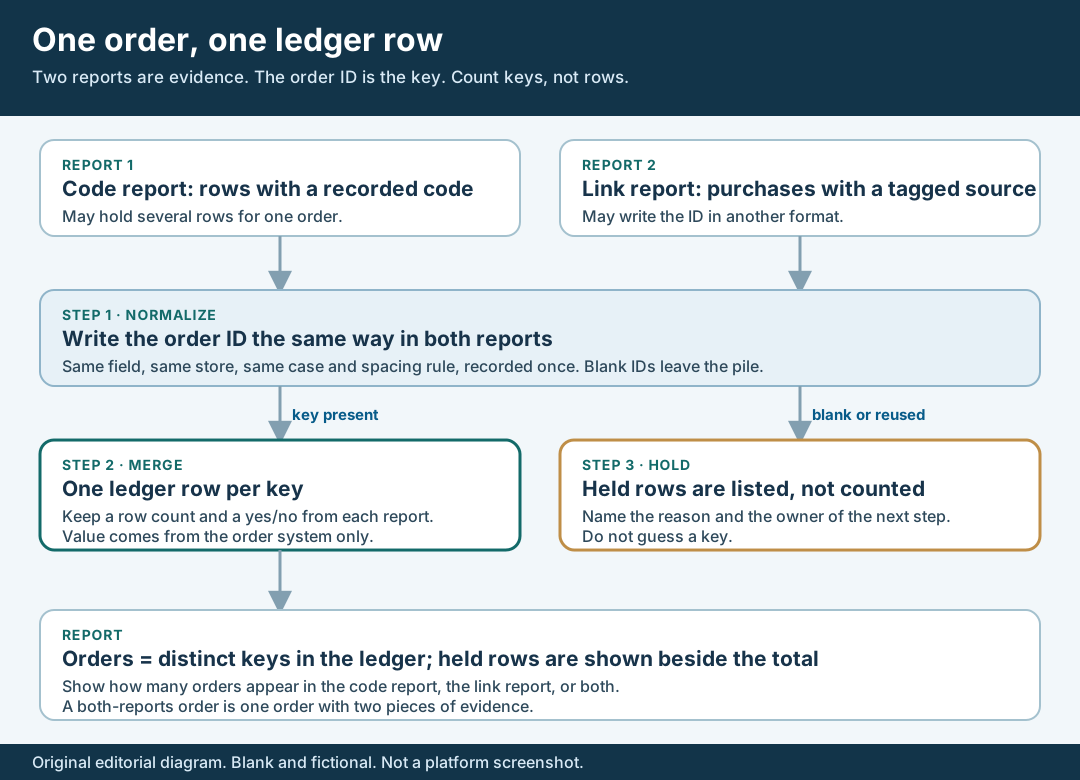
An original editorial ledger map. Count keys, not rows; hold what cannot join.
Original visual by Superdirector editorial team. Creation date not recorded.
Walk through a fictional ledger
Fictional exercise: no real store, order, creator or result was inspected. A made-up shop, Shop A, exports a code report and a link report for one made-up window. The code report holds five rows. Four of them are A-1001, A-1002, A-1002 and A-1003, and the fifth is #a-1004. The A-1002 rows are two line items of one order. The link report holds four rows: A-1002, A-1003, A-1005, and one with a blank ID.
Adding the rows gives nine, which is the number a careless headline would print. Now normalize. The shop’s order system treats the ID without a leading hash and without regard to case, a rule the owner checked on the system, so #a-1004 becomes A-1004. The two A-1002 rows collapse to one with a row count of two. The code report now holds four distinct keys: A-1001, A-1002, A-1003 and A-1004. The link report’s blank row goes to the held list, and its remaining rows give three distinct keys: A-1002, A-1003 and A-1005.
Two keys appear in both: A-1002 and A-1003. The check gives four plus three minus two, which is five distinct orders: A-1001 through A-1005. The ledger has five rows, so the check passes. One row is held. The report line for this fictional window reads: five orders counted once; two appear in both reports, two only in the code report, one only in the link report; one link row held for a missing ID. Nine was never the order count, and the page makes no claim that any real campaign looks like this.
Hold the rows that cannot join
Some rows cannot be placed, and the honest move is to list them. A held list is a small table beside the ledger. Each line names the report, the row, the reason it could not join and who will resolve it. Do not guess a key from an amount, a date or a customer’s first name, and do not drop the row silently.
| Held reason | Why it cannot join | Next step |
|---|---|---|
| Blank or empty ID | No key to match on; Google warns that an empty transaction ID makes Analytics treat all such purchases as the same one | Ask whoever owns the site tag why the ID was not sent; keep the row out of the order count |
| Reused ID | One key stands for different orders, so a join would merge them | Ask the order system owner which order each row belongs to |
| ID not in the order system | The key does not exist there, so it may be a test, a typo or a different store | Check the store and the field first; if still absent, leave it out and list it |
| Format could not be normalized | A prefix or field mismatch no rule explains | Look up one example in the order system and write the rule it implies |
Held rows matter for honesty even when they are few. If the link report’s purchases are partly missing their ID, the link-only count is an undercount, and the report should say so. Google’s current transaction-ID guidance tells app implementations to send IDs through the Firebase SDK. Confirm the purchase event, stream and transaction ID your property actually receives. This does not establish that every app event or independent export is automatically reconciled.
Report orders once and show what each report saw
The headline is orders counted once: the number of distinct keys in the ledger, after applying the cancelled-and-refunded rule the owner confirmed. Beside it, show three smaller counts from the same ledger: orders that appear in the code report only, in the link report only, and in both. Add the held count last. These numbers come from your own data and should be labelled with the window, the export dates and the time zone.
Be explicit about what each count can support. An order in both reports is one order with two pieces of evidence, which is a reason for more confidence about the order and not a reason to count it twice. An order in only one report was missed by the other, and the miss may be a tag gap, a format gap or genuinely absent evidence. The ledger cannot tell which. Write the open questions as questions: whether the missing ID is a tag issue, whether the code was typed after a tagged visit expired, and so on.
Finally, record a sentence of scope. The ledger says how many orders existed. It does not say which creator caused them, how much of the order was incremental, or whether the reports are complete. If a client wants creator credit next, hand them the ledger and the coupon and link guide; the first answers *how many orders*, the second *what the evidence says about them*.