How-To Guide
How to check a creator's subtitles when they name a product feature or qualification
Compare each subtitle cue that names a feature, qualification or number with the final audio and your verified terms, then keep a dated proof sheet.
By the Superdirector editorial team. YouTube Help, W3C and FTC rule pages reviewed October 30, 2026.
At a glance
How should a brand check subtitles when a creator names a product feature or qualification?
Treat the final audio as the evidence and the subtitle as the thing under test. Lock the exact audio file, write each claim line as heard with a timestamp, then compare every subtitle cue that names a feature, a qualification or a number with that transcription and with your verified product terms. Mark each cue match, differs or cannot tell, send differences to the creator as questions, and recheck the exported file the audience will actually see. Keep a dated proof sheet that holds all of it.
- Check the claim lines, not every word: features, qualifications and numbers first.
- Compare against the audio and your own term list, never against the script alone.
- Recheck the exported subtitles after any fix, in every language shown.
Direct answer
Short answer: build a subtitle proof sheet for each finished video. It holds five things: the locked final audio, a line-by-line transcription of every spoken line that names a feature, a qualification or a number, the subtitle cue beside each of those lines, your verified product term beside both, and a result for each row: match, differs or cannot tell. Differences go to the creator as questions, and the sheet ends with a recheck of the exported subtitles and a dated decision.
This is for an agency or brand marketer who has a creator video in hand and needs to know whether the words on screen say what the creator said and what your product actually offers. The decision is narrow: does each subtitle that names a feature or qualification match the final audio and your verified terms, and what do you do about the ones that do not. It does not decide whether a claim is permitted, whether a disclosure is sufficient or whether a translation is good prose.
A subtitle is easy to treat as decoration, but it is text that viewers read, and it can differ from the audio in ways nobody intended: a model name swapped for a similar one, a qualification dropped, a number heard wrong. Use the blank proof card, the CSV register and the proof map to keep the check in one place.
Lock the final audio and list the claim lines
Start with the file, not the video link. Write down the name and version of the final audio or final video you are checking, the date you received it and who sent it. If the creator later re-exports, that is a new file and the sheet starts again for it. A check done on a rough cut proves nothing about the cut that posts.
Then list the claim lines. A claim line is any spoken line that names a product feature, a qualification (a condition, a limit, a plan or tier, a requirement, an "only if"), a number (a count, a price, a duration, a size) or a name (a model, version or product name). You are not proofreading the whole video. You are picking out the sentences where a wrong word changes what the viewer believes the product does. Mark each with a line id such as C1, C2, C3.
Next to the claim lines, attach your verified term list: the exact product names, feature names and conditions as you have confirmed them, each with its source and date. If you do not keep one, the versioned product facts guide shows how to settle the facts before a handoff, and the claims sheet guide shows how to attach proof to each claim. The subtitle check borrows from those lists; it does not replace them.
Note the subtitle file too: its name, version, language and how it will be shown. A creator may burn text into the picture, upload a separate subtitle file or rely on a platform's automatic captions. Each route leaves a different thing to check, and the sheet should say which one you are looking at.
Write down what is actually said
Listen to each claim line and type it exactly as heard, with its start and end timestamp. Do not copy it from the script, the brief or the subtitle. Those are the things you are testing, and copying from them hides the very difference you are looking for. Play the line more than once, ideally on headphones and at normal speed.
Write one of three answers for each line: heard clearly, heard with doubt or cannot hear. Doubt is a normal and useful result. Music under speech, an accent you do not know, a fast list of numbers or a product name that sounds like another word can all defeat a careful listener. A line marked doubtful is not a line you can use as proof, and you will need the creator's own statement of what they said.
Be aware of what automatic transcription can and cannot give you. YouTube's Help page on adding subtitles says it uses speech recognition to create captions automatically, and that if automatic captions are available they are published on the video without an extra step. It also says they are generated for the video's default language. YouTube Help: add subtitles and captions. Read that as a description of the process. It gives no accuracy figure, so an automatic caption cannot stand in for your own listening on the claim lines.
Also decide what the transcription should include. The W3C's explanation of the captions criterion in the Web Content Accessibility Guidelines says captions include dialogue and also identify who is speaking and give non-speech information conveyed through sound, and it lists captions that omit some dialogue or important sound effects as a failure. W3C Understanding WCAG 2.2: captions (prerecorded). That is an accessibility standard about completeness. For this check it is a reminder that a cue which drops a spoken qualification has left out part of what was said, even when every word it kept is correct.
Compare each subtitle cue to the audio and your terms
Now put three things side by side for every claim line: what was said, what the subtitle shows and your verified term. Read the cue as a viewer would, on screen at its real size, including where it breaks across lines and when it appears. Then mark one result: match, differs or cannot tell.
| What you compare | Look for | Mark differs when | Mark cannot tell when |
|---|---|---|---|
| Feature name | The product's own name for the feature | The cue uses a different or similar name | The audio is doubtful or the name sounds like two things |
| Qualification | A condition, tier, limit or requirement | The cue drops, softens or adds a condition | The qualification is spoken under music or over another voice |
| Number | Counts, prices, sizes and durations | The cue shows a different figure or unit | The digits are fast and you cannot confirm them |
| Product or model name | Exact name and version | The cue shows another model, spelling or version | Your term list does not cover that name |
| Timing | The cue appears while the line is spoken | The cue shows a claim before or after it is said | The file has no cue times you can read |
Keep the three comparisons separate. A cue can match the audio and still differ from your verified term, because the creator said something loosely. A cue can differ from the audio and happen to match your term, because the tool guessed right where the creator misspoke. Each of those is a different finding with a different owner. Record the audio comparison and the term comparison in their own columns, and write the exact words that differ rather than a summary.
When the subtitle is in another language, the cue is a new statement, not a copy. Have a reader of that language compare it with the audio and with your term list in that language. Where your product's feature names are not translated or are named differently by market, say so on the sheet. The language coverage guide covers what your product supports in each language, and the native-language source packet guide covers what to give a creator before the script is adapted. If no one on your side can read the subtitle language, mark every claim cue in it as cannot tell. That is an honest result and it keeps the sheet from implying a check that did not happen.
If a spoken line itself looks unsupported, note it and move on. The subtitle sheet only answers whether the words on screen match the words in the audio and your terms. Whether the claim may stay belongs to the claim verification guide. Keeping those apart stops a subtitle fix from quietly becoming a claim approval.
When enlarged, scroll horizontally to read the diagram.
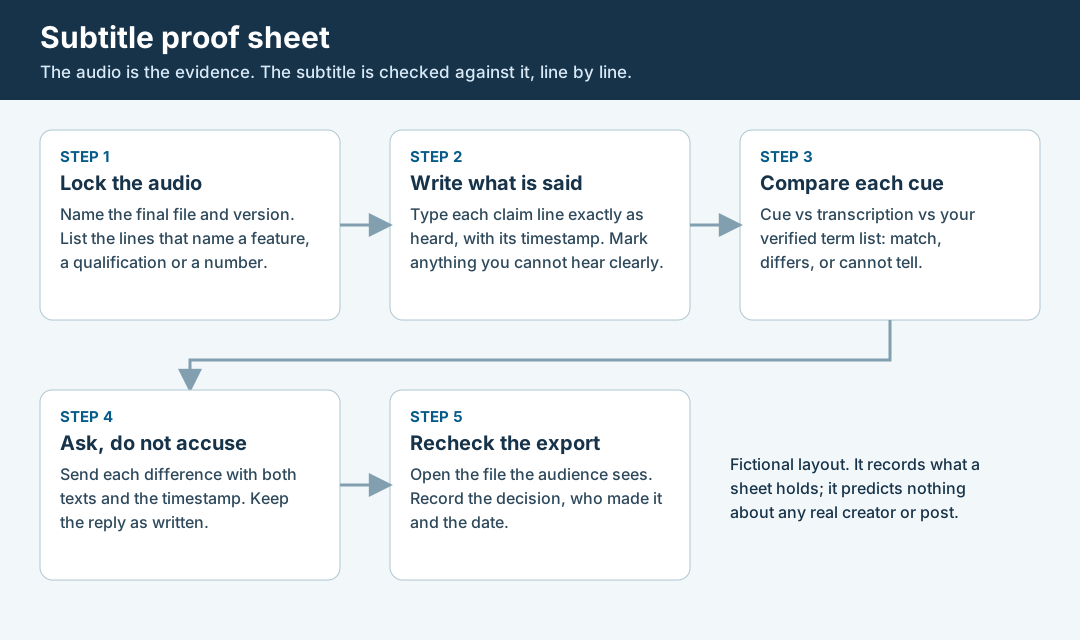
An original editorial map. The audio is the evidence; the subtitle is the thing checked against it.
Original visual by Superdirector editorial team. Creation date not recorded.
Ask the creator and keep the answer as written
Send each difference to the creator as a question with both texts and the timestamp: "At 0:42 you say X; the subtitle reads Y. Which did you mean, and can the subtitle be corrected?" Name the file and version. Do not say the creator misrepresented the product and do not guess where the difference came from. A caption tool, an editor, a translator or a slip of the tongue can each produce it, and the question should leave room for all of them.
Save the reply exactly as written, with the date, time and time zone you received it. If the creator says what they meant to say, that is their statement of intent, kept as theirs. It does not change what the audio contains. If the audio itself is wrong, the fix may be a re-record or a new cut, which is a different request from correcting the subtitle, and the first-cut review guide shows how to separate what the agreement requires from what you would prefer.
If the creator does not reply, record the date you asked, the date you chased and that no reply was received. An unanswered question is a fact about the process. It is not a reason to assume the subtitle is right or wrong.
Where the creator works from automatic captions, the practical request is short. YouTube's Help page on captions tells creators to review automatic captions and edit any parts that have not been properly transcribed, and describes doing it in YouTube Studio under the Subtitles section. YouTube Help: use automatic captioning. You can ask for exactly that on the claim lines you listed, naming each one, instead of asking for a general proofread.
Recheck the exported subtitles and record the decision
A promised fix is not a finished fix. When the creator sends a corrected file, open the version the audience will actually see and run the claim lines again. Check the cue text, the language and the timing. If the text is burned into the video, that means a new export of the video. If it is a separate subtitle file, it means the file as uploaded, shown in the player. A correction made in the creator's editing project that never reached the exported file has fixed nothing for viewers.
Then close each difference with one decision, one name and one date. The decision is one of four: accept the subtitle as it is, with the reason written; fix it, naming the new file version; escalate it to the deal owner or counsel; or leave it open because the evidence is not enough yet. A line marked cannot tell stays open until a person who can judge it has looked, or until you decide in writing to proceed without that check.
Keep the whole sheet together: the file names and versions, each claim line as heard, the cue beside it, the verified term and its source, the result, the creator's answers, the fixed file and the decision. If something changes after posting, such as a platform re-processing captions or a creator editing a subtitle, the sheet gives you the state you checked. The separate record you need for a post edit is covered in the edit retention guide.
Walk through a fictional subtitle check
Fictional exercise: no real brand, creator, product or result was inspected. A made-up brand, Brand A, sells a note-taking tool with a made-up feature called Sync Shelf. Creator Q delivers a 30-second video, version 3 of the audio. The reviewer lists three claim lines: C1 names the feature, C2 states a condition, C3 states a number.
For C1, the reviewer hears "Sync Shelf" clearly and the cue reads "Sync Self". Audio comparison: differs. Term comparison: the verified term is "Sync Shelf", so the cue differs from it too. For C2, the creator says a feature works "on the paid plan", and the cue reads "on every plan". Audio: differs. The cue has changed the condition, which is the kind of difference the sheet exists to find. For C3, the creator says a number quickly under music, and the reviewer marks heard with doubt. The cue shows a figure the reviewer cannot confirm, so the result is cannot tell.
The reviewer asks Creator Q about all three, with timestamps and both texts, and saves the reply as written. Suppose the creator confirms the number and sends a corrected file. The reviewer then opens the exported version 4, finds C1 and C2 now match, and records the decision with the file version and date. The scenario predicts nothing about any real creator, platform or product.
What this page does not decide
This method checks whether subtitle text matches the audio and your verified terms. It does not tell you whether a claim is allowed, whether it is true, whether a disclosure is adequate or whether a subtitle meets an accessibility standard. For the legal frame, we quote one rule and do not interpret it: the FTC's endorsement rule says advertisers are subject to liability for misleading or unsubstantiated statements made through endorsements. 16 CFR 255.1. Whether a given subtitle or spoken line raises that issue is a question for counsel.
The closest existing pages are neighbors, not substitutes. The claim verification guide and the claims sheet guide decide which claims are allowed and attach proof, before and after filming; this page starts from a finished file and tests only the words on screen. The native-language source packet guide prepares a script for a new market before it is written; this page checks the subtitles after it is spoken. The first-cut review guide sorts review comments by obligation; this page contributes a line-by-line proof sheet for subtitle cues. The disclosure check guide looks at sponsorship disclosure on three surfaces, which is a different question from product-term accuracy. The live post claim fix guide applies after a post is public.
Nothing here measures how often subtitles are wrong, how accurate any platform's captions are or how a subtitle error affects results. Those numbers are not available to us and are not claimed. We did not read the caption help pages of Instagram or TikTok while preparing this article, so we say nothing about how those platforms generate or show captions. The page is an editorial method for keeping audio, subtitle and verified term apart, so each statement about a cue rests on its own evidence.