How-To Guide
How to verify a TikTok post’s branded content setting and the creator’s own disclosure
Check a sponsored TikTok post in two steps: the platform label and the setting behind it, then the creator’s own words. Log each result on one receipt.
By the Superdirector editorial team. TikTok and FTC pages reviewed October 30, 2026.
At a glance
How can a team verify TikTok’s branded content setting and the creator’s own disclosure?
Run two separate checks and log each one. Check one is the platform side: which label the public post shows, in which words, and whether the creator confirms the setting itself. Check two is the creator’s own message in the video, the caption and the spoken words. A label on the post does not show what the creator said, and a creator’s words do not show what the platform displays. Record each result as seen, not seen or cannot tell, on one dated receipt, then accept, ask for a fix that names the surface, or escalate.
- Quote the agreement’s disclosure requirement, or write “no clause”, before you look at the post.
- Record the label’s exact words and treat the toggle state as something the creator confirms.
- Check the creator’s own message on its own, and never let one check answer for the other.
Direct answer
Short answer: treat a TikTok sponsored post as two separate checks and log each one. Check one is the platform side. Which label does the public post show, in which exact words, and has the creator confirmed the setting that produces it? Check two is the creator’s own message. What does the video show and say, what does the caption say, and did the creator state the connection themselves? Mark each check seen, not seen or cannot tell, put both on one dated receipt, and then accept, ask for a fix that names the surface, or escalate.
This is for an agency or brand marketer whose creator post is already live on TikTok and who needs to know what can be shown about its disclosure. The decision is narrow: which statements you can truthfully record about the label, the setting and the creator’s message, and which you cannot. It does not decide whether a disclosure is legally sufficient. Those calls have their own pages, listed in the boundary section below.
The reason to split the checks is that each one can pass while the other fails. A post can carry a platform label and still contain no statement from the creator. A creator can say “this is a partnership” in the video while the post shows no label at all. If one screenshot is allowed to stand for both, you cannot tell which surface needs a fix. Use the setting-versus-post card, the CSV register and the setting-versus-post map to keep the record in one place.
Pin the requirement and the partner route
Before you open the post, write down what you are judging it against. Quote the clause in your agreement that covers disclosure, with its date and version. If the agreement says nothing about disclosure, write “no clause” and do not substitute a rule you remember. Add the post address, the creator account the agreement names, and the date you expect the post to be public. The account proof guide covers confirming that the post sits on the contracted account, so this page starts after that match is settled.
Then record the partner route. TikTok’s help page on turning on the commercial content disclosure setting describes the creator turning on a “Disclose commercial content” setting from the post screen, from an existing post, from LIVE settings or from a web upload, and then choosing between “Your brand” and “Branded content”. Its page also says that all TikTok One projects automatically turn on the Commercial Content Disclosure. That sentence gives you two routes to keep apart in the record: a creator posting from their own account, and a project run through TikTok One. If you do not know which route produced the post, write “unknown” and ask. Do not carry what is true of one route over to the other.
The same page says that a post without the proper disclosure may be removed or restricted, that exact legal requirements vary by country, and that in the United States the FTC’s Endorsement Guides apply. Treat those as TikTok’s stated platform rules and a pointer to law. Your record should say what TikTok’s page says, dated, and leave interpretation of the law to counsel.
Read the label on the public post
Open the public post the way a viewer would and record what it displays. Capture the words of any label exactly, where on the post it appears, the time with its time zone, who captured it, and whether you were signed in or signed out. A screenshot with no post address and no time is a picture, not a record. If you can only reach the post through an account that follows the creator or that belongs to your team, say so, because what appears may differ by viewer and app version, which we did not test.
TikTok’s own page names the two labels this check is looking for. It says the setting adds a “Commercial content” label to the post or under the description of the video, and a “Paid partnership” label when the creator is promoting a third party and posting branded content. TikTok’s separate help article on the content disclosure setting for creators, last updated April 2026, also names “Paid partnership” and “Commercial content” as the disclosures. About the content disclosure setting for creators. Use the wording on your own capture, not the wording from this article, because labels can be reworded after we wrote this.
| What you see | What you can write | What you cannot write |
|---|---|---|
| “Paid partnership” on the post | “Label seen: Paid partnership, at [place], on [date and time]” | That the creator’s own disclosure is adequate |
| “Commercial content” on the post | “Label seen: Commercial content, at [place], on [date and time]” | That it is the label the agreement expected, unless the agreement says so |
| No label in this capture | “Not seen in this capture, in this viewing context” | That the setting is off or that the creator did not turn it on |
| Cannot reach the post or its details | “Cannot tell: post not reachable”, with the reason | Anything about the label or the post’s state |
Confirm the setting itself without assuming it
A label on a post is the visible result of a setting. The setting is the toggle on the creator’s side. They are two facts, and a public capture gives you the first. It does not give you the second. The toggle sits in the creator’s account, and a team that does not hold that account has two honest options: ask the creator to confirm the state, or ask them to show it from their own settings screen. Whatever they provide, label it as what it is, such as “creator statement” or “screen shown by the creator on this date”, and do not merge it into your own observation.
TikTok’s page describes where the creator finds the setting: they turn on “Disclose commercial content”, choose “Your brand” or “Branded content”, and for branded content tag a partner under “Brand partnership”. It also says the authorization period is 60 days by default. Turn on the commercial content disclosure setting. That is a description of the creator’s options. It does not tell you what a viewer can see about a partner tag or its authorization, so leave those fields as “unknown” unless the creator tells you or shows you.
The same page describes turning the setting on for an existing post, through the post’s options and its ad settings. It does not say whether the setting can be changed or switched off after posting, so this page makes no claim either way. If a later capture shows a label that an earlier capture did not, or the reverse, do not name a cause. Log both captures, date the change by the span between them as in the edit retention guide, and ask the creator.
TikTok’s creator-facing page adds one more fact that shapes who can act. It says TikTok flags videos as commercial content when it shows clear marketing intent, names three factors, financial incentives, brand mentions and product recommendations, and says creators get a notification and 24 hours to respond. It also says only the original video poster can appeal a flagged video. About the content disclosure setting for creators. For a brand, the consequence is practical rather than legal. If TikTok has flagged a post, the notice goes to the poster, so ask the creator whether they received one and record their answer verbatim. Never infer a flag from what a public capture shows.
When enlarged, scroll horizontally to read the diagram.
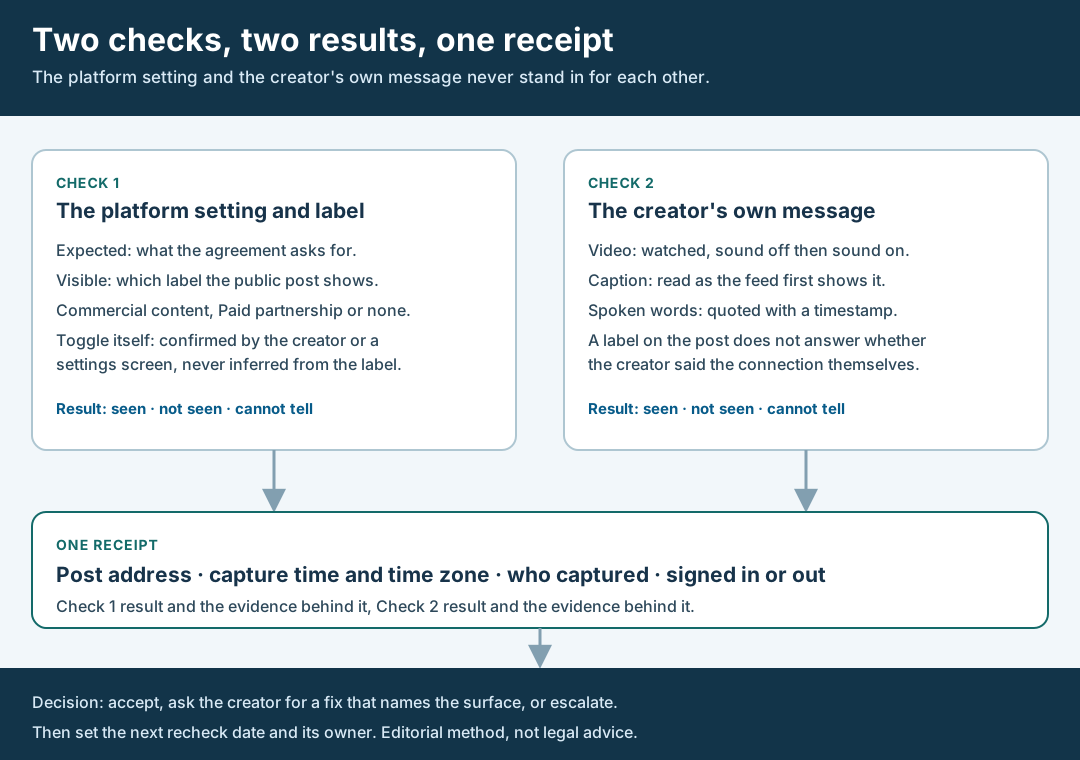
An original editorial map. The platform setting and the creator’s own message are separate checks with separate results.
Original visual by Superdirector editorial team. Creation date not recorded.
Check the creator’s own message separately
Now judge a different surface. Check two is about what the creator themselves said, and it uses the video, the caption and the spoken words. Watch the video twice, once with the sound off and once with it on, because viewers do not all watch the same way. Read the caption exactly as the feed first shows it, and note where it is cut off on the device you used. Quote any spoken statement of the connection, with a timestamp, and any on-screen text with its timestamp. If the connection is stated nowhere you can see or hear, write “not seen”, with the capture details.
The FTC’s influencer guide, dated November 2019, is the reason not to let the label answer for this check. It says not to assume that a platform’s disclosure tool is good enough, that a disclosure should be hard to miss, and that in a video it should be in the video and not only in the description. FTC Disclosures 101 for Social Media Influencers. The FTC’s question-and-answer page on the Endorsement Guides adds that a platform offering a disclosure feature is no guarantee that it is an effective way to disclose, that the agency would look at whether the tool alone clearly and conspicuously discloses the connection, and that the duty sits with the influencer and the brand, not the platform. FTC Endorsement Guides: What People Are Asking.
Keep two outcomes apart on purpose. If check one shows a label and check two shows nothing from the creator, the fix request names the creator’s message. If check one shows no label and check two shows a clear spoken statement, the fix request names the platform label. Name the surface in every request, since “please fix the disclosure” leaves the creator to guess which one you mean.
Walk through a fictional review
Fictional exercise: no real brand, creator, campaign or result was inspected. A made-up brand, Brand A, agreed with Creator Q that one TikTok video would carry the platform’s partnership label and a spoken statement of the sponsorship. The agreement clause is quoted on the card. The partner route is “creator’s own account”. The agreement expects the label “Paid partnership”.
The reviewer captures the public post signed out on a phone and records the time and time zone. The post shows a label reading “Commercial content”. Check one: label seen, wording differs from the expected one, toggle state unknown. The reviewer does not write that Creator Q chose the wrong option, because the capture cannot show which choice was made. The reviewer asks Creator Q to confirm the setting from their own account and to say which of the two brand options they selected.
For check two, the reviewer watches with the sound off and sees no on-screen mention, then with the sound on and hears the sponsorship stated at a timestamp. The caption, as first shown, does not mention it. Result: spoken statement seen, caption not seen, on-screen text not seen. Creator Q replies that they picked the other brand option by mistake, and the reply is saved as written. The deal owner decides to ask for a fix that names the platform label only, because the spoken statement is present. The next recheck date is set. The scenario predicts nothing about any real creator or post.
Record one receipt and decide
Write one receipt per post that holds both checks side by side. It carries the post address, the capture time with its time zone, who captured it, the viewing context, the quoted agreement clause and the partner route. Under Check one it holds the label’s exact words, where it appeared and the evidence for the toggle state, labeled as a creator statement or a screen shown, or “none”. Under Check two it holds the video, caption and spoken results with timestamps and quotes. Each check ends with one word: seen, not seen or cannot tell.
Then decide. There are three outcomes: accept both checks as they stand, ask the creator for a fix that names the surface, or escalate to the deal owner or counsel. A fix request should quote the surface and say what the agreement expects, for example: “The capture on [date] shows the label [words]. The agreement asks for [expected label]. Can you confirm the setting from your account and tell us what you chose?” Do not say the creator has broken the agreement. Do not guess a motive.
Save the creator’s answer exactly as written, with the date and time you received it. If they do not reply, record the date you asked and the date you chased. An unanswered question is a fact about the process and should not become an assumption about the setting. If the creator reports a TikTok notice or flag, record that as their statement. Finally, schedule the next recheck and its owner, because the creator can change the post or its settings later, and a check that passed once is a statement about one capture.
What this page does not decide
This method keeps a two-check record for a TikTok sponsored post. It does not tell you whether a disclosure is clear enough, lawful or a breach. It also differs from the closest existing pages. The disclosure caption and video guide covers all three surfaces of one finished post for any platform, and treats the platform label as one observation within it. This page goes further on one platform and one question: what can be established about the label and the setting behind it, versus what only the creator’s words can show, and who can confirm the toggle. For the handoff checklist, see branded content on TikTok.
The edit retention guide keeps dated captures when an approved post changes, and this page uses its span rule if a label appears or disappears between captures. The account proof guide establishes that the post is on the contracted account, and the sponsor categories guide classifies a creator’s other sponsorships before a deal. Neither of them separates a platform setting from a creator’s own message, which is the artifact this page adds: a setting-versus-post receipt.
Nothing here measures how often creators leave a setting off, how TikTok enforces its rules, or how a label affects results. Those numbers are not available to us and are not claimed. We also did not read TikTok’s account-level settings screens, only its help pages, so we make no statement about what a creator’s screen shows in your region or app version. If a point turns on law or on the meaning of your agreement, send it to counsel instead of settling it in a comment thread.