How-To Guide
TikTok influencer marketing: from creator search to a report you can use
Use TikTok One for creator search, commercial disclosure, optional Spark Ads and reporting. Includes an editable campaign map and clear access limits.
By the Superdirector editorial team. Official TikTok and U.S. FTC sources read November 5, 2026.
At a glance
How can a brand run a TikTok influencer campaign using native tools?
Use TikTok One to discover and invite creators, a specific brief to define the work, the commercial content disclosure setting for the relationship, and separate authorization for optional Spark Ads. Creative Center is a place to study creative ideas, not proof that a creator is available or their media can be reused. Agree the reporting source before posting and keep post totals distinct from paid ad results.
- A creator discovery profile is a shortlist input; watch their recent organic and sponsored work.
- A disclosure label, brand-partner tag and Spark authorization are related features with different effects.
- TikTok says activity gained from a Spark boost accrues to the original post, so a post total after paid promotion is not purely organic.
Start with what the creator will publish
A TikTok creator campaign starts with a product question and a publishing promise, not a trend or a follower tier. Write: who should learn what, which creator account will post, what the video must show, what action the viewer should take and where the result will be read. That gives you a basis for discovery, a brief the creator can answer and a report you can evaluate.
Decide whether you are asking for a creator-posted video, a file for your brand to publish, optional paid amplification, or a combination with separate deliverables. This guide follows a creator-posted branded video and its optional Spark Ad. It does not require a Shop affiliate campaign or promise that a specific creator tier, hook or format will deliver sales.
Use the original TikTok native-tool map and editable campaign card, or download the blank CSV. The fields follow the work from search to reporting, with no invented campaign data.
Use the right TikTok surface for the job
| Question | Native surface | Useful output, with a limit |
|---|---|---|
| What creative approaches should we study? | Creative Center / public creative inspiration | A reference to examine, not a license to copy it or evidence that its creator is available. |
| Which creators might fit? | TikTok One creator discovery | A shortlist supported by audience information and actual work. Some search features have limited access. |
| Who accepted the project? | TikTok One project invitation status or your direct agreement | The creator’s actual response and agreed version, not a sent invitation. |
| How is the relationship disclosed? | Commercial content disclosure setting | A named platform label; the creator’s own message and applicable legal duties remain separate checks. |
| Can we promote this post? | Authorized identity or post, then Spark Ads in Ads Manager | Permission for the intended content and period, followed by actual ad setup and reporting. |
| What happened after publication? | Available post insights, Content Suite and ad reporting | Results tied to a post or ad and a window. Access must be confirmed, and scopes must stay clear. |
The public Creative Center destination offers top-ad inspiration. TikTok’s May 2026 TikTok One explanation describes discovery, collaboration and reporting within TikTok One, including Creator Marketplace experiences that migrated into it. Names coexist in the documentation; the important distinction is between studying creative, inviting a creator and authorizing an ad.
A reference video can help you describe a demonstration or opening, but it does not settle music rights, product claims or reuse permission. Note what you want to learn from it in your own words. The creator should develop original work for the agreed product, rather than reproduce another creator’s script or footage.
When enlarged, scroll horizontally to read the diagram.
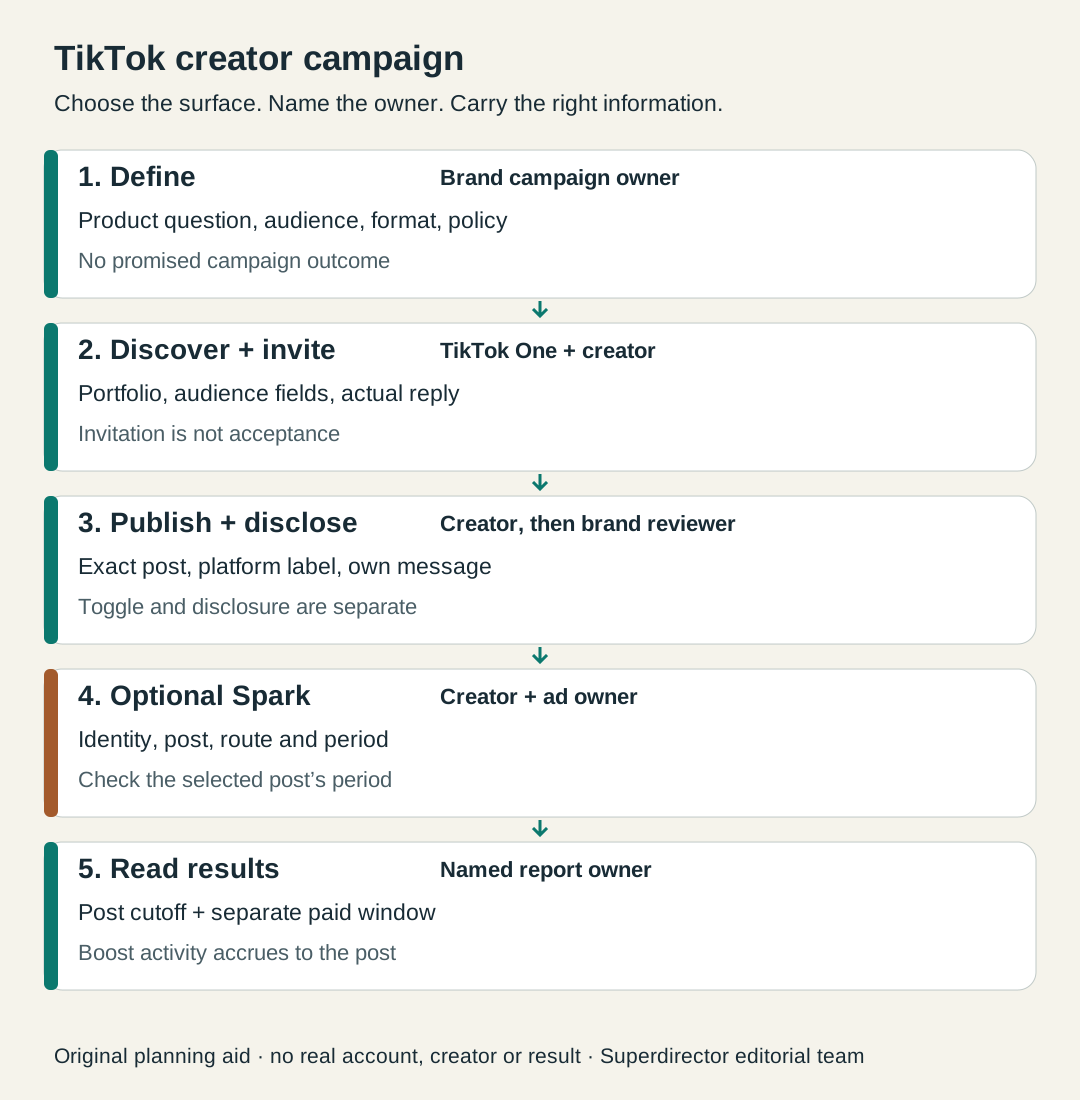
Original editorial campaign map. Tool access, an agreement, publication and results answer separate questions.
Original visual by Superdirector editorial team. Creation date not recorded.
Check the category and market before you commission the work
TikTok’s Branded Content Policy, effective October 30, 2026 in the version read, defines branded content to include third-party promotion in exchange for payment or another incentive. Gifts and sales commissions are included. It requires the commercial disclosure toggle, prohibits false or misleading product claims, and contains prohibited, restricted and market-specific categories.
Read the current rules that apply to your product and the intended market before settling the deliverable. A creator’s account being visible in discovery does not establish that every category or proposed claim can be promoted. If the answer depends on a restricted industry or local law, resolve that specific point with the platform guidance and appropriate counsel. This page is a platform-workflow guide, not legal advice.
Give the creator a source for every important product claim and say what they should actually demonstrate. A fictional storage-container brand could ask for a lid-closing demonstration and an honest account of the creator’s use, while excluding unsupported claims about keeping food fresh for a stated number of days. Clear limits help the creator make useful content without having to invent evidence.
Find creators in TikTok One, then watch their work
The creator-discovery guide updated November 2026 describes the path through Explore creators → Creator search. Search a username when you already have a person in mind, or a keyword to find creators who have posted content containing it. The same guide says Search with AI is available to select customers. Use the capability your account actually has.
- Separate creator details from audience details. TikTok lists both, including country or region; the creator’s location alone does not answer where their audience lives.
- Use the available performance filters as comparison inputs. The help page names median video views and engagement rate, but it does not make them a guarantee of your result.
- Open the portfolio and watch recent organic and sponsored videos. Look for the actual explanation or demonstration your brief needs, not only a matching category name.
- Save promising creators to a shortlist and retain the work example that made them relevant. Note any missing audience information that would change your choice.
For a niche product, this might mean searching a buyer task such as organising a shared kitchen, then watching how a creator explains storage constraints. A large general lifestyle audience and a small space-saving demonstration answer different parts of the brief. Decide which facts you need rather than accepting a platform score as the whole judgment.
Turn the shortlist into a specific project invitation
TikTok’s discovery help describes Invite to project, selecting the project and writing its details and proposed offer for TikTok to use in the invitation. It also describes a Lite project route for creators not on TikTok One. Track who accepted, declined or has not responded; a saved profile or sent invitation is not an agreement.
Before using Invite to project, name the brand’s TikTok One account owner and confirm that the intended project exists and can be selected by the person sending the invitation. The observable outcome is a named project with the right brief, offer and responsible operator, not merely a working login. If that project is missing, assign its setup to the owner using the current native instructions before sending invitations. Project and account creation are outside this guide; no unverified setup path is implied.
The invitation should name the product, audience, buyer question, format and publishing account. Add the intended publication window, compensation or benefit, the claims that have support, how the first cut will be reviewed and which results you need. If Spark Ads are wanted, state the intended use separately, including the term and who will run the ad.
For the fictional container project below, separate these budget lines before inviting the creator. They describe what must be agreed, not how much a TikTok creator should charge. If a paid-use payment is included in the creator fee, mark it included so it is not counted twice.
| Budget line | Write down | Owner to name |
|---|---|---|
| Creator post / benefit | Agreed video fee or benefit, plus any product and shipping cost | Who agrees and pays for the creator deliverable |
| Optional Spark use | The agreed term, content and any additional use payment, or included-in-fee wording | Who settles the paid use with the creator |
| Optional ad media | A separate advertiser spend amount and flight for the selected Spark Ad | The operator responsible for the ad-account budget |
A fictional invitation could read: “Your shared-kitchen videos explain storage without assuming a large worktop. We would like a video showing our container’s lid and how it stacks. Please propose a demonstration in your own style. The request is a post from your account with the agreed commercial disclosure; our project brief names the offer, timing and reporting request. Paid reuse is a separate item.” This is an example of a bounded request, not outreach sent to anyone.
Confirm the commercial disclosure route before posting
TikTok’s disclosure instructions say that from the post screen the creator opens Content disclosure and ads, turns on Disclose commercial content, then chooses Your brand or Branded content. If the creator is outside TikTok One, the page points through More options first. For promotion of a third party as branded content, the documented label is Paid partnership. The page also gives a route for an existing post.
In that choice, Your brand means the posting person is promoting their own business. For the commissioned creator in this guide who is promoting a different sponsoring business, the relevant choice is Branded content. The documented Paid partnership label refers to that third-party branded-content case; “your brand” does not mean whichever sponsor the creator is working for.
TikTok says its One platform manages this setting automatically for collaboration projects. Treat that as a description of the platform setting, then still review the actual published video and caption. It does not establish that the creator’s message is accurate or that every legal requirement has been met.
A brand-partner tag has additional consequences. TikTok’s brand-partner help says tagged content is added to Content Suite, where brands can discover it and access the described post analytics for the ads the brand chooses to run, and the route can provide Spark Ads pre-authorization. Discuss that use intentionally with the creator rather than treating the tag as a purely decorative mention.
For U.S. campaigns, FTC staff guidance says not to assume the platform disclosure tool alone is enough. Check the visible label and the creator’s own video and caption separately. The TikTok setting-versus-message guide covers that detailed review; this first-campaign map helps you assign it before posting.
Use Spark Ads as an optional paid branch
TikTok defines Spark Ads as an ad format using organic TikTok posts, with authorization required for other creators’ posts. A creator-posted video and a Spark Ad are distinct deliverables. Agree the paid use before asking the ad owner to configure it.
The Manual and Search campaign creation guide says an ad needs a selected TikTok account identity. It describes sourcing from authorized identities or a creator’s post code. For the code route, the creator opens the video’s options, goes to Ad settings, and uses Generate. The advertiser selects the authorized post in Ads Manager and reviews the authorization period beneath it. These are documented instructions, not a live-account test.
Check the correct creator handle, exact post and permission period before the ad owner finishes setup. The same guide warns that the post caption cannot be edited after authorization as an ad and that a private video becomes public when used in a campaign. Settle the final caption and intended visibility with the creator first; do not use a private test upload as if it will remain private.
Keep the authorization route visible. The brand-partner-tag page describes a default of 60 days for that route, while the May 2026 Content Suite description names a 365-day invitation route and calls Content Suite a Global Beta. Those statements do not make one universal Spark period or guarantee access today. Use the actual period shown for your selected post. The Spark authorization expiry guide handles the detailed date record.
What can the brand verify before the post is live?
| Before publication | What you can actually inspect | What stays unproved |
|---|---|---|
| Discovery | Available creator and audience fields; recent work; invitation response | Future reach, availability not yet confirmed, and your campaign’s sales. |
| Agreed draft | The proposed demonstration, claims, caption and intended disclosure | The live label, final account, actual posting time and viewer experience. |
| Paid-use plan | The written use and the permission displayed for a selected identity or post | That an ad has launched or delivered any result. |
| Measurement plan | Named post-level report owner, requested fields, cutoff and destination tracking | The later results and any field your account or the creator cannot supply. |
Ask for the information that changes your decision. Before posting, a creator can show past work and agree a reporting request. After posting, verify the exact live item and what it displays. An authorization is useful for setup, but it is not a publication receipt or a delivery metric. The map’s handoff column gives these actions separate owners.
Keep post totals and paid results readable
TikTok says a Spark boost’s views and interactions accrue to the original post. This matters when a campaign report labels a later post total “organic.” After promotion, the displayed total cannot be assumed to represent only unpaid distribution. Preserve a clearly dated pre-promotion observation when available and label any later count with its source and cutoff.
For the ads a brand chooses to run, TikTok’s Content Suite description for tagged partners names video engagement, content performance metrics and audience demographics. Confirm what your authorized account actually exposes before promising those fields to a client. A missing report is unknown, and a cropped screenshot without the item, metric label or window may need a wider capture.
Give the ad its own row with its identity, selected reporting window and exact paid metric. TikTok’s Spark documentation defines paid clicks as clicks on the CTA button and ad caption; that is not a purchase count. Use owned destination data or the applicable commerce report for purchases, and state the attribution rule rather than turning video engagement into revenue.
For example, a report can say “creator post total at the stated cutoff” and separately “paid ad results during the selected flight.” Do not add paid results to an already boosted post total as though they were independent audiences. The organic-versus-paid results guide carries the detailed reporting method.
Fictional walkthrough: one demonstration, then a paid decision
Fictional teaching example. No real brand, creator, campaign or result was inspected. Brand A wants people in shared kitchens to understand how its containers stack. The team studies creative examples, then uses TikTok One’s available search and audience fields to shortlist Creator B. It watches a relevant demonstration and sends a project invitation with the offer, exact posting account, intended window and requested post results.
Before this fictional invitation, Brand A writes a review criterion: report creator-routed product-page visits at the agreed cutoff and compare the cost with the brand’s own acceptable limit. It keeps any paid ad question separate. The brand must choose and fill the criterion before it sees results; there is no suggested minimum, cost target or forecast here. Define that limit as the total cash fee plus product and delivery costs for the creator post, all in one currency and counted once. List other benefits and their valuation basis, Spark-use payments and ad media separately so the brand can see which budgets the decision includes.
Creator B accepts the stated brief. The draft shows the lid and stack, uses supported product wording and plans the commercial disclosure. When it publishes, the brand checks the actual post and visible label. It does not write a performance result simply because the post is reachable.
Later the team wants paid promotion. It agrees that use and checks the actual authorization route and displayed period for this post. The ad owner runs the selected ad and captures its reporting separately. The post’s later total is labeled with its cutoff and the fact that paid promotion occurred. If the requested audience breakdown is unavailable, that cell remains unknown; the team asks the report owner rather than inferring it from comments.
Suppose, in a hypothetical review, the team receives a post total and a paid-click count but no destination visit record for the agreed creator route. It decides to repair that measurement before repeating or comparing the campaign; neither available number answers its stated goal. In another hypothetical branch, the source-bound visit report is complete but misses the brand’s preset criterion. The team changes the next brief’s demonstration question and keeps the same reporting definition so it can learn from the change. It does not treat the existence of a Spark permission as evidence that the creator performed well or badly. These branches illustrate decisions, not measured outcomes.
Close the loop on the brief, not on a large number
At review, compare the campaign with its original question. Was the agreed demonstration published from the intended account? Did the label and creator message appear as planned? Which post and paid results are actually available, and do they answer the goal? Use those answers to decide whether to refine the brief or invite the creator again. The native tools make parts of the work easier to find and manage; your agreed deliverable gives the work its meaning.
Official sources were read November 5, 2026. The policy date, help-page revisions, limited AI-search access and dated Content Suite beta statement are preserved because native tools change. No live account setup, universal feature access, creator performance or Superdirector posting or ad-management capability was tested. The worksheet and diagram are original planning aids, not platform screenshots or campaign evidence.