How-To Guide
What to inspect when a creator video earns views but few qualified site visits
Follow one creator video from view to site visit: define a qualified visit, then check the offered link, the tap route, GA4 capture and landing fit.
By the Superdirector editorial team. GA4 and YouTube help pages reviewed October 30, 2026.
At a glance
What should a team inspect when a creator video has views but few qualified visits?
Inspect the path in order and stop at the first breakpoint you can evidence. First write what counts as a qualified visit in your own data. Then check that the post surface offered a tappable route, tap that route from the live post and follow it to the final page, and confirm that GA4 could record the landing session and the qualifying event. Each of these is a lead, not a cause. A view count, a tap you cannot see and a session count are separate measures, so the gap between them is not a loss rate.
- Define the qualified visit before opening any report.
- A view is a play, not a tap, so check that a route was offered.
- Name one evidenced breakpoint and keep the rest unknown.
Direct answer
Short answer: walk the path from the video to your site in a fixed order and stop at the first breakpoint you can evidence. Write down what a qualified visit means in your own data. Check that the post surface actually offered a tappable route. Tap that route from the live post and follow it to the final page. Then confirm that GA4 could record the landing session and the action that makes it qualified. Each check yields a lead, such as a missing control, a redirect that drops a tag, a page that does not match the promise or a tag that did not fire. None of them yields a proven cause.
This is for an agency or brand marketer who sees a creator video with a healthy-looking view count and a thin row of landing sessions, and has to decide what to inspect first. The decision is narrow: where on the path is there evidence of a break, and who should test the next thing. It does not decide whether the creator was a good choice, whether the video was good, or what any of this is worth. It also does not turn a view count and a session count into a rate.
The reason to work in order is that each later check is meaningless if an earlier one is open. A perfect tag on a page nobody was offered a way to reach says nothing about the tag. Use the blank diagnostic card, the CSV register and the diagnostic tree. All three are blank or fictional teaching aids, and none represents a real post, creator or campaign.
Write the qualified visit before reading any views
Start with the word "qualified." Write one sentence that names the page, the action and the record that would make a visit worth counting for this campaign. For example: a session that lands on the product page and then fires the event your team treats as a signup, as recorded in your own analytics property. If you cannot write that sentence, the diagnosis cannot start, because "few qualified visits" has no meaning yet. Google's help page defines a key event as an event that measures an action that is particularly important to the success of your business, and says any event you collect can be marked as one (GA4 key events). Whether your signup, download or inquiry is already marked is something you read in your own property, not something this page can assume.
Then record the view number you read, which platform report it came from, and the date you read it. A view is not a visit. YouTube's help page, as read on October 30, 2026, says views are counted the moment a video starts to play across formats, a definition it lists as effective August 24, 2026, so check how older reports counted (YouTube Help: video views). That is a statement about plays on YouTube. It says nothing about whether a viewer saw a link, tapped it or reached your site, and the same word may be defined differently on another platform. Check the definition on the platform you are reading, and write it beside the number.
Finally, decide which analytics measure you will compare it with, and name its unit. GA4's engaged session is one that lasts longer than 10 seconds, has a key event, or has two or more screen or page views, and its bounce rate is the share of sessions that were not engaged (GA4 engagement metrics). That is a quality filter on sessions, not a statement about intent. If your qualified visit is stricter, such as a completed form, say so, and do not use engaged sessions as a stand-in without writing that choice down.
Confirm the post offered a tappable route
Open the live post as a viewer would, on a phone, signed in or out as your target viewer would be, and look for the control a person could tap to reach your site. Write down what you saw: a link control on the post, a link on the creator's profile that the post points to, a link only in the description, or nothing tappable at all. Which of these exists depends on the platform, the account type and the format, and those rules change. Read the platform's own current help page for the exact surface before you describe it in a report; this page deliberately does not state them, because the platform help pages we tried to load did not return their text and we make no claim from them.
Then record what the video asks the viewer to do. A spoken or on-screen call to action may point to a place that is not where the viewer's thumb is, such as a profile, a pinned comment or a description. If the video says "tap the link" and the surface offers none, that is a candidate breakpoint with direct evidence: a screenshot of the post surface and the date. If the video asks for nothing at all, that is a different finding about the brief, and the creator campaign objective guide is where the goal should have been fixed.
Be careful with what you can and cannot see. Plays are usually visible to the account owner, and tap counts on a link control, where a platform reports them at all, may live in the creator's own analytics rather than yours. Ask the creator for those numbers if you want them, name the metric exactly as their screen labels it, and keep any figure you receive separate from your own session count. Do not infer taps from views, and do not infer views from sessions.
When enlarged, scroll horizontally to read the diagram.
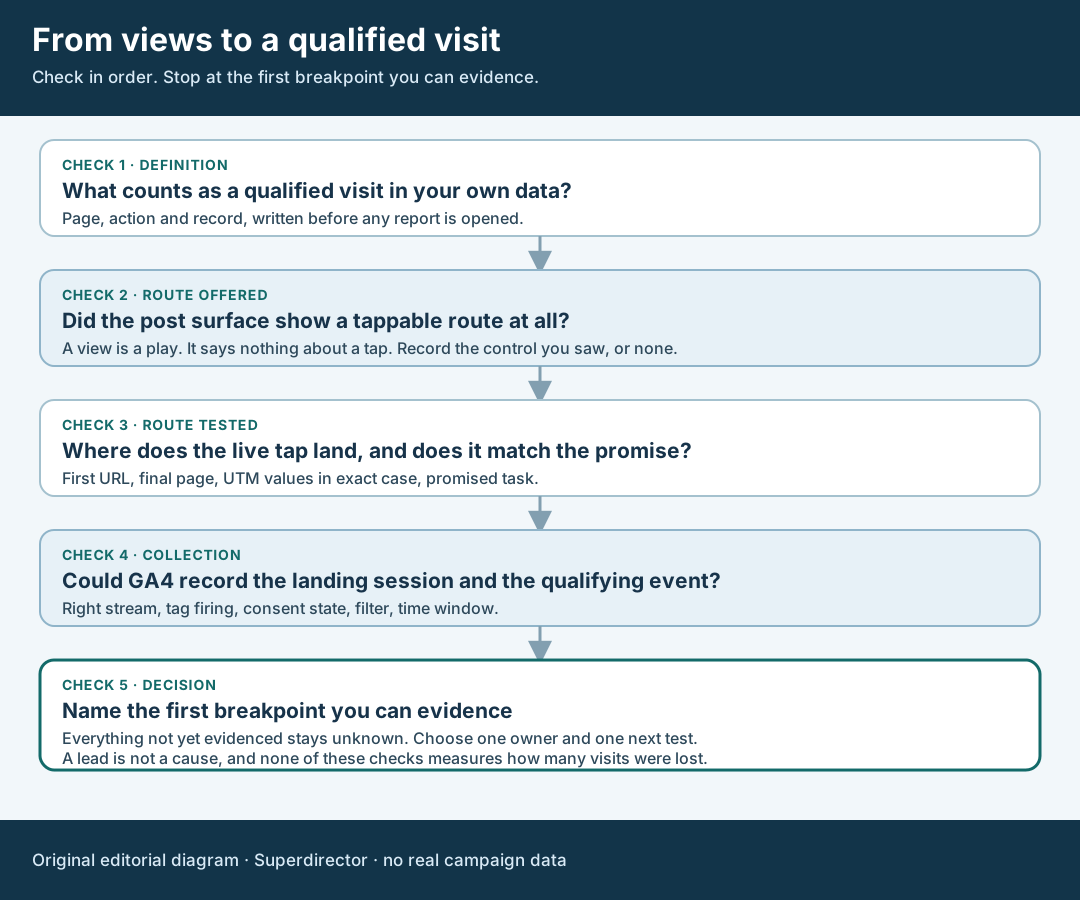
An original editorial diagnostic tree. Stop at the first breakpoint you can evidence; keep the rest unknown.
Original visual by Superdirector editorial team. Creation date not recorded.
Tap the route and follow it to the page
Now tap the route from the live surface and write down each step: the first URL you see, any intermediate address, and the final page. Record the device, the app or browser and the time. A link that works when pasted into a desktop browser can behave differently when opened from a platform's in-app view; you cannot know until you try it, and you should not assume either way. The live creator link guide goes through the redirect trace in detail, and the pre-post destination rehearsal covers the same test before a post goes out. Use them for the mechanics and keep this page for deciding what the trace implies.
Compare the tag values you expected with the ones you saw. Google's URL-builder help says to include source, medium and campaign values, that missing parameters appear as "(not set)" in reports, and that values are case sensitive, so Meta and meta are treated as different sources (GA4 campaign URLs). A value that differs from what your report filter expects, in case or spelling, makes sessions look absent from a campaign view while they sit under another label. Write the expected and the observed string next to each other, character for character.
Finally, compare the final page with the promise in the video. If the video demonstrated one thing and the page opens on another, a viewer who did tap may have left, and a team looking at sessions would see only a short visit. That is a lead about page fit, supported by your own screenshot and the video's timecode. It is not a measurement of how many viewers left, and it does not say the page is wrong. Perhaps the offer changed, perhaps the creator described a different product. Record both, ask the deal owner, and do not fix the page until you know which side moved.
Check what GA4 could and could not record
A session count is only as good as the collection under it. Per Google's help page, a session begins when a user views a page or screen and no session is currently active, and by default a session ends after 30 minutes of inactivity (GA4 sessions). So a visit that never loads a page carrying the tag has no session, whatever happened before it. Check these in your own property: that the web data stream is the one your site sends to, that the tag fires on the landing page, and that the qualifying event is configured. Google's setup page notes that data collection may take up to 30 minutes to begin after installation (set up GA4), so wait that long before reading a fresh test as a failure.
Use the DebugView page to see your own test events as they arrive. Google's help says events will not appear there if privacy controls block them, or if consent mode is active without analytics cookie consent (GA4 DebugView). That means a missing test event has several possible explanations, including the viewer's consent state, and your own test device's choice matters. Record the consent choice you made on the test device, not only the result. Real visitors make their own choices, and you cannot see them from this test.
| Check | What you look at | What it can support | What it cannot support |
|---|---|---|---|
| Stream and tag | The web stream ID the site sends to and the tag on the landing page | That a test visit from your device could be collected | That every real visit was collected |
| Tag values | Expected and observed source, medium and campaign strings, exact case | Why sessions sit under a different label than the report filter | A count of sessions that never carried tags |
| Qualifying event | Whether the event exists, fires on the right action and is marked as a key event | That the definition from step one can be counted at all | That visitors who completed the action were counted once |
| Report window and filters | Date range, time zone, segment and any comparison applied | Whether the row you read matches the post's publication period | How many sessions fell outside your window |
Keep in mind the limit of the whole section. A clean test proves collection is possible, not that it happened for each real viewer. If your platform-side and analytics-side counts differ, the paid-media case has its own guides: the Spark click and GA4 session guide and the ad purchases versus GA4 guide. This page is about organic or unspecified creator posts where no ad report exists, and about the earlier question of whether anyone was offered a route.
Walk through a fictional post
Fictional exercise: no real brand, creator, campaign or result was inspected, and no number below is a measurement. Brand A asked Creator Q for one vertical video about a spreadsheet template. Brand A defined a qualified visit as a session that lands on the template page and fires its download-confirmation event, recorded in its own analytics property. The video's view count is V. Landing sessions in the same window are S, and S looks small to the team. They want to know where to look first.
They work the order. Definition: written, and the download-confirmation event is marked as a key event, so the measure can be counted. Route offered: on the live post, the reviewer sees no tappable control, and the video says "link below." That is evidence for one candidate breakpoint, a mismatch between the spoken call to action and the surface, and it needs no further test to record. Route tested: from the creator's profile, the reviewer taps the link and reaches the template page, but the address carries a source value with a capital letter that the team's report filter does not expect. Collection: the test device's session appears in DebugView after the consent prompt is accepted.
Notice what the team may and may not write. They may write that two leads are evidenced: no tappable control on the post and a differently capitalized source value. They may not write that either one explains S, that visits were "lost," or that fixing both will change anything. They also cannot say how many viewers saw the call to action or looked at the profile. The next test is a small one: ask Q whether the post surface can show the link, correct the value to the expected spelling and record the date. The exercise predicts nothing about how any real creator or post would perform.
Name the first breakpoint you can evidence
Write the finding as one line with its evidence: the breakpoint candidate, the screenshot or trace that shows it, and the date. Choose from a short list: definition, route offered, route tested, page fit or collection. If two candidates have evidence, list both and order them by where they sit on the path, since an earlier break makes a later test less informative. If none has evidence, write "none evidenced" and say which checks you completed. That is a real result and it should not be dressed up as a cause.
Then list what stays unknown. Usually that includes how many viewers saw the call to action, how many tapped, how many of those tapped sessions were recorded and whether the viewers were the people the offer was meant for. Do not fill that gap with a ratio. A play count, an invisible tap count and a session count are separate measures from separate systems, and dividing one by another yields a figure with no agreed meaning. The organic and paid results guide shows the same discipline for delivery reports.
Finish with one owner and one next test, with a recheck date. The owner might be the creator, for the link surface; the web team, for tags and the page; or the deal owner, for a brief that never asked the viewer to do anything. Test one change at a time and keep the old trace beside the new one, so the next reader can see what moved. When the recheck comes, run the same path from the same live surface rather than a new one, and carry forward only the checks still open.
What this page does not decide
This method looks for evidence of a break on a path you can inspect. It does not say how many visits a good video should earn, whether the creator's audience is right for the offer, or whether the views were organic or boosted. It does not replace the checks next to it: the coupon-code and tagged-link guide covers orders, the observability guide covers choosing a measurable goal before launch, and the guides linked above cover redirects and paid-media gaps.
Nothing here measures how often these breakpoints occur, how large any of them is, or how much traffic a repair would recover. Those numbers are not available to us and are not claimed. The page is an editorial method for keeping the definition, the route, the page and the collection apart, and it asks only that a named breakpoint show its evidence and that everything else stay marked unknown.