How-To Guide
What you can measure when creator traffic ends at an app-store page
Map each hop from creator post to install, mark where your web tracking stops, read each store console’s own definitions and report gaps as unknown.
By the Superdirector editorial team. Apple and Google store documentation reviewed October 30, 2026.
At a glance
What can a team measure when creator traffic ends at an app-store page instead of its website?
Three separate witnesses, each seeing one part of the path. Your own web records can see a click on a link you control, and any redirect, until the visitor leaves your site. The store console reports page views and downloads in its own units, with its own thresholds and delays. Your app sees a first open only if it records one. No count crosses that boundary unchanged, so report each witness separately and write every missing value as unknown, withheld or delayed, never zero.
- Number the hops and name the witness for each one.
- Test the real link on a phone to find the last record you own.
- Read each store’s own definitions and thresholds before you interpret a blank.
Direct answer
Short answer: when creator traffic ends at an app-store page, three different witnesses see three different parts of the path, and none of them sees all of it. Your own web records can see a click on a link you own, and any redirect it passes through, until the visitor leaves your site. The store console (App Store Connect for iOS, Play Console for Android) reports page views and downloads in its own units, on its own definitions and under its own thresholds. Your app sees a first open only if you built it to record one. Draw that as a map, mark the boundary where your web tracking stops, and write one sentence per witness instead of one blended number.
This is for a marketer or agency analyst whose creator campaign sends people to an app, so the link ends at a store page and not at a website. The decision is narrow: what can this team honestly measure on each side of that boundary, and what must the report call unknown? It does not choose an attribution tool or say how many installs a creator drove.
Use the boundary map, the blank observable-boundary card and the blank CSV register to keep each hop, its witness, its unit and its missing values in one place.
Write the creator-to-install path hop by hop
Start with the path as a person would walk it, and number every hop. A typical path has five: (1) the creator’s post, (2) the link the viewer taps, (3) the store product page, (4) the install, and (5) the first time the app is opened. Some campaigns skip one: a creator may name the app and give no link. Write down which path this campaign actually has, from the published post and not from the brief.
For each hop write the question it answers and the witness that could answer it. Hop 1 answers “was a link offered, and where?” and its witness is the post itself, captured on a date. Hop 2 answers “did anyone tap our link?” and its witness is a record on a domain you control, if one exists. Hops 3 and 4 (“was the store page viewed?”, “was the app downloaded?”) belong to the store console. Hop 5 (“was the app opened?”) belongs to your app’s own events, if you record any. A hop with no witness is not a zero. It is a hop you cannot see.
The most consequential choice is whether the link is yours or the store’s. A link that points straight to the store page sends the viewer from the creator’s post to the store with no page of yours loading in between, so your web analytics has nothing to record. A link on your own domain that redirects to the store gives you a click record at hop 2, but only if the click is logged before the redirect completes. Record which of the two you have, and test it with the same hand test used for live creator links after redirects.
Mark where your own web tracking stops
Your web analytics can only record what happens on a page or server you control. The observable boundary is the last point at which one of your own systems handles the visitor: a redirect service that logs the request, a landing page whose tag fires, or nothing at all. After that point the visitor is on the store’s page, inside the store’s app, and your tag is not there. Write the name of the last record you own on the map.
Do not assume where that line falls. Whether your analytics tool records a visit that is redirected away before the page finishes loading depends on how the redirect is built and when the tag runs, and this article makes no claim about any particular tool. Test it. Open the real published link on a phone, tap through to the store page, and check what your own records show for that tap and when they show it. Consent state can also change what a page records, as in testing a creator link on mobile with consent.
Then write what the web side can claim: “our link was requested N times in this window, by this method,” filled from the record you tested. It cannot say how many people reached the store page, or installed, because both are past the boundary. Clicks versus visits are a separate problem, treated in comparing GA4 sources with a creator click report, so keep your unit written beside the number.
When enlarged, scroll horizontally to read the diagram.
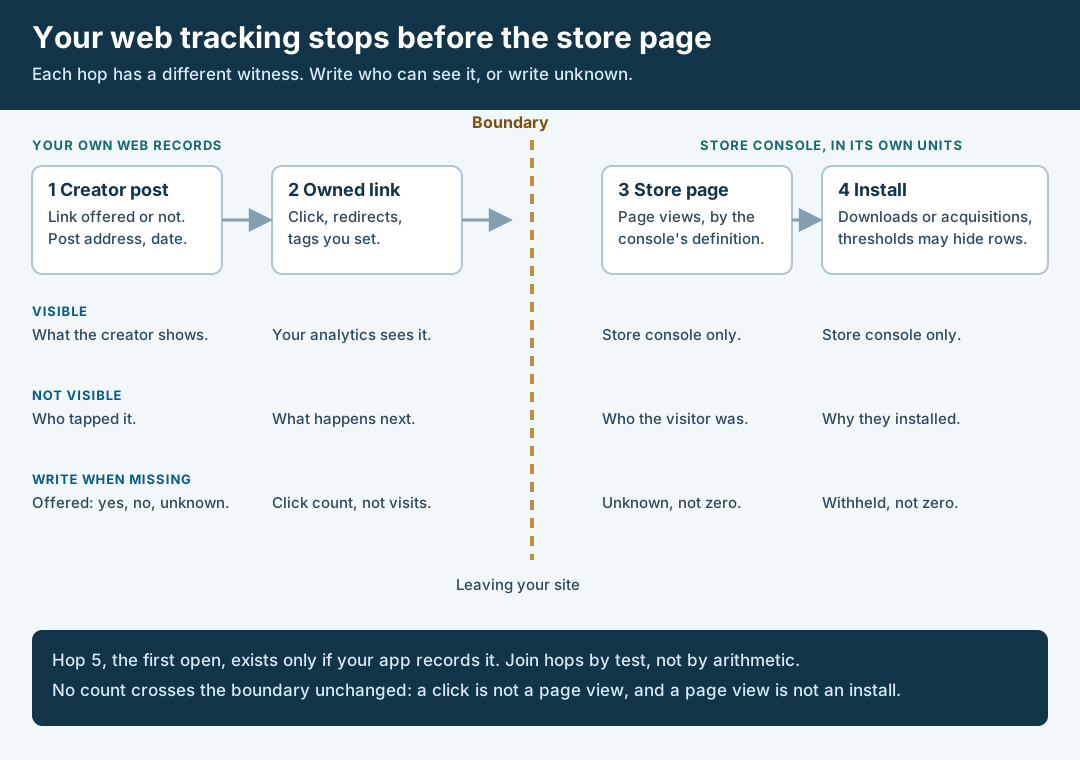
An original editorial map. Your own web records end at the boundary; the store console and your app each see only their own hop.
Original visual by Superdirector editorial team. Creation date not recorded.
Read what each store console reports for each hop
Past the boundary, the witness is the store console, and each store defines its own terms. Read each definition on the day you use it, because help pages change. As of October 30, 2026, Apple’s App Store Connect metrics reference defines Product Page Views as the total number of times your App Store product page was viewed, First Time Downloads as the number of first-time downloads on devices with iOS, macOS, tvOS or visionOS, and Total Downloads as the sum of first-time downloads and redownloads. It also says usage data, such as sessions, is based on users who have opted in to share their analytics with you, and that usage metrics appear only when there are at least five active devices in the selected range.
Apple’s acquisition page sorts page views and downloads by source type. Web Referrer means users tapped a link from a website that brought them to your product page, and where Safari follows a chain of redirects, the referring website is the last URL in the chain. App Referrer means users tapped a link in an app. The same page says that for iOS apps, taps from websites in non-Safari browsers such as Chrome are attributed to that browser app under app referrers. It does not mention built-in browsers inside other apps, so treat how those links are classified as unknown until your own hand test shows it.
Apple also offers campaign links. Its campaign links page says you create them in App Store Connect, that the link carries a provider token and a campaign token, and that the Campaigns tab appears only after the app has generated analytics data. It says a first-time download within 24 hours of using a campaign link or token is counted as a First-Time Download, that if a user clicks more than one campaign link only the most recent link receives credit for subsequent sales, and that campaigns appear in Analytics only after at least 24 hours. It also says a metric shows only if it reaches a minimum of 5 in the selected range, and that very small groups of users may be withheld or combined with other rows. A campaign with few downloads may therefore show nothing.
Google’s side is described on the Play Console store analysis help page. It defines store listing visitors as users who visited your store listing and did not already have your app installed on any device, counted once per day and per dimension, and store listing acquisitions as users who visited your listing and installed your app, counting only users who did not already have it installed on another device. It lists UTM source and UTM campaign as the values of those parameters in deep links to your listing, and says UTM source is only available when the traffic source is filtered by ads and referrals. It also says that search terms, UTM sources and UTM campaigns without enough visitors or acquisitions are grouped under “Other”.
The table sets the two side by side. It says nothing about how the numbers compare in size, because the units differ.
| Question | Apple App Store Connect | Google Play Console | What to write if it is blank |
|---|---|---|---|
| Was the store page viewed? | Product Page Views; a unique-device version is shown in acquisition reports | Store listing visitors, users who did not already have the app | Unknown, with the report path you checked |
| Was the app downloaded? | First Time Downloads, Redownloads and their sum | Store listing acquisitions, users who visited and installed | Withheld or unknown, never zero |
| Which link or campaign? | Campaign token on a campaign link created in App Store Connect | UTM source and UTM campaign in deep links to the listing | Unlabeled, and say who built the link |
| What is hidden? | Metrics under 5 in the range are not shown; small groups may be withheld | Low-volume UTM values grouped under “Other” | Withheld, with the rule quoted |
| What delay or window applies? | 24 hours before a campaign appears; 24-hour window for a first-time download | Not stated on the page we read | Delayed or unknown, with the date you read it |
One more witness lives inside your app. Google’s Play Install Referrer documentation shows sample code that reads the referrer URL string and the click and install-begin timestamps, says the information is available for 90 days and does not change unless the app is reinstalled, and advises calling it once, on first execution after install. That is a record your app can keep for Android installs if you build it. It is not a store-console number. We did not read an equivalent Apple document, so we make no claim about one.
Walk through a fictional boundary map
Fictional exercise: no real brand, creator, store listing or number was inspected. A made-up brand, Brand A, asks Creator Q for one video about its app. The published post offers a tappable link on Brand A’s own short domain, and that short link redirects to the store page for the viewer’s device. The analyst numbers the hops: post, owned link, store page, install, first open.
Hop 1’s witness is the dated capture of the post, and the link is offered. Hop 2’s witness is Brand A’s redirect log, if the hand test shows it records the request before the redirect completes. Suppose the test shows it does: the analyst writes that the link was requested a number of times she reads from that log, in requests and not people. The boundary sits right after hop 2. Hop 3 and hop 4 belong to the consoles, so she reads each console’s own definition and writes down the unit, and she records any campaign row that falls under a threshold as withheld, not as zero. Hop 5 belongs to the app, which records a first open only on Android in this made-up case, so on iOS she writes unknown.
The report has one line per witness, each with its unit and date. No line says requests became installs, and none says Creator Q caused any. The scenario predicts nothing about any real post or app.
Record each gap as unknown, withheld or delayed
Every cell on the map is in one of four states. Observed: you read a number from a named report on a named date. Withheld: the source says it hides values below a threshold or combines small groups, and you read that rule. Delayed: the source says the data appears later, and you have not yet reached that date. Unknown: you have no witness at all for that hop. Write the state in the cell. A blank cell reads as zero to a client, and zero is a claim.
Quote the reason beside each non-observed cell. “Withheld: App Store Connect shows a metric only when it reaches 5 in the range” says the number may exist. “Unknown: no link of ours was in the path” says it was never collectable. “Delayed: read again on this date” says when to look. These are three different facts, and a merged total hides them. The missing-analytics report guide covers how to show such cells without turning them into zeros.
Do not fill a gap by arithmetic across the boundary. A click count from your redirect and a page-view count from a store console have different units and different witnesses, so dividing one by the other gives a ratio with no defined meaning. If a reader wants to know how many clicks reached the store, the honest answer is that your records stop before it, and a few hand-test taps show only that the path works, not how often.
Pick one question per source and write the report line
Give each witness one question it can answer and write that sentence. Your redirect log answers “was our link requested, and how often, by this method?” Apple’s and Google’s consoles answer “did the store record page views and downloads, in its own units, under this link or campaign label?” Your app’s events answer “did the app record a first open, and what did it carry from the install referrer?” None answers “did this creator cause these installs,” because each looks at one hop and none sees the person across all of them.
A report line has a fixed shape: the source, the unit as that source defines it, the window with its time zone, the value or its non-observed state, and the date you read it. For example, with blanks: “Our short link was requested [N] times between [date] and [date] ([time zone]) in our redirect log, counted in requests.” “App Store Connect shows [value or: withheld, below the 5 minimum] product page views for campaign token [name], read on [date].”
Finish by naming an owner and a next-read date for each delayed or unknown cell, and decide whether to close it. Closing it may mean adding a link you control, creating a campaign link before the post goes live, or recording an event in the app, all for a future campaign. Defining the action you count before the first post, as in defining the conversion event, is the cheapest time to decide.
What this page does not decide
This page maps who can see what when the link ends at a store page. It is not an attribution model, and it does not say how to credit a creator. It does not cover paid-platform reporting, third-party mobile measurement tools or any vendor’s privacy features, none of which we read for this article. We have no benchmarks and claim none.
It differs from the closest pages in this library by where it starts. Testing live creator links after redirects follows a link through redirects to a web landing page and checks tags and events there; this page begins where that path leaves your site. Testing a creator link on mobile with consent compares consent states on a web destination. Comparing GA4 sources with a creator click report reconciles two web numbers, a session-source row and a creator-supplied click count. Defining the conversion event fixes the business action before the post. The artifact here is different: a map that assigns every hop to a witness and a unit, plus the store-console definitions that decide what a blank means.
Apple’s and Google’s pages are the authority for their own consoles, and they can change. We read the pages cited above on October 30, 2026 and state only what they say. We did not verify how links opened inside other apps’ built-in browsers are classified, or any Apple equivalent of the Play install referrer. If a point turns on privacy law or on your developer agreements, take it to counsel.