How-To Guide
Why TikTok Spark destination clicks and GA4 sessions differ
Diagnose TikTok Spark destination-click, Landing Page View and GA4 session gaps. Match the ad, URL, time zone, load and tag before calling traffic lost.
By the Superdirector editorial team. Sources reviewed October 28, 2026.
At a glance
Why can TikTok Spark Ad destination clicks differ from GA4 landing sessions?
TikTok destination clicks, TikTok Landing Page Views and GA4 landing-page sessions are independently counted observations. The first records a click toward the destination, the second a successfully loaded page under TikTok’s method, and the third a session collected and classified by GA4. Match the ad, URL, report scope, time zones and GA4 dimensions before diagnosing a gap.
- Do not substitute Clicks (all) for website destination clicks.
- A loaded page does not guarantee a GA4 session in the selected landing-page and source row.
- Aggregate differences are not matched lost people or a causal loss rate.
Direct answer
Short answer: a TikTok Spark Ad destination click, TikTok Landing Page View (LPV), and a GA4 landing-page session are three independently counted observations. A destination click, in TikTok's definition, is a click leading to a specified destination. TikTok counts LPV after an ad click when it sees the landing page load. GA4 starts a session under its own collection and session rules, then assigns a session source. No system promises one GA4 session for each TikTok click. Before calling a gap a problem, match the ad, website route, report window, time zones, and GA4 session dimensions. TikTok's metric definitions, TikTok LPV guidance, and GA4's session definition describe the separate boundaries.
This guide is for a Spark Ad with a website destination and an existing GA4 web stream. It helps an analyst decide which path to inspect after the ad has run. It does not estimate a universal click-to-session ratio, match people across TikTok and GA4, or claim that Superdirector reads either account. Use the three-measure diagnostic diagram and blank reconciliation CSV to keep the comparison honest.
Name the three measures before comparing them
| Measure | What the source says is counted | What the count does not establish |
|---|---|---|
TikTok Clicks (destination) | Clicks leading to the specified destination, in Ads Manager's selected ad and report scope. | That the website finished loading, that a GA4 tag fired, or that clicks were unique people. |
| TikTok Landing Page View | An ad click followed by a successfully loaded landing page under TikTok's LPV method. TikTok computes LPV as the page loads; it is distinct from advertiser-supplied Pixel or Events API page events. | A GA4 page view or session, a completed form, or a one-to-one match to a destination click in an export. |
| GA4 landing-page sessions | GA4's Sessions metric for sessions whose first page view has the selected landing-page path, optionally narrowed by session-scoped source, medium and campaign dimensions. | A count of TikTok clicks, unique people, or every visit to that page during an already active session. |
The first row comes from TikTok's basic metric definitions. TikTok separately defines Clicks (all) as ad clicks including social interactions. That broader number is the wrong numerator for a website-destination comparison. TikTok's Spark overview explains why: CTA and caption clicks can go to the advertising landing page, if there is one, while profile, follow and music interactions can remain on TikTok. Do not equate the Spark-specific “paid clicks” label with a different Ads Manager column without checking the selected report's definition.
The LPV row follows TikTok's LPV definition. Its page-load observation is independent of whether GA4 collected a session. TikTok says LPV can appear as a reporting metric for ad groups even when they were not optimized for LPV; record the ad group's actual optimization goal rather than assuming it from the column. TikTok also says its LPV, Google Analytics page views, and Google Analytics sessions can differ because the systems use different definitions and firing logic.
For the GA4 row, Google defines a session as a period of interaction that starts when a user opens the app in the foreground or views a page or screen and no session is active. The default timeout is 30 minutes of inactivity and can be changed for a web stream. GA4 automatically collects session_start when a session starts, but its reported Sessions metric estimates unique session IDs; do not simply substitute a raw event count. Google's Landing page report uses the first page view in a session and lets you add Session source / medium. A visit to the route during an already active session need not create another landing-page session. That last sentence is an inference from the two documented rules, not a matched visitor observation.
When enlarged, scroll horizontally to read the diagram.
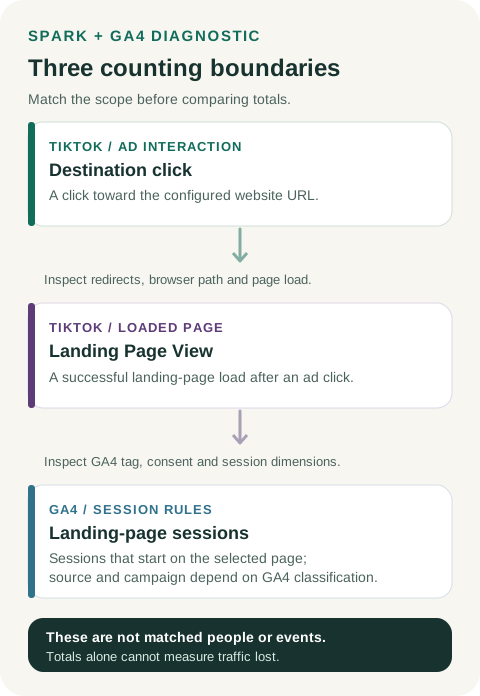
Original three-measure diagnostic. Match the ad, URL, date window and report scope before investigating a gap.
Original visual by Superdirector editorial team. Creation date not recorded.
Lock a comparison that means something
Start with the exact TikTok ad account, campaign, ad group, Spark post or ad ID, and configured website destination. Save the Ads Manager column names and export timestamp. If multiple ads use one campaign tag, GA4's campaign row cannot isolate a single ad by itself. Use an ad-specific value such as utm_content only if it was actually deployed and available in the chosen GA4 report; otherwise compare at the wider campaign scope and label that limit.
Record the ad's full tagged URL and the final URL after redirects. Google's campaign URL guidance says UTM values identify referring campaigns in Analytics and that source, medium and campaign spelling is case sensitive. A displayed UTM is not proof the tag was collected. Google also notes that UTM parameters are omitted from the Landing page + query string dimension; inspect Page location or a separate URL/redirect record for the raw values, and use session-scoped dimensions for the GA4 attributed-session row. Do not look for the UTM string in the landing-page dimension and treat its absence there as a broken tag.
In GA4, verify the property and the web stream collecting this destination. In the Landing page report, choose the path where the session actually started, then compare all-source sessions on that landing page with the narrower row using Session source / medium and, when useful, Session campaign. Google documents that report combination. Do not substitute First user source, which is user-scoped, or a Page path report that includes sessions visiting the page later; Google explains the scope distinction. The all-source row is a diagnostic contrast, not proof that TikTok sent the difference.
Finally, freeze the same elapsed interval as closely as the two reporting interfaces permit. TikTok says its ad-account time zone affects report display; GA4 has a property reporting time zone. Write both down. A “Tuesday” in different time zones can include different hours, so a daily total is not a matched window until those boundaries are reconciled. TikTok time-zone guidance and Google's property setup guidance are the basis for this comparison rule. Allow standard reports to settle before interpreting a recent window; preserve the time each export was taken.
Use the gaps as leads, not as a loss-rate formula
The accessible three-measure diagram puts each counting boundary on one page. Its arrows tell you which check to make next. They do not assert that the three tools share person-level event IDs or that every recorded click must appear in the next box.
Destination clicks above LPV: TikTok's definitions make a page-load question reasonable: did the intended website route load under the ad's actual mobile path? Check the configured destination, redirect chain, market or login gate, and any error shown to a tester. A gap is consistent with load failure, but the totals alone do not identify failed visits or say how many people abandoned. TikTok's LPV article is about its own loaded-page observation, not a GA4 collection receipt.
LPV above GA4 TikTok-attributed landing sessions: inspect GA4 collection and classification separately. A loaded page may not yield a GA4 session in the selected report if the tag was not collected, consent or a configured filter changed collection, a session was already active, the first recorded page was different, or the session source/campaign filter missed the recorded value. These are diagnostic possibilities, not conclusions about this ad. Google's DebugView guidance notes that privacy controls and denied Analytics consent can hide events from DebugView; Google's setup troubleshooting includes tag and data-filter checks. A fresh authorized test can show one path now, not reconstruct every historical click.
GA4 attributed sessions above LPV, or more GA4 sessions than destination clicks: first recheck ad versus campaign scope, landing path, dates and time zones. The counts can also describe different visits: Google says session attribution uses non-direct last click and gives a case where a later direct return retains the earlier source. If that returning session begins on the selected landing page, it can appear in a GA4 campaign row without a new TikTok click in the same report window. This is a source-backed possible mechanism, not proof that it occurred in your account. No ordering of the aggregate totals proves fraud, wasted spend, or extra people.
Inspect the path in six passes
- Confirm the numerator. In Ads Manager, record
Clicks (destination),Clicks (all), LPV, ad ID, destination type, optimization goal, report dates and account time zone. Keep social interaction clicks out of the destination comparison. TikTok's click-discrepancy guide explicitly distinguishes Spark interactions that remain on TikTok from CTA or caption paths to the external page. - Rehearse the exact website route. From the intended mobile surface where available, open the ad's configured URL using authorized test data. Record first URL, every redirect, final page, load result and final UTM state. If a prelaunch preview cannot reproduce the actual wrapper or route, mark it unverified. This is a route check, not a replay of the historical audience.
- Verify GA4 collection for the test. Confirm the correct web stream and tag on the final page. On a debug-enabled test device with appropriate consent, inspect
page_viewandsession_startin GA4 DebugView, noting that an active session may not start again. Record the test timestamp, consent state and any active data filter. A successful test proves only that configuration and device at that moment. - Read the GA4 rows at the right scope. Record Landing page
Sessionsfor the route from all sources, then addSession source / mediumandSession campaignfor the declared TikTok tag. Compare exact case, spelling and ad-specificutm_contentonly where the report can expose it. If the GA4 session began elsewhere, the route may have page views without landing-page sessions. - Align the reporting window. Record the TikTok ad-account zone, GA4 property zone, start/end instants and export times. If the interfaces cannot produce the same elapsed window, say so; compare a wider aligned interval or leave the precise gap unresolved. Do not turn a midnight-boundary mismatch into a conversion rate.
- Write a bounded result. State what was observed, what one test confirmed, what remains a hypothesis, and who owns the next repair. Re-export after a tag, redirect or report-filter correction. Never subtract the three totals and label the remainder “lost visitors.”
A hypothetical filter mistake, without invented performance numbers
Suppose one fictional Spark website ad was tagged with utm_source=TikTok, while an analyst filtered GA4 Session source for lowercase tiktok. The analyst's row would omit sessions carrying the differently capitalized value because Google treats those UTM values as distinct. The correction is to record the deployed value and inspect the matching GA4 rows; it is not to claim that the TikTok destination-click total now equals GA4 sessions. There are no account exports, totals, users or matched events behind this illustration. The blank CSV card leaves all count fields empty for that reason.
Decide what to fix and what to leave unknown
A useful reconciliation note might conclude that a redirect is broken in a current test, a GA4 filter is excluding a known class of test events, a campaign tag was split by case, or that the selected columns measure different scopes with no verified technical fault. Each conclusion needs its own dated evidence. If the evidence stops at a plausible cause, write unresolved and assign the next check. The diagram's blank table keeps the source, report setting, observation and owner beside the numbers you eventually enter.
This diagnosis ends at traffic measurement, not ROI. A UTM-labeled GA4 session is not a verified sale or an incremental return. Once the site path and counter definitions are understood, the social ROI guide concerns the separate decision about business return and cost; use reconciled business records before making that claim. This article does not turn TikTok clicks, LPV or GA4 sessions into revenue.
Editorial source note
Editorial source note: TikTok documentation supports the definitions and Spark interaction paths; Google documentation supports session, landing-page, UTM, consent and time-zone scopes. The six-pass diagnostic order and hypothetical capitalization error are original teaching methods. No TikTok account export, GA4 property observation, client result, person-level match, loss rate or Superdirector account connection is claimed.
Frequently asked questions
Why can TikTok Spark Ad destination clicks differ from GA4 landing sessions?
Is TikTok Landing Page View the same as a GA4 landing-page session?
Why might GA4 show more TikTok-attributed sessions than TikTok LPV?
Can I divide GA4 sessions by destination clicks to calculate lost traffic?
Which GA4 report should I use for the comparison?
Sessions metric for the page where a session began, then add session-scoped source/medium and campaign dimensions. Keep an all-source landing-session row as a diagnostic contrast. Use a raw URL or Page location check for UTM values, since Google omits them from the Landing page + query string dimension. Record the chosen path, web stream, date window and time zone.