How-To Guide
Correct a creator’s YouTube video after upload without losing track of the URL
Choose the right YouTube correction after upload, verify the changed watch page, and reconcile campaign links when a new video creates a new URL.
By the Superdirector editorial team. Official YouTube Help reviewed October 29, 2026.
At a glance
Can an agency replace a creator’s YouTube upload while keeping the same URL?
YouTube cannot replace an uploaded video file while preserving its watch URL. Identify the faulty layer and choose an adequate change on the existing upload when supported: details, captions, a trim, a blur, or a timestamped Corrections card. If the fix needs a revised master, upload a new video, verify its watch page, and reconcile each confirmed campaign link to the new URL.
- Pin the exact viewer-facing fault before choosing an edit.
- Use an existing-upload change only when it adequately fixes that layer.
- A revised-master upload gets a new URL; verify and reconcile confirmed links.
Direct answer
Short answer: YouTube does not let a channel replace an uploaded video file and keep its watch URL. First identify the faulty layer. Correct editable details or a caption track on the existing upload when that actually fixes the viewer’s experience. A trim, cut, blur, or timestamped Corrections card may be available for a narrower problem, but each has limits. If the required fix needs a revised master, the channel owner uploads a new video with a new URL. Verify the actual watch page and reconcile every confirmed campaign placement that points to the old one. YouTube: replace or delete a video.
This guide is for an agency or brand that has already received a creator’s YouTube watch link and then finds an error. Its task is the correction and destination handoff. The pre-publication claim guide decides whether a proposed claim is supported; this page starts when a particular upload must be repaired. It does not claim access to the creator’s channel or the ability to edit someone else’s video.
Use the blank correction card, CSV destination register, and original correction-route map. These are empty or explicitly fictional teaching assets, not campaign results.
Pin the observed error before picking an edit
Open the exact watch URL supplied for the campaign. Record the channel, video title, visibility you can actually observe, review time and cut or master identifier if the creator supplied one. Identify the error by a timestamp or field: title, description link, thumbnail, selectable caption track, spoken words, picture, burned-in text, or a linked destination. Preserve the current observation before asking for a change.
Separate the wrong observation from the proposed remedy. “At 00:42 the voice says the product guarantees a result” describes a video problem. “Add a description note” is one possible response, but it does not remove the audible words. If the product claim itself is disputed, route it through the owner of the underlying evidence. The agency should not treat a cosmetic edit as proof that the claim is now true.
The useful correction ticket has five items: (1) exact URL and current content version, (2) timecode or named field, (3) what a viewer presently sees or hears, (4) the supported replacement wording or action, and (5) who can make and verify the change. Keep any private source document, commercial terms or account credentials in the owned workspace, not in a public card.
Match the faulty layer to a supported route
YouTube’s documentation distinguishes changing an existing upload from uploading a replacement file, which gets a new URL. Its current help describes title and description changes, caption-track edits, trim and cut, custom blur, and a description-based Corrections card. The agency’s decision is whether one of those options adequately corrects the actual problem on this exact video. Existing-upload changes, video settings and Corrections, captions.
| Faulty layer | Route to evaluate with the channel owner | Acceptance check |
|---|---|---|
| Title, description, or destination link | Edit the existing video details | Open the same watch URL; read the changed field and follow the intended link |
| Thumbnail | Change the existing upload’s thumbnail if the channel can | Inspect the public thumbnail where viewers encounter it, then open the intended watch URL |
| Selectable caption text or timing | Edit and Publish the intended language track | Play with that track selected at the affected timecode |
| Small removable segment | Preview a trim or cut if the video and account qualify | Play through both joins; check that the remaining claim still makes sense |
| Visible sensitive or wrong detail that can be obscured | Evaluate custom blur for the exact frames | Play the saved watch page; make sure the detail stays hidden and the result remains truthful |
| Statement that needs an explanatory correction | Evaluate YouTube’s timestamped Corrections card, if available | Check that viewers see the correction; decide whether an unchanged spoken claim is still misleading |
| New footage, replacement narration, or a revised master needed | Upload a corrected file as a new video | Verify the new watch URL and every confirmed dependent placement |
A change in a caption track does not change the speaker’s audio. A blur hides picture detail but cannot supply new words or footage. A Corrections card provides an explanation; it is not an automatic cure for a serious unsupported sponsor claim. The correct route depends on the required viewer outcome, not on which button is cheapest. YouTube caption editing, custom blur, Corrections card.
Use the existing upload only when the result is sufficient
For a title or description error, ask the channel owner to edit the video details in YouTube Studio. The reviewer then reloads the same public watch URL and reads the final field. For a bad product link, follow it to the intended page in the intended viewer context; a corrected draft description in chat is not a live-link receipt. If the video contains a separate incorrect caption track, the owner can edit its text or timing and publish it. YouTube notes that editing automatically generated captions creates a new track with the revisions, so verify the selected language track on playback, not merely the editor field. Edit video settings, edit captions.
For a removable clip, YouTube says its trim and cut tools can remove the beginning, middle or end of videos shorter than six hours while retaining that video’s URL, view count and comments. It warns that an unedited video with more than 100,000 views may not be able to save changes except face blur, unless the channel is in the YouTube Partner Program. The owner must inspect current availability on the actual video. Preview the full sentence and demonstration around each cut: removing a qualification can make a claim broader. As of June 2025, YouTube says saved Editor changes can no longer be undone with the Revert to original feature, so retain the original master and review carefully before the save. Trim and cut restrictions.
YouTube also documents custom blur. It may conceal a wrong label or sensitive screen detail when the remaining video is still accurate, but a blur is not a way to replace a product action. Watch the moving object throughout the relevant frames; a stationary box can miss it. Preview before saving, then review the published watch page afterward, as YouTube instructs. A saved Editor preview alone does not prove the processed public result. Blur your videos, preview and review changes.
Know what a Corrections card does and does not do
YouTube permits a creator to add a timestamped “Correction:” or “Corrections:” entry in the video description. Its help says this can show viewers a “View Corrections” info card. The marker must use those English words, and YouTube says the feature is unavailable for a channel with an active strike or for content that may be inappropriate to some viewers. It is an option for an explanatory correction, not a promise that every viewer notices it. YouTube’s Corrections instructions.
Decide with the brand and channel owner whether the resulting video is actually acceptable. If a sponsored spoken promise remains false or a demonstration still shows a nonexistent feature, an appended note can leave the misleading scene in place. A trim, blur, corrected master, or another accountable response may be required. Record the accepted viewer-facing result and the reason; do not let “card added” become shorthand for “claim repaired.” The claim-evidence review supplies the separate proof decision.
Treat a revised master as a new publication
When the correction requires new footage, rewritten on-screen text, a rerecorded sentence, or a complete rebuilt cut that the documented in-place tools cannot deliver, the creator must upload the revised master as a new video. YouTube explicitly says a new upload gets a new URL. Save both the old URL and the new one in the record; do not overwrite the old row or promise that old embeds, comments, views or approvals migrate. Replace or delete a video.
Before closing the ticket, inventory confirmed destinations that use the old URL: the brand’s landing page, the agency’s campaign report, a scheduled post, an email draft, a paid creative record or a contracted partner placement. Record the owner of each placement. Change only the links the team controls; ask other owners for a change and leave their status open until they confirm. For each changed placement, open it as a viewer and follow its link to the new video. The live-link trace method explains how to verify a destination rather than accepting a pasted URL.
Ask the authorized channel owner what happens to the old upload and record the outcome. It may remain visible, become unlisted, carry a correction, or be removed according to the owner’s decision and the campaign’s commitments. Do not delete merely to make a worksheet tidy: YouTube says deletion is permanent, and deleted-video watch time remains in aggregate reports without attribution to that video. YouTube deletion behavior. A new upload is a new approval object; return its actual URL and final cut to the content approval process.
Worked decision: one upload, two different faults
Fictional example — no creator, product, campaign or result is represented. A creator uploads cut C2 for an invented travel mug. The description links to the wrong color, while a burned-in lid label stays visible through the demonstration. The channel owner edits the description; the reviewer opens C2’s watch page and confirms the correct destination. That fixes the description fault only.
The team evaluates an in-place cut and blur for the label. In this fictional scenario the label runs through the essential demonstration, and obscuring or removing it would make the product explanation unclear. The editor prepares corrected master C3, the creator uploads it, and the reviewer observes its new watch URL. The agency updates its own landing page, then asks the email owner to update an unsent email. The email item remains outstanding until that owner confirms and the link is tested. No view, sale, retention, or distribution effect is inferred from this invented case.
The diagram below encodes the same decision. Its branches are editorial choices, not a claim that the video in this example exists or that every YouTube account has every editing option.
When enlarged, scroll horizontally to read the diagram.
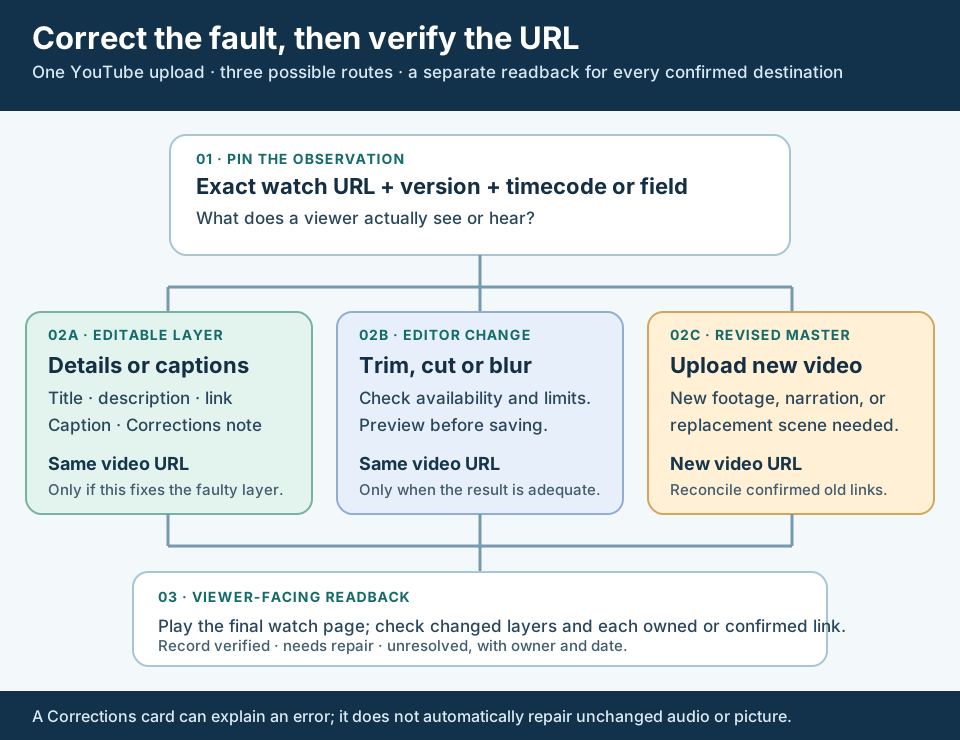
An original route map. The blank card and CSV keep the exact upload, owner and dependent destinations together.
Original visual by Superdirector editorial team. Creation date not recorded.
Close on a dated public observation
For an in-place correction, play the affected passage at the original watch URL after YouTube has processed the edit. For a replacement, play the new video and open each confirmed dependent placement. Capture what was seen, when, and under which viewer context. Mark each row verified, needs repair, or unresolved; do not mark the whole campaign complete while another owner’s link request is open.
Hand the accepted content version, URL, changed layers, unresolved destinations and reviewer’s date back to the normal approval record. Keep the old observation and the new one linked, because the fact that one field changed does not prove the rest of the video or campaign changed. The blank correction card and CSV register make that handoff practical without pretending to be a completed campaign audit.