How-To Guide
How to separate a creator post's organic results from paid amplification
Report TikTok post totals and Spark Ad delivery honestly. Use a verified, applicable TikTok One video split; otherwise leave organic-only views unknown.
By the Superdirector editorial team. Sources reviewed October 28, 2026.
At a glance
How can a report separate a creator post's organic results from paid amplification?
Use an exact-video TikTok One organic and Spark-paid split only when both fields are available and applicable to the campaign. If the paid-and-organic optimization feature is on, its own first-party reporting splits only impressions; verify how any TikTok One view fields apply before using them. Otherwise keep the dated post total and named ad metric separate, and label organic-only views unknown.
- A Spark-boosted post counter includes activity attributed to the original post; it is not organic-only.
- TikTok One Spark-paid video views do not by themselves identify one advertiser ad ID or incremental lift.
- Do not subtract ad impressions from post views or combine unlike scopes.
Direct answer
Short answer: first identify the post, the ad, the reporting surface, and any paid-and-organic optimization setting. TikTok One Project Reporting defines *organic video views* as non-Spark delivery and *paid video views* as Spark delivery. If an accessible report exposes both fields for the exact video, use that split only for the displayed scope and date. TikTok's separate paid-and-organic optimization guidance says its feature-specific first-party reporting splits only impressions; the help pages do not establish how that feature and a TikTok One video split interact for the same campaign. If applicability is unresolved, leave the organic-only view result unknown. Otherwise, when no applicable split is available, report the original post's observed total and the matching ad's reported delivery as different measures. TikTok says Spark boosting adds views and engagement to the original post, so its visible total is not an organic-only figure after amplification. TikTok One Project Reporting, paid-and-organic optimization, and Spark Ads supply those definitions.
This guide uses a creator's already-public TikTok post that a brand later uses as a Spark Ad. It solves a reporting decision: what can a client honestly call organic, paid, combined or unknown? It does not decide when publication or ad delivery began, reconcile website sessions, or calculate return on investment. Use the two-lane reporting card and its blank CSV ledger while gathering the records. Neither asset contains campaign results.
Why the original post counter changes meaning after a boost
A Spark Ad uses an organic account's post in paid advertising. TikTok says views, comments, shares, likes and follows gained from boosting are attributed to that original post. The number visible on the post after the boost therefore mixes activity associated with organic delivery and paid promotion. A screenshot of that counter is still a useful dated observation of the post total; it is weak evidence for an *organic-only* number. TikTok describes this attribution as a feature of Spark Ads, including ads using another creator's authorized post.
The tempting calculation is “post views after the boost minus post views before the boost equals paid views.” It fails because the post can also receive organic views during the same interval. The reverse calculation, “post total minus Ads Manager impressions equals organic views,” also fails: impressions count times an ad was shown, while a video-view metric counts plays under its own definition, and the post total may cover a different period. TikTok's basic ad metrics define impressions as ad showings; its video-play definitions distinguish video views from two-second and six-second views. These are different units, not two parts of a subtraction.
The same caution applies to likes and comments. A post's total is not a clean organic result after Spark use. A paid-engagement field has its own reporting method and period. Use an explicit organic/paid breakdown from a source that actually defines one; do not infer the missing side from unlike counters.
Start with a video-level split when TikTok One supplies one
For a video inside an accessible TikTok One project, TikTok's Project Reporting documentation defines a useful potential split in its *Overview* metric definitions. Use it at the video level only when the actual video report exposes the named fields and their scope is applicable:
| TikTok One field | TikTok's definition | Report label to use |
|---|---|---|
| Total video views | Times the project or video was watched | TikTok One total video views, for the selected video or project scope |
| Organic video views | Views acquired through organic delivery, not Spark Ads | TikTok One organic video views |
| Paid video views | Views acquired through Spark Ads | TikTok One Spark-paid video views |
| Organic likes, comments and shares | Interactions generated through non-paid delivery | TikTok One organic interactions, naming the exact metric |
| Paid likes, comments and shares | Interactions generated through Spark Ads | TikTok One Spark-paid interactions, naming the exact metric |
The video row matters. A project-level total can contain several creators or videos. In TikTok One, open Tools → Reporting, choose the project, go to the video overview/list and select the specific video. The documentation says the video tab has custom reports that can add available video-level metrics; it does not guarantee every named field for every project. Export report can download CSV, XLSX or ZIP. Record the project, region, video/post identity, selected columns, visible filters, displayed through-date and export time beside the numbers. TikTok says reports are limited to projects and videos in the current region; a missing project in your account is not evidence of zero organic views. TikTok's access, metric and export instructions are the basis for this workflow.
Do not silently treat a fresh export as a complete same-day result. TikTok says the Overview and Ads performance tabs update in real time, while other reports update daily or every seven days, and a 24–48-hour discrepancy can appear between the current date and the displayed timestamp because of time zones. Put the report's displayed data date in the client-facing caption. If the exact video or time scope is unavailable, label that field unavailable and keep its evidence request open. TikTok states the report refresh limits here.
This is a reported delivery split, not a causal experiment. TikTok One's “paid video views” says those views came through Spark delivery in its selected video or project scope. That field alone does not assign every view to this brand's particular ad ID or establish all advertiser accounts that boosted the post. It does not show how many views would have happened without the ad, whether the audiences overlap as people, or whether the creator's fee was profitable. Keep any “lift,” “unique people” or ROI claim for a method that can support it.
When enlarged, scroll horizontally to read the diagram.
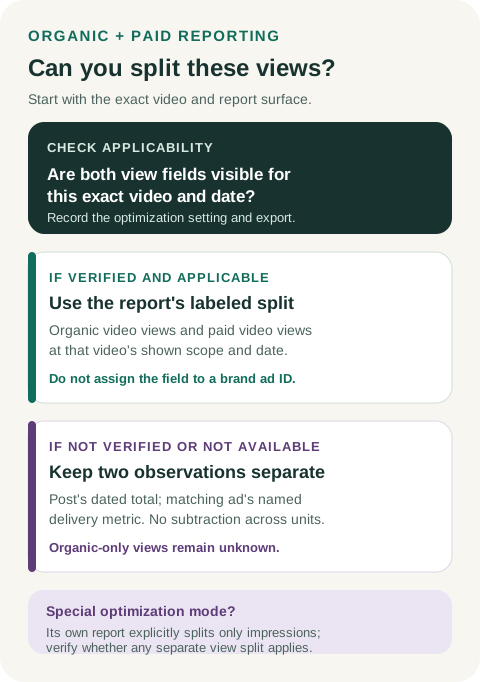
Original view-split decision diagram. Report source scope and applicability before using an organic-only label.
Original visual by Superdirector editorial team. Creation date not recorded.
Write the report so another analyst can reproduce it
Decide the report window and unit before comparing figures. The creator-post screenshot is a point-in-time total. An ad export may be a daily or custom-period count. A TikTok One video report may have a displayed data date that lags the export time. Record these separately; do not put them under one unqualified heading of “views this week.” TikTok says the Ads Manager account time zone controls how report data is displayed, so include it for any daily comparison. TikTok's time-zone guidance and the TikTok One refresh note support these labels.
Use this compact evidence sequence:
- Identify the content. Save creator account, exact post ID/URL, and which deliverable or report row it represents.
- Identify every boost. Save each ad account and ad ID that uses that post, plus the ad-report window. One post can have more than one paid report; a single ad export may be incomplete if other accounts boosted the same post.
- Look for an applicable source split. In an accessible TikTok One project, check whether the specific video's report actually offers organic and paid fields. Inspect the paid-and-organic optimization setting and the exact report's metric definitions. If the feature is on and the TikTok One view split's applicability to that campaign cannot be established, keep the view split unknown; the feature-specific first-party report splits only impressions. Do not relabel a combined field.
- Match scope and units. Keep video views beside video views from the *same reporting source and selected video*, when that source supplies a split. Keep impressions, reach, public counter snapshots, ad costs and website events as separately named diagnostics. Record report time zone, displayed through-date and export time.
- State the unknown. If an exact organic-only field is unavailable, write “organic-only post views not established from these records.” That is a valid reporting result, not a blank to fill by arithmetic.
For a hypothetical collaboration whose exact-video TikTok One export exposes an applicable split, a client sentence could read: “For video [post ID], TikTok One Project Reporting shows [organic video views] from organic delivery and [paid video views] from Spark delivery, through [displayed date] in [selected scope]. The attached export identifies the project, region, video and any applicable optimization setting. These are platform-reported views, not this ad's incremental lift.” The bracketed items are empty placeholders, not measured results.
If that project report is unavailable, the corresponding sentence is: “The creator post displayed [total] at [observation time]. Ads Manager reported [named ad metric] for ad [ID] during [interval and time zone]. Those records use different scopes; an organic-only result is not established.” Never add the two figures or subtract one from the other unless the source explicitly defines a common, disjoint breakdown in the same scope.
Keep the next decisions separate
This split helps answer how distribution occurred, not whether the creator delivered on time, whether the ad caused incremental demand, or whether revenue exceeded the full cost. The creator-post and Spark Ad timeline guide covers the separate publication, authorization and delivery dates. The served social ROI guide addresses verified business return and campaign cost. A platform view, click or like alone is not a sale or a numeric ROI calculation.
The two-lane reporting card gives an accessible blank table for the post and ad records. Its CSV ledger captures the source, identity, scope, metric, date and permissible client wording. They are templates: no account export, creator identity, measured campaign outcome or Superdirector integration is implied.
Editorial source note
Editorial source note: TikTok's current Spark Ads, TikTok One Project Reporting, Ads Manager performance, paid-and-organic optimization, metric and time-zone pages linked above support the platform-specific statements. The two-lane ledger, evidence order and report wording are original editorial methods. No creator or ad account was accessed, and no campaign result is represented. Source pages checked 2026-10-28. The keyword phrases are intent hypotheses, not measured search-demand claims.