How-To Guide
Instagram influencer marketing: a brand’s native-tool workflow
Use Instagram’s native tools for creator discovery, disclosure, optional partnership ads and separate reports. Includes an editable campaign map.
By the Superdirector editorial team. Official Meta, Instagram and U.S. FTC sources read November 5, 2026.
At a glance
How can a brand run an Instagram influencer campaign using native tools?
Use Instagram’s creator discovery tools to find a match, agree exactly what the creator will post, have the creator disclose the partnership, and arrange separate permission if you want a partnership ad. Then read organic post results and paid delivery separately. The useful starting point is a campaign map that names the tool, the account owner and the information you need at each handoff.
- Creator Marketplace helps discovery and contact; it does not settle your campaign terms.
- The Paid Partnership label and permission to promote a post answer different questions.
- Record each metric with its post, source and time window so a campaign report does not mix account totals and post results.
Start with the post you want to buy
Instagram influencer marketing is a brand working with a creator on content for the creator’s audience. To run a first campaign with native tools, separate five jobs: define the post, find a creator, agree and disclose the work, arrange any ad use, and read the results. Instagram has tools for several of those jobs, but a discovery result does not write the agreement or choose a reporting question for you.
Write a short campaign sentence: “We want [audience] to understand [one buyer question] through [format and account], then [intended action]. We will review [named result and source] on [date].” This is an editorial planning method, not a performance formula. A useful product demonstration can be briefed without promising a reach level, conversion rate or follower increase.
Use the original native-tool map and editable campaign card as you go. The blank CSV carries the same handoffs. These are planning aids; they contain no real creator, campaign or result.
Which Instagram tool handles which job?
| Job | Native surface or owner | What to check before moving on |
|---|---|---|
| Find possible partners | Creator discovery / Creator Marketplace available to the brand | Audience attributes and portfolio examples match the written brief. |
| Discuss the opportunity | Native brand message or project; creator’s reply | The exact account, deliverable, dates, fee or benefit and reporting request are agreed. |
| Make the relationship visible | Creator’s Paid Partnership label plus their disclosure | The published post shows the planned label and message; a draft is not a live observation. |
| Run paid promotion | Partnership ad tools and authorized ad account | The intended use is agreed, platform permission exists, and the actual ad is identified. |
| Review what happened | Item-level organic view, available hub insights and paid reporting | Each number names its content, source, metric and window. |
Meta’s creator-marketplace explanation describes discovery, contact and launch as separate steps. Its older names remain useful for understanding the jobs. Meta’s June 2026 announcement in Portuguese planned to combine Creator Marketplace and Partnership Ads Hub into Meta Creator Marketing Hub later that year. We could not read the subsequent launch announcement in full. Check the surface name and access your own account presents; this guide does not promise an unchanged menu path.
When enlarged, scroll horizontally to read the diagram.
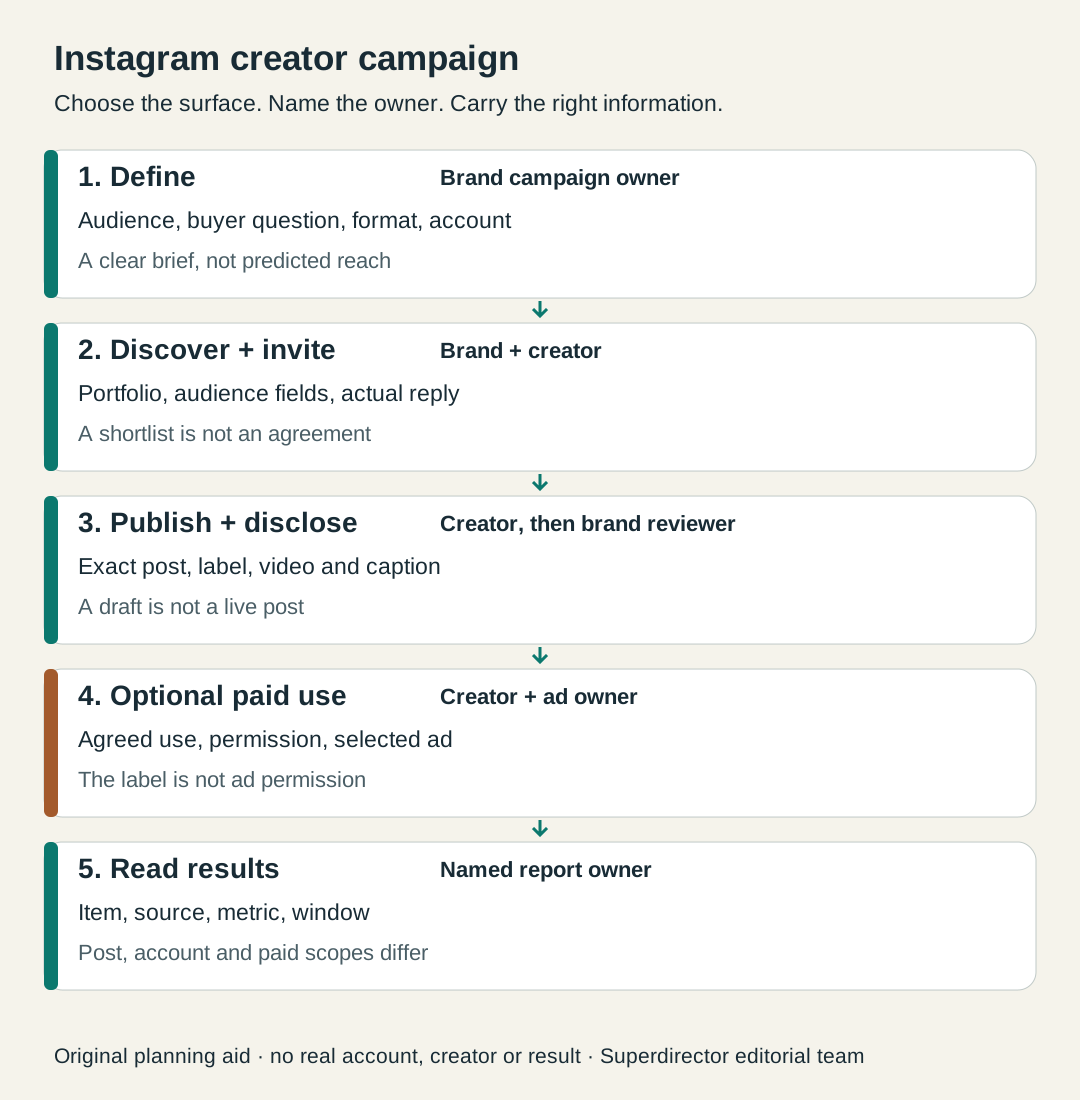
Original editorial campaign map. Tool access, an agreement, publication and results answer separate questions.
Original visual by Superdirector editorial team. Creation date not recorded.
Find creators, then open the work
Meta says brands can search creator and audience attributes, review portfolios and see creators who have expressed interest. The creator-facing entry is the professional dashboard in the Instagram app; the brand entry described by Meta is Meta Business Suite. These are the two sides of the relationship, so agree which brand account will send the opportunity and which creator handle is being considered.
Make the first handoff an account-owner check. Ask the person who manages the brand’s Meta Business Suite to open the intended brand workspace and show whether they can search creator profiles and send the planned message or project. Save the surface name, brand identity and the action they could actually complete. If discovery or contact is unavailable, mark that result and assign the next task: inspect an already known creator’s public work and confirm a contact route. Do not spend the creator invitation window waiting for an assumed feature. This is our access check, not a verified menu path or a promise that your account qualifies.
Turn the campaign sentence into a search and review task. A brand selling compact cooking equipment might look for creators whose own videos show cooking in small kitchens, then check whether the available audience information covers the market it serves. The creator’s location and the audience’s location are different questions. A relevant bio is a reason to open the portfolio; it is not proof that a creator can demonstrate your product well.
Meta’s January 2026 update, published in Portuguese describes similar-creator search, recommendation explanations and predictions of ad performance for a brand. Those can suggest whom to inspect. They do not establish that the creator is available, accepts your terms or will produce a particular result. Keep the work example that made you shortlist someone beside the name.
If your brand cannot access a native discovery feature, keep that limitation visible and continue from creators you can actually inspect and contact. For a decision about where to spend sourcing time, use the separate marketplace-versus-manual comparison. This page maps the Instagram handoffs after that choice; it does not rank discovery services.
Send an opportunity the creator can answer
Meta’s description of native collaboration says brands can contact creators directly or send a project to several creators. Creators receive brand messages in a dedicated Partnership Messages folder and can review the requirements and rate in the Instagram app. A sent message is an invitation to discuss the work, so keep the actual reply and agreed version with the brief.
- Name the exact creator handle and publishing format, with the number of posts. For Stories, specify the number of frames, their order and whether they form one sequence or separate publications. If a Collab is wanted, state who originates the post and whom they invite.
- State what the product demonstration must show and which claims have supporting evidence. Let the creator propose how to make the explanation fit their work.
- Name the draft-review date, intended publication window and the reporting cutoff. Ask which results the creator can supply and when.
- State the compensation or benefit and the separate scope of any reuse or paid promotion. Do not hide an ad-use request inside “one Reel.”
For the fictional pan campaign below, give the budget three lines before requesting any ad permission. The amounts are blanks for the parties to agree, not recommended rates. If product or shipping is part of the offer, record that cost alongside the creator deliverable.
| Budget line | Write down | Owner to name |
|---|---|---|
| Creator deliverable / benefit | One Reel, agreed fee or benefit, and any product or shipping cost | Who agrees and pays for the creator work |
| Optional additional paid use | Agreed content, term and any extra payment; say explicitly if included in the creator fee | Who settles the use with the creator |
| Optional ad media | The advertiser’s separate spend amount and flight; no media spend if no ad is planned | The person controlling the ad-account budget |
A fictional compact-kitchen brief could say: “Show how the pan fits and is used on your small hob; do not claim it saves energy. Publish one Reel from your handle. Send the agreed item-level results at our review date. No paid promotion is included in this request.” The example is invented to show the information the invitation needs, not a message sent to a creator.
Have the creator disclose the relationship
Instagram’s public creator guidance says creators paid in any form need a Paid Partnership label. Its FAQ says money is not the only benefit that counts: gifted products and trips count too. Put the intended brand partner and disclosure responsibility in the brief, and ask the creator to confirm the tools available in their account before the publishing day.
For campaigns affecting U.S. consumers, FTC staff guidance says a material connection can include free or discounted products, the disclosure belongs with the endorsement, and video disclosure should be in the video rather than only its description. It also says not to assume a platform’s tool is sufficient. That is U.S. guidance, not a global legal checklist or a certification that a specific caption is compliant.
Review the actual post once published, including its visible label, video and caption. A screenshot of a settings choice and a draft caption do not show what a viewer received. The caption-and-video disclosure review handles that finished-post check. A Collab invitation is a separate matter: use the Collab delivery guide if coauthorship is part of the brief.
We could read Instagram’s public creator page, but the detailed Help Centre label and brand-approval pages returned shells. We therefore give no current menu sequence, automatic brand-approval promise or fixed private-insights window. Confirm those details with the account owner and the current help available to them.
Add a partnership ad only when it is part of the plan
Meta describes partnership ads as amplification using a creator’s or partner’s handle, and says advertisers can promote existing organic content or create a new partnership ad in Ads Manager. The feature used to be called branded content ads. An organic creator post can be the full campaign deliverable; buying it does not by itself describe an ad flight.
Instagram tells creators they must give permission before a business sees the option to promote their branded-content posts. Agree the specific content, intended paid use and dates with the creator, then verify the platform permission in the relevant account. Keep that permission distinct from the visible Paid Partnership label.
After permission, the ad owner still has to identify and run the intended ad. Ask for the ad account, the selected content and the planned flight, then review actual paid reporting if it launches. No code lifetime or guaranteed delivery follows from this page. The partnership-ad setup guide covers the deeper permission decision; the campaign map here simply gives that job a named owner.
What can the brand see in each report?
Before posting, agree the report question and the source that can answer it. “How did the creator post perform?” needs an identified content item. “How did our paid promotion perform?” needs the ad and its window. “Did it bring orders?” needs the destination’s purchase records and an explicit attribution method. These are different questions even when the same video is involved.
| Source | What the source description supports | What to request or keep separate |
|---|---|---|
| Creator portfolio / discovery profile | Work and discovery information available in that surface | Ask for audience or historical-post details that your account cannot see. A recommendation is not a campaign forecast you can promise. |
| Organic content insights in the hub | Meta names views, interactions, likes, comments, shares and saves for clicked content | Confirm the actual item and cutoff. Do not assume every private field or creator is visible. |
| Creator-supplied item-level results | The fields actually shown for the identified post and captured period | Request an uncropped metric label, content identity and window. Keep private captures in your own workspace. |
| Paid ad reporting available to the advertiser | Results for the selected ad and reporting period | Do not relabel these as unboosted organic results or add them to post totals without a justified measurement definition. |
| Owned destination data | The visits, signups or orders your instrumentation actually recorded | State the link, code or other attribution rule and its blind spots. Engagement alone is not a sale. |
The named organic metrics above come from Meta’s update to Partnership Ads Hub in Portuguese, which says the insights appear when an advertiser clicks a creator content item. Its June 2026 announcement also describes paid performance insights in the hub. Neither page establishes that every brand can see all of a creator’s private post data. Read what your authorized account actually exposes and ask for the missing report before you need it.
For a coauthored post, the Collab-metrics guide explains how to reconcile captures of the same item. Here, the first-campaign decision is simpler: agree the source and owner of each requested result before the creator publishes.
Fictional campaign: an organic post with an optional paid branch
Fictional teaching example. No real brand, creator, account or result was inspected. Brand A sells a compact pan. Creator B makes small-kitchen cooking videos. The brand reviews a relevant portfolio demonstration and the available audience fields, then asks for one Reel showing the pan in use. The accepted brief names the handle, the demonstration, the Paid Partnership label, the additional disclosure for the intended market and a date for item-level reporting.
Before commissioning this fictional Reel, Brand A writes its repeat criterion: creator-routed product-page visits must meet the brand’s own minimum, within its own acceptable cost, using the agreed tracking route and cutoff. The brand fills those blanks from its budget and purpose; this page supplies no threshold or performance forecast. This criterion also tells the report owner which information is needed. For this criterion, use a total creator-post cost in one named currency: agreed cash fees plus actual product and shipping costs, each counted once. Note other non-cash benefits and their valuation basis separately; additional paid-use fees and ad media belong to the optional paid branch.
Creator B publishes. The brand checks the exact post and the planned label and message. The report row is still empty until the agreed results arrive; the campaign does not acquire a conversion result because the post is live. If the brand later wants an ad, it makes a separate paid-use agreement and verifies promotion permission before the ad owner sets up the flight.
At review, the brand keeps the Reel observation and the ad observation on separate lines, each with its source and cutoff. If it only has a whole-account overview, it asks for the Reel’s results instead of using the overview as a substitute. The example’s useful outcome is a clear next action at every handoff, not a made-up performance number.
In one hypothetical review, the Reel was delivered but the creator route was not recorded in the destination analytics. Brand A decides to repair and verify that tracking before buying another post; missing visits cannot be used to judge Creator B. In a second hypothetical branch, the agreed visit report is complete and meets both preset conditions. Brand A repeats the brief and reporting arrangement. If a complete report instead misses its own criterion, it reconsiders the product question or format before commissioning the same request again. These are invented decision branches, not campaign results.
Finish with a campaign decision you can explain
The campaign map should let another marketer answer: what did we ask for, which creator and account did we agree it with, what was published, was any paid use separately arranged, and which report answers our goal? Use those answers to decide whether to repeat the same brief, change the content question or work with a different creator. A recommendation badge or a single large metric cannot make that decision by itself.
Official sources were read November 5, 2026. The two Meta Newsroom updates linked in Portuguese are paraphrased in English here, with their dates preserved. No live account journey, guaranteed feature access, campaign result or Superdirector ad-management capability was tested for this article. The diagram and editable card are original planning tools, and legal interpretation belongs with counsel for the campaign’s jurisdiction.