How-To Guide
How does influencer marketing work for mobile apps?
How influencer marketing works for mobile apps: a store link per creator, matching custom product pages, deep links, and what install attribution misses.
By the Superdirector editorial team. Apple developer documentation (campaign links, custom product pages, AdAttributionKit), Google Play Console Help and Android developer docs, FTC guidance, and guides from InfluencerFee, Branch and The Influencer Marketing Factory read November 6, 2026.
At a glance
How does influencer marketing work for mobile apps?
Like any creator deal, plus three app pieces: each creator gets their own store link (App Store campaign link, Google Play referrer or listing URL), the link opens a store page and deep-linked screen that match the video, and you read installs and in-app actions knowing store attribution is partial.
- Apple shows campaign data only after five first-time downloads and credits the most recent link within 24 hours.
- Custom product pages (up to 70) and Play custom store listings (up to 50) let the store page match the creator's video.
- Name the report that decides any per-install bonus before the creator posts.
One creator, one link, one matching store page
Influencer marketing for a mobile app works like any creator deal, plus three app-specific pieces. Each creator gets their own store link, an App Store campaign link on iOS and a tracked Google Play link on Android, so installs can be credited back to them. That link should open a store page that matches what the creator showed, using a custom product page or custom store listing, and ideally a deep link into the same screen. And you measure installs and what users do next knowing that store attribution is partial by design.
The last part is where expectations go wrong. Some guides say every app download can be tied to an influencer campaign; InfluencerFee puts it that way. Apple's own campaign links documentation is more careful: campaign data appears only after at least five users have made a first-time download, a download counts only within 24 hours of using the link, and if someone taps two campaign links, only the most recent gets credit. Plan your deals around what you can actually see.
This page covers the full path from post to install for iOS and Android. For single steps we link to our detailed pages. The creator link plan is a sheet with one row per creator.
How a post turns into an install
| Step | iOS | Android |
|---|---|---|
| Viewer taps the creator's link | App Store campaign link with that creator's campaign token (ct=) | Google Play link with a referrer, or a custom store listing URL |
| Store page opens | Default page, or a custom product page that matches the video | Default listing, or a custom store listing for that URL |
| Viewer installs | Credited to the link only if the first download happens within a day | The Install Referrer API can return the referrer URL and click time |
| App opens | A custom product page deep link can open a set screen (iOS 18 and later) | Your deep link or attribution SDK routes the first open |
| You read results | App Store Connect, after thresholds; an MMP if you use one | Play Console and your own referrer data; an MMP if you use one |
A mobile measurement partner (an MMP such as AppsFlyer, Adjust or Branch) can join these steps across both stores and add in-app events. Either way, decide the route before you brief a creator, because the link is part of the brief.
When enlarged, scroll horizontally to read the diagram.
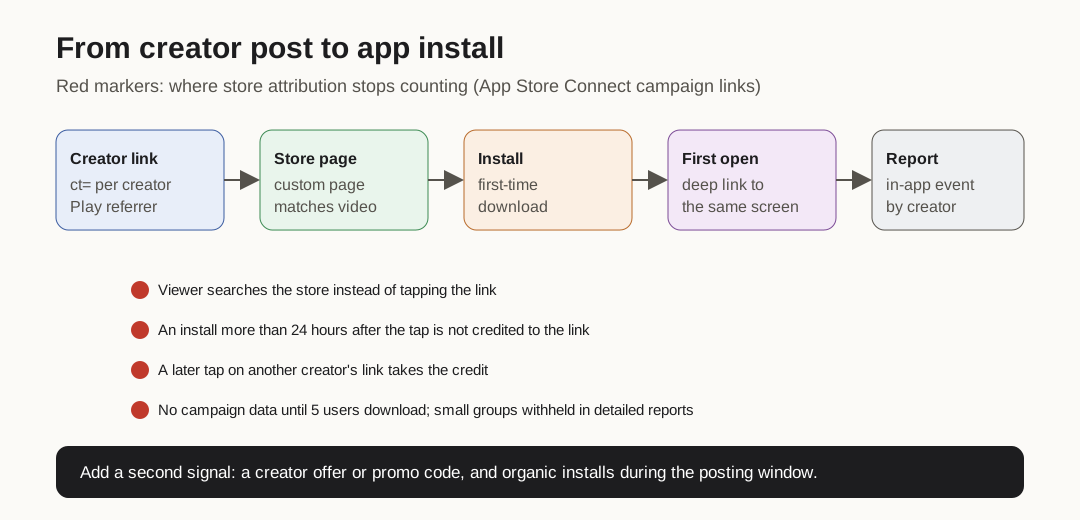
Original diagram. The red markers are where store attribution stops counting.
Original visual by Superdirector editorial team. Creation date not recorded.
Give each creator their own link
On iOS, create a campaign link per creator in App Store Connect. Apple's documentation explains that the campaign token is the campaign name, up to 30 characters, and that the provider token identifies your developer account and stays the same: you change only the campaign token for each creator. Two practical details matter for creators:
- App Store Connect only offers campaign links once the app has analytics data. A brand-new app has to be live and downloading first, so plan this before launch posts.
- The link works worldwide. Apple says the App Store redirects each user to their own local storefront, whatever region the link names.
On Android, Google Play supports a unique custom store listing URL per audience: you choose a URL parameter unique across your listings, and Play shows the matching listing to people who arrive through it. Google's Play Install Referrer API lets your app read the referrer URL and the referrer click time after install, which is how many teams credit a creator on Android.
Name every link the same way so reports line up. The Influencer Marketing Factory recommends creator-specific tracking URLs with consistent naming, and warns that without deferred deep linking you can lose creator-level attribution entirely. Test each link on a phone before the creator posts; our guide to testing a creator tracking link on mobile walks through it.
Match the store page to the video
If a creator shows your habit tracker's streaks and the store page opens on a generic screenshot of settings, you lose people at the last step. Apple lets you publish up to 70 custom product pages, each with its own screenshots, promotional text and previews and a unique URL to share. You can add a deep link to each one, supported on iOS 18 and iPadOS 18 or later, so someone who opens the app from that page lands on the feature they saw.
- Build the page before the creator posts. Custom product page metadata must be submitted for review, though Apple says this can happen without an app update.
- Use the same screens the creator films, from the current build.
- On Android, a custom store listing does the same job; Google allows up to 50. Note that custom store listings do not include automated translations, so add a translation for each language your creators reach.
If a page is approved but traffic still lands on the default page, our checklist for an approved custom product page that is not serving covers the usual causes.
Brief a real task, filmed in the app
App videos that work show someone doing one real thing in the app: logging a workout, splitting a bill, finishing a lesson. Brief the task, not the features. The FTC's guide for influencers says creators should not describe using something they never used, and the Endorsement Guides say an endorser who claims to use a product must actually have used it. Give creators access early enough to use the app for real.
- The task to show, from first tap to result, on the current build.
- Device and OS limits, so a creator does not film a feature their audience cannot get. See checking device eligibility before asking people to install.
- What is free and what is paid, said plainly, if the task touches a paywall.
- The link to use, and where it goes (bio, Story link, pinned comment).
- The disclosure: said or shown inside the video, with the description as a backup only.
Before posting, walk the whole route yourself, from the creator's link to the screen they showed. Our page on checking the whole signup route before promoting an iOS app link has the steps.
Know what attribution will not show
Store and ad attribution is built to protect privacy, so some creator-driven installs will not be credited. Read reports with these limits in mind:
| Limit | Where it comes from | What to do |
|---|---|---|
| No campaign data until 5 users make a first-time download | App Store Connect campaign links | Do not judge a small creator in the first days |
| Download counts only within 24 hours of the link | App Store Connect campaign links | Someone who installs next week shows as unattributed |
| Most recent link wins | App Store Connect campaign links | Two creators in one week can take credit from each other |
| Small groups withheld or combined | Detailed analytics reports | Expect gaps in per-creator exports |
| Postbacks arrive 24 to 48 hours after launch, with conditional fields | Apple AdAttributionKit (for ad networks) | Paid amplification of creator posts reports late and coarse |
| Viewer searches the store instead of tapping | Any platform | Watch organic installs and branded search during posting windows |
Apple's AdAttributionKit applies when you run ads through registered ad networks, for example when you put paid spend behind a creator's video. It attributes installs without tracking individual users across other companies' apps, credits a click within 30 days, and sends postbacks within 24 to 48 hours of the first launch. Use creator promo or offer codes as a second signal; our guide to a creator iOS offer code campaign shows how.
Pay for what you can verify
InfluencerFee lists the usual app deal shapes: a flat fee per post, a fee per install, a fee per in-app action, and a flat fee with a performance bonus, which it describes as a guaranteed base payment that covers the creator's production time, with an install or action bonus on top. Whatever you choose, write down which report decides the bonus and accept its limits in the agreement. A per-install fee read from a report that hides small groups and the last click will undercount, and creators will notice.
Measure past the install. Branch advises giving creators deep links that open the app at the right place and credit the creator. Once users are inside, we suggest tracking the one event that matters for your model, such as trial start, first purchase or day-7 retention, by creator. That is the number to compare creators on.