How-To Guide
How do you use App Store custom product pages for two creator posts?
Give each creator post its own App Store custom product page, submit both before posting, hand each creator one link and compare them in App Analytics.
By Bell Chen, founder of Superdirector — how the analysis works.
At a glance
How do you use App Store custom product pages for two creator posts?
Build one custom product page for each post. Make the first screenshots on each page show what that creator's post promises, give each page a reference name you will recognise in App Analytics, and get both pages approved by App Review before either post goes live. Send each creator only their own page URL. When each page has passed five first-time downloads, compare the two pages with each other and with your default page.
- Two posts with two different promises need two pages; one page cannot match both.
- A custom product page is only seen through its link, or through keywords you assign, so the creator's link is the way in.
- Plan the submission date, the link handoff and the reading date before you brief the creators.
Write down what each post promises
Start with the two posts, not the store page. Suppose one creator plays your puzzle game's daily challenge on the train and the other builds a level with the editor. Those are two different reasons to install. A viewer who taps through from the level-building video and lands on screenshots of the daily challenge has to work out for themselves whether the app does what they just watched.
Write one line per post: the creator, the outcome the post shows, and the screenshot that proves the same outcome on the App Store. AttentionClaw's guide to store pages for social campaigns puts the rule plainly: if the post names a specific outcome, that outcome should be visible in the first screenshots. It also lists an influencer collaboration as a case for its own page, matched to that creator's audience.
If both creators are going to show the same thing, you do not need two pages. One page with two campaign links answers the question of which post sent the installs. Two pages earn their place when the posts make different promises.
Build one custom product page per post
Apple allows up to 70 custom product pages per app for iPhone and iPad, so two is well inside the limit. Some older guides still say 35; check Apple's page rather than a blog post. Each page can change its screenshots, promotional text and app previews, and each gets its own URL. Your app has to have the Ready for Distribution status in at least one country or region before you can create one, according to Apple's App Store Connect help.
- In App Store Connect, open the app, choose Custom Product Pages in the sidebar and create a page. You need the Account Holder, Admin, App Manager or Marketing role.
- Give it a reference name you will recognise later in App Analytics, such as the creator's handle and the post date.
- Start from a copy of your default page or a blank page, then replace the first screenshots and the preview with the ones that match that creator's post.
- Edit the promotional text so it answers the same question the post raised.
- Optionally add a deep link so people who tap Open land on the feature the post showed. Apple supports this on iOS 18 and iPadOS 18 or later, and the deep link is reviewed along with the page.
- Repeat for the second post with its own screenshots and reference name.
Leave keywords off unless you also want the page to show up in search. Per the App Store Connect help, without keywords, a custom product page is only seen by people who follow its link; everyone else still sees your default page. That keeps each page tied to its creator. If you do add keywords, Apple asks that each keyword combination be unique to a single product page, so the two creator pages cannot share a set.
Get both pages approved before posting
Custom product pages must be approved before they are visible to users. If your app is already approved, you can submit a page with or without a new iOS app version, so you do not have to wait for a release. The page moves through Ready for Review, Waiting for Review and In Review. Apple's submission help says that while it is in review you cannot change its screenshots, previews, promotional text or keywords; withdrawing the submission makes it editable again.
Put the approval date in the creator brief as a dependency. Agree the post dates first, then work back: final screenshots, submission, approval, link handoff. If a page is not approved by the day before the post, either move the post or send that creator your default page link and note it in your records, because their numbers will no longer be comparable.
Fixing a page later is safe. An approved page can be edited and resubmitted without changing its URL, and the changes publish automatically when App Review approves them. A link already in a creator's bio keeps working through that.
Hand each creator one checked link
Apple's overview explains that the URL for a custom product page is your default product page URL with a product page ID parameter added. Send creator A only page A's URL and creator B only page B's. Open each one on an iPhone before you send it; the page needs iOS 15 or iPadOS 15 or later to show.
- Do not put a URL shortener or extra redirect in front of the link; Apple advises against them for deep links.
- If you disable or delete a page while a post is still live, people who tap the old link are redirected to your default product page, not shown an error.
- Campaign links from App Store Connect Analytics are a separate tool. They attribute downloads to a campaign token, give the most recent link the credit when someone taps more than one, and can only be generated once your app has analytics data.
Apple's help pages describe the custom product page URL and the campaign link separately. If you want both a page ID and a campaign token on one link, build it, tap it on a device, check that it opens the right page, and wait for the campaign to show in Analytics before you rely on it. Apple shows a campaign's data once it has first-time downloads from at least five individual users.
When enlarged, scroll horizontally to read the diagram.
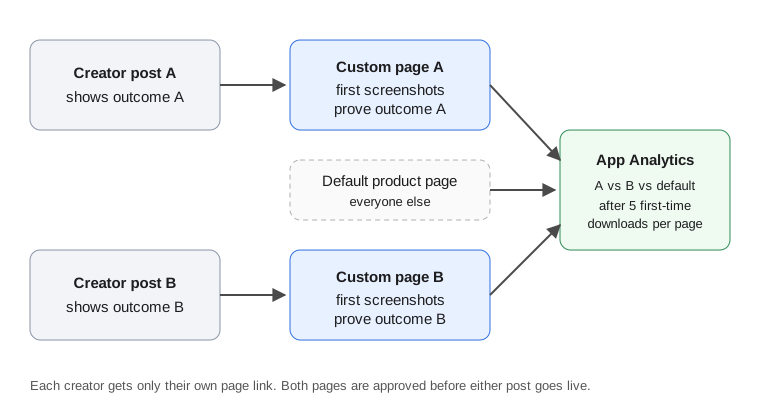
Original diagram; no real app, creator or result shown.
Original visual by Superdirector editorial team. Creation date not recorded.
Compare the two pages with the default page
According to Apple's custom product pages overview, in App Analytics each custom product page reports product page impressions, downloads, redownloads and conversion rate, and you can view retention and average proceeds per paying user for each page. Apple's analytics help says the data only appears after a page receives at least five first-time downloads, so a small creator post may show nothing for a while. An empty report below that threshold is expected; tap the link once more to rule out a broken link, then wait.
Read three comparisons: page A against page B, each page against your default page, and each page's retention against its downloads. A page that converts well but keeps few users may be matching a promise the app does not keep in the first session. AppsFlyer notes that it can be hard to get enough data for statistical significance, which is especially true with two posts. Treat the result as a reading for the next brief, not a verdict on either creator.
On the same overview page, Apple reports that developers see a 2.5 percentage point increase in conversion on average when they refer people to a custom product page. That is Apple's average across apps, not a forecast for yours, and it says nothing about which creator did better.
Two-post planning sheet
| Field | Post A | Post B |
|---|---|---|
| Creator and post date | Handle, platform, agreed date | Handle, platform, agreed date |
| What the post shows | One outcome, in the creator's words | One outcome, in the creator's words |
| First screenshot on the page | Proves outcome A | Proves outcome B |
| Reference name in App Store Connect | creatorA-postdate | creatorB-postdate |
| Keywords | None, or a set unique to this page | None, or a set unique to this page |
| Deep link (iOS 18+) | Feature shown in post A | Feature shown in post B |
| Submitted / approved | Dates | Dates |
| Link sent and tested | Date, device checked | Date, device checked |
| Reading date | After five first-time downloads | After five first-time downloads |
The same sheet is available as a CSV you can copy. Fill it in before you send the creator briefs, so the store page and the post are planned together.