How-To Guide
How do you promote an iOS game to creators who mostly cover PC games?
Pitch PC game creators an iOS game they can play and record at their desk, with a PC-style angle, the right access route and an honest mobile call to action.
By Bell Chen, founder of Superdirector — how the analysis works.
At a glance
How do you promote an iOS game to creators who mostly cover PC games?
Pitch the part of your game a PC audience already cares about, such as its depth, its systems or its difficulty, and make it easy for the creator to play and record it at their usual desk setup. Check whether your game can run on Apple silicon Macs, choose an access route (a TestFlight link before launch, promo codes for a paid game after it), and agree a call to action that tells viewers plainly it is a phone game. Then measure installs separately from views, because much of a PC creator's audience may not download on the spot.
- Find the angle a PC audience already watches for, not the angle your mobile ads use.
- Remove the friction of playing and capturing on a phone before you ask for a video.
- Expect a smaller, slower install response than from a mobile-first creator, and plan for it.
Pick the angle a PC audience already watches for
A creator who mostly covers PC games has an audience that expects a certain kind of video: deep dives into systems, hard runs, strategy breakdowns, mod showcases, honest first impressions. Your mobile ad angle (quick satisfying moments, a big tap-to-play hook) may be the wrong fit for that audience. Look at the creator's last twenty uploads and ask which of them your game could sit beside without feeling like an interruption.
Playio's comparison of mobile and PC game marketing says PC players research more before buying and that word of mouth weighs more for them than on mobile. That suggests a video format that explains, compares or tests, rather than one that just shows the game for a minute. A roguelike with real build variety, a tactics game with a hard campaign or a port of a PC classic gives a PC creator something to say.
| What the creator usually makes | Angle an iOS game can offer | Weak angle to avoid |
|---|---|---|
| Strategy or tactics breakdowns | A hard mission or build explained on the phone | "Relax and tap" casual framing |
| Roguelike or difficulty runs | A first full run, deaths included | A cut-down montage of wins |
| First impressions and reviews | Honest early access, with permission to criticise | A script of feature claims |
| Ports and retro coverage | How the controls and saves hold up on iPhone | Treating it as a new game when it is a port |
If you cannot fill the middle column for a creator, they are probably the wrong creator for this game, however big their channel is.
Make the game easy to play and record at a desk
PC creators record from a capture setup built around a computer. Asking them to film a phone is a real cost. Two things help.
First, check whether your game can run on a Mac. According to Apple's App Store Connect help, users on macOS 11 or later with Apple silicon can get iPhone and iPad apps through the Mac App Store, with no porting process, and the developer controls that availability at the app level. The same selection applies to TestFlight groups set up for testing on those Macs. Play your game on a Mac yourself before you offer it: touch controls, screen ratios and performance may not translate well, and Apple's help says to mark the app as verified for these Macs in App Store Connect only once it is compatible and works as intended.
Second, tell the creator how to record if they play on the phone. iPhone has a screen recording control in Control Center that can capture sound, but Apple notes you cannot record and use screen mirroring at the same time, and some apps do not allow recording. Test that your own game can be recorded. On a Mac, QuickTime Player can record the screen, which suits a creator playing the Mac version at their desk.
Choose how the creator gets access
The access route depends on where the game is in its life.
- Before launch, use TestFlight. Apple allows up to 10,000 external testers and a public link you can share by email or social media. When you use a public link, you can set tester criteria such as device and OS requirements. Apple's external tester help says the first build needs a full TestFlight review, so allow for that before the creator's recording date.
- After launch, for a paid game, use promo codes. Each promo code is valid for four weeks from generation and can be used once, you can request up to 100 per version of each platform, and people who redeem one cannot rate or review the app. Send codes close to the recording date so they do not expire.
- For a free game, the creator can simply download it. Early access to new content can still be worth offering, which ClickAnalytic describes as seeding creators with early access or exclusive assets.
Whichever route you choose, give the creator a test account or save state if the interesting part of your game is hours in. A PC creator covering a strategy game will want to show the late game, not the tutorial.
When enlarged, scroll horizontally to read the diagram.
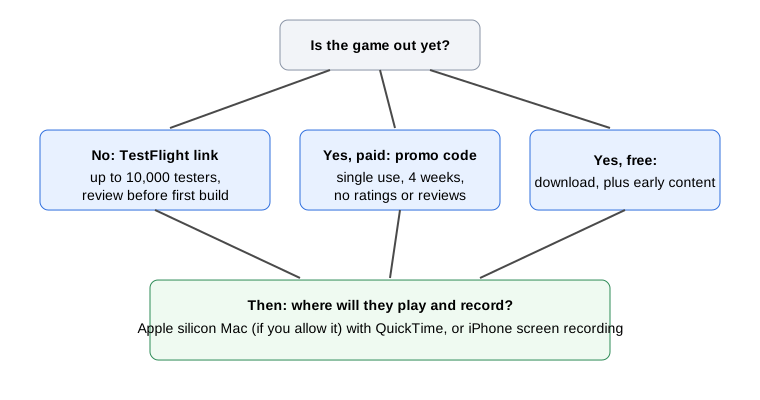
Original diagram based on Apple's TestFlight, promo code and Mac availability help pages.
Original visual by Superdirector editorial team. Creation date not recorded.
Agree the brief, the label and the call to action
Keep the brief short and specific: the angle you agreed, what must be shown (the platform, the price model), and what you are not asking for. YouTube's own advice to creators on brand deals tells them to communicate what they are and are not willing to do, so ask the creator what they will not do before you send a script.
- Say clearly in the brief that this is an iPhone game (and a Mac game, if you enabled that), so viewers who only play on PC are not misled.
- Ask for the paid promotion setting on YouTube. Selecting it adds a disclosure label at the start of the video, and the creator can restrict branded content by age or location in YouTube Studio if your game's rating or markets require it.
- Agree one store link. If you are using custom product pages, give the creator the page whose screenshots match what they showed.
- Agree when the video goes live and whether there will be a pinned comment or description link.
If the creator is in YouTube Creator Partnerships, any earn amount you see in an inquiry is provided by the advertiser, and YouTube says it should not be confused with a final offer. The program also requires creators to be at least 18 and in the YouTube Partner Program, which is a filter worth knowing when you search.
Measure the post as a slower, cross-device response
For mobile game creator content, MobileAction notes that installs often peak in the first 48 hours after the content is published, and that viewers of mobile game content can download the app while they watch. A PC creator's viewer may be watching on a monitor with their phone in another room, so expect fewer immediate installs and a longer tail. Read your results over a longer window than you would for a mobile post: for example, the first 48 hours and then the following weeks, compared side by side. Keep views, store page visits and installs as separate numbers.
Ask the creator, before the deal, what they can tell you about where their audience watches and plays. If they have no idea and almost no mobile viewers, the post may still build awareness for your game, but do not judge it against a mobile creator's install numbers.
A creator planning sheet for this kind of deal has the angle, access route, recording setup and measurement window as columns, so you can fill it in for each creator before you write the pitch.