How-To Guide
Before a creator shares your iOS offer code, rehearse the redemption
Plan an iOS creator offer around the actual redemption route, eligibility, renewal terms and end-of-campaign message.
By the Superdirector editorial team.
A creator's discount code is only useful if an eligible viewer can turn it into the promised access. Before filming the announcement, choose the code type, verify the exact redemption route, and make the offer's end state visible. A code displayed in a video is not proof that the offer is redeemable.
This guide is for an app founder preparing an Instagram, YouTube or X promotion for an App Store subscription. It is not a guide to bypassing in-app purchases or a promise that discounts acquire profitable customers. The campaign worksheet and fictional example below are editorial planning tools, not measured results.
Start with the route, not the catchphrase
Apple distinguishes unique one-time-use codes from reusable custom codes. Custom subscription codes are redeemed through a redemption URL or supported in-app flow; do not tell viewers to type them into their App Store account's ordinary code field. Eligibility, territory and the offer's terms also matter. Check your exact configuration against Apple's subscription offer-code instructions.
That distinction changes the creator brief. “Use my code” is incomplete when the viewer does not know where to use it. Specify the visible destination, what opens there, and what the person does after redemption. If the campaign depends on a link, put the tested destination wherever your selected social surface actually supports a usable link; do not assume a typed caption URL behaves like a clickable description link.
A public developer question about custom-code redemption illustrates the confusion. A separate launch troubleshooting thread includes a later report that codes eventually worked. These are two anecdotes, not failure-rate evidence. They justify checking the journey, not promising a universal waiting period or diagnosing every error as propagation.
Make one campaign card before making three videos
Record these details in plain language. Leave an unknown blank until the product owner verifies it.
| Field | What the creator needs |
|---|---|
| Product | Exact subscription and the useful task it unlocks |
| Audience | Who is eligible, with a concise exclusion where necessary |
| Route | Tested redemption destination and fallback support page |
| Offer | Actual price or free duration, not a vague “premium deal” |
| After the offer | Verified renewal or expiry behavior and the displayed subsequent price |
| End condition | Exact expiry date/time or redemption limit, if one applies |
| Access check | The screen or task that confirms entitlement after redemption |
| Correction owner | Person who updates the linked page and creator if something changes |
Do not invent urgency. If there is no expiration, do not manufacture “today only.” If there is a cap, explain what happens after it is reached. An evergreen tutorial can outlive a temporary promotion; the video should direct people to current terms rather than imply that an old offer remains available forever.
Match the code to the creator's distribution pattern
Use a reusable custom code when the intended audience should share one public route. Use individually distributed one-time codes when the invitation is deliberately limited. These are different distribution designs, not a contest between which code looks more exclusive. Do not put a single one-time code in an evergreen public video and imply every viewer can claim it.
Build a destination record for each live asset: video or post URL, link placement, exact redemption destination, code type, associated offer, last verification and person responsible for corrections. Check the final exported video as well as the caption. A corrected link does not remove a wrong instruction burned into the footage.
Rehearse the route from a device without the app installed, then from the installed app. Include the required install or account step in the longer walkthrough. If a short clip omits it, label the transition rather than making it look like one uninterrupted tap. Confirm that the promised task becomes accessible—not merely that a success message appears.
Offer eligibility and ordinary introductory trials are separate subjects. For the full eligibility-to-copy distinction, see showing a trial without promising it to every viewer. Here, the acquisition question is narrower: did the creator give this audience a usable route for this specific code?
Plan for an old video with a new viewer
A long-lived tutorial can keep sending people after an offer ends. Before posting, decide who owns the linked information page, what it will say when the offer is exhausted, and how the creator will correct the description or pinned explanation where those controls are available.
Do not silently redirect an ended free offer to an ordinary paid checkout. Tell the viewer that the offer ended and identify current choices. A creator may not be able to edit the original video; in that case, the correction needs to be prominent enough that the viewer sees it before taking the purchase step.
Rehearse the communication with a visibly labeled mock state, without deactivating a real campaign or consuming limited codes merely to obtain footage. For implementation tests use the appropriate sandbox; separately verify the live public route. A sandbox receipt does not establish production availability.
When enlarged, scroll horizontally to read the diagram.
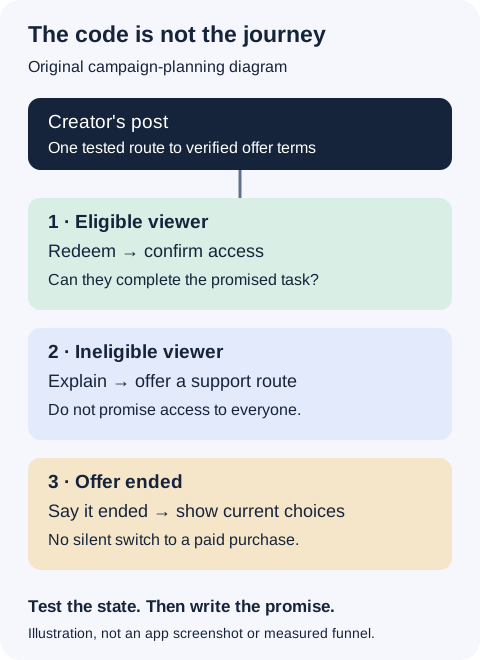
Original campaign map: access, explanation and ended-offer routes need different outcomes.
Original visual by Superdirector editorial team. Creation date not recorded.
A fictional brief for a reading app
Assume a fictional app called Shelf Practice has configured a particular offer for qualifying new subscribers. The actual product configuration, not this example, determines the terms.
The creator's first shot shows a real supported task: selecting a short passage, recording a reading note, then finding that note again. The next shot explains the offer with verified fields: “If you meet the eligibility shown on the offer page, use the redemption link for [offer duration and price]. Afterward, [verified renewal or expiry behavior].” The closing shot shows where to find the link and says, “Check the terms before confirming.”
Do not use this bracketed draft publicly. Fill it from the current purchase sheet and configuration, then have someone unfamiliar with the app explain the offer back to you. If they cannot say what happens afterward, fix the wording before increasing distribution.
For a longer YouTube tutorial, keep the redemption walkthrough as a named chapter so viewers can revisit it. For a short Reel, prioritize the useful task and one correct next step; move the complete terms to a clearly identified destination. For X, a concise announcement can accompany a screen recording, but the post and destination must describe the same offer.
Measure access separately from sales
Keep four observations distinct: people reaching the offer page, attempted redemptions you can lawfully observe, confirmed redemptions, and completion of the useful task. Record unknown stages as unknown. A creator-specific code can be copied elsewhere, so its redemptions are not automatically the creator's incremental acquisitions.
After a failure report, retain the exact message, device/app context, subscription state and time without collecting unnecessary account details. Pause distribution of incorrect instructions, repair the route or explanation, and test the affected state again. Do not erase a genuine failure by changing the denominator to only people who succeeded.
What should be ready before the creator posts?
One verified campaign card, one tested eligible-user route, one honest ineligible-user explanation, and one end-of-offer plan. The creative is ready when the product promise survives those states—not when the code looks good on screen.