How-To Guide
How do you make carousels and X posts automatically in your brand style?
Save brand rules, turn a real customer question into distinct drafts, review them and publish eligible Instagram carousel and X formats.
By the Superdirector editorial team.
At a glance
How do you make carousels and X posts automatically in your brand style?
Give the workflow a stable brand reference and trustworthy source material, then create separate drafts suited to each format. Review accuracy, voice, and readability before publishing. Automation makes production repeatable; it does not establish that a draft is right or that a post will perform.
- Use a real customer question or checked source rather than an empty prompt.
- Outline carousel slides in plain text and preview the sequence at phone size.
- Confirm publishing eligibility and choose individual approval or an available Auto-post rule.
The workflow: brand reference, source, drafts, review, publishing
To make carousels and X posts automatically in your brand style, first write down what the style means: who you address, how you sound, what visual elements recur, and which claims need a source. Feed the workflow a real question or checked material, not just a topic. Draft a carousel as a sequence, adapt the core idea into a standalone X text post, then review each one before it goes out.
The useful distinction is between repeatable production and unattended publishing. A tool may help with research, brand memory, drafting, and publishing, but you still need to assess whether paying for delegation is worthwhile, whether the work serves your goal, and how much oversight it takes. No supplied evidence establishes guaranteed results or a fixed review workload.
| Stage | Repeatable input | Human decision |
|---|---|---|
| Brand reference | Voice rules, examples, approved colors and type | Whether a draft sounds and looks like the business |
| Source | A real customer question or verified material | What is accurate and relevant to answer |
| Drafts | Carousel outline and separate X-post brief | Whether the two formats have clear, useful jobs |
| Review and publish | A checklist and eligible publishing route | Whether this piece is ready and which approval control to use |
This workflow applies across tools. For example, Adobe Express describes creating a brand manually and adding logos, colors, fonts, and graphics. That can help keep visual ingredients together, but a brand kit alone does not decide what your business should say. For style guidance, see how to design better social media carousels.
Set a usable brand reference
Keep the reference short enough to consult, but specific enough to judge a draft. Include your intended audience, a few voice qualities, examples of phrases that sound like you, preferred visual elements, core topics, and wording or claims to avoid. Add facts that change often—such as prices or opening hours—to a separate source document with a date or source note. Do not ask a style guide to serve as evidence.
Turn vague adjectives into tests. Instead of only writing “friendly,” say whether you use contractions, explain specialist terms, or address readers directly. Instead of “bold,” specify which color is reserved for emphasis and where a logo belongs. Keep a small set of approved examples and counterexamples: a sentence you would publish, and a sentence you would rewrite, with the reason.
If a draft misses the mark, correct the rule or example behind the miss. For instance, “less salesy” is hard to reuse; “avoid inflated superlatives and make one clear invitation” is easier to apply. Superdirector says edits to drafts can guide later drafts, but that is a provider description, not evidence of a particular level of brand fidelity. Check the output yourself.
Choose one source and two distinct jobs
A useful source might be a question customers actually ask, a documented process, or a checked product detail. Keep the original question and the facts needed to answer it together. Then decide what each post should accomplish: the carousel can explain a small process step by step, while the X post can offer a related reminder or perspective. That is adaptation, not copying the same text into two formats.
Worked example — hypothetical, not a customer result: imagine a neighborhood bicycle-repair shop receives this question: “What should I bring when I drop off my bike?” The owner confirms the answer from the shop’s own intake instructions: the bike, its key if locked, and a short description of the problem. The owner checks that these details remain current before drafting.
| Piece | Brief | Draft direction |
|---|---|---|
| Carousel | Help a first-time visitor prepare for drop-off | Opening: “Dropping off your bike? Bring these three things.” Follow with one item or instruction per slide, then a final reminder to check the shop’s current intake instructions. |
| X text post | Reduce uncertainty before a visit | “A smoother repair drop-off starts with three details: bring the bike, its lock key if needed, and a short note about the problem. Check our current intake instructions before you come.” |
The example is deliberately modest: it uses a business’s own checked instructions and makes no claims about customer behavior or outcomes. If the source cannot support a detail, remove the detail or verify it; do not let a generator fill the gap.
Draft the carousel as a sequence
Write the outline before opening the design tool. Give the opening slide one clear reason to continue, make the middle progress logically, and let the final slide close the explanation or offer one relevant next step. Keep one main idea on each slide; split or simplify a slide that is trying to do several jobs. A reusable template can preserve margins, type hierarchy, and recurring brand elements without forcing every slide into the same layout.
For the hypothetical repair-shop example, the plain-text outline is: (1) the drop-off question, (2) bring the bike, (3) bring the key if it is locked, (4) describe the problem briefly, (5) check the shop’s current intake instructions. Those are draft slots, not new claims: the shop must confirm the details before use. Then apply the brand’s approved colors, fonts, and logo treatment.
Preview the whole sequence at phone size. Look for small type, crowded slides, inconsistent spacing, and jumps that make the order hard to follow. A useful production recommendation from Media Cheat Sheet’s carousel guide is to write the slide outline in plain text first and preview the result at phone size. Treat these as practical design checks, not promises of performance.
Adapt the idea for X and review both
Do not flatten the carousel into a string of slide headlines. Write the X post as a complete thought a reader can understand on its own. For the example, the point is preparation for drop-off; the post should state the useful details in natural language, not refer to “slide three.” Keep the core facts consistent while changing the framing and amount of explanation.
Use a review pass that separates mechanical checks from editorial judgment. Confirm names, dates, prices, and instructions against the source. Check that the carousel is readable and coherent as a sequence; check that the X post stands alone. Then ask whether the language matches the brand reference and whether either draft makes a promise or claim the source cannot support. A script can find a phrase on an avoid list, but a person must decide whether the meaning is accurate.
Save corrections that recur, such as a preferred term or a visual rule, so they can inform later work. Keep one person accountable for final approval, even if different tools or teammates handle research, drafting, and design. This is a recommended workflow choice, not a statement that every team needs the same review process.
Publish within the current limits
For a business considering a customizable AI-run channel around $200 a month, Growth is currently $199/month for two accounts, with no trial. It can publish eligible Instagram image carousels and single X text posts, either with per-piece approval or an enabled account Auto-post rule. Finished video—including TikToks, YouTube videos, and Reels—and fully autonomous channels are upcoming, not current publishing capabilities. Before enabling Auto-post, verify that the account’s first manually approved post is live; implementation requires this check. Assess whether delegation serves your own goal by measuring review and correction effort and the results you define, rather than assuming minimal oversight or guaranteed outcomes. See current pricing and publishing documentation.
Publishing connects selected source cards to the chosen account; Instagram requires a Business or Creator account. Turning Auto-post off stops unsent posts, and Pause posting holds the queue. See the publishing setup for details.
When enlarged, scroll horizontally to read the diagram.
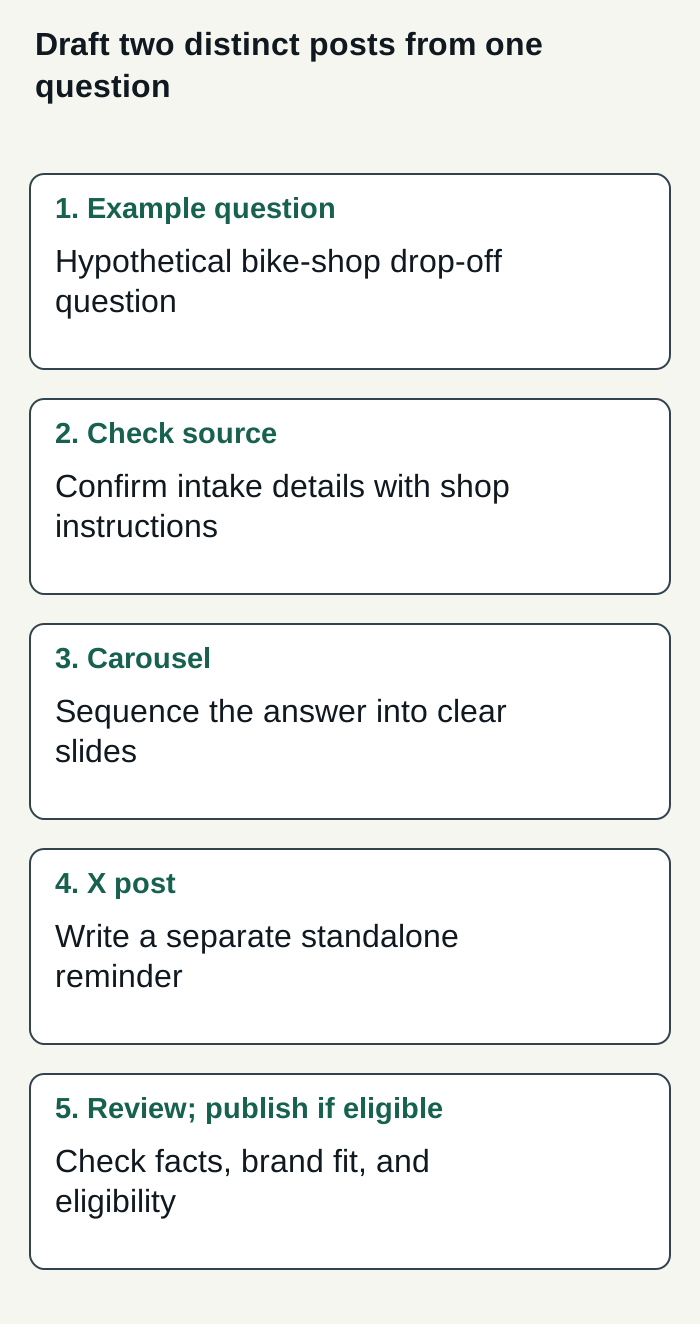
Hypothetical bicycle-shop example: verify one customer-question answer, adapt it into distinct posts, review both, and publish only eligible content.
Condensed original editorial illustration. Read the surrounding guidance for qualifications and the complete procedure; any example is fictional and shows no verified customer outcome or product screen.
Illustrative worked example by Superdirector editorial team. Created 2026-11-09.