How-To Guide
How do you schedule tweets and X posts, including threads?
Schedule a post on x.com in four clicks, see which X apps can schedule in 2026, and how to schedule a thread with X Pro or a scheduler, inside X's rules.
By the Superdirector editorial team. Vendor, X developer and X automation-rule pages read November 6, 2026; the native x.com steps follow the guides named in the text.
At a glance
How do you schedule tweets and X posts, including threads?
On x.com in a desktop browser, write your post, click the calendar icon in the composer, pick the date, time and time zone, click Confirm, then Schedule. Scheduled posts wait in Drafts under Scheduled, where you can edit or delete them. The x.com composer schedules single posts only; to schedule a thread, use X Pro, which needs a Premium subscription, or a third-party scheduler such as Buffer, Hypefury, Fedica or OpenTweet. Phone scheduling is newer and patchy: iPhone users began seeing it in September 2026, Android users had not, and, per OpenTweet, X's Help Center still had no page on it in October.
- Single post: x.com composer, calendar icon, Confirm, Schedule.
- Thread: X Pro with Premium, or a scheduler that posts through the official X API.
- Automation rules still apply: no duplicate posts across accounts, and automated replies only for users who asked for them.
Schedule a post on x.com, step by step
- Open x.com in a desktop browser and click into the composer at the top of the home timeline.
- Write the post and add any photos, GIFs or links.
- Click the calendar (schedule) icon in the composer toolbar.
- Pick the date, time and time zone, then click Confirm. The scheduled time now shows above the post.
- Click Schedule.
These are the steps in Hootsuite's scheduling guide, which also notes that native scheduling on X works on desktop only. Hypefury's guide adds one limit worth knowing: posts with polls cannot be scheduled this way. A guide from 2023 at MakeUseOf put the scheduling window at up to 18 months ahead; we found no current limit published by X.
How to schedule a thread
You can write a thread natively on X, but OpenTweet's thread guide from March 2026 says the composer only offers Post all: there is no schedule button for a thread. Two routes work. X Pro, formerly TweetDeck, has a full post composer and, per OpenTweet's route table, schedules threads for Premium subscribers. Everyone else uses a third-party scheduler.
- Connect your X account to the scheduler.
- Write the first post, then add posts to the thread (most tools use a plus button under each post).
- Preview the whole thread; check line breaks, links and images on each post.
- Pick a time, or add the thread to your queue, and schedule it.
- After it goes out, reply to the first comments yourself; a scheduled thread still needs a person in the replies.
Check thread support against the vendor's own page, because third-party reviews contradict each other. OpenTweet's guide says Buffer does not schedule X threads, while Buffer's own X page says it schedules X posts 'and X threads' and its thread announcement walks through Start Thread in the composer. Fedica schedules threads for free and can spread the posts of a thread across the day, and Hypefury turns long posts into threads automatically.
Edit, reschedule or delete a scheduled post
On x.com, per Hootsuite's guide, click the calendar icon again and choose Scheduled posts, which opens your Drafts folder with its scheduled posts. Click a post to change its text or time and click Schedule again; to delete, click Edit on the Drafts page, tick the post and click Delete. In a scheduler, use its calendar or queue view, which is usually quicker when you have more than a few posts waiting.
Pick a scheduler: price and what to check
| Tool | Price as listed (Nov 6, 2026) | Threads | Notes |
|---|---|---|---|
| Buffer | From $5 a month per channel (Essentials, billed yearly) | Yes, per Buffer's own pages | Crossposts to Threads, LinkedIn, Mastodon and more |
| Hypefury | $6 a month per platform; Creator $19; Pro $39 | Long posts become threads | 7-day trial of the Creator plan |
| OpenTweet | From $19.99 a month, 7-day free trial | Yes | Built only for X; uses the official X API |
| Fedica | Free to start | Yes | Can spread a thread's posts over the day |
| Hootsuite | From $99 a month (Standard) to $399 (Advanced) | Not covered here | Bulk scheduling and posting across many networks |
- Does it post through the official X API? Every scheduler should; X's automation rules ban scripting the website.
- Are threads included on the plan you would buy, with a preview?
- Does it handle your time zone and a queue, so you are not picking a time for every post?
- Can someone approve posts before they go out, if more than one person writes?
- Does it show results per post, so you know which times and formats to repeat?
Tools price posting partly because X does. The X API lets apps create posts, replies and threads, and its pay-per-use pricing lists $0.015 per post created and $0.20 per post created with a URL. That helps explain why some schedulers, OpenTweet among them, cap link posts separately from plain posts. Prices in the table come from Buffer, Hypefury, OpenTweet and Hootsuite pricing pages; Fedica's free start is from its thread guide. If you are building the calendar itself, start with a content calendar that works.
Stay inside X's automation rules
Scheduling a post you wrote is ordinary use. Trouble starts when a tool does the same thing many times over. Under X's automation rules, a scheduler must not push out the same or nearly the same post again and again, whether on one account or across several of yours, and must not post automatically about whatever is trending. Bots may answer someone only after that person reached out first, for example with a reply or a DM, and only once per interaction; auto-answering strangers because their post matched a keyword is banned. X also holds the account owner responsible for whatever a connected app does.
For a founder, the practical version is simple: schedule your own posts, vary them, keep replies human, and check which apps have access to your account now and then. For the bigger picture of what to post on X, see the solo founder marketer guide and our audit of AI tools for social media marketing.
Which X apps can schedule posts in 2026
Native scheduling on X has changed often, and guides disagree because many were written before the mobile rollout. The most current summary we found is OpenTweet's November 1, 2026 answer, which pulls together a hands-on report and Sked Social's reading of X's Help Center. OpenTweet sells a scheduler, so treat its table as a vendor's reading.
| Route | Single posts | Threads | Cost | Status and source |
|---|---|---|---|---|
| x.com composer (desktop browser) | Yes: calendar icon in the composer | No | Free | Long-standing; Hootsuite's guide walks through it |
| X app on iPhone | Rolling out since September 2026 | Not documented | Free | A hands-on test summarized by OpenTweet (Nov 1, 2026): seen on iOS; not documented by X's Help Center |
| X app on Android | Not found in a September 2026 test | No | Free | OpenTweet (Nov 1, 2026) |
| ads.x.com Composer | Yes | Not documented | Free with ads access | OpenTweet: X documents it, but for ads; organic use is a workaround |
| X Pro (formerly TweetDeck) | Yes | Yes | Needs an X Premium subscription | OpenTweet's route table; X Pro has a full post composer |
| Third-party scheduler (Buffer, Hypefury, Fedica, OpenTweet and others) | Yes | Yes, on most | Free to about $40 a month | Each vendor's own page; they post through the official X API |
The same routes are in this CSV of X scheduling routes. On an iPhone, update the app first and check whether your composer now shows a calendar icon; it costs nothing to look. On Android, use a browser or a tool for now.
When enlarged, scroll horizontally to read the diagram.
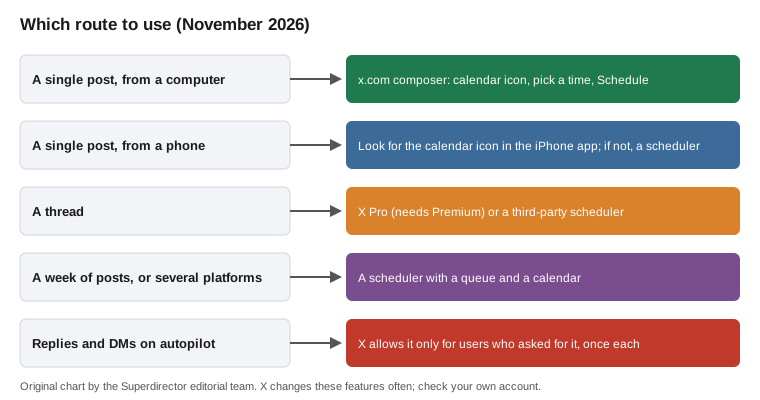
Original chart; X changes these features often, so check your own account.
Original visual by Superdirector editorial team. Creation date not recorded.
Where Superdirector fits
Superdirector, which we make, drafts X posts and threads in your brand voice from the formats rising in your niche and lays them out across the month. Growth, at $199 monthly for two accounts, publishes single X text posts (and Instagram carousels) once you approve the first one, or automatically if you switch on Auto-post; threads stay drafts for you to post. The $29 Starter plan begins with a 7-day free trial with 100 credits and needs a card. Your AI app can draft and save posts through it, but posting stays in the Canvas, and you stay the publisher.