How-To Guide
What are the best AI carousel generators for Instagram and TikTok in 2026?
Six AI carousel generators compared from their own pages: what each starts from, brand control, slide limits, video export, posting and price as listed.
By the Superdirector editorial team. Vendor pricing and product pages read November 6, 2026. Superdirector is our product.
At a glance
What are the best AI carousel generators for Instagram and TikTok in 2026?
The right AI carousel generator depends on what you start from. To turn your own writing into slides, Contentdrips and PostNitro are built for it. For carousels plus ads and scheduling in one place, Predis.ai. For a low cost per carousel, aiCarousels, whose Pro plan is $120 a year for 60 carousels a month with up to 20 slides. For multilingual accounts, CarouselMaker.co. To start from posts that are already working in your niche and have them posted for you, Superdirector, our own product. Check two things before you pay: the slide limit on your plan, since Instagram allows up to 20, and whether that plan really posts to Instagram or only downloads.
- Instagram carousels hold up to 20 images or videos, and every slide is cropped to the first one's aspect ratio (1:1 by default).
- Plan limits differ from platform limits: PostNitro's Starter makes 8 AI slides per carousel, and Sprout Social schedules at most 10 images.
- Prices and limits below are as each vendor listed them on November 6, 2026.
Six AI carousel generators compared
Most 'best carousel maker' lists are written by one of the tools on the list. OutlierCreator's review makes the point bluntly: of the pages ranking for this term, most were written by a listed tool and each ranks its own product first. This page is no exception to the first part, since Superdirector is ours, so the table is ordered by what you start from, our product sits last, and every cell comes from the vendor's own page.
| Tool | Starts from | Brand control | Output and posting | Price as listed (Nov 6, 2026) | Best for |
|---|---|---|---|---|---|
| Contentdrips | A topic, blog post, YouTube video or X thread | Brand kit styles every slide | Images, or a Reel as GIF or MP4; sizes set for Instagram, LinkedIn, X and TikTok | Free plan with 50 AI credits; Starter $15/mo, Pro $26/mo billed monthly | Repurposing your own writing, LinkedIn as well as Instagram |
| Predis.ai | A topic, product page, PDF or YouTube link | Brand kit; writes copy and picks the template | Publish or schedule to Instagram; can turn a carousel into a scrolling video | Core $19/mo billed yearly ($32 monthly), no auto-posting; Rise $40/mo yearly with auto-posting; 3-day trial, card required | Small brands that want posts, ads and scheduling in one place |
| PostNitro | A topic, an article URL, your own text or an X post | Brands, custom templates and palettes | Downloads on Starter; scheduling from Creator+ | Starter $15/mo with 8 AI slides per carousel and no scheduling; Creator+ $30/mo with 15 slides and 10 accounts; Team+ $60/mo with 20 slides | Fast drafts when you already know the topic |
| aiCarousels | Your idea or text | 10 brand kits on Pro | Up to 20 slides, no watermark, video export for Reels, TikTok and Shorts | Free try (one carousel, no download); Pro $120 a year ($10/mo); Lifetime $99 with your own OpenAI key | Low cost per carousel |
| CarouselMaker.co | A topic, text or blog URL | You control the design | Video carousel (MP4) and PowerPoint (PPTX) export; 100+ languages | Free to start (paid tiers not read) | Multilingual accounts |
| Superdirector (our product) | A post or format already taking off in your niche, plus your brand | Brand voice and look learned from your profile or site | Carousels and X posts; posts Instagram carousels on Growth after approval or standing Auto-post | Starter $29/mo with a 7-day free trial (card required); Growth $199/mo | Remaking proven formats in your brand and posting them |
The table is available as a CSV to sort and add your own trial notes. Canva is not in the table because we could not check its current carousel features and prices on the day; it remains the obvious choice if you want to design every slide by hand.
When enlarged, scroll horizontally to read the diagram.
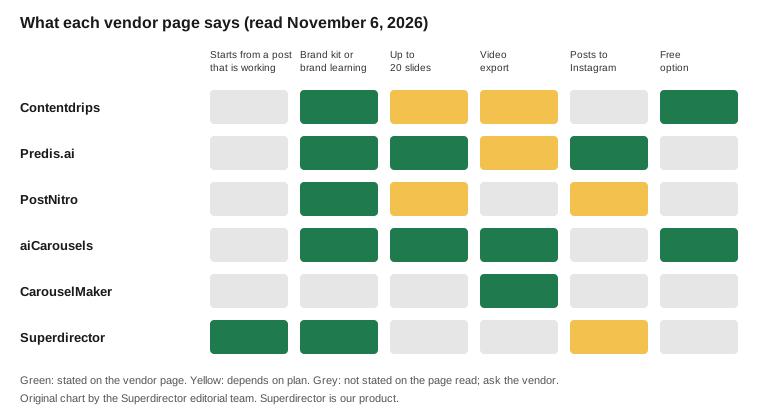
Original chart from vendor pages read November 6, 2026; Superdirector is our product.
Original visual by Superdirector editorial team. Creation date not recorded.
What to check before you pay
- What it starts from. Most tools start from a topic, text or a link to your own content. If your problem is not knowing what to post, you want a tool that starts from posts already working for accounts like yours.
- The slide limit on your plan. Instagram's publishing API allows carousels of up to 20 images, videos or a mix; PostNitro's pricing caps AI slides at 8 per carousel on Starter, 15 on Creator+ and 20 on Team+.
- Whether it posts or only downloads. Predis.ai's Core plan lists no auto-posting; auto-posting starts on Rise. PostNitro's Starter has no social scheduling.
- Brand control. Look for a brand kit with your fonts and colours at minimum, and a way to keep the voice consistent across slides.
- Video export. If you also post the same slides as a Reel or a TikTok, check for video export; Contentdrips lists GIF or MP4, and aiCarousels lists video export for Reels, TikTok and Shorts.
- The real price. Credit-based plans run out at different speeds; read what one carousel costs in credits before you compare monthly prices.
How each tool works
Contentdrips turns a topic, a blog post, a YouTube video or an X thread into a designed carousel, styles it with your brand kit and sets sizes for Instagram, LinkedIn, X and TikTok, according to its AI carousel generator page. Its pricing page lists a free plan with 50 AI credits, Starter at $15 a month with 500 credits and Pro at $26 with 1,200.
Predis.ai takes a topic or a product page, PDF or YouTube link, writes the copy, picks a template and lays out every slide, then lets you publish or schedule to Instagram. Its Core plan is $19 a month billed yearly for one brand without auto-posting, and every plan starts with a three-day trial that takes a card.
PostNitro is built for speed from a topic, an article URL or text you already wrote. Its tiers are split by AI slides per carousel (8, 15 or 20) and by scheduling, which starts on Creator+ at $30 a month and covers 10 social accounts.
aiCarousels is cheap per carousel on list price: Pro is $120 a year for 60 AI carousels a month (about 17 cents each), up to 20 slides, no watermark and video export for Reels, TikTok and Shorts. A $99 lifetime plan runs on your own OpenAI key, so you pay OpenAI separately. CarouselMaker.co turns a topic, text or blog URL into slides in more than 100 languages and exports MP4 video carousels and PowerPoint files.
Two more are worth a look for narrower jobs. Lovart generates a batch of slides from one prompt so the set stays visually consistent, and Circleboom pairs an AI carousel generator with a scheduler for Instagram and several other networks.
Instagram vs TikTok carousels
On Instagram, a carousel holds up to 20 images or videos, and the publishing API crops every image to the first image's aspect ratio, 1:1 by default, so design slide one at the size you want for all of them. Third-party schedulers can be stricter: Sprout Social's guide notes its users are limited to 10 images per Instagram carousel.
TikTok's photo posts are swipeable slides too, and its Content Posting API now supports posting photos, but an app that has not passed TikTok's audit can only post privately. Many carousel tools export TikTok-sized slides for you to upload by hand. If direct TikTok posting matters, ask the vendor whether its TikTok integration is audited and live for public posts.
For slide-by-slide craft, from the first-slide hook to the last slide that asks for a save, pair any of these tools with a format plan: the hook formula for short videos works for first slides too, and types of UGC videos covers creator-made versions.
Where Superdirector fits
Superdirector, our product, starts from a different place. It watches the accounts, competitors, keywords and hashtags you choose on Instagram, TikTok, YouTube and X, picks the posts and formats taking off, and rebuilds them as carousels with the same hook and structure in your brand. On Growth ($199 a month, two accounts) it posts Instagram carousels after your first approval or by a standing Auto-post. Starter is $29 a month and has a 7-day free trial with 100 credits, card required. It does not post to TikTok, and AI video is coming soon. Choose it if your bottleneck is knowing what to post; choose one of the tools above if you already have the words and need slides.