How-To Guide
How do you build an evergreen queue so the account posts when you are busy?
Build a reviewed reserve of reusable posts, assign realistic empty slots and check what can publish automatically on each platform.
By the Superdirector editorial team. Product and platform documentation reviewed November 9, 2026.
At a glance
How do you build an evergreen queue so the account posts when you are busy?
Keep a small, reviewed reserve of accurate posts that support a clear business goal. Choose a cadence you can sustain, count only the slots fresh posts leave empty, and estimate the reserve as empty slots per week times the weeks between repeats. Adapt each post for its platform, schedule only eligible formats, and check that publishing is actually working before you depend on it.
- Evergreen means reusable after a current accuracy check, not permanently current.
- Use pool arithmetic as a planning aid, not a universal posting-frequency recommendation.
- Keep timely posts separate and review the reserve before it fills a slot.
Build a reserve, not an unattended account
An evergreen queue is a reviewed bank of posts that can still help your audience when you are busy. It is not a guarantee that old posts remain accurate, that every platform will publish them automatically, or that repeating them will improve results. Start with a business goal and a cadence you can keep up with; then let reusable posts fill only the gaps left by fresh content.
A practical queue needs just a few fields: topic, goal, platform, last accuracy check, last publication date, next eligible date, link, and approval or scheduling status. A spreadsheet is enough to begin. If you use a calendar or scheduler, keep the same information somewhere you can review it.
Planning a calendar is more useful after deciding what it should accomplish. Buffer’s calendar guide recommends defining strategy before working in the calendar. And when adapting an idea across networks, Sprout Social’s repurposing guide advises accounting for each network’s features and audience. Those are useful principles for a queue: choose deliberately, then adapt rather than copy-paste.
Choose one goal and realistic slots
Write down what the account should help with: answer recurring customer questions, explain a service, direct people to a stable booking page, or another specific task. Select the platform because your intended audience uses it and the format suits the message—not because a calendar has empty squares.
Choose a posting rhythm you can maintain alongside ordinary business work. Do not assume that more slots are better. YouTube’s upload-schedule guidance explicitly asks creators to consider whether a frequency is sustainable over the long term. That is video guidance, not a rule for every social platform, but sustainability is a sensible planning check.
- Name the account’s practical goal in one sentence.
- Choose the channels and formats that fit that goal.
- Set a starting cadence you can review after trying it.
- Keep timely announcements and reactive posts outside the evergreen pool.
Select posts that remain useful
Review your own published material and ask three questions: Is it accurate today? Would it still make sense without its original date or news context? Does it help with the goal you chose? A “no” means update it first or keep it out. Recheck prices, service descriptions, links, screenshots, opening hours, and any claim that could have changed.
Start with useful foundations: a straightforward explanation of how to book, an answer to a question customers often ask, or a checklist that remains relevant. Do not assume that a post belongs in the reserve because it received attention once. Use your own observations as context, but do not treat one result as proof that repeating it will work again.
| Candidate | Queue decision | Check before reuse |
|---|---|---|
| How to request an appointment | Consider | Booking link and process still work |
| Answer to a recurring question | Consider | Answer remains complete and accurate |
| This week’s discount | Exclude | Offer expires and may mislead later |
| Reaction to a current event | Exclude | Depends on its original context |
The examples are a hypothetical neighborhood repair shop, not customer results. Keep only original material you are entitled to reuse. If the post depends on another person’s content, obtain appropriate permission and check the relevant platform requirements before using it.
Calculate a manageable reserve
Here is a hypothetical worksheet for a neighborhood repair shop. Suppose the owner chooses two social posts per week as a trial cadence, and expects to create one timely or freshly written post. That leaves one possible evergreen slot. If the owner wants each pool item to wait six weeks before being considered again, the planning estimate is one empty slot per week multiplied by six weeks: six eligible entries.
| Planning choice | Hypothetical value | Worksheet result |
|---|---|---|
| Total weekly slots | 2 | 2 |
| Fresh posts reserved | 1 | 1 |
| Evergreen slots left | 2 minus 1 | 1 per week |
| Chosen repeat interval | 6 weeks | Planning choice |
| Eligible reserve estimate | 1 times 6 | 6 entries |
This is a spacing worksheet, not evidence that six is the right pool size for every business. If the owner has only four suitable posts, the practical choices are to publish fewer evergreen slots, write more useful material, or revisit the interval—not to add weak or outdated posts just to fill the spreadsheet. If fresh posts fill both weekly slots, the queue waits.
Record the last time each entry appeared and calculate its next eligible date from the chosen interval. Keep a separate review date: being eligible to repeat does not mean it is still accurate or timely. A short reserve that someone actually checks is preferable to a large archive that nobody can verify.
Adapt and record each entry
Store the core idea, then tailor the finished post to its destination. A booking explanation might become a short text post on one channel and a step-by-step image carousel on another. Change the opening, length, visual treatment, and call to action where appropriate. Reusing the useful idea does not require sending identical copy everywhere.
For every entry, record the version for each platform, the stable destination link, last fact-check date, last-posted date, and any approval needed. Keep campaign links, temporary prices, and date-specific wording out of the reusable version. If a post cannot stand alone without those details, it is not ready for the evergreen queue.
Schedule, approve, and verify
Place fresh content first, then use an eligible queue entry only for a remaining slot. A scheduled time matters: YouTube’s official instructions, for example, explain how to schedule a private video to become public at a specified time using its own tools (YouTube scheduling help). That procedure applies to YouTube video publishing; do not assume another platform or tool supports the same workflow.
For a small business, a spreadsheet plus each platform’s native scheduler may be enough. A human-approved scheduler is another option when you need a review step. Check the platform and tool’s current format support, account connection, approval requirements, and scheduled time before relying on it. A saved draft is not a scheduled post.
For a business weighing a customizable AI-run channel at about $200 a month, Growth costs $199 per month for two accounts and has no trial (pricing). For an evergreen queue, it can prepare eligible Instagram image carousels and single X text posts from selected source cards for connected accounts; each needs per-piece approval unless Auto-post is enabled. Verify the first hand-approved post live before enabling Auto-post. Finished video—including TikTok, YouTube, and Reels methods—and full autonomy are upcoming, so video scripts still need filming and final editing. Treat this as a buying goal, not current autonomy or a results guarantee; assess review time and outcomes against your own goals.
The publishing guide explains how account connection and selected source cards define what can publish. You can stop unsent work by turning Auto-post off or hold the queue with Pause posting. Use these controls to decide whether the workflow fits your queue; they do not make video publishing available or guarantee results.
Review the queue and results
Review entries before they become eligible and during a regular calendar check. Confirm that the facts, destination link, format, and call to action still fit. Remove an entry when its offer has ended, the underlying service has changed, or the original wording no longer sounds like the business. Keep timely work in a separate list so a quiet week does not turn into an irrelevant one.
- Did the scheduled item actually appear on the live account?
- Is the post still accurate, useful, and appropriate today?
- Are fresh posts still getting priority when they are ready?
- Is the workflow saving effort without creating more checking than it removes?
- Do the recorded responses or customer questions justify keeping this item?
If publishing looks wrong or the business needs a pause, stop relying on the queue until you have checked the account and scheduler. Treat response patterns as observations, not proof that reuse caused an outcome. The goal is a reliable planning habit you can inspect—not unattended posting at any cost.
When enlarged, scroll horizontally to read the diagram.
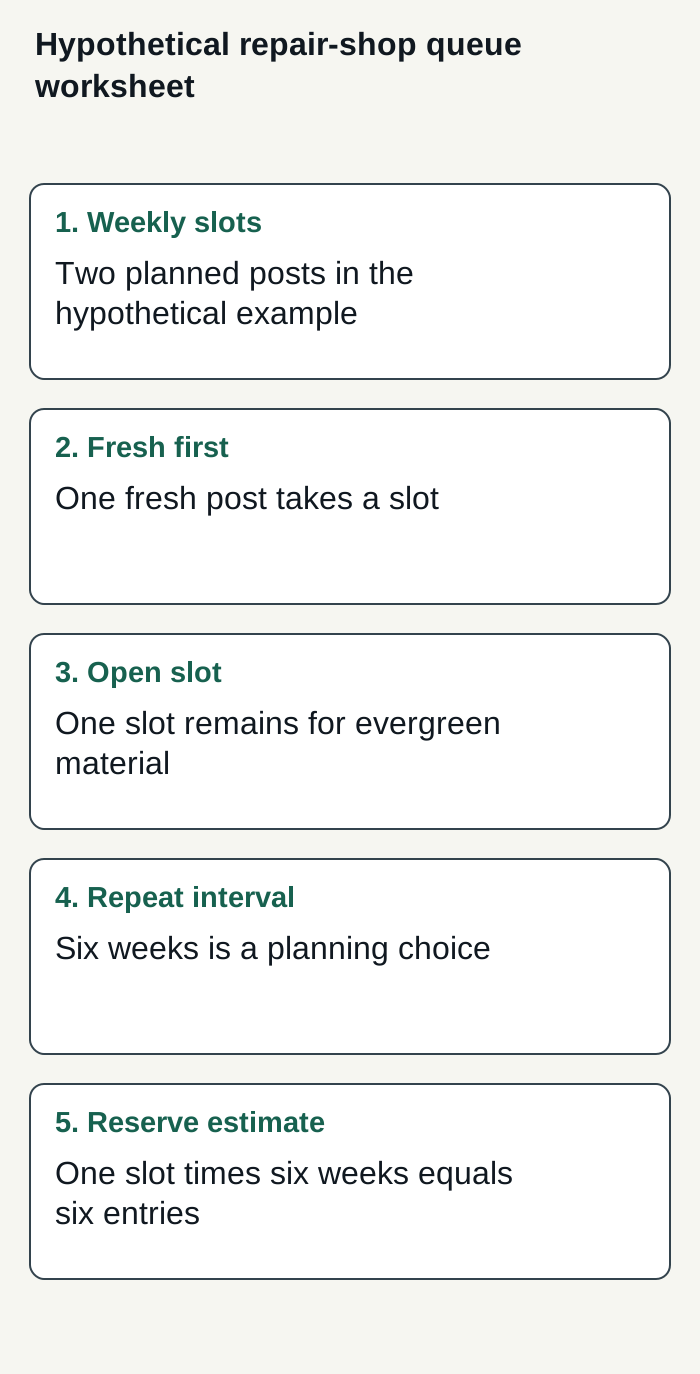
Hypothetical repair-shop example: one weekly evergreen slot and a chosen six-week interval produce a six-entry planning estimate.
Condensed original editorial illustration. Read the surrounding guidance for qualifications and the complete procedure; any example is fictional and shows no verified customer outcome or product screen.
Illustrative worked example by Superdirector editorial team. Created 2026-11-09.