How-To Guide
What parts of social media posting can you safely automate in 2026?
Research, drafts, calendars and your own posts can run on official APIs. Replies to strangers, bulk actions, claims and AI or paid labels need a person.
By the Superdirector editorial team. Platform documentation read November 6, 2026.
At a glance
What parts of social media posting can you safely automate in 2026?
You can safely automate the jobs that only touch your own account: tracking your niche, drafting posts, filling a calendar and publishing your own original posts through the platform's official API at a spread-out pace. Keep a person on anything that reaches other people or speaks for you: replies and DMs to strangers, bulk follows and likes, the same text on several accounts, product claims, and paid-partnership and AI labels. X's Developer Policy, Meta's spam policy and TikTok's developer guidelines all draw the line in that place.
- Instagram's API allows 100 posts per rolling 24 hours, and the same page also says 50; plan well under both.
- TikTok keeps posts from unaudited apps private, so check that your tool is audited.
- Approve each post while a format is new; move proven formats to standing auto-post.
The short answer: automate your own content, not your conversations
Automation is safe for the jobs that only touch your own account: watching what is working in your niche, drafting posts, laying out a calendar and publishing your own original posts through the platform's official route. It stops being safe where it reaches other people or makes a claim on your behalf: replies and DMs to strangers, follows and likes in bulk, the same text pushed to several accounts, and disclosures such as paid-partnership and AI labels.
That line is not a guess. X's Developer Policy says any service that posts, follows or sends DMs must follow its Automation Rules, must get explicit consent before sending automated replies or DMs, and must never post identical or substantially similar content across multiple accounts. Meta's spam policy bars posting at very high frequencies whether it is done manually or automatically. TikTok's developer guidelines say a posting app should help authentic creators post original content, and call an app that copies content from other platforms to TikTok not acceptable.
| Job | Automate it? | What sets the line | What a person still does |
|---|---|---|---|
| Track accounts, competitors, hashtags | Yes | Read-only; no posting rules apply | Decide which signals matter for your brand |
| Draft captions, carousels, X posts | Yes | Your own claims and the platform's rules on realistic AI media | Check every product claim and offer |
| Fill the calendar | Yes | Nothing on the platform side | Set the weekly pace and the mix of formats |
| Publish your own original posts | Yes, through the official API | Instagram: 100 API posts per rolling 24 hours (50 in another section of the same page). X: Automation Rules. TikTok: audit before public posts | Approve new formats; watch the first results |
| Same post to several accounts | Only with real variation | X bans identical or substantially similar posts across accounts | Rewrite per account |
| Reply to comments and DMs | Only for people who opted in | X: consent first. Instagram: 24-hour messaging window | Answer strangers yourself |
| Follow, like, repost in bulk | No | X bans bulk or aggressive actions; Meta restricts high-frequency activity | Nothing to automate here |
| AI labels and paid-partnership settings | No | TikTok and Meta labels; TikTok's commercial content disclosure | Set them on every post that needs them |
The table assumes you post as your own business account. If you run accounts for clients, the same rules apply per account, plus the access rules for apps that serve accounts you do not own.
When enlarged, scroll horizontally to read the diagram.
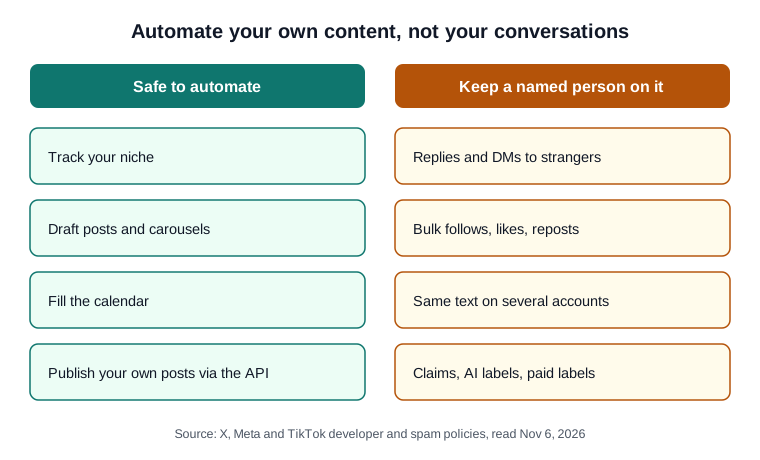
Original diagram; the rule behind each split is in the table above.
Original visual by Superdirector editorial team. Creation date not recorded.
Sort your posting work into jobs
Write the jobs down before you buy a tool. Most founders lump them together as "posting", but they carry very different risks. Research, drafting and calendar planning happen inside your own workspace and no platform ever sees them. Publishing touches the platform but only your own account. Replies, DMs, follows and likes touch other people's accounts, and that is where every platform's spam rules concentrate.
A simple test: if the action would look the same whether a person or a script did it, and it only changes your own profile, it is a candidate for automation. If it lands in someone else's notifications, keep a person on it until that person has opted in. The audit sheet has one row per job with a column for the route you use and who owns the check.
Use each platform's official publishing route
Every platform with a publishing API sets its own limits, and a tool built on that API inherits them. The figures below come from each platform's developer documentation, read on November 6, 2026: Meta's content publishing guide, X's Developer Policy, TikTok's content sharing guidelines and YouTube's videos.insert reference.
| Platform | Official publishing route | Limits and rules worth knowing |
|---|---|---|
| Content Publishing API, for professional (business or creator) accounts | 100 API-published posts in any rolling 24-hour window, and one carousel is one post; the carousel section of the same page says 50. Up to 20 items per carousel; every slide is cropped to the first image's ratio, 1:1 by default. JPEG only; no shopping tags or filters | |
| X | X API under the Developer Policy | Show exactly what will be published before it goes out. No bulk or aggressive actions, no identical posts across accounts. A bot account must say what it is and who is responsible for it |
| TikTok | Direct Post API, or Upload API to send a draft | Unaudited apps post to private view only, for up to 5 users in any 24-hour window. Posting cap typically around 15 posts a day per creator account. Apps may not add their own logo or watermark, and must offer the commercial content disclosure |
| YouTube | Data API videos.insert | Uploads default to public unless the creator's account settings make them private; unverified API projects are not restricted to private viewing. The upload carries a field for declaring synthetic media |
Two details trip people up. First, Meta's content publishing page states 100 posts in a rolling 24 hours in its rate-limit section and 50 in its carousel section; PlugKit spotted the same contradiction. For a single brand account either number is far above what you should post, so plan well under the lower one. Second, TikTok's Upload API uploads the post to TikTok as a draft for further editing in the app. That is a useful middle ground when you want a person to finish and publish a post inside TikTok.
What the official route excludes is just as clear. A browser script or phone farm that taps through the app as if it were you is not a publishing API, and no platform's API quota gives it permission to act.
Choose approval or standing auto-post per format
Scheduling tools offer two modes. In the first, each post waits for someone to approve it, then goes out at its slot. In the second, a standing setting lets drafts publish on their own. Neither is wrong; the choice belongs to the format, not to the whole account.
- New format, new claim, new offer: approve each post. The first few drafts of a format show you what the generator gets wrong.
- A format whose last several drafts went out unedited: move it to standing auto-post and spot-check the week.
- Anything time-sensitive or reactive (a news moment, a price change, a reply-bait question): back to approval, because a queued post cannot read the room.
On X, the label question follows the same split. The Developer Policy requires an API-based bot account to say it is one. OpenTweet's reading of the rules is that an account where a person approves AI drafts before they are scheduled is ordinary scheduled posting and needs no bot label, while an account that posts with no human review should carry X's automated-account label. That is a vendor's interpretation, not X's wording, so read X's own Automation Rules before you run an account with no review.
Set a pace and keep every post different
Published limits are ceilings, not targets. Meta's spam policy says it may restrict accounts acting at lower frequencies when there are other signs of spam, and it names posting repetitive content as one. A calendar that posts five similar carousels in an hour can look like spam even though it is far under 50 a day.
The only pacing numbers in the cited pages come from vendors that sell X schedulers, so treat them as practitioner guidance. OpenTweet suggests new accounts start at 1 to 3 posts a day and ramp over weeks, and points out that ten posts spread over 16 hours look like a person while ten in ten minutes look like a script. BeeReach gives 5 to 20 a day for established accounts, spaced across waking hours. A founder posting three to seven carousels and X posts a week per account is far inside every one of these figures.
Variation matters as much as spacing. If one idea goes to Instagram and X, rewrite it for each: different first line, different length, different call to action. Across platforms that is good practice rather than a rule; X's own ban covers identical or substantially similar posts across several X accounts, so if you run more than one account there, each needs its own version.
Keep a person on replies, claims and labels
Four jobs stay with a named person even when everything else runs on its own.
- Replies and DMs. X requires explicit consent before automated replies or DMs. On Instagram, Meta's messaging API only lets an app message a user inside a window opened by that user, 24 hours for most actions, and where the law requires it, automated chats must say they are automated.
- Claims and offers. A generated caption will state a discount, a result or a feature with the same confidence whether it is true or not. Someone who knows the product reads it first.
- AI labels. TikTok's Community Guidelines require a label on AI-generated content that shows realistic-looking scenes or people. Meta adds an "AI info" label when it detects AI images or when people disclose that they are uploading AI-generated content. YouTube's upload API has a field for declaring synthetic media. A designed carousel is not realistic footage, but a generated photo of a person is.
- Paid partnerships. TikTok requires posting apps to offer its commercial content disclosure. If a post promotes a brand you are paid by, the person posting sets that disclosure.
Give each of these a name in your team, even if the team is you. An automated calendar with nobody responsible for its replies is how an account ends up answering a complaint with a scheduled promo.
A weekly routine for a founder running it alone
This is the smallest routine that keeps the automated parts honest. It assumes one Instagram account and one X account.
- Monday, 20 minutes: read what the tracker found in your niche last week and pick the formats worth remaking.
- Monday: approve the week's drafts that use a new format or name a price; leave proven formats on standing auto-post.
- Daily, 10 minutes: answer comments and DMs yourself.
- Friday: compare each post with your own median for that format, not with someone else's viral post, and drop the format that lost twice.
- Monthly: check the audit sheet against each platform's current rules, since limits and labels change.
What Superdirector automates today
This site belongs to Superdirector, so this section is the publisher describing its own tool. Its headline is "Autonomous social media growth.*" with the note "* AI video and full autopilot are coming soon." Today it tracks your niche across X, YouTube, TikTok and Instagram, remakes the formats that are taking off with the same hook and structure in your brand, and fills your calendar for the month. On the Growth plan it publishes Instagram carousels and X text posts, one post at a time, to your own accounts at a weekly pace, once you have approved the first one or switched on Auto-post. The how it works page lists what runs today. It does not post video, Reels, TikTok or YouTube today, and an AI app you connect to it cannot post. You stay the publisher, which means the labels and replies above are still yours.