How-To Guide
How many slides should an Instagram carousel have, and what is the maximum?
Understand Instagram's carousel maximum, then choose a useful length without padding. Includes a slide-by-slide example and assessment worksheet.
By the Superdirector editorial team. Revised November 9, 2026.
At a glance
How many slides should an Instagram carousel have, and what is the maximum?
Instagram's reported maximum is 20 photos or videos in one carousel. That ceiling does not tell you how many to use: plan enough slides to deliver one clear idea, and remove any that repeat or pad it. A working range such as 7–12 may be useful to test, but it is not a rule or guaranteed performance optimum.
- The supplied sources report a maximum of 20 items, including photos and videos.
- Choose length from the material; do not treat the maximum or a vendor range as a target.
- Compare posts against your own typical results, without assuming slide count caused a change.
Separate the maximum from the useful length
Instagram allows up to 20 photos or videos in a carousel, according to PetaPixel's report of the August 2024 change and the practitioner guide RecurPost's account of the app and publishing API limits. The limit was previously 10. The references supplied for this article do not include a directly verifiable Instagram-owned Help Center page, so treat that figure as a reported platform ceiling and check Instagram's current interface if the precise limit is critical.
How many to use is an editorial decision, not a platform rule. Start with the idea and the reader's route through it. As an editorial planning suggestion informed by differing vendor samples, 7–12 slides can be a hypothesis to test when an idea has several distinct parts; neither vendor reports that exact range, and it is not a guaranteed optimum. A complete idea may need fewer. Twenty is a maximum, not a goal.
The available performance evidence does not settle on one ideal count. Top Carousels reports that its 11–15-slide group reached twice its creator's usual result more often than shorter groups, while its 16–20 group did no better than its 6–9 group. PostEverywhere reports stronger account-relative results for 7–10 slides, but its own sample stops at 10 because its product schedules no more than that. These are vendor-selected observational samples, not a controlled test of adding slides. They do not prove that length causes performance.
Outline the reader's route before counting
Draft the sequence in plain text before opening a design tool. Write one line for the promise, one for each necessary point or step, and one for the ending. Then ask whether every line moves the reader forward. Combine duplicates; split a step only if it contains two ideas that each need explanation.
| Sequence element | Question to answer | Keep it when… |
|---|---|---|
| Opening | What will the reader get? | The promise is specific enough to set expectations. |
| Middle | What must they understand or do? | Each slide contributes a distinct point, example, or step. |
| Ending | What can they do with this? | It gives a relevant next action or a concise takeaway. |
This is a planning structure, not a required formula: a visual story or photo sequence may need no instructional steps. The practical test is whether a person can follow the sequence without a missing link, and whether anything can be removed without losing meaning.
Work through a hypothetical example
Hypothetical example: a small shop wants to explain how to photograph a mug against a home-made backdrop. The goal is not to promise better sales or reach; it is to make the process understandable. The outline comes to seven slides:
| Slide | Job | Draft content |
|---|---|---|
| 1 | Set the promise | Photograph a mug with a simple paper backdrop. |
| 2 | Prepare | Clear the surface and place the mug near a window. |
| 3 | Make the backdrop | Curve paper behind the mug to remove a hard corner. |
| 4 | Set the light | Turn the mug until the window light shows its shape. |
| 5 | Compose | Leave clear space around the rim and handle. |
| 6 | Check | Look for distracting reflections before taking the photo. |
| 7 | Close | Invite readers to save the steps or share their setup. |
Seven is the result of this outline, not an instruction to always make seven slides. If the reflection check were already clear in the lighting step, combine those slides. If the audience needs a separate example of a reflection, keep it. If the final prompt adds no value, end with a useful takeaway instead. This post does not need extra slides to approach 20.
When enlarged, scroll horizontally to read the diagram.
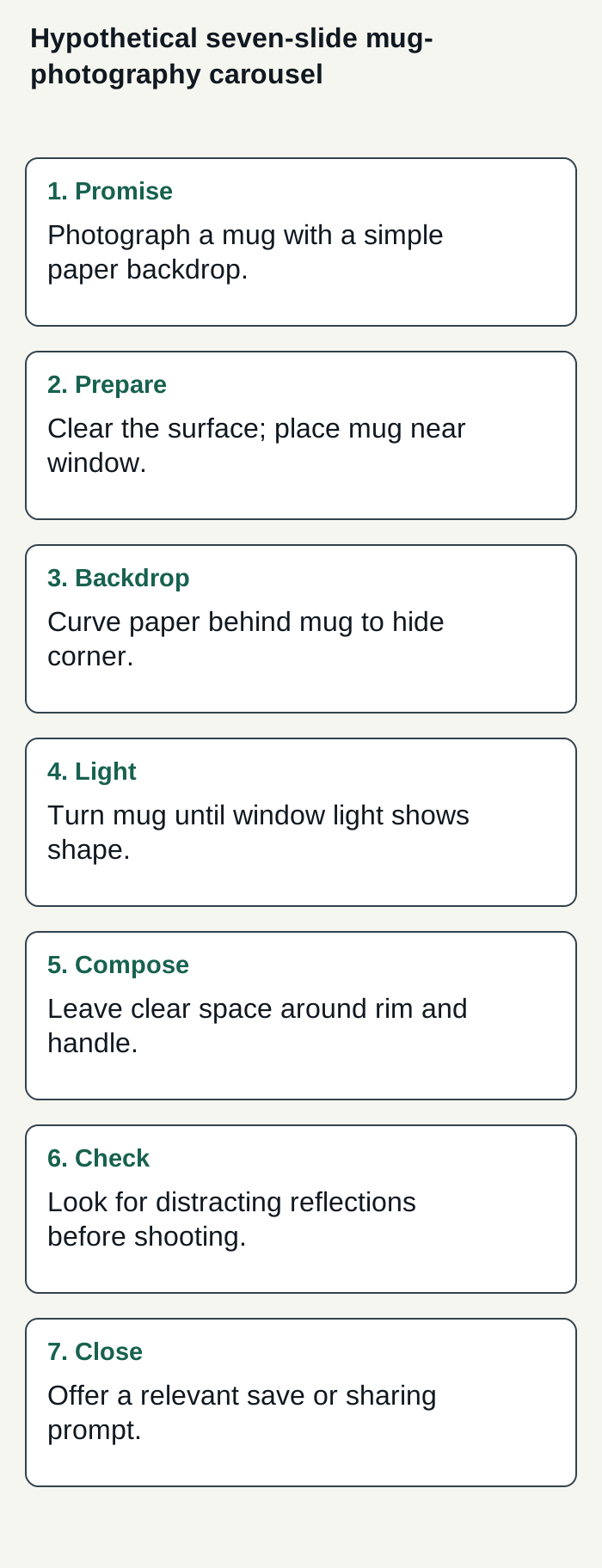
Hypothetical example: seven slides counted from distinct jobs, not padded toward the maximum.
Condensed original editorial illustration. Read the surrounding guidance for qualifications and the complete procedure; any example is fictional and shows no verified customer outcome or product screen.
Illustrative worked example by Superdirector editorial team. Created 2026-11-09.
Check the tool and preview the sequence
Before designing, check the publishing route you actually plan to use. A scheduling product can impose its own lower cap; that does not establish Instagram's cap. PostEverywhere says its reported data stops at 10 slides because its scheduler supports up to 10, while the Instagram maximum reported in the supplied references is 20. Confirm your tool's current behavior rather than relying on an old guide or assuming every tool supports the platform maximum.
Preview the sequence at phone size. Check that the opening accurately promises what follows, that each middle slide makes sense in order, and that the last slide does not introduce an unfinished point. If the carousel mixes photos and video, count both toward the reported 20-item ceiling. For dimensions and design preparation, see the related Instagram carousel size guide and how to make an Instagram carousel.
Measure a useful result for your account
If you want to learn whether different lengths suit your account, keep a simple log rather than declaring a winner after one post. Record the topic, slide count, date, and one outcome that fits your purpose. For an educational carousel that might be saves; for a conversation-led post it might be comments. Use the same measure for each comparison and compare results at a similar point after posting.
A small worksheet could look like this:
| Post | Length | Purpose | Measure | What to review |
|---|---|---|---|---|
| A | 6–8 | Explain a short process | Saves | Did the sequence answer the question? |
| B | 9–12 | Compare several options | Saves | Did each extra point add useful detail? |
| C | As needed | Show a visual sequence | Shares | Was the full sequence worth swiping through? |
These are planning bands, not an experiment guaranteed to isolate slide count. Topics, creative quality, timing, and audience response can differ. Review several comparable posts, note what changed, and use the result to guide another test. For a working content schedule, see how to plan a week of content; for one possible measure, see engagement rate.
Where Superdirector fits
For a business seeking a customizable AI-run channel for about $200 a month, Superdirector Growth is currently $199/month for two accounts, with no trial (pricing). For this carousel-planning task, AI can help develop an outline, but you still decide whether each slide earns its place and assess results against your own account; track review effort and customer-defined outcomes rather than assuming either. Current publishing is limited to eligible Instagram image carousels and single X text posts, with per-piece approval or an enabled account Auto-post rule; finished video and full autonomy are upcoming. The publishing guide explains the setup: connected accounts and accepted source cards define what may publish. Before enabling Auto-post, verify the account’s first hand-approved post is live. Turning Auto-post off stops unsent posts; Pause posting holds the queue. This is a buying goal, not a guarantee of results or minimal oversight.
The publishing setup connects selected source cards to the chosen account; Instagram requires a Business or Creator account. When you enable Auto-post for that account, finished eligible posts from those cards, including posts made in chat, can publish at their calendar times without individual approval. Turning it off stops unsent posts; Pause posting holds the queue. These controls define current delegated publishing, rather than promising a fully autonomous channel or business results.