How-To Guide
What size should an Instagram carousel be, and how many slides can it have?
Use 1080 x 1350 px (4:5) for every slide, up to 20 photos or videos per carousel. Square and 1.91:1 work too; the first slide sets the crop.
By Bell Chen, founder of Superdirector — how the analysis works.
At a glance
What size should an Instagram carousel be, and how many slides can it have?
Make every slide 1080 x 1350 pixels, a 4:5 portrait. Instagram accepts images from 4:5 to 1.91:1, so square (1080 x 1080) and landscape (1080 x 566) also work, but the first slide sets the shape and every later slide is cropped to match it. A carousel can hold up to 20 photos, videos or a mix of both; Reels cannot go inside one. Keep the text on your first slide about 60 pixels in from the edges, because the profile grid shows that slide cropped to 3:4.
- Best size: 1080 x 1350 px (4:5) for all slides.
- Slide limit: 20 items per carousel, photos and videos mixed; it was 10 until August 2024.
- The first slide decides the crop for the whole post; slides can be reordered after posting but not added.
The sizes at a glance
Instagram's own publishing documentation is the most precise public source for carousel limits. Its image specification requires an aspect ratio within 4:5 to 1.91:1, and its publishing guide says carousels are limited to 20 images, videos or a mix of the two. Those pages are written for apps that publish through the API, which is how scheduling tools post, so they set the rules your scheduler follows. The pixel sizes below are the 1080-pixel-wide versions of each allowed shape.
| Shape | Ratio | Export at | Notes |
|---|---|---|---|
| Portrait (use this) | 4:5 | 1080 x 1350 px | Tallest shape the publishing API accepts; most screen space |
| Square | 1:1 | 1080 x 1080 px | Instagram's default crop if nothing else is set |
| Landscape | 1.91:1 | 1080 x 566 px | Wide charts and desktop screenshots only |
| Tall portrait | 3:4 | 1080 x 1440 px | Outside the API's range; see the grid section before using it |
| Story or Reel frame | 9:16 | 1080 x 1920 px | Not a carousel shape; cropped to 4:5 |
Shapes are width to height, so 1.91:1 is wide and 4:5 is tall. The full spec sheet as a CSV has the same rows with the grid crop for each shape.
Pick one shape for every slide
Choose the shape before you design anything, because the first slide decides it for the whole post. Instagram's publishing guide says carousel images are all cropped based on the first image, with 1:1 as the default. Storrito's guide adds that there is no per-slide override, so a landscape photo dropped into a 4:5 carousel loses its sides.
Portrait 4:5 is the right default for almost every brand. It is the narrowest shape the API range allows, so it is the tallest shape a scheduler can publish and fills more of a phone screen than a square. Square only makes sense if you already have a library of square templates or product shots; landscape only for content that is wide by nature.
Export at 1080 pixels wide
Design at 1080 pixels wide and let the shape set the height. Instagram's specification scales anything wider than 1440 pixels down and anything narrower than 320 pixels up, so a 4K export gains nothing and a small one turns soft. The height then follows from the ratio: 1350 for 4:5, 1080 for square, 566 for 1.91:1.
A correction worth making in your templates: 1080 divided by 1.91 is 565.4, so a 1.91:1 landscape slide is 1080 x 566 pixels, as Carouselli lists it. Agorapulse and Contentdrips give 1080 x 608, which is a 16:9 shape (about 1.78:1). Instagram accepts that shape, since it sits inside the 4:5 to 1.91:1 range, but it is not 1.91:1: if your first slide is a true 1.91:1 image, a 608-pixel-tall slide is cropped to match.
Keep the cover inside the profile-grid crop
Your feed shows the full slide, but your profile grid shows only the first slide, cut to a taller tile. Your Social Team's July 2026 guide reports that the grid now previews posts at 3:4 (1080 x 1440) and that only the first slide of a carousel appears there. We worked out what that cuts from each shape when the tile uses the slide's full height:
| First slide | Width kept in the 3:4 tile | Cut from each side | Keep text and faces |
|---|---|---|---|
| 1080 x 1350 (4:5) | 1013 px | About 34 px | 60 px from every edge |
| 1080 x 1080 (1:1) | 810 px | About 135 px | At least 135 px from the sides |
| 1080 x 566 (1.91:1) | 425 px | About 328 px | In the middle third only |
For a 4:5 slide the cut is small, so a 60-pixel margin covers it; that margin is also what Carouselli recommends for text and logos. Krumzi's size guide arrives at the same 135 pixels for square covers. Only slide 1 needs this strict margin; later slides can use the full frame.
Should you design at 1080 x 1440 to fill the grid exactly? Not for carousels you schedule. 3:4 sits outside the 4:5 to 1.91:1 range in Instagram's publishing specification, and Your Social Team notes that most third-party schedulers do not fully support it yet. Keep 3:4 for grid banners you post by hand from the app.
When enlarged, scroll horizontally to read the diagram.
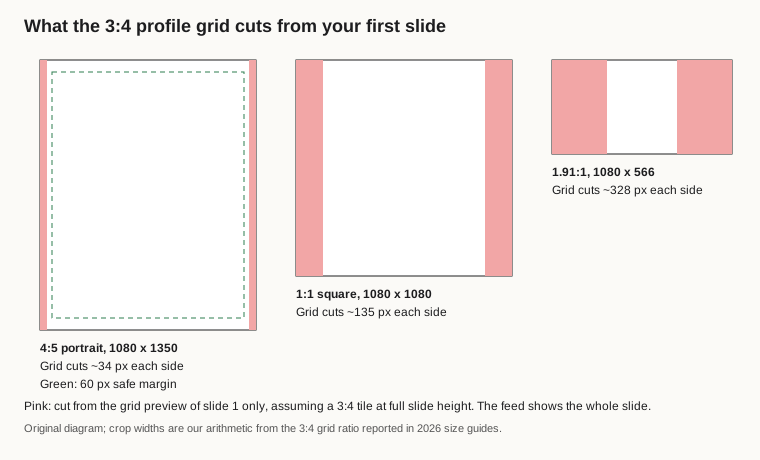
Original diagram; crop widths are our arithmetic from the 3:4 grid ratio, not an Instagram figure.
Original visual by Superdirector editorial team. Creation date not recorded.
Check the file, the colour and the video slides
- File type: JPEG for photos. The publishing API accepts only JPEG, at 8 MB at most; vendors such as Storrito report that the app also takes PNG, at up to 30 MB per photo.
- Colour: export in sRGB. Instagram converts other colour spaces to sRGB, which can shift brand colours you set in P3 or CMYK.
- Video slides: Sprout Social gives 600 x 600 pixels as the minimum video resolution, and Storrito reports up to 60 seconds per video slide. Crop video to the same shape as your photo slides.
- Reels: a Reel cannot be a carousel item. Upload the clip as a video slide instead.
- Alt text: Instagram supports alt text of up to 1,000 characters for each image in a carousel. Describe what each slide shows.
- Caption: up to 2,200 characters, 30 hashtags and 20 @ tags per post, per the same media reference.
Count the slides and fix the order
You can use up to 20 photos and videos in one carousel. The limit was 10 until August 2024, when MacRumors reported that Instagram had doubled it, which is why older guides and some scheduling tools still say 10. Contentdrips' size guide, updated in September 2026, still lists 10 as the maximum.
Use as many slides as the idea needs and no more. Twenty is a ceiling, not a target. Name the files 01, 02, 03 before you upload. Instagram began rolling out reordering after publishing in March 2026, as 9to5Mac reported, but you still cannot add a slide to a published carousel. If your scheduler still caps you at 10, it has not caught up with the change; post longer carousels from the app.
For the content of each slide (the hook, one idea per slide and the save-worthy ending), see how to write scroll-stopping hooks and plan the post's slot on your content calendar.
If the slides are made with AI
Instagram lets publishing apps flag a post as AI-generated, and for carousels the flag goes on the carousel as a whole, not on each slide. Whatever tool you use, you remain the publisher: label AI content where Instagram asks you to and check every claim on the slides against your product.
Superdirector, the site you are reading, is our product. It remakes formats that are taking off in your niche into on-brand carousels, and on the Growth plan posts Instagram carousels and single X text posts for you after your first approval or with standing Auto-post. AI video and full autopilot are coming soon. See how it works.