How-To Guide
How do you turn customer questions into videos when you have no testimonials?
Turn real customer questions into short demonstration videos when you have no testimonials: find, rank, film and post them, without fake reviews.
By the Superdirector editorial team. Four FAQ video guides, Google Search Console, YouTube captions and chapters help, Google's helpful content guidance, DMCC Act Schedule 20, CMA fake reviews guidance and 16 CFR Part 465 read November 6, 2026. Method only; not legal advice.
At a glance
How do you turn customer questions into videos when you have no testimonials?
Collect the questions people ask before they buy, choose the ones that repeat, block a purchase and can be shown, and make one short video per question. Put the question on screen, answer in the first sentence, then show the product, step or limit, and say who is speaking. A demonstration needs no testimonial; inventing one is banned in the UK and US.
- Questions come from messages, comments, calls, returns, Search Console queries and site search.
- One question per video: the question, the answer first, the demonstration, the limit, the presenter's name.
- The DMCC Act and the FTC's rule on reviews and testimonials ban fake reviews and invented customers.
The short answer
Turn customer questions into videos by collecting the questions people actually ask before they buy, choosing the ones that stop a purchase, and making one short video per question that shows the answer happening on screen. Put the question in the customer's words at the start, answer it in the first sentence, then show the product, the step or the limit. A demonstration lets viewers judge for themselves, so you do not need a testimonial. What you must not do is invent one: fake reviews and made-up customers are banned in the UK and the US.
A testimonial says someone else was happy. A question video does something different: it answers the exact doubt the next buyer has. "Will this fit a 30 cm shelf?" is answered better by a tape measure on camera than by a stranger saying they love it.
This page covers where the questions come from, how to choose them, how to film one, who should be on camera, and where to post it. It is a method; no source measures whether question videos sell more than testimonials.
Why a demonstration can stand in for a testimonial
Early on, the honest proof you have is the product itself and the people who made it. A question video uses both. It shows the thing working, says who is speaking, and leaves the judgement to the viewer.
Google's guidance on helpful, people-first content asks whether content provides original information and whether it shows first-hand expertise, such as from having actually used a product. A founder answering "how long does the battery last on a full day out?" by filming a full day out is that kind of content. A stock clip with a quote from "Sarah, happy customer" is not.
The rules point the same way. In the UK, Schedule 20 of the Digital Markets, Competition and Consumers Act 2024 lists submitting or commissioning a fake consumer review, or one that hides an incentive, among practices that are always unfair, along with publishing reviews in a misleading way. The CMA published its fake reviews guidance on 4 April 2025. In the US, the FTC's rule on consumer reviews and testimonials bars a business from creating a testimonial that materially misrepresents that the person exists or used the product, and requires an officer or manager who gives a testimonial to disclose the relationship unless it is already clear.
Where to find the questions
You have more questions than you think, even with no customers. Every message from a curious stranger counts.
| Source | What it gives you | How to record it |
|---|---|---|
| Email, DMs and website chat | Pre-purchase doubts in the buyer's own words | Copy the question, remove the name, note the date |
| Comments on your posts and on competitors' posts | Public questions other buyers can see | Screenshot or copy the wording, not the person |
| Calls, markets and pop-ups | Questions asked face to face | Write them down the same day |
| Returns, cancellations and refund notes | The question you failed to answer before the sale | Reword it as the question the buyer should have had answered |
| Search Console Queries tab | What people typed before landing on your site | Note queries phrased as questions |
| Your own site search | What visitors could not find | Export the terms monthly |
Wistia's FAQ video guide says to begin with whoever on your team hears prospects' questions every day, and then to check surveys, reviews and social posts. Wyzowl also starts with the support team. If the support team is you, start with your inbox.
Google's Search Console performance report shows the queries that bring people to your site; its queries dimension groups data by the search query users typed. Treat it as a source of wording, not a ranking promise. Google notes that a query in your list may not show your site when you search it yourself.
Choose the questions that stop a purchase
Not every question deserves a video. Moonb's guide suggests pulling twenty real questions and sorting them by how often they repeat. Colossyan suggests putting first the questions that affect whether someone buys or signs up. Use both, and add a third test: can the answer be shown, not just said?
- Repeats: asked more than once, in any channel.
- Blocks a purchase: the buyer would not order until it was answered.
- Can be shown: size, fit, setup, speed, sound, texture, what is in the box, what it does not do.
A question that scores on all three is your first video. Log every question in the customer question video log: it has a column for each test, the exact wording, the source, the answer you can show and the limit you must state.
Turn one question into one video
Keep it to one question per video. Moonb calls that the discipline that matters more than format, and Wistia's guide suggests no more than one or two. Its script outline is simple: introduce, state the question, answer it clearly, then say where to get more help.
- Open with the question on screen, in the customer's words with names and details removed. Say it aloud too.
- Answer in the first sentence. "Yes, it fits a 30 cm shelf, with 2 cm to spare."
- Show it. The measurement, the setup, the sound, the product next to something familiar for scale.
- State the limit. If the answer is "not for that", say so and say what it is for.
- Say who is speaking: "I'm Ana, I make these."
- End with where to find more: the product page, the size guide, or a reply to their message.
If the honest answer is no, film it anyway. A clear "this will not work on a gas hob" saves a return and tells every later viewer you will not oversell them.
When enlarged, scroll horizontally to read the diagram.
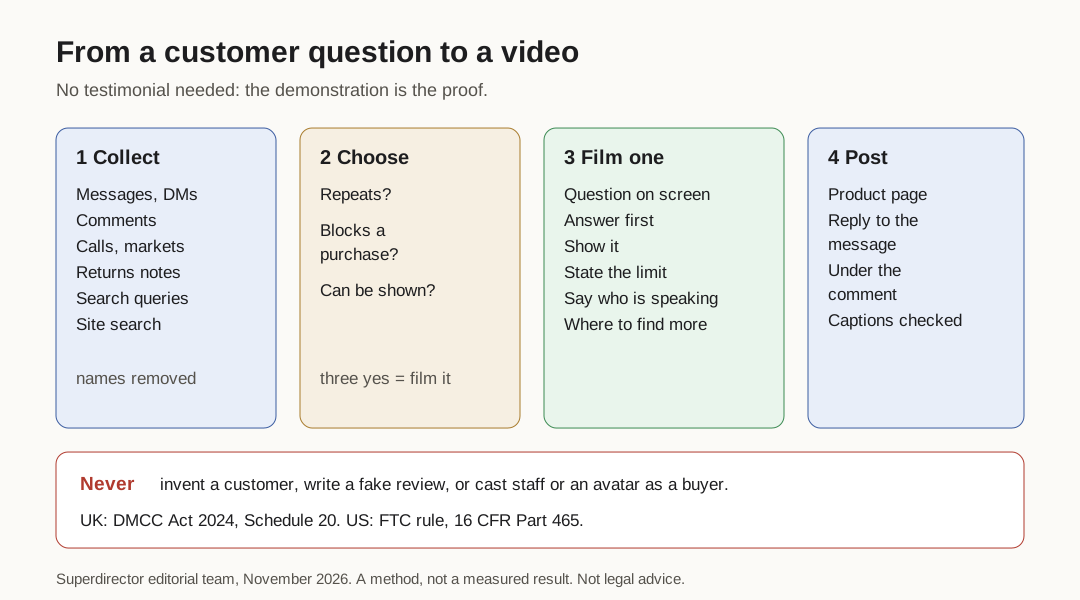
Original diagram. A method, not a measured result.
Original visual by Superdirector editorial team. Creation date not recorded.
Who should be on camera
| Presenter | Works when | Say on screen or in the caption |
|---|---|---|
| Founder or maker | The question needs knowledge of how it is made | Their name and role |
| A team member | The question is about service, delivery or setup | That they work for the brand |
| Hands only or a screen recording | The answer is a step, a size or a setting | Who is speaking, in the voiceover |
| A paid or gifted creator | You want a buyer's-eye view of the answer | An ad label, and that they were paid or gifted the product |
Do not cast staff, friends or an AI avatar as customers. Under the FTC rule, a testimonial that implies a person exists or used the product when they did not is the problem, and an officer or manager has to make the relationship clear. Under the DMCC Act, submitting or commissioning a review that hides an incentive is banned. Saying who is speaking covers the disclosure point; the rest is simply not inventing anyone.
If you brief a creator, keep the same structure: their name, the question, the shown answer, the limit, and an ad label. To brief one objection in depth, see turn a buyer objection into a creator video brief. Our guide to reviewing creator disclosure in the caption and the video covers the label.
Post the answer where the question was asked
A question video works best next to the doubt it answers. Put it on the product page beside the size or setup detail, send it as the reply to the message that asked, and post it where the comment appeared.
On YouTube, a longer video that answers several questions can use chapters: add timestamps and titles to the description, start the first one at 00:00, and list at least three in ascending order. Each chapter can be one question.
Add captions, so the answer still works for anyone watching without sound. YouTube's automatic captions page says their quality may vary, that they can misrepresent speech because of accents or background noise, and that you should always review and edit them. Check product names and numbers in particular.
For more formats to fill the gaps once you have a few videos, see types of UGC videos and UGC brand examples for beginners.
When real customers arrive
Question videos do not stop being useful when reviews start, but you can now add real voices. Ask buyers whether you may quote their question or their result, and record that they agreed. If you offer anything for a review, make sure the incentive is not hidden, because the DMCC Act bans submitting or commissioning a review that conceals one.
Keep the question log going. The questions change once people own the product: from "will it fit?" to "how do I clean it?". Those are your next videos.