How-To Guide
What should a creator post say about a feature in a phased release?
What a creator video and your support reply should say when only some users have a feature: rolling out, a check path, no promised date or reinstall.
By the Superdirector editorial team. Apple's phased release and manual update pages, App Review Guidelines, Google Play staged rollout and update help, 16 CFR Part 255 and five release communication guides read November 6, 2026. Method only.
At a glance
What should a creator post say about a feature in a phased release?
Say the feature is rolling out gradually so some viewers will not have it yet, give a check path (update the app, then look in a named place), and say that if it is not there nothing is wrong. Do not promise a date, suggest reinstalling or claim everyone has it, and make the support reply use the same words.
- Apple's phased release reaches 1% of auto-update users on day one and 100% on day seven, and can be paused for up to 30 days.
- Google Play staged rollouts pick users at random, do not notify them, and do not increase on their own.
- Server-side feature switches ignore app updates, so the check path changes.
The short answer
A creator post about a feature in a phased release should say three things plainly: the feature is rolling out gradually, so some viewers will not have it yet; here is how to check (update the app, then look in a named place); and if it is not there yet, nothing is wrong and it is on its way. It should not promise a date, tell people to reinstall, or say the feature is available to everyone. The support reply your team sends should use the same words, so a viewer who writes in hears the same story they heard in the video.
The reason is mechanical. On the App Store and Google Play, a phased or staged release sends an update to a random share of users first, and those users are not told. A creator's audience is a random mix of people with and without the update, so a video that says "go try it now" will reach many people who cannot.
Why some viewers will not see the feature
Apple's phased release documentation says a version update can be released in stages to a random sample of users with automatic updates on eligible devices, without any notification of their participation. Over seven days the share grows from 1% to 100%.
| Day of Apple phased release | 1 | 2 | 3 | 4 | 5 | 6 | 7 |
|---|---|---|---|---|---|---|---|
| Share of auto-update users | 1% | 2% | 5% | 10% | 20% | 50% | 100% |
Two details matter for a creator post. First, Apple says anyone can manually download an update in phased release from the App Store at any time, so on iPhone a viewer can usually get the new version by updating by hand. Second, the team can pause the release for up to 30 days, and a resumed release picks up on the day it paused. A date said in a video can slip without anyone doing anything wrong.
Google Play's staged rollouts work differently. An update reaches a percentage of users that the team increases over time; new and existing users are chosen at random; users are not notified; the percentage does not increase automatically; and a rollout can be limited to certain countries. Google also notes it may take time for the full group to receive the update.
Some features are not tied to an app version at all. The team switches them on from a server for a growing share of accounts, sometimes called a feature flag. In that case updating the app does not help. Ask your team which kind of rollout this is before anyone films, because the check path depends on it.
What the creator should say, and what to avoid
| Say | Avoid | Why |
|---|---|---|
| "This is rolling out gradually, so you might not have it yet." | "It's out now for everyone." | Most of the audience may not have it on day one |
| "Update the app, then look under [place]." | "Reinstall the app to get it." | Neither store's rollout page offers reinstalling as a way to get an update early |
| "If it isn't there yet, nothing's wrong. It's on its way." | "If you don't see it, something's broken." | Sends people to support for a normal state |
| "The team is rolling it out over the coming days." (only if the team says so) | "Everyone will have it by Friday." | Releases can be paused or held at a percentage |
| Show the app version and the date filmed on screen | Edit out the version number | Lets viewers compare with their own app |
Rollout guides agree on the core line. Makeitnice's phased rollout entry says some users have access while others do not, and that people are more understanding when told a feature is rolling out gradually than when they find out from someone else. ReleaseGlow makes the same point about labels: people shown a beta tag adjust what they expect, while people shown nothing assume the feature is finished.
Keep the timing vague unless the team commits. "Over the coming days" or "gradually" is honest. A specific date is a promise the team may not keep.
Give viewers a check path they can follow
A check path is the two or three taps a viewer makes to see whether they have the feature. Put it in the video and repeat it in the caption or pinned comment.
- Update the app. On iPhone: open the App Store, tap your account photo, tap App Updates, then Update next to the app. On Android: open Google Play, tap the profile icon, tap Manage apps & device, tap See details under Updates available, then Update.
- Open the app and go to the named place: "Settings, then Sharing" or "the plus button on the home screen".
- If the feature is there, they have it. If not, they wait. No reinstall, no support ticket.
Those update steps come from Apple's manual update page and Google Play's update help. Google adds that an Update button appears on the app's Details page when an update exists. If the feature is switched on from a server, drop step one and say so: "Updating won't speed it up; it's turning on account by account."
If the creator films on a device that already has the feature, show the version number in shot. Our guide to catching outdated product screens in creator footage covers the reverse problem, where footage shows a screen most viewers no longer have.
When enlarged, scroll horizontally to read the diagram.
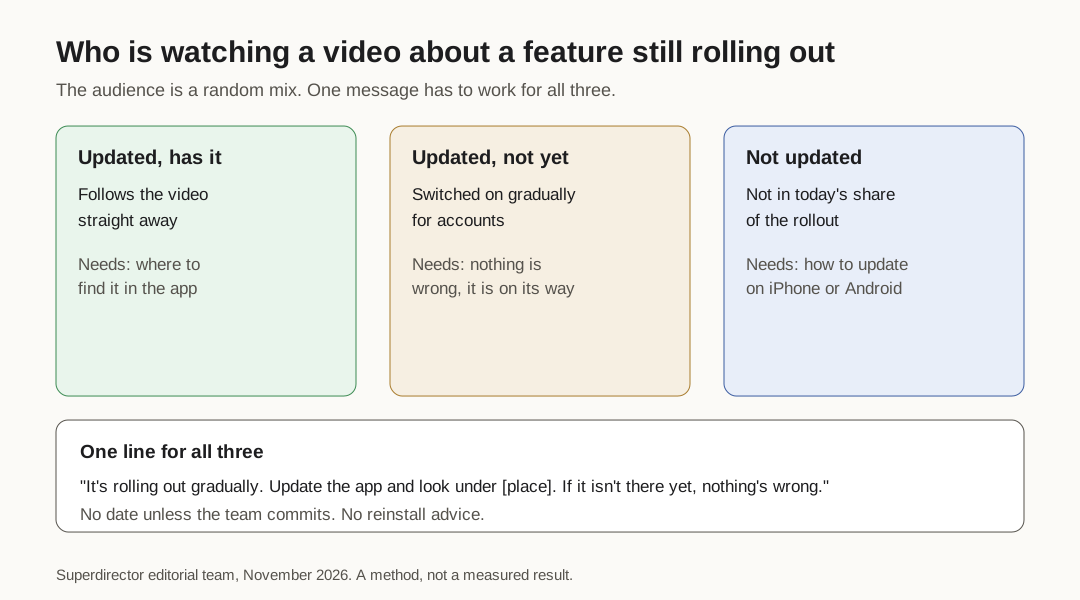
Original diagram. Viewer states during a rollout; not a measured result.
Original visual by Superdirector editorial team. Creation date not recorded.
Match the support reply to the video
Viewers who cannot find the feature will write in, comment or leave a review. Featurebase advises showing a new feature to support before customers get it, along with a note on what it is for and where people are likely to get lost. For a creator campaign, that brief includes the creator's exact wording.
A reply that matches the video:
"Thanks for asking. [Feature] is rolling out gradually, so not everyone has it yet. Please update the app and check under [place]. If it isn't there, there's nothing wrong with your account, and it will appear without you doing anything."
Use the creator and support lines sheet to keep the video script, the caption, the pinned comment and the support reply in one place. When something changes, such as a pause or the move to everyone, update all four together.
LaunchNotes warns that announcing a feature before it is stable creates support load. A creator post in the first day or two of a 1% or 2% release will produce exactly that. If you can, schedule creator posts for later in the rollout, once most viewers can follow along.
What to put in the creator brief
- Rollout type: store phased release, Play staged rollout, server-side switch, or a mix.
- Platforms and countries included so far.
- The app version that contains the feature, and the version the creator is filming on.
- The check path, written out, and where the feature appears.
- The lines to say and the lines to avoid.
- Whether the team will share timing, and the exact words if so.
- Who to tell if the rollout is paused before the post goes live.
- Disclosure: if the post is paid or the creator received something, an ad label viewers cannot miss.
StackPractices' rollout communication template includes a rollout strategy field for all users, a gradual percentage, a feature flag or a beta; copy that field into the brief so the creator knows which one applies. For disclosure, the FTC's endorsement guides apply when a tie between creator and brand could change how much weight viewers give the post and is not something they would expect; then it has to be stated clearly, and on social media in a way viewers cannot avoid.
When the release changes, update the brief, not just the chat thread. Our guides to handing creators versioned product facts and updating an approved creator brief after a product change cover the mechanics.