How-To Guide
Prove which exact creator cut the client approved before it was posted
Fingerprint the delivered file, record who approved which parts and when, and compare the file to be posted with that receipt.
By the Superdirector editorial team. Hash, NIST, RFC 3339, YouTube and FTC sources reviewed October 30, 2026.
At a glance
How can a team prove which creator cut the client approved?
Write a receipt when the client approves. Compute a SHA-256 hash of the exact delivered file, record the approver, their role, the channel, the timestamp with a time zone offset, and which parts they approved or did not see. Quote the fingerprint in the approval request. Before posting, hash the file you are about to publish and compare it with the receipt. A different value is a new cut that needs its own approval. A matching hash proves the bytes are the same, not that the cut is accurate or that the approver had authority.
- Approve a fingerprint, not a file name or a folder link.
- List the parts approved and the parts not shown.
- A mismatch is a new cut, never an edit to the old row.
Direct answer
Short answer: to prove which creator cut the client approved, record a receipt at the moment of approval that names the exact file, not just the project. Compute a cryptographic hash of the file (a SHA-256 fingerprint), write down who approved it, which parts they approved and the date and time with a time zone, and keep the receipt where it cannot quietly change. Before posting, hash the file you are about to publish and compare it with the receipt. If the two fingerprints differ, the approval does not cover that file, however similar it looks.
This is for an agency or brand marketer who has been asked, usually after the fact, “which version did the client actually sign off?” The decision is narrow: does the file about to go live match the one that was approved? It does not decide whether the cut met the brief (that is a review), whether the client approver had authority, or what happened after the post went public.
The weak point in most approval trails is that “approved” attaches to a message, a folder or a name such as “final_v3,” and each of those can end up pointing at a different file. A fingerprint attaches the approval to the content. Use the blank approval receipt card, the CSV register and the receipt chain diagram. All three are blank or fictional teaching aids, and none represents a real campaign, creator or client.
Name the cut and fingerprint the exact file
Start by naming the cut in a way that cannot be mistaken for another one: the project, the creator, the deliverable, a cut number you assign and the file's name as delivered. Then compute its hash from the file you will actually send for approval. Microsoft's documentation for the PowerShell Get-FileHash command says the command computes a hash value for a file with a specified algorithm, that the default is SHA256, and that changing even a single character in a file's contents changes its hash value. Most operating systems ship an equivalent tool, so the method does not depend on any one vendor.
The same page explains why this beats a file name. File names and extensions can change without altering the content, and content can change without altering the name. A hash identifies the content itself. NIST's Secure Hash Standard (FIPS 180-4), listed as final in August 2015, describes the purpose in one line: digests are used to detect whether messages have been changed since the digests were generated. NIST's page also notes that the agency has decided to revise the standard, so check it again before you write an internal rule that quotes it. The practical point for a team is just this: write down the algorithm name beside the value, so anyone can recompute it later.
Prefer SHA-256 or stronger. The Microsoft page says MD5 and SHA1 are no longer considered secure and should be used only for simple change validation, not for files that need protection against tampering. A paid creator video that a client may later dispute is closer to the second case. Also record the file's size and the exact name, because they make a typo in a copied hash easier to catch.
Hash the delivered file, not a preview. If the creator sends a download link, download the file, hash it, and record that you did. A link to a shared folder is not a version: whoever owns the folder can replace the file behind the same link. If the cut is only ever shared as a streaming review link, ask the creator for the downloadable master before approval, or record plainly that the approval covers a streaming link whose bytes you cannot fingerprint. That is a weaker receipt and the record should say so.
Record who approved which parts, and when
A fingerprint says which bytes. It does not say who agreed to them or to what. Next to the hash, write the approver's name and role, the way they sent their answer (email, a platform approval tool, a signed form), and the date and time with a time zone or UTC offset. The internet timestamp standard, RFC 3339 (July 2002), shows how: a date-time ends in either Z for UTC or a numeric offset such as -04:00, which is local time minus UTC. A time with no offset is ambiguous the moment two offices are involved.
Then list the parts the approval covers. A cut is rarely just a video. It has a caption, on-screen text, music, a cover frame or thumbnail, a disclosure and the account it will publish on. If the client said “looks good” to a video but never saw the caption, the receipt must say the caption was not approved. Writing the exclusion is as useful as writing the inclusion, because the usual later dispute is over a part nobody remembers being shown.
| Part | Question to answer | Receipt entry if unknown |
|---|---|---|
| Video file | Which fingerprint did the approver see? | Not approved; do not post |
| Caption and tags | Was the exact text shown, or described? | Caption not approved |
| Music and audio | Was the audio part of the approved file? | Audio not covered |
| Cover or thumbnail | Is it inside the file or a separate image? | Cover not approved |
| Disclosure | Where does it appear and who saw it? | Disclosure unchecked |
| Approver authority | Who named this person as the approver? | Authority unconfirmed |
Finally, record the condition. “Approved with changes” is not an approval of the file in front of the approver: it approves a file that does not exist yet. Log it as *changes requested*, and give the revised file its own cut number, fingerprint and approval. Treat “approved, assuming we fix the caption” the same way unless the written answer separates the part that is final from the part that is not.
Bind the approval to that fingerprint
Now join the pieces into one record: cut number, file name, size, algorithm, hash, approver, role, channel, timestamp with offset, parts approved, parts excluded, condition. Where possible make the approval itself quote the fingerprint. A short line in the request, such as “please approve cut 2, SHA-256 beginning 9f2c…,” followed by a reply that quotes the same line, ties the answer to the file without anyone needing to remember it. If the approval happens inside a tool that stores versions, record the tool's own version identifier next to the hash instead of replacing it, since the two answer different questions.
Keep two copies of the evidence apart. The approver's own words (the email or tool record) are the evidence of consent. The receipt row is your index into it. Do not paraphrase the approval into the receipt. Paste or attach the original, and store the receipt where changes are logged: a shared document with edit history, a ticket, or a read-only export. This page makes no claim that any particular tool is tamper-proof; it asks only that a later edit to the receipt would be visible.
The hash is also not a signature. Anyone can compute a hash of any file, so it proves that a file matches a fingerprint, not that a particular person approved it or that the receipt was written when it says. The proof of who approved comes from the channel they used. The proof of which file comes from the hash. A receipt needs both, and an honest one says which of the two is missing.
When the client wants to see the receipt, show them the row and the original message together. That is the same discipline the content approval process guide sets up for the approval stage, applied here to the evidence it leaves behind.
When enlarged, scroll horizontally to read the diagram.
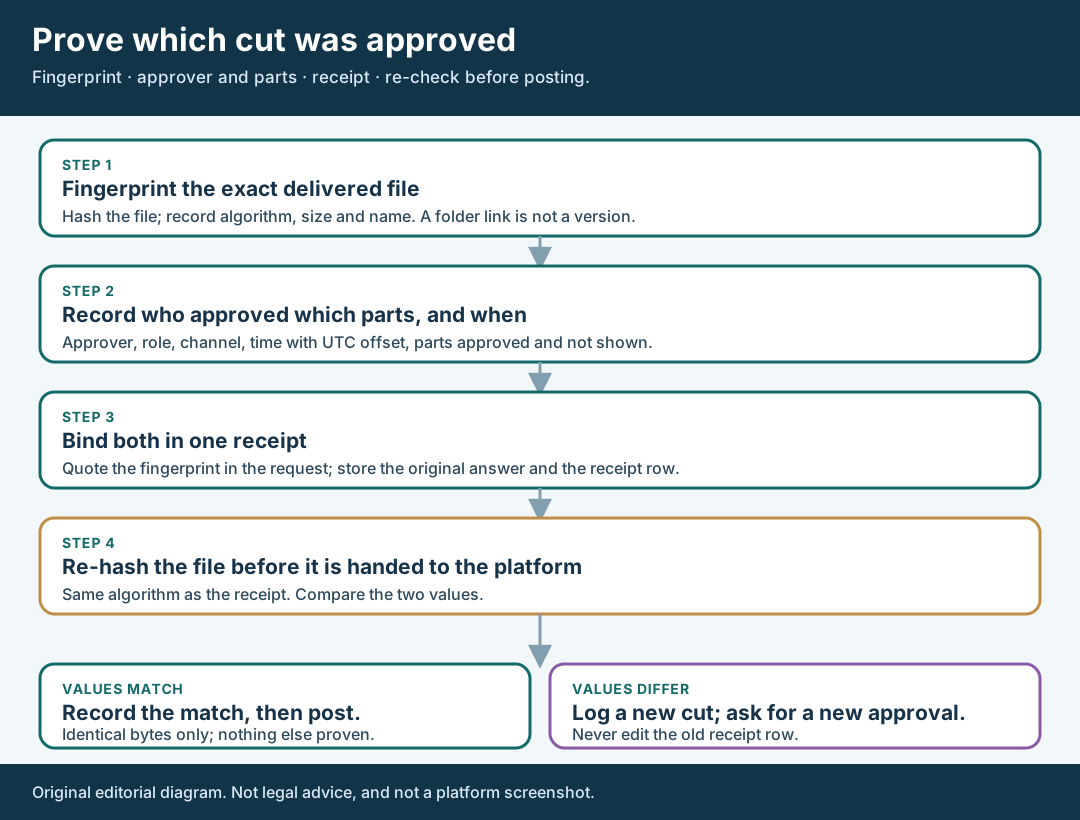
An original editorial diagram. A matching hash proves identical bytes only.
Original visual by Superdirector editorial team. Creation date not recorded.
Re-fingerprint any file that arrives later
The receipt does its work when a file arrives after approval: the creator's final upload to your folder, the export a scheduler is about to publish, or the file an editor “just tidied.” Hash that file with the same algorithm and compare it with the receipt. Identical fingerprints mean identical bytes. Microsoft's documentation says that if the hash values of two files are identical, the contents are identical; treat that as the working rule, using a current algorithm.
A mismatch is not an accusation. Common innocent causes include a re-export for a different aspect ratio, a platform-friendly re-encode, a trimmed intro or a caption burned in at the last minute. The right response is to log the new file as a new cut with its own number, compare it with the approved one, and ask for a fresh approval of what changed. If the change is trivial, the approver can say so in writing, and that answer becomes the new receipt. Do not edit the old row to match the new hash.
Know what a matching hash does not prove. It does not prove the cut is accurate, lawful or on brief. It also does not prove that the platform will serve the same bytes: YouTube's recommended upload encoding settings page says YouTube converts unsupported color spaces to BT.709 and full color range to limited range when processing uploads. That is our inference, not YouTube's statement: the video a viewer receives may therefore not be byte-identical to the file you uploaded. The check applies to the file you hand to the platform, which is the last point you control.
A match also says nothing about the parts that sit outside the file. If the caption is typed into the platform at posting time, compare it with the approved caption as text, character by character, and record the result separately. Do the same for the disclosure placement and the account the post will publish from.
Keep the receipt with the post record
The last step is to attach the receipt to the post record, so that whoever audits the campaign later can follow one line from approval to publication. Add three fields before the post goes live: the receipt ID, the fingerprint of the file that was handed over, and the match result (match, mismatch with a new approval, or approved by exception with the approver's written answer). Then add the posting time with its offset and the person who pressed publish.
This matters because the FTC's business guidance treats review before posting as the sensible control. Its endorsement Q&A page says that a company that pre-approves its influencers' paid posts should review them, that for ephemeral content a company should require that paid posts are not made without prior approval, and that the ultimate responsibility for clearly disclosing a material connection rests with the influencer, with responsibility extending to the brand and not shifted to the platform by its disclosure tools. A receipt is the record that such a pre-approval step happened for this exact file. The page does not say that any particular record is required, and this guide does not claim that a receipt satisfies any legal rule.
Set a retention rule that matches your agreement. Keep the original approval message, the receipt row, the approved file or its location, and the posting record for as long as the agreement or your client contract says a dispute can arise. If the agreement says nothing, write “not stated” and ask the deal owner. Never delete the approved file merely because a later cut replaced it, since the point of a receipt is that you can still show what was approved.
Finally, close the loop in one sentence on the post record: *“Cut 2, SHA-256 ending …, approved by [role] on [date and offset], parts approved: video, cover; caption approved separately.”* That sentence answers the original question in a form a client, a creator and a colleague can all check.
Walk through a fictional approval receipt
Fictional exercise: no real brand, creator, client, file or result was inspected. A made-up brand, Brand A, commissions one short video from Creator Q. Creator Q delivers cut 1. The client contact, Reviewer R, replies “approved,” and the agency's coordinator writes a receipt row for cut 1 listing the fingerprint, the time with an offset, and parts approved: video only. The caption was not yet written, so it is listed as not approved.
Two days later the creator sends a file called the same name, saying she fixed a sound dip. The coordinator hashes it, compares the value with the receipt and finds the fingerprints differ. The row for cut 1 stays unchanged. A new row for cut 2 records the new fingerprint with the status *changes requested*, and the coordinator asks Reviewer R to approve cut 2, quoting its fingerprint and listing the sound fix as the only intended change.
Reviewer R answers “yes, cut 2 is fine” and attaches nothing else. The coordinator records that as an approval of cut 2's video, writes the caption approval as a separate row once the text is agreed, and, at posting, hashes the scheduled file and sees that it matches cut 2. The post record carries the receipt ID and the match result. The scenario shows a method only; it predicts no outcome and says nothing about how often real teams see mismatches.
What this page does not decide
This method proves which file was approved. It does not replace the checks around it. Whether the cut met the agreed deliverable is the question in the first-cut review guide. Whether claims in it are supported is in the product claims guide. Whether its disclosure is visible in the video and the caption is in the disclosure review guide.
What happens after the post is public, including any edit to a live upload, has its own page: the YouTube correction guide. Whether the published post sits on the contracted account is the question of the account-to-post proof guide. A receipt for the cut is evidence on one question only: *was this exact file approved before it was posted?*
Nothing here measures how often approval disputes occur, how many teams hash their files, or whether a receipt changes any dispute outcome. Those figures are not available to us and are not claimed. For a contract or legal question, such as whether an email approval binds a client, ask counsel.